Showing posts with label antivirus. Show all posts

Wednesday, May 10, 2017

Your Attention Is Required - NOW!


Virtually ALL my customers use
   -  Microsoft Security Essentials on Windows 7 and
   -  Windows Defender on Windows 8.x and Windows 10.

A really BAD bug has been uncovered that warrants your immediate attention.

Please follow the instructions in this article or alternatively you can do the following:
  1. Open Windows Defender (MS Security Essentials on Windows 7)
  2. Click on the Update tab
  3. No matter what the program says click on the big button Update Definitions
If there is any update for Defender or Security Essentials it will be downloaded and installed.

Stay safe.


Friday, May 5, 2017

"Security" software breaks Windows


It gets fun again - my life I mean; the rest of this blog post is dead serious, please make no mistake.

For years I have recommended NOT TO USE products from Webroot. I remember too many bad experiences with and infections on computers that were presumably "protected by Webroot".

In NBC's words:
An antivirus service used by tens of thousands of businesses and millions of home users shut down an untold number of computers around the world Monday after it mistakenly identified core parts of Microsoft Windows as threats, the company confirmed.
Similar events have occurred in the past; sadly they are much more common than we would like and the public hardly knows about it. Some well known companies in the "computer security" or "anti virus" business have had similar snafus. Here is a quote from a blog post at Bleepingcomputer.com:
... Such mishaps have been reported for years to include major anti-virus/security vendors such as Panda, avast, AVG, BitDefender, Kaspersky, Malwarebytes, McAfee and Symantec. In most cases when these issues occur, the anti-virus vendors and security tool developers take quick action to correct the problem and provide support to those users who have been affected.
To call such blunders a "mishap" is not a euphemism, IMHO it is outright glossing over or covering up a major blunder.

Things like this should not happen and they don't need to happen, they are major avoidable blunders. In every case we can only speculate about the "why" and I don't like to speculate.

What does all the above tell us? IMHO very simple:

Do not trust a single word in high gloss, pretty brochures.
Do not believe the words in computer related advertisements on TV.

What you find in high gloss publications is mostly marketing hype and likely not really trustworthy. And when certain "security" software seemingly out-of-the-blue suddenly is being hyped over the moon in TV advertisements it IMHO is time to run for the hills. It tells me that very likely a marketing campaign has to cover up some so called "mishap".

-----

So far I have used the acronym IMHO three times in this blog post. Generally there are always at least two ways to look at something, as we say around computers YMMV. If you have a different opinion - or maybe simply think I am a dumba.s then I ask you to please leave a comment, state your case or blow off steam below. 

Thank you in advance.

Monday, July 25, 2016

AVG and McAfee - Not Safe


Again, please give up on so-called "security" products from AVG and McAfee.

As reported here they are not safe!

Should you not know what to replace them with then give me a call at four.one.four-seven.one.nine-two.nine.seven.seven. I look forward to hearing from you.

Stay safe!


Monday, July 4, 2016

Norton "Security" Software - REALLY INSECURE


It is a shame that "the media" ignore these facts and thus allow millions of computer users to live with unsafe computers.

A few quotes from The Register's recent article: 
  • Scores (or thousands, or millions) of enterprise and home Symantec users are open to remote compromise through multiple now-patched (where possible) wormable remote code execution holes described by Google as 'as bad as it gets'.
  • They [the security flaws] don’t require any user interaction, they affect the default configuration...
  • Victims would not even need to open the malicious files to be compromised.
  • Some of those [affected] platforms cannot be upgraded. 
Towards the end of the article The Register seems to quote six actions users should take to secure their systems. Four of those six are impossible to even think of for normal home users; they require corporate installations and corporate management structures that just are non-existent in home installations.

The other two require a level of know-how and technical expertise that is equally non-existent in the average home user environment.

The only consequent reaction for home user is what I preach to my customers for years:
Ditch any and all Norton products.
If you have allowed that Norton automatically charges your credit card you have to revoke that permission. You can get their phone number(s) through this web page.

Normally uninstalling them from Programs and Features in the Control Panel is not enough. I recommend to additionally run the Norton Removal Tool downloaded from this page; click on either of the links "Download@MajorGeeks".

Stay safe.

Tuesday, April 28, 2015

Bye bye Viruses, Hello Carelessness


It's almost like in the Everly Brothers song "Bye Bye Love" from 1957. They sang
Bye bye happiness, hello loneliness...
I am enticed to, no, don't be afraid, not sing but say
Bye bye viruses, hello carelessness...
In August 2014 I wrote in this blog the 2014 Update On Malicious Programs. Everything in this article is still valid today – which in the fast changing world of computers is astonishing all by itself. Self replicating viruses that "find and infect" our computers by their own accord have gone almost extinct.
What has massively changed though are the tricks and methods used by miscreants to foist their malicious junk software on our computers. It is so bad that I feel compelled to say
Do NOT click on any link in any email,
do NOT open any email attachment
and NEVER click in any advertisement.
Does that sound extreme to you? Good, because it is extreme. We are in an extreme situation and it's getting worse so extreme measures seem appropriate.
In the meantime you have learned to immediately delete emails with an unfamiliar sender address. But what about the email from that buddy of yours who always sends all the jokes? My advice is to IGNORE it! Just hit the Delete button. If that email really was from him and if he were a nice guy he would have told you in the email why and what he sends there. If he does not have the decency to do that you better err on the side of caution and delete that email; you may “miss” a joke but what is that compared to $100 or $200 cost for a good clean-up job?
Another way how modern malware (called PuPs) is distributed are dirty tricks pulled on us when we apply required updates. Even big, well known companies participate in these schemes; names that come to mind as examples are Oracle, Norton, McAfee and Adobe. Some visual examples are here.
And don't get me going on advertisements. Listen up:
If you see advertisements on your computer screen then you computer most likely already is compromised. Get it cleaned up!
And then the sneaky methods that well known download web sites like Download.com, Cnet.com and other use. You want to download that nice free little program and what they give you is a specially crafted downloader program that in turn is supposed to download the program you actually want. But what you get are one or several PuPs and then the program you really wanted.
The only method to help here is to watch for the tricks, traps and deceptions. 
In July 2013 I published my 10 Commandments Of Safe Computing. To heed the first of these has become more important than ever before; it reads:
Thou shalt read and think(!) before you click.
Be vigilant, pay attention to details and always remember: If it sounds too good to be true it usually is not true; especially in this day and age on the Internet.

As usual I welcome suggestions and comments right here in the blog.

Click here for a categorized Table Of Contents.


Tuesday, January 6, 2015

"Tests" of Security Software


Again it is a customer question that triggers new information on this blog; Thank you Frank C.

The customer asked what I think about the results of a test of Security Software in Consumer Reports' June 2014 issue.

I am not subscribed to Consumer Reports and the contents of their publication is not available online. Luckily the customer had attached a pdf file of the article. Without permission from CR I can not publish it here.

Needless to say that Microsoft Security Essentials/Windows Defender ended up on one of the last places in the rankings. That is very relevant to me because all my home customers use either one of these anti virus programs.

Here is my reply, almost verbatim from the email.
Thank you for the question. A few points in no special order as a reply.

Who actually ran these tests?
And who financed them?
Consumer Reports certainly does not have a proper test lab; that takes years to develop and a big lot of money to finance and run.

I have seen dozens and dozens of "tests" that were paid for by manufacturers of "security software".
And guess what, the result was always that their specific product ended up on top of the list.

Microsoft Security Essentials and Windows Defender on Windows 8 are not "security" programs, they are classic anti virus programs. Anti virus programs protect against getting virus infected files on your computer. And in my limited experience of 12 years and ca. 6000 distinct home customers these two programs do an excellent job at that.

To compare the two MS programs 1:1 against security suites is ridiculously wrong and done to dupe the un-informed into wrong conclusions.
Security suites try to supervise every click and input in web pages.
An endeavor that brings additional computing burdens but is doomed to fail because most errors are or are a result of an EBKAC (Error Between Keyboard And Chair).
Please see an irreverent remark below.

Most security suites are a very noticeable additional work load even for well equipped computers.

Just today I had been called to "slow" computer. After removing the PuPs the machine was still sluggish. After removing an older version of Norton Internet Security (about 4 years old)  the computer suddenly worked just fine. It was a BIG perceivable difference; I have seen that many, many times. This effect is not specific to Norton, it applies to many brands of security suites; in my experience especially (but not limited) to AVG, Avast, Norton, McAfee and Trend Micro.

Many of these "tests" do not talk about the curse of free security suites, that is false positives. Erroneously marking a benign program as malicious leaves the non-geek home user clueless and helpless.

Avast especially has last year broken quite a few computers with insufficiently tested updates.

AFAIK
only one of the programs in the CR test can even detect Poweliks, the worst and best hidden virus currently around.

AFAIK the only AV program that currently detects Poweliks is MS's Security Essentials/Defender! Although I use third party tools to remove it completely and terminally.

Re. EBKAC errors:IMHO no software in the world can protect irresponsible people from themselves.

We need to pay attention to the details and we need to heed #6 of my 10 commandments for safe computing.

Frank, please do not take the last paragraph personally; it only reflects general observations that I make all too often.
Please let me know in the comments what you think; thank you in advance

As usual I welcome suggestions and comments right here in the blog.

Click here for a categorized Table Of Contents.


Friday, August 8, 2014

2014 Update On Malicious Programs


As far as malicious software is concerned much has changed since I last wrote about it. So here is an updated report on the current situation (summer 2014) ans my personal advice on how to stay safe on the Internet. I will talk about
  • Definitions
  • Protective tools for the home user
  • How to avoid these troubles and a
  • Conclusion

Definitions:

Malware: Short for malicious software. It is a general term used to describe all viruses, worms, spyware, and pretty much anything that is specifically designed to cause harm to your PC, steal your information or throw never ending torrents of advertisements at you.

Virus: A program that copies itself and infects a PC, spreading from one file to another, and then from one PC to another when infected files are copied or shared.

Spyware: Any software that collects your information without your knowledge and usually sends that information back to the creator(s) so they can use that personal information in some nefarious way.

Scareware: A relatively new type of attack, where a user is tricked into downloading what appears to be an antivirus application, which then proceeds to tell you that your PC is infected with hundreds of viruses, and can only be cleaned if you pay for a full license. Of course, these scareware applications are nothing more than malware that holds your PC hostage until you pay for the “full” version. In many cases you can't uninstall them and/or the render the PC unusable.

Trojan horses: Applications that look like they are doing something innocuous, but secretly have malicious code that does something else. In many cases, trojans will create a backdoor that allows your PC to be remotely controlled, either directly or as part of a botnet—a network of computers also infected with this trojan and/or other malicious software. The major difference between a virus and a Trojan is that trojans don't replicate themselves—they must be installed by an unwitting user.

A computer worm uses a network to send copies of itself to other PCs, usually utilizing a security hole to travel from one computer to the next, often automatically without user intervention and often via email.

Ransomware usually encrypts your files that then are useless to you and some even “lock” your computer. The software requests an often quite substantial payment for the means to restore your files into usable form – which even after payment sometimes fails. 


Protective tools for the home user

You will always want to run a specialized anti virus program and a specialized on-demand only malware removal tool. I will recommend the only two programs I have learned to trust over the years – and that are easy enough to handle for the home user.

Anti virus: The release of Microsoft Security Essentials has changed the landscape of antivirus software. We finally have a completely free application that protects against viruses, spyware, and other malware without killing system performance like some of the "suites" tend to do. In my extensive personal experience it barely slows down even relatively slow machines and it's user interface is the easiest to use of all I know.

Don't only take my word for it. AV-Test.org found that it detects 98% of their enormous malware database and AV-Comparatives (a widely known anti-malware testing group) found that MSE was one of only three products that did well at both finding and removing malware.

Anti malware: Modern malware, mostly called PuP (potentially unwanted program), is very different from classic viruses. Most anti-virus programs can not detect PuPs and thus do nothing about it. And, as if to add insult to injury, most of them come on the computer because the user got tricked into allowing their installation.

I recommend Malwarebytes Anti-Malware (MBAM for short). Please download it from these two links only (they both go to the same destination).

MBAM is a time proven product and available in a totally sufficient free version. You have to watch during the original install and when you install a program update. The last window of the installer looks like this:
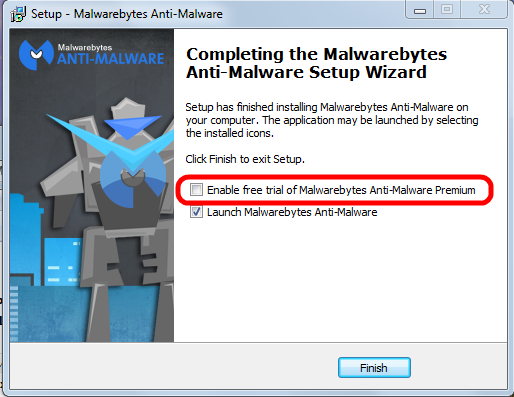


Please pay attention to the marked entry; it's check box is preselected! That means the “trial version” will be activated and after the trial period ends you would have to pay for using the program.

You have to uncheck this check mark.

Eventually the program itself needs to be updated; the installer will run again and again you have to pay attention to this little detail to avoid the for-pay version!

See this article on how to correctly use MBAM.


How to avoid all these troubles

When it comes to protecting yourself, it's laughable how many people install multiple antivirus applications but don't keep their system updated with the latest patches for the operating system.

If everybody would simply keep their system and all programs up to date, we wouldn't have to worry so much about these problems. If the constant rebooting action of Windows Update has you frustrated, you can always temporarily delay the reboot; remember, only after the reboot the patches are completely installed and active to protect your computer..

Keeping your applications updated is critically important to protect your computer's security. Your firewall won't protect you, and an antivirus software is unlikely to help if you're using an old, vulnerable version of Adobe Flash or Adobe Reader.


Conclusion

In the end, good browsing habits and common sense should be your first line of defense against any kind of malware. I recommend to always run a good security suite like MSE and additionally to use MBAM as an on-demand scanner. That way you're as well protected as easily possible and you can scan your system for malware whenever you want.

So here's the bottom line: In my not so insignificant experience MSE and the on-demand free version MBAM work very well together . Coupled with good browsing habits and common sense this a good combination of security tools and judiciously using them should keep you well protected.

As usual I welcome comments and suggestions right here in the blog. Thank you in advance.

Click here for a categorized Table Of Contents.


Saturday, April 12, 2014

Heartbleed - Internet Wide Risk


You may already have heard about the Heartbleed bug. This article is meant to be a simple rundown:

Web sites encrypt (or should encrypt) important traffic over the Internet such as usernames and passwords for example.

All web sites use some sort of special encryption software for this. Many web sites use a freely available (free as in no money) encryption software named OpenSSL.

Many OpenSSL versions are perfectly safe, only a few versions are affected, that is they contain a bug that allows encrypted information to be decrypted, that is finally to be read in clear text.

There is little we can do on our computers to avoid Heartbleed except avoiding affected web sites. Here are two places where you can check web site addresses for this bug. A web site address is the URL, what you type in the address bar of your web browser.
  1. Heartbleed Test by Filipio.io seems to be privately run; just type over the example "Facebook" entry in the form. This site has lots and lots of detailed information about Heartbleed  and a lengthy Q&A page.
     
  2. Heartbleed Test by Lastpass.com is professionally run by Lastpass.com, a password management service.
    For full disclosure: I use Lastpass, I am one of their customers.
And last but not least here is a list of affected web sites. A warning: This link leads to a forum entry with lots of subsequent discussions that you can safely ignore.

What to do if you use an affected web site?

Assuming that you have done above checking and you have in the past used an affected web site there is only one thing we can do:
Do not log into accounts from afflicted sites until you're sure the company has patched the problem. If the company hasn't been forthcoming -- confirming a fix or keeping you up to date with progress -- reach out to its customer service teams for information, said John Miller, security research manager for TrustWave, a security and compliance firm.
PLEASE give that website or company feedback; tell them that you will shun them if they don't fix their servers soon. If we don't speak up we give them the liberty to stay lazy and to ignore our concerns about this.

Don't be shy about reaching out to small businesses that have your data. Make sure their web site is secure. While high-profile companies like Yahoo and Google certainly know about the problem, a small businesses might not be aware of it, said TrustWave's Miller. Be proactive about the safety of your information.

Keep a close eye on financial statements for the next few days. If attackers can access stored credit card information it can't hurt to be on the lookout for unfamiliar charges on your bank statements.

Once you have gotten confirmation that the web site is fixed change passwords of sensitive accounts like banks and email immediately.

What to do if you have used the same password on more than one web site? Immediately stop this dangerous practice.

On important web sites, where money is involved for example, establish unique passwords for every such web site. And as usual, write the passwords down where you can find the note when you need it - you will need the note, believe me.

And last but not least at all: Your sleek Android smartphone could be affected as well! You find more about that here.

As usual I welcome suggestions and comments right here in the blog.

Click here for a categorized Table Of Contents.
 

Thursday, December 5, 2013

Virus Check BEFORE Download


I assume that you know about Virustotal (VT). If you still don't now than I am at a loss of words- which rarely if ever happens to me. But enough of my puny attempts on being funny.

With VT you can check any reasonably sized file (up to 64MB) that already is stored on your computer for viruses. What if you want to check a file for viruses before you actually download it?

If you use a web browser other than Internet Explorer you could install an extension.
  • In Mozilla Firefox you can install the VTzilla extension.
  • In Google Chrome  you can install the VTchromizer extension.
  • In Opera you can install the VTopera extension. 
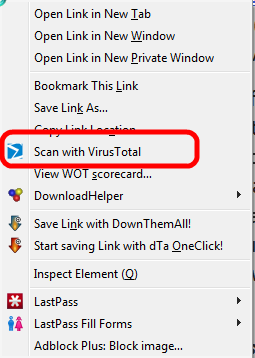
Thesae extensions make it possible to right click on a download link before you start the download. In the context meny that opens you will see an entry like shown here; the example was taken from VTzilla in Firefox:
VT will upload and test the file in it's usual manner and presto you have a good idea whether the file in question is "clean".

If you feel challenged by the idea to install an extension in Firefox don't despair, I can do that remotely. 

As usual I welcome suggestions and comments right here in the blog.

Click here for a categorized Table Of Contents.


Monday, November 18, 2013

Warning - W A R N I N G - Warning


On October 23rd 2013 I wrote about a really, really bad new virus called CryptoLocker.

Back then, only three and a half weeks ago, CryptoLocker was an acute danger mainly in the UK, parts of continental Europe and in some Asian countries.

This has changed dramatically. Computer users in the USA get hit with this virus increasingly often. Since a few days I receive about five emails every day that offer me "free money" or pre approved credit cards "ready to be shipped" my way. Would I ever click on a link in such an email? Would I ever be tempted to open one of the attachments? You bet not!

A free(!) protection method is available but it will interfere to some degree with normal computer operation. When this happens the computer user needs a certain amount of technical know-how to correctly diagnose the reason for the interruption and the to create an exception; this has to happen every time when it happens. If you can do that you should look at CryptoPrevent.

For everybody else I shout as loud as I can:
Disconnect your external backup drive when the backup is done!
If you don't disconnect the backup drive your backup files will be encrypted as well! They are totally useless once encrypted.

As usual I welcome suggestions and comments right here in the blog.

Click here for a categorized Table Of Contents.


Monday, October 28, 2013

How Malware Gets Installed


You hear from me that your computer got infected with malware, especially PuPs, and you ask:
"How did that stuff get on my computer? I did not download or install it".
Sorry, but in most cases you did give permission to install that garbage alongside some legitimate install or update. You did not do it consciously, you got duped or tricked into allowing the installation. See this article for just one all too common example.

These tricks can have many different shapes and forms. They all are designed to trick or fool us into allowing the garbage to get installed alongside a legitimate program or update. User beware!

One of the more and more common forms is a legitimate install or update that asks something along the lines of

  • Default (or Express) install (recommended)
  • Custom install (for experienced users)
No matter whether you consider yourself to be experienced or not, if you click Default (which always is pre-selected!) or just click on the Next button you likely get PuPs installed. By now even software from well known names does that! Just as an example: Oracle's Java and Adobe Reader are bundled with PuPs; most downloads from well known download portals are by now loaded with PuPs. Why is that happening?

Simple answer: Money! The authors of PuPs pay for their stuff being bundled with legitimate software. There is a lot of money to be made from advertising!

Distributing viruses is illegal, distributing "search helpers"  or tool bars is not!

My advice: When you have to choose between Default and Custom installs always(!) click Custom; it is the only way to check for PuPs because so far at least they are being offered with some sort of a choice to decline or skip them.

If you are in doubt take a screen shot of the window(s) that sparked your suspicion, postpone the install and ask me in an email about it; don't forget to attach the screen shot please.

As usual I welcome suggestions and comments right here in the blog.

Click here for a categorized Table Of Contents.

Wednesday, September 18, 2013

PUPs - No Virus But Just As Nasty


Updated Oct. 27th, 2013

The latest and fast growing trend of cyber crime against the unsuspecting user of a Windows PC is a new breed of malware, so called PuP programs (Potentially Unwanted Program).

These programs technically are not viruses; that is why anti virus programs don't find them - although there are some special programs for geeks and technicians that can clean this stuff from your computer.

You can easily check your computer for at least a few the most commonly encountered names.
  1. Open the Control Panel
  2. Set "View by" in the right top corner to Small Icons and 
  3. Open Programs and Features
You find names of PuPs that I have encountered in this list. Warning: The list is long, by it's very nature incomplete and it keeps growing almost every week. Please be aware that spelling, capitalization, prepended or appended numbers or syllables and inserted or omitted spaces are common and still denote the "main offender" as worthy of removal.

The somewhat good news: Many of these pieces of trouble can be uninstalled, that is removed, from right there in the Programs and Features window where you just found them.

The really BAD news: Even if you uninstall them successfully there will be leftovers in web browsers and other important locations in the operating system.; especially Google Chrome seems to be likely to retain some of that. These leftover entries can be numerous, affect functioning of web browser(s) and significantly hamper the computer; they can only be removed with some specially written very detail oriented clean-up programs.

Well, you know who can help, don't you?

Please remember: Toolbars are forbidden, no matter who promises what, no matter how tempting the name and no matter who made the tool bar! If you find any toolbars remove them right away.

If you find folders with names from random letters or numbers like for example:
         pgmfkblbflahhponhjmkcnpjinenhlnc
you have a clear indicator of malicious software. You know who can help, don't you?

If you wonder how all this stuff got on the computer then please read the explanation  here.

As usual I welcome suggestions and comments right here in the blog.

Click here for a categorized Table Of Contents.


Tuesday, September 17, 2013

Cybercrime


If you ever wondered about the how and why of virus programs, cyber crime and all that nasty stuff then please take 18 minutes out of your busy schedule and watch this video.

As usual I welcome suggestions and comments right here in the blog.

Click here for a categorized Table Of Contents.


Tuesday, May 15, 2012

DNS Changer - as promised on the last radio show

Well, I have gotten a few calls because of the ridiculously exaggerated comments and reporting in the press.

If you want the low down and the details please grab a cup of Joe or a beer or whatever else you like, settle in your favorite chair and head over to this article on the Windows Secrets newsletter dated May 2nd. 2012.

You'll have to read oll the way to the end to find the link to the web site that is testing your computer for an eventual DNS Changer infection. SHOULD against all expectations your computer be infected and if you can't get rid of the virus yourself then I would be more than willing to help.

As usual I welcome comments and suggestions right here in the blog. Thank you in advance.

Click here for a categorized Table Of Contents.
 

Friday, January 27, 2012

Reality Catches Up With Symantec


It has happened! I will not lie to you, some part of me is chuckling gleefully. Symantec, the maker of the (in-)famous Norton products recommends to their customers:
“Symantec recommends disabling the product until Symantec releases a final set of software updates that resolve currently known vulnerability risks,” 
This is original text from an online statement released by Symantec about their computers having been hacked back in 2006! Emphasis added by me.

A few things are of interest to me:
  1. They must have known about this for 6 (SIX!) years and kept it a secret.
     
  2. They write "currently known ... risks".
    They knew about the risks all along but did not care to fix them!
     
  3. They ask customers that have paid dearly for the purchase and are paying dearly for updating the software to stop using it altogether with no offer of any compensation at all.
    Pretty arrogant and overbearing if you ask me.
The short of it: I feel very relieved to now have it from the horse's mouth:
Stay far way from everything with a "Norton" label.
And applying my experiences with any other of the big name security suites (read about three examples) I now feel emboldened to say "Stay away from any of them". 

And if you want some more detail go to this FoxNews.com article.


As usual I welcome comments and suggestions right here in the blog. Thank you in advance.

Click here for a categorized Table Of Contents.

Thursday, January 26, 2012

The Computer is NOT a Toy


Your computer is not a toy, even if your children or grandchildren disagree. Use it responsibly and enjoy it.
Antivirus software can help you prevent certain types of malicious software and viruses. But any antivirus is not the ultimate solution. 
If your system is slow or sluggish it does not necessarily have to be virus infected. Mostly some program is causing the slow down, very often big "security suites" are the culprit (see here). Or over time too many programs think they always have to run in the background or simply by now your hardware is outdated.

“Outdated hardware?” you ask? Oh yes; Windows and most important programs get updated all the time. That means they are being made more secure and/or get new functionality. This is possible only by growing larger; they contain much more code than they did originally. Your hardware is still what was sufficient in 2004, 2005 or 2006 but this not sufficient any longer.
We may not like to be told directly and honestly but most security problems with Windows computers are caused by.... the user. Keep your common sense hat firmly on at all times and think before you act.
Remember:" With great power comes great responsibility!" As a responsible user, you can enjoy the web without “pay through the nose” bloated and expensive security suites and without having to battle viruses or rogue programs.
Everything you need is available free of charge if you do your homework before going to that download site only because “there was a link”. Example at hand: Many well known and widely distributed computer publications (ZDNet, PC World are only examples!) will give you download links to Download.com. This site will always download and install a totally superfluous "Downloader" program that from then on will always run in the background on your computer.  
As usual I welcome comments and suggestions right here in the blog. Thank you in advance.

Click here for a categorized Table Of Contents.

Wednesday, November 30, 2011

Slow Computer? Boot Your bleeping Security Suite!


In the last three days I had three customers who were complaining about their slow computers. Customer number one had an older but fairly well equipped Windows XP machine with paid AVG, number two a Vista computer with Kaspersky Security Suite (paid) and number three was running Windows Vista Basic on a computer with limited main memory and Trend Micro Security Suite (paid).

In all three cases the machines were between four and six years old, that is just on the border where I begin to evaluate the worth of investing money into an aging computer versus buying a new computer.

In all three cases the customers choose to have me try removing the installed "security suites" and replace them with Microsoft Security Essentials before they made their choice between fix old or buy new.

Number one was a no brainer; original words of the customer: "Wow; that box NEVER before worked that fast!". He still is using Windows XP and he is a happy camper.

Number two was trickier because his machine had over time caught about 340 pieces of malicious software, among others two very nasty Rootkit viruses, a couple of Trojan horse programs and it was missing half a ton of updates. The clean up and updating took some time, I removed Kaspersky and installed Microsoft Security Essentials and guess what, the customer said he'd happily pay me, give the computer to his daughter in college and asked me to advise him what to replace his computer with!

Number three is so happy they gave me an excellent tip in the form of home made dill pickles, yummy! Thank you Fred and Judy! They will keep using their computer until they can afford a new one. And I got an additional job from them, thanks for that too.

Why do I tell these stories? Because that's the reality out in the field of home computing, not what I witnessed last (Black) Friday in a local Best Buy store where almost every customer who talked to the Best Buy sales people about a computer got pestered to buy one of  Kaspersky's security suites.

All these by now massively complex programs in my opinion are not worth the money compared to Microsoft Security Essentials.

MSE "speaks" only understandable English,
MSE is absolutely unobtrusive,
MSE does not slow down your computer,
MSE does not block your computer while it is scanning,
MSE updates in the background when the computer is otherwise idle and on top of all
MSE is free, free as in no money!

Sounds like a no brainer to me.


As usual I welcome comments and suggestions right here in the blog. Thank you in advance.

Click here for a categorized Table Of Contents.

Wednesday, October 5, 2011

Webroot Proven To Be Inadequate

Finally it has happened! Webroot Antivirus and Webroot Spysweeper software is gone. How did that happen?
Webroot, the manufacturer himself says it is not good enough for you!
They, Webroot, launched a new system based on completely new, unproven technology. You can read details on the TechWorld blog. And it costs money, naturally.

If your computer still has Webroot's Antivirus and/or Spysweeper installed then quickly uninstall it and replace it with Microsoft Security Essentials. You can read here how to do that correctly.
  • MSE is free.
  • MSE speaks simple English language that everybody can understand.
  • MSE allows you to work on your computer while it scans, even on weak older computers.
  • MSE employs massively proven techniques. 
Many people are not aware that Microsoft has many years of experience with combating malicious software. Okay, they had a rocky start but we are so long past these initial problems.

With first beginnings in 1997 many of MS's server customers have relied on Microsoft Forefront and these experiences have finally led to Microsoft Security Essentials.

As far as I know no other antivirus system ever had all of these advantages on it's side. 

As usual I welcome comments and suggestions right here in the blog. Thank you in advance.

Click here for a categorized Table Of Contents.


Thursday, September 1, 2011

Virus Check Any File


Today a customer told me that she actually reads this blog and that she would like to see something about virus-checking any given file. Thank you Rose K. for reading this blog and for the suggestion.

I can think of many scenarios where you have a file, any kind of file, that you feel you better check for viruses before you "work" with it. And you may want something like a "majority vote" because just the other day you read in the newspaper that scary article saying that one anti virus program may not be enough to know "the truth".

As with increasingly many things around computers the Internet can help with a service that will allow you to upload any file up to a size of 20MB; this service then will submit your file to currently 40 (forty!) different anti-virus programs and give you the results.

This free service is called VirusTotal. Here is a partial screenshot of  an example output:


When you click on the Show All button the list gets much, much longer.

In the Result column on the far right you see what every anti-virus program says about the file. No entry here means that the AV program does not qualify the file as containing a virus.

Yes, above mentioned newspaper article is technically correct, one vote is not enough to really matter. But when only 5 of 40 results mark the file as virus infected you can with some degree of reliability assume that these five positive results may be so called "false positives". 

A word of warning: I can imagine that only a few AV programs mark a file as infected while the majority does not and the file actually contains a brand new virus that the majority of AV programs can not yet detect! Depending on the circumstances you may react super carefully rather than too trusting.

Again another good example that computer safety benefits from an open mind, common sense, a good measure of caution and careful consideration of all aspects of the given situation.

The only problem with common sense seems to be that it ain't that common..

As usual I welcome comments and suggestions right here in the blog. Thank you in advance.

Click here for a categorized Table Of Contents.

Saturday, June 18, 2011

Set-Up Job

Edited March 24, 2018: Problems with Windows 10 "Feature Updates" (twice every year!)Edited March 9,   2016: Block Windows 10 from snooping and Picasa discontinued
 
Every brand name computer you buy in a store or on the internet brings with it three areas of concern: Gunk software, missing updates and costly and questionable "security" software. I'll address these three concerns separately and then offer my suggestion to deal with these concerns before they become a problem.

1. Gunk software: Brand name computers come with some (and sometimes a lot of) "gunk" software pre-installed. You'll find anything from trial versions of programs that will cost additional money to outright spyware and even back door programs.

It goes without saying that this gunk should be removed before you even connect the computer for the first time to the internet.

I even consider programs like Microsoft's Internet Explorer and MS's email programs and Microsoft Office trial versions to be "gunk". By virtue of the very technology used TO WRITE them (called ActiveX) they will enable a large percentage of malicious software to be executed on your computer. Just by using alternative programs that were built without ActiveX technology you avoid all this malicious ActiveX software automatically.

Microsoft's Office is by now always a trial version; it will cost you additionally about $100 to $150 depending on where you buy the product key that you will need to use MS Office for more than 60 days.

There is a commercial program being offered to do this removing of gunk software but the computer manufacturers regularly modify what they pre-install and the names of what they install. Thus a program attempting the clean-up will almost always be outdated and work only incompletely. Or it will offer you a list of installed non-Microsoft programs and ask for your decision on what to remove; and you bought the program because you don't know that in the first place!

2. Missing Updates: The brand name computer you buy was designed and originally configured months ago, sometimes many months ago. For good reasons software companies like Microsoft, Adobe and others regularly release security relevant updates. Microsoft used to do that up to Windows 7 on a monthly schedule; since Windows 8 MS updates more or less continually.

All these mandatory updates from when your computer model was designed until when you bought it are missing. That mostly is a lot to download and install. These downloads should be done in a safe environment to protect the machine from eventual hack attacks before all required updates are installed.
Edit March 2018: Microsoft has a new method to upgrade Windows 10 every six months. These upgrades are HUGE and can take many hours to download and run. IMHO it is imperative to supervise this process and to know what to do (or not to do) when problems arise.
There sheer size and the volume of work to install them is the main reason that I recommend to buy computers with SSD drives; with HDD drives these big updates just take too long!  

3. "Security" Software: All of the commonly preinstalled anti virus programs or "security systems" will in the future cost additional money. Some are considerable, clearly perceivable heavy workloads making your computer slow; see this article for real life experiences with security suites slowing down perfectly well working computers.

Some others are not always working correctly and/or proving their questionable quality by not
uninstalling correctly or quietly stopping to work altogether.

After seemingly error-free uninstalling of some security suites I have found that they left sometimes parts of their software still running. Due to the nature of what these programs have to do these left-over drivers and orphaned processes can wreak havoc.

This clearly calls for a knowledgeable human doing the uninstalling and checking for left-overs.

My Solution: I offer a set-up job for new computers; I even offer a fixed price if I can do it at my house because I can overlap some of the time with answering my emails and other activities.
This set-up job includes:
  • De-gunking the computer (manually and completely removing unwanted, potentially risky programs and all kind of trial software)
  • Updating the operating system and all other software in a safe environment.
  • Installing and updating (or enabling) free security software (currently Microsoft Security Essentials on Win7, enabling Windows Defender on Windows 8.x and Windows 10)
  • Edit March 2016: On Windows 7, 8.1 and 10 I install a free program that blocks Windows from reporting back to Microsoft what you do and how you do it (I call that spying!).
    Since about November 2015 Microsoft has begun to "enhance" Windows 7 and 8.1 with some of the reporting features of Windows 10. That is called progress...
  • Installing Mozilla's Firefox web browser, my choice as alternate web browser including the best available advertisement blocker and a utility that warns you if search results would lead to known malicious web sites
  • Installing Mozilla's Thunderbird email client if so desired including the best available advertisement blocker
    • Installing Libre Office (Microsoft file compatible office software)
    • Installing Google Earth
    • Installing Picasa (photo management and editing program) if so desired;
      Edit March 2016: Only upon request; the Web Album Service was discontinued by Google;
      you can keep using Picasa to organize, edit a.s.o. locally stored pictures just as in the past; there will be no more program updates for Picasa (the current version is VERY stable!).
    • Installing an easy to use screen shot program (so you can send me a picture of the pesky error message that is bugging you)
    • Installing a remote control program that enables me to give you remote support  
    • Replacing the always out-of date preinstalled version of Adobe Reader with a free, faster and safer alternative called PDF-XChange Viewer
    • Installing a virtual PDF printer; it creates PDF files from anything you can print. You don't want to email a job application as a Word document that anybody could modify! 
    • Establishing desktop icons leading directly to Documents, Downloads, Pictures and so on. 
    • On Windows 8 and Windows 10 install a proven, small program that starts the computer directly into desktop mode and establishes a Start button and a Programs menu like we have been used to since Windows XP (that is since 2002)!
    All above mentioned software is of excellent quality, officially FREE for home use and guaranteed to be free of advertisements and spyware.

    All this can take many hours and will seriously confuse the normal "non geek" computer user.
    If I can do the Set-Up job at my house I offer it for a flat fee! Should you be interested please send a personal email to ejheinze_at_gmail_dot_com; thank you.


    As usual I welcome comments and suggestions right here in the blog. Thank you in advance.

    Stay safe!