Showing posts with label cleanup. Show all posts

Monday, September 18, 2017

Why Me?

One time too many I have been asked by a caller why he should hire me rather than take his computer to Best Buy; here is my complete reply. I apologize for the bad style (way too many paragraphs begin with "I"!) but I am not a native English speaker.

In general
  • my main interest is cleaning your computer of all viruses and malware and securing it and your web browser against getting infected again in the future

  • I have over 25 years of experience with Windows PCs plus over 23 years of experience as a computer programmer and database dministrator

  • I do not mince words but rather say it as I see it

  • I can explain technically complex concepts in layman's terms

  • I prefer real-life usability and experience over personal opinions and commercial “tests”

  • I abhor industry shenanigans and trickery and warn my customers

  • I work on Windows PCs only and do only house calls up to 30 miles from my residence. There is no extra charge to appear at your door and I charge no mileage fees.
I neither sell material goods nor any software;
I sell only my experience, my know-how and my time.

I do not charge sales tax.

I have NO contractual ties to any product;
I do not get any kickbacks from any manufacturer, wholesaler or dealer, no matter where and what you eventually buy.

I have absolutely no hidden financial interest or other commercial bias; there is no added or hidden cost for the home user.

With two rare exceptions I use and install only freely available and functionally proven programs.
Even a proven alternative to Microsoft Office® is officially available free of charge.

I have worked professionally as a programmer and database administrator
  • with computers since July 1st 1964
  • with Microsoft software on CP/M computers since 1977
  • with PCs since February 1982
  • with Microsoft Windows since version 3.1 in 1992
For 11 years I was once every month the “computer guru” on a call-in talk show on WTKM radio out of Hartford, WI.

If you are interested please send an email to ejhprivate*AT*gmail*DOT*com

I will reply and send you my brochure with more information as a .pdf file;
if you rather want a paper copy please give me in your email your name and address and I will send you a letter.

The information in the brochure should enable you to decide whether you want to hire me to repair and secure your computer.

Thank you for your interest.


Wednesday, February 24, 2016

2016-02-25 WBKV Talking Points

Stay Safe on the Internet
  1. Always install Operating System updates
     
  2. Keep your installed applications up-to-date
     
  3. Do not use the same password at every site
     
  4. Install and be sure to update your anti-virus software

  5. Additionally install a free anti-malware scanner and use it(!) regularly
     
  6. Use a firewall (the FW built-in to Windows is good enough!)
     
  7. Backup your data!
     
  8. Enable the display of file extensions
     
  9. Do not open attachments from people you do not know (especially Word files, Locky ransomware travels in Word files! Use MS's Word and Powerpoint viewers to check files)
     
  10. Delete emails that say you won a contest or a stranger asking for assistance with their inheritance or money transfer
     
  11. Watch out for online and phone support scams
     
  12. Ignore and close web pop ups saying your computer is infected or has a problem (use ALT+F4)
     
  13. Ignore and close web pop ups that pretend to be a Windows alert (use ALT+F4)
     
  14. Some types of web sites are more dangerous than others
     
  15. Be extra vigilant when using Peer-To-Peer Software (torrents!)
     
  16. When installing software, watch for "bundled" tool bars and programs you don't want
     
  17. Read the End User License Agreement (EULA) Lol, I know!  


Wednesday, February 10, 2016

2016-02-11 WBKV Talking Points


Today I want to talk only (or mainly) about modern malware and how it gets in our computers.

Pull up this web page and you have the detailed blueprint for today's talk.

The 10 worst offenders are (IMHO #1 is by far the worst one):
  1. Download portals
  2. Fake updates (e.g. Java, Adobe Flash, Yahoo!) 
  3. Installer programs (mainly from download portals)
  4. PuPs downloading and installing more PuPs
  5. Express installation (expressway to an infected computer)
  6. Custom Install abused with confusing EULAs
  7. Home page and search provider changed
  8. Forced install (e.g. Inbox Toolbar)
  9. Other people(!) using your computer (visitors, relatives)
  10. Researching PuPs; do it ONLY in a virtual machine! 

Saturday, February 6, 2016

Top 10 Ways PUPs Sneak Onto Your Computer. And How To Avoid Them.


Disclaimer: I copied the title literally from this blog post.

And that is all I want to say here; this article is simply a MUST READ if you ever had PuPs installed or had to call me because everything got so slow or whatever problem you had.

95% or more of all computer problems I encounter nowadays are initially caused by a PuP! The authors of these PuPs have gotten very clever and constantly invent new tricks to dupe the unsuspecting computer user.

Only permanent vigilance, caution and attention to detail can ultimately somewhat protect us and our computers. 

Please note the use of the word "somewhat" in the previous paragraph! 

For the first time ever I will directly recommend a piece of commercial security software. 

If you want the IMHO best automatic protection against all kinds of malicious programs including PuPs then you will have to pay some money, currently just shy of $40 per year for a single computer. You find details about Emsisoft Anti-Malware here.

Another disclaimer: I am in no way at all associated with Emsisoft or any of their distributors or resellers!

If you don't want to pay that is fine, you just have to DIY (do it yourself). MSE or Defender in conjunction with Malwarebytes Free will do it just as well but you have to regularly do more yourself.

Whether you want to pay for Emsisoft Anti-Malware or not doesn't really matter, IMHO you simply HAVE TO READ this article.

 Stay safe.

Sunday, January 3, 2016

How to avoid Windows 10


Are you tired of Microsoft's permanent nagging to upgrade to Windows 10?

Do you want to avoid the computer world's biggest and most openly staged attempt to get the greatest data collection system world-wide set up?

Then here is THE solution - as far as I know and as of January 3rd 2016.

Download GWX Control Panel from this web page. I recommend to use the portable version called "Stand-alone" and please read the program author's user guide.

You best start GWX Control Panel [GWXcpl] in administrator mode, that means you right click on the program file and the click on "Run as administrator".

The GWXcpl windows looks like similar to this:
I can not show you an EXACT picture because I have no computer that is still unprotected from Windows 10 upgrades.

 On your computer the upper part will have different contents; I believe it is very self explanatory.

In the lower part you will probably see instead of *n these text entries:
*1  Disable 'Get Windows 10 App' ...
*2  Delete Windows 10 Download Folders
*3  Prevent Automatic Windows 10 Upgrades
*4  Delete Windows 10 Programs
  I recommend to at least click on Disable "Get Windows 10 App' ..." and on "Prevent Automatic Windows 10 Upgrades". Whether you want to delete Windows 10 files and/or folders is up to you; on older computers with less than 320GB large disk drives it seems to be a good idea to free up the space. And don't forget to reboot when you are asked to even if it means that you may have to run GWXcpl more than once.

Feel free to ask any uestions you might have, preferably by email.

Stay safe.


Wednesday, August 19, 2015

Yahoo! - Helps to Distribute Malware


I have said it to countless customers and I say it again, publicly and absolutely clear:
If you see advertisements while browsing the internet
then your computer is not set up safely!
I have said it to countless customers and I say it again, publicly and absolutely clear:
Stay away from Yahoo!
And I mean Yahoo! everything; email, finance, sports, EVERYTHING that comes from Yahoo! 

Here is a literal quote from NetworkWorld.com (bolding and links added by yours truly):
Malwarebytes Labs recently uncovered a large malvertising attack on the Yahoo! advertising network that started on July 28. Malwarebytes estimates that up to 6.9 billion readers could have been affected, making it one of the largest malvertising attacks Malwarebytes Labs has seen recently.
Malvertising is defined as crafted advertisements that intentionally infect the computers of anyone who visits the site. A tiny piece of code hidden deep in the ad will reroute your computer to criminal servers without your knowledge, which then determines how exposed your computer is and decides which piece of malware to send you.

In the case of the Yahoo ad, victims are infected with ransomware via the Angler Exploit Kit, but it’s possible that anything from banking Trojans to additional advertising fraud is also being used in this attack.

Malwarebytes said that the infection included Yahoo's main site, as well as subgroups like News, Finance, Sports, Celebrity, and Games. The ads route users to a site on Microsoft Azure, which eventually leads to the Angler Exploit Kit.

But, according to a friend at Malwarebytes, when you are running Adblock Plus or any other ad blocker, then the ad never plays, so no payload is delivered to your PC. So the malware doesn't ever get to touch your PC. Even if you don't click on the ad, the fact is it loads and becomes saved in your browser cache, so it does get onto your PC without the blocker.
My customers do not need to worry about malvertising, they all have Adblock Plus installed. All others please listen up:

If you use ANYthing from Yahoo! and/or
if you see advertisements when web surfing
then your computer is UNSAFE!

Do yourself a favor, get your computer cleaned up and secured.
As usual I welcome comments and suggestions right here in the blog. Thank you in advance.

For whatever reason the darned TOC (table of contents) feature that I got from Google does not work any longer, sorry.

Tuesday, April 28, 2015

Bye bye Viruses, Hello Carelessness


It's almost like in the Everly Brothers song "Bye Bye Love" from 1957. They sang
Bye bye happiness, hello loneliness...
I am enticed to, no, don't be afraid, not sing but say
Bye bye viruses, hello carelessness...
In August 2014 I wrote in this blog the 2014 Update On Malicious Programs. Everything in this article is still valid today – which in the fast changing world of computers is astonishing all by itself. Self replicating viruses that "find and infect" our computers by their own accord have gone almost extinct.
What has massively changed though are the tricks and methods used by miscreants to foist their malicious junk software on our computers. It is so bad that I feel compelled to say
Do NOT click on any link in any email,
do NOT open any email attachment
and NEVER click in any advertisement.
Does that sound extreme to you? Good, because it is extreme. We are in an extreme situation and it's getting worse so extreme measures seem appropriate.
In the meantime you have learned to immediately delete emails with an unfamiliar sender address. But what about the email from that buddy of yours who always sends all the jokes? My advice is to IGNORE it! Just hit the Delete button. If that email really was from him and if he were a nice guy he would have told you in the email why and what he sends there. If he does not have the decency to do that you better err on the side of caution and delete that email; you may “miss” a joke but what is that compared to $100 or $200 cost for a good clean-up job?
Another way how modern malware (called PuPs) is distributed are dirty tricks pulled on us when we apply required updates. Even big, well known companies participate in these schemes; names that come to mind as examples are Oracle, Norton, McAfee and Adobe. Some visual examples are here.
And don't get me going on advertisements. Listen up:
If you see advertisements on your computer screen then you computer most likely already is compromised. Get it cleaned up!
And then the sneaky methods that well known download web sites like Download.com, Cnet.com and other use. You want to download that nice free little program and what they give you is a specially crafted downloader program that in turn is supposed to download the program you actually want. But what you get are one or several PuPs and then the program you really wanted.
The only method to help here is to watch for the tricks, traps and deceptions. 
In July 2013 I published my 10 Commandments Of Safe Computing. To heed the first of these has become more important than ever before; it reads:
Thou shalt read and think(!) before you click.
Be vigilant, pay attention to details and always remember: If it sounds too good to be true it usually is not true; especially in this day and age on the Internet.

As usual I welcome suggestions and comments right here in the blog.

Click here for a categorized Table Of Contents.


Tuesday, January 6, 2015

"Tests" of Security Software


Again it is a customer question that triggers new information on this blog; Thank you Frank C.

The customer asked what I think about the results of a test of Security Software in Consumer Reports' June 2014 issue.

I am not subscribed to Consumer Reports and the contents of their publication is not available online. Luckily the customer had attached a pdf file of the article. Without permission from CR I can not publish it here.

Needless to say that Microsoft Security Essentials/Windows Defender ended up on one of the last places in the rankings. That is very relevant to me because all my home customers use either one of these anti virus programs.

Here is my reply, almost verbatim from the email.
Thank you for the question. A few points in no special order as a reply.

Who actually ran these tests?
And who financed them?
Consumer Reports certainly does not have a proper test lab; that takes years to develop and a big lot of money to finance and run.

I have seen dozens and dozens of "tests" that were paid for by manufacturers of "security software".
And guess what, the result was always that their specific product ended up on top of the list.

Microsoft Security Essentials and Windows Defender on Windows 8 are not "security" programs, they are classic anti virus programs. Anti virus programs protect against getting virus infected files on your computer. And in my limited experience of 12 years and ca. 6000 distinct home customers these two programs do an excellent job at that.

To compare the two MS programs 1:1 against security suites is ridiculously wrong and done to dupe the un-informed into wrong conclusions.
Security suites try to supervise every click and input in web pages.
An endeavor that brings additional computing burdens but is doomed to fail because most errors are or are a result of an EBKAC (Error Between Keyboard And Chair).
Please see an irreverent remark below.

Most security suites are a very noticeable additional work load even for well equipped computers.

Just today I had been called to "slow" computer. After removing the PuPs the machine was still sluggish. After removing an older version of Norton Internet Security (about 4 years old)  the computer suddenly worked just fine. It was a BIG perceivable difference; I have seen that many, many times. This effect is not specific to Norton, it applies to many brands of security suites; in my experience especially (but not limited) to AVG, Avast, Norton, McAfee and Trend Micro.

Many of these "tests" do not talk about the curse of free security suites, that is false positives. Erroneously marking a benign program as malicious leaves the non-geek home user clueless and helpless.

Avast especially has last year broken quite a few computers with insufficiently tested updates.

AFAIK
only one of the programs in the CR test can even detect Poweliks, the worst and best hidden virus currently around.

AFAIK the only AV program that currently detects Poweliks is MS's Security Essentials/Defender! Although I use third party tools to remove it completely and terminally.

Re. EBKAC errors:IMHO no software in the world can protect irresponsible people from themselves.

We need to pay attention to the details and we need to heed #6 of my 10 commandments for safe computing.

Frank, please do not take the last paragraph personally; it only reflects general observations that I make all too often.
Please let me know in the comments what you think; thank you in advance

As usual I welcome suggestions and comments right here in the blog.

Click here for a categorized Table Of Contents.


Saturday, September 27, 2014

Wipe or Repair


Over time some computers tend to slow down compared to how they worked when they were new; that even can lead to the computer “freezing p” and become totally unresponsive. There are many potential reasons for these effects. Here are a few examples:
  • During regular use temporary files do not get deleted when no longer needed.
  • Too many “background” programs accumulate and run unnecessarily.
  • Unscrupulous companies, programs and web sites literally trick the user into installing unnecessary and often outright pernicious programs, so called PuPs.
When this this gets too bad some people just buy a new computer but in most cases this is not necessary. Other people ask a computer repair shop or technician for help. And here is where it gets tricky for the end user who usually is not a computer geek.

Provided that the hardware of the computer in question is still working correctly these “repairs” can be done in two fundamentally different ways:
  1. The computer can be wiped or reset to factory-new state as it was originally delivered.
  2. Offending files and programs can be removed and eventual damage repaired.
Among computer repair technicians the question “repair or wipe” is one of the most controversially discussed topics of all. More often than not these discussions in online forums are based mostly on beliefs and habit than on facts.

My personal take at this question is this: It very rarely is in my client's best interest (or mine!) to wipe and reload the operating system. I know this in stark contrast to what businesses like Best Buy and others say and do but I write this for my average clients, home users that want their computer “to just work”.

A successful repair is, among others, defined by:
  • All viruses, malware, PuPs and so on have been completely removed.
  • The cleanup is actually accomplished in about 2 hours.
  • After the cleanup the computer runs reliably at normal speed.
  • For a reasonable period of time the computer remains free from malicious software - provided the user cooperates and avoids mistakes that are all too common.
Especially larger support organizations routinely apply the wipe-and-reload method. They usually claim one or more of the following reasons as their justification:
  • It’s the only way to be sure all infections are removed.
  • It’s the fastest way to resolve the problem.
  • This process also gets rid of other clutter.
IMHO much more to the point, this one-size-fits-all approach doesn’t require much skill, training or experience on part of the technician who is doing the work; thus the bigger organization saves money on training and wages for better qualified employees.

Most certainly the wipe-and-reload solution is not in the customer’s best interest; here are some of the reasons:
  • The rarely understands that their computer will look and feel very different after a reload.
  • The customer will have to manually reload drivers, reset the fonts he got used to and now “wants”, select colors, margins, standard folders and file associations; he/she may have to install printer(s) and apat other system settings that have been building up over time since the computer was new.
  • Some programs or data files will get destroyed or lost; if they are infrequently used that may show up only weeks or months after the “repair”.
  • The user will be without the computer for as long as the reload takes which could be several days.
  • Very sophisticated viruses may return after a reload unless very specific measures prevent such reinfection, for example after MBR and/or BIOS infection.
Here are some of the reasons why this approach is not in the technician's best interest, especially if I am the technician doing the cleanup:
  • If I “wipe and reload” then the client doesn’t need me, he/she can do it themselves or,
    worse yet, use the techie kid next-door to do it for the cost of a pizza.
  • Some programs, drivers, settings and user data will get lost.
  • The computer will not “look and feel the same” as it did before the repair.
  • The work involved will require much more time than I can honestly charge.
The only way to resolve issues caused by viruses or malware is to find and remove all such nasty programs, their activation methods and associated files and to repair eventual damage to the operating system.

A good cleanup must include improved preventive measures to avoid future success of another malware attack.

I am fully aware that this sometimes is next to impossible; modern malware almost always relies on social engineering tricks to get on a computer. In the end it depends on the user to always follow my Ten Commandments Of Safe Computing, now more than ever before.

Again opposed to common methods I prefer the on-site visit for a clean up job. Only on-site I can convey to the customer some training, show him/her the time proven tools and methodology I recommend to follow and get a feeling for how well they understand my appeals to use common sense.

There are situations when wipe-and-reload is appropriate, for example and IMHO if all these conditions are met:
  • You have a recent full-image backup of that computer.
  • There are only one or two user(s) set up on the infected computer .
  • There is no (or very little) locally-installed software on the infected computer.
These conditions are hardly ever met in a home environment. Only if these conditions are met I will consider a reload. In eleven years of “fixing” home computers I have had to reload the operating system only on two occasions.

I see no acceptable alternative to intelligently and methodically removing all malware infections and repairing any damage they may have caused. 

And I am well aware of the fact that on rare occasions malware may have done so much damage to the operating system that there may be no other way but to wipe and rebuild; but, as I said, luckily these cases are becoming more and more rare.

As usual I welcome suggestions and comments right here in the blog.

Click here for a categorized Table Of Contents.

Monday, September 1, 2014

Details on CryptoWall


This article assumes that you are familiar with my previous article CryptoLocker - Revisited.

Detailed information was released about CryptoWall, one of the CryptoLocker variants.

Between mid-March and late August CryptoWall infected almost 625,000 systems; on these systems it encrypted more than 5.25 billion files.

The US seems to have the most CryptoWall infections: 253,521 (or about 40 percent), followed by Vietnam with 66,590 infections, the U.K. with 40,258, Canada with 32,579 and India with 22,582.

The US likely got targeted more often because CryptoWall's got distributed through spam emails sent from the Cutwail botnet which targets English language computer users.

Researchers collected data directly from CryptoWall's  payment server such as the exact number of paying victims and the amount of payments. Of nearly 625,000 infections and over about six months 1,683 victims (0.27%) paid the ransom for a total of $1,101,900.

CryptoWall seems to have  a home-made problem by accepting payment of ransom by Bitcoin only. Many average computer users will have problems paying with Bitcoin and reseachers assume that this is part of the reason that only 0.27% of CryptoWall's victims paid compared to 1.3% of CryptoLocker victims; CryptoLocker allowed payment by MoneyPak as well.

As sad as it is, these numbers clearly show that cyber crime pays.


As usual I welcome suggestions and comments right here in the blog.

Click here for a categorized Table Of Contents.


Tuesday, August 26, 2014

CryptoLocker - Revisited


In December 2012 I wrote for the first time about the back then new relatively virus CryptoLocker.
In October 2013 I wrote again about new variants of this virus. Now I have new information that warrants to visit CryptoLocker again.

This family of viruses is by now one of the most destructive threats I have seen. Much of the news regarding CryptoLocker is rather negative but there is at least a bit of positive news as well.

CryptoLocker has evolved

Very shortly after the original CryptoLocker had appeared the first variant was discovered; on first glance it appeared to be similar to the original version. It almost was a look-alike, the method of infection was the same, the encryption seemed the same and the message on the infected computer's screen was very much like the original's. There were only two obvious differences: The original CryptoLocker demanded $100 for information to decrypt the user's files and it offered two payment methods (MoneyPak or Bitcoin); the “look alike” demanded $300 and accepted Bitcoin only.

Time consuming and detailed analysis uncovered significant internal differences. Specialists found that the second version most likely was written by a different programmer or even programming team. It was written in a different programming language and many other internal differences were discovered as well.

In the meantime we know of at least six other virus programs that work similar to CryptoLocker. They are called “encrypting ransom ware” (in the following ERW), they are actively distributed, modified and improved. Most likely they were created and are being run by different groups of malware creators and distributors. Some names I have run across:
  • CryptoLocker (the original)
  • CryptoLocker 2 (the first imitator referenced above, my naming))
  • Critroni
  • CryptoDefense
  • CryptorBit
  • CryptoWall (see this new article for details)
  • CTB Locker
  • PrisonLocker or PowerLocker
  • TorLocker
The newer versions of ERW viruses have become increasingly sophisticated, hard to detect and difficult to remove.

How these infections spread

Many infections happen when the user attempts to opens an e-mail attachment that then in turn launches the ERW. By now almost any file type can be abused in this way; you just can't trust so called “safe” file types any longer.

Over time I have received many emails about supposedly failed deliveries of goods. Some of these emails were made professionally and looked at first glance almost authentic. It made no difference whether the email seemed to be from DHL, FedEx, UPS or the US Postal Service; there always seemed to be some legitimate sounding reason to open the attachment.

In all cases attention to detail and applied common sense protected my computer better than any security program could have done; I simply avoided that one fatal click to open an attachment.

Another increasingly often encountered way for ERWs to spread are “drive-by downloads”. They come from compromised websites and compromised web servers. These sophisticated attacks take advantage of known vulnerabilities in almost ubiquitous software like Windows, Adobe Flash, Adobe Reader, Java and so on. Since these vulnerabilities are known there is only very little excuse to get caught by a drive-by download. To get the computer infected by a drive-by download is very unlikely if the user keeps all software up to date.

Protection?

On the positive side we have to my knowledge three options, some free and some with premium versions for a charge. These programs do not interfere in or conflict with common anti virus or security software. I warn against running any two of these programs concurrently due to the likelihood of conflicts with each other.

1. CryptoPrevent
2. MalwareBytes Anti-Exploit
3. HitmanPro Alert with CryptoGuard

If you are interested to learn more please follow the links.

To make it perfectly clear: I am convinced that the best protection is our own attention to detail, caution and applied common sense. No software in the world can replace our watchfulness!

ERWs on non-Windows computers

To make a bad situation even worse there are reports of ERWs on other, non-Windows platforms like tablets and smart phones with the Android operating system. There was talk about a popular NAS system (Network Attached Storage) being targeted as well. Only Apple systems seem to be not affected, so far at least; as we all know that can change any moment.

A bit of good news

Fairly recently, I believe it was in early August 2014, two software companies announced that they have jointly developed a method to decrypt at least some of the files that were encrypted by the original CryptoLocker. The companies and their web sites are The companies offer their program free of charge to people who still have files encrypted by the original version of CryptoLocker who wants to attempt to recover them.

The companies are FireEye (www.fireeye.com) and Fox-IT (www.fox-it.com). These companies apparently did not crack the encryption, they gained access to some of the command and control servers where some private keys were stored that the original CryptoLocker virus had used.

Much detailed sleuthing, dis-assembling, re-engineering and analysis of the original virus enabled them to write a program called DecryptCryptoLocker that can decrypt affected files when the were encrypted using any of the recovered private keys. At https://www.decryptcryptolocker.com/ you can read how this works. There is a decent chance that this program will recover encrypted files but there is no guarantee.Some so far encountered obstacles that may prevent decryption are:
  • It works only on files encrypted by the original version of CryptoLocker infections; it may or may not work on files encrypted by later versions of ERW.
     
  • Nobody knows if the servers accessed by FireEye and Fox-IT contained all private keys CryptoLocker had used.
     
  • The original CryptoLocker was effectively eliminated late in May, 2014; any later infections will most likely have used different sets of private keys.
Despite these obvious limitations of the procedure FireEye and Fox-IT deserve a lot of credit and big kudos. Anybody who still has files encrypted by the original CryptoLocker should try the procedure and see if it works for them.

My personal conclusion

It is primarily user behavior that protects the computer by always keeping Windows and all other regularly used programs up to date. If all this is accompanied by attention to detail and applied common sense then the computer will most likely remain “healthy” and safe.

In the worst case scenario, that is after your computer got hit by CrypyoLocker or a look-alike having a recent clean backup will be the best medicine against sleepless nights.

As usual I welcome suggestions and comments right here in the blog.

Click here for a categorized Table Of Contents.


Tuesday, August 12, 2014

How to Use Malwarebytes Anti-Malware


In my article 2014 Update On Malicious Programs I promised to write about how to correctly use Malwarebytes Anti-Malware (MBAM). Here it is.

Allow me to repeat the short installation instructions:

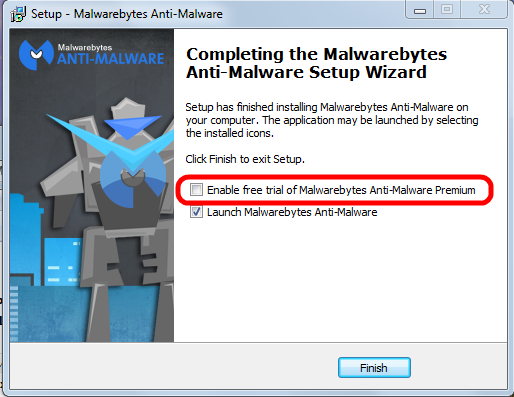
MBAM is a time proven product and available in a totally sufficient free version. You have to watch during the original install and when you install a program update. The last window of the installer looks like this:


Please pay attention to the marked entry; it's check box is preselected! That means the “trial version” will be activated and after the trial period ends you would have to pay for using the program.

You have to uncheck this check mark.

Eventually the program itself needs to be updated; the installer will run again and again you have to pay attention to this little detail to avoid the for-pay version!

And now to what the title promises.

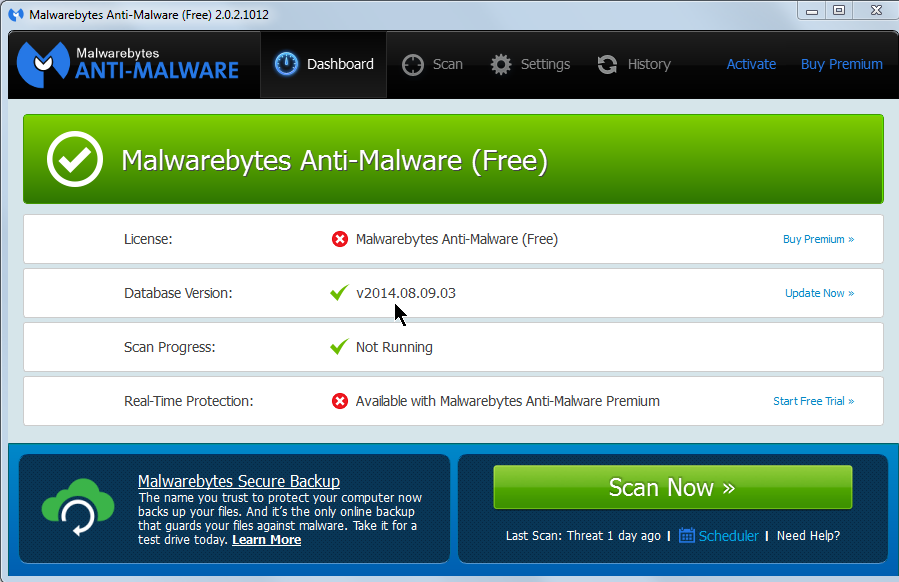
After you start MBAM you see this window:


I recommend to always click on Update Now; this is where the cursor points in the screen shot. Let the program work until you see that the database has been updated:


Do you see the check mark by Database Version (see the cursor).

Then you click on the big green button labeled Scan Now.

The program window will show the progress:


When MBAM finishes scanning it may either show that no traces of malware were detected:


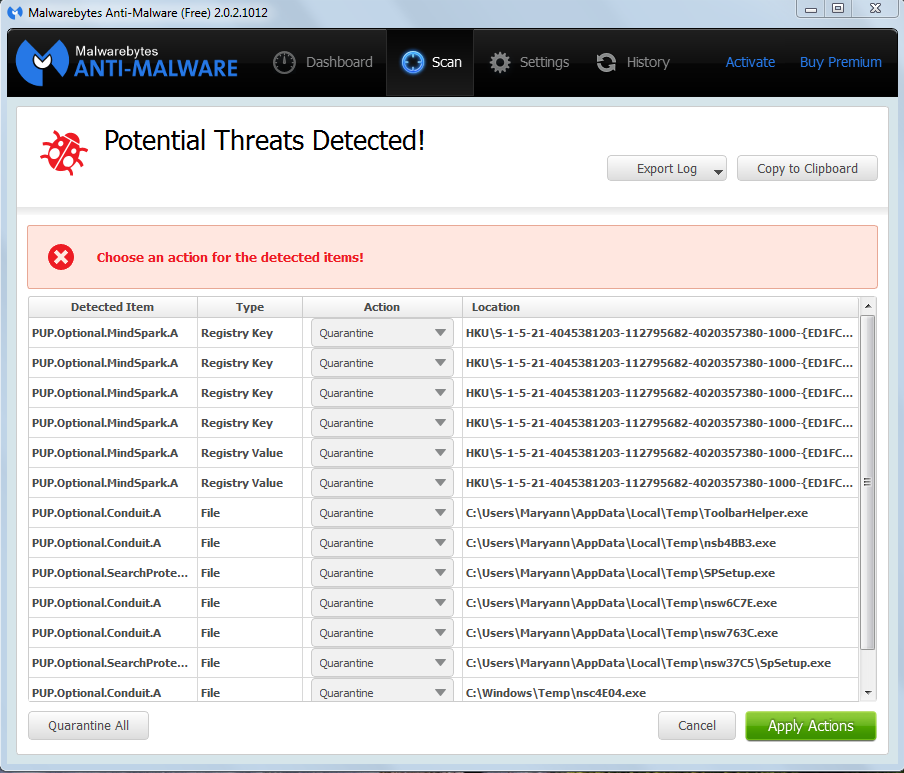
Or it shows this window listing encountered traces of malware (a real life example from a customer's computer):


The free version of MBAM does not allow to select different action(s). Experience has shown that the program's suggested action is appropriate.

My recommendation is to follow MBAM's suggested actions and to click on Apply Actions. When that action has finished you can close MBAM.


As usual I welcome suggestions and comments right here in the blog.

Click here for a categorized Table Of Contents. 
 

Friday, August 8, 2014

2014 Update On Malicious Programs


As far as malicious software is concerned much has changed since I last wrote about it. So here is an updated report on the current situation (summer 2014) ans my personal advice on how to stay safe on the Internet. I will talk about
  • Definitions
  • Protective tools for the home user
  • How to avoid these troubles and a
  • Conclusion

Definitions:

Malware: Short for malicious software. It is a general term used to describe all viruses, worms, spyware, and pretty much anything that is specifically designed to cause harm to your PC, steal your information or throw never ending torrents of advertisements at you.

Virus: A program that copies itself and infects a PC, spreading from one file to another, and then from one PC to another when infected files are copied or shared.

Spyware: Any software that collects your information without your knowledge and usually sends that information back to the creator(s) so they can use that personal information in some nefarious way.

Scareware: A relatively new type of attack, where a user is tricked into downloading what appears to be an antivirus application, which then proceeds to tell you that your PC is infected with hundreds of viruses, and can only be cleaned if you pay for a full license. Of course, these scareware applications are nothing more than malware that holds your PC hostage until you pay for the “full” version. In many cases you can't uninstall them and/or the render the PC unusable.

Trojan horses: Applications that look like they are doing something innocuous, but secretly have malicious code that does something else. In many cases, trojans will create a backdoor that allows your PC to be remotely controlled, either directly or as part of a botnet—a network of computers also infected with this trojan and/or other malicious software. The major difference between a virus and a Trojan is that trojans don't replicate themselves—they must be installed by an unwitting user.

A computer worm uses a network to send copies of itself to other PCs, usually utilizing a security hole to travel from one computer to the next, often automatically without user intervention and often via email.

Ransomware usually encrypts your files that then are useless to you and some even “lock” your computer. The software requests an often quite substantial payment for the means to restore your files into usable form – which even after payment sometimes fails. 


Protective tools for the home user

You will always want to run a specialized anti virus program and a specialized on-demand only malware removal tool. I will recommend the only two programs I have learned to trust over the years – and that are easy enough to handle for the home user.

Anti virus: The release of Microsoft Security Essentials has changed the landscape of antivirus software. We finally have a completely free application that protects against viruses, spyware, and other malware without killing system performance like some of the "suites" tend to do. In my extensive personal experience it barely slows down even relatively slow machines and it's user interface is the easiest to use of all I know.

Don't only take my word for it. AV-Test.org found that it detects 98% of their enormous malware database and AV-Comparatives (a widely known anti-malware testing group) found that MSE was one of only three products that did well at both finding and removing malware.

Anti malware: Modern malware, mostly called PuP (potentially unwanted program), is very different from classic viruses. Most anti-virus programs can not detect PuPs and thus do nothing about it. And, as if to add insult to injury, most of them come on the computer because the user got tricked into allowing their installation.

I recommend Malwarebytes Anti-Malware (MBAM for short). Please download it from these two links only (they both go to the same destination).

MBAM is a time proven product and available in a totally sufficient free version. You have to watch during the original install and when you install a program update. The last window of the installer looks like this:


Please pay attention to the marked entry; it's check box is preselected! That means the “trial version” will be activated and after the trial period ends you would have to pay for using the program.

You have to uncheck this check mark.

Eventually the program itself needs to be updated; the installer will run again and again you have to pay attention to this little detail to avoid the for-pay version!

See this article on how to correctly use MBAM.


How to avoid all these troubles

When it comes to protecting yourself, it's laughable how many people install multiple antivirus applications but don't keep their system updated with the latest patches for the operating system.

If everybody would simply keep their system and all programs up to date, we wouldn't have to worry so much about these problems. If the constant rebooting action of Windows Update has you frustrated, you can always temporarily delay the reboot; remember, only after the reboot the patches are completely installed and active to protect your computer..

Keeping your applications updated is critically important to protect your computer's security. Your firewall won't protect you, and an antivirus software is unlikely to help if you're using an old, vulnerable version of Adobe Flash or Adobe Reader.


Conclusion

In the end, good browsing habits and common sense should be your first line of defense against any kind of malware. I recommend to always run a good security suite like MSE and additionally to use MBAM as an on-demand scanner. That way you're as well protected as easily possible and you can scan your system for malware whenever you want.

So here's the bottom line: In my not so insignificant experience MSE and the on-demand free version MBAM work very well together . Coupled with good browsing habits and common sense this a good combination of security tools and judiciously using them should keep you well protected.

As usual I welcome comments and suggestions right here in the blog. Thank you in advance.

Click here for a categorized Table Of Contents.


Monday, November 18, 2013

Warning - W A R N I N G - Warning


On October 23rd 2013 I wrote about a really, really bad new virus called CryptoLocker.

Back then, only three and a half weeks ago, CryptoLocker was an acute danger mainly in the UK, parts of continental Europe and in some Asian countries.

This has changed dramatically. Computer users in the USA get hit with this virus increasingly often. Since a few days I receive about five emails every day that offer me "free money" or pre approved credit cards "ready to be shipped" my way. Would I ever click on a link in such an email? Would I ever be tempted to open one of the attachments? You bet not!

A free(!) protection method is available but it will interfere to some degree with normal computer operation. When this happens the computer user needs a certain amount of technical know-how to correctly diagnose the reason for the interruption and the to create an exception; this has to happen every time when it happens. If you can do that you should look at CryptoPrevent.

For everybody else I shout as loud as I can:
Disconnect your external backup drive when the backup is done!
If you don't disconnect the backup drive your backup files will be encrypted as well! They are totally useless once encrypted.

As usual I welcome suggestions and comments right here in the blog.

Click here for a categorized Table Of Contents.


Wednesday, September 18, 2013

PUPs - No Virus But Just As Nasty


Updated Oct. 27th, 2013

The latest and fast growing trend of cyber crime against the unsuspecting user of a Windows PC is a new breed of malware, so called PuP programs (Potentially Unwanted Program).

These programs technically are not viruses; that is why anti virus programs don't find them - although there are some special programs for geeks and technicians that can clean this stuff from your computer.

You can easily check your computer for at least a few the most commonly encountered names.
  1. Open the Control Panel
  2. Set "View by" in the right top corner to Small Icons and 
  3. Open Programs and Features
You find names of PuPs that I have encountered in this list. Warning: The list is long, by it's very nature incomplete and it keeps growing almost every week. Please be aware that spelling, capitalization, prepended or appended numbers or syllables and inserted or omitted spaces are common and still denote the "main offender" as worthy of removal.

The somewhat good news: Many of these pieces of trouble can be uninstalled, that is removed, from right there in the Programs and Features window where you just found them.

The really BAD news: Even if you uninstall them successfully there will be leftovers in web browsers and other important locations in the operating system.; especially Google Chrome seems to be likely to retain some of that. These leftover entries can be numerous, affect functioning of web browser(s) and significantly hamper the computer; they can only be removed with some specially written very detail oriented clean-up programs.

Well, you know who can help, don't you?

Please remember: Toolbars are forbidden, no matter who promises what, no matter how tempting the name and no matter who made the tool bar! If you find any toolbars remove them right away.

If you find folders with names from random letters or numbers like for example:
         pgmfkblbflahhponhjmkcnpjinenhlnc
you have a clear indicator of malicious software. You know who can help, don't you?

If you wonder how all this stuff got on the computer then please read the explanation  here.

As usual I welcome suggestions and comments right here in the blog.

Click here for a categorized Table Of Contents.


Tuesday, September 17, 2013

PUPs - The List


This is the list of PuPs that I have encountered; it is not comprehensive and it is growing almost daily...

Update February 12th 2014: This list now is 313 entries long and the malware programmers create new names every day. Keeping this list up-to-date has become increasingly time consuming and I will in the future add only well descriptive new names. 

This list makes sense only as part of this article on PuPs.


1clickdownload
24x7 Help
adawaretb
AdpeakProxy
Advanced System Protector
alotToolbar
ammyy
Amonetize
Anti-phishing Domain Advisor
aol toolbar
apn
apnupdater
AppGraffitti
Application Updater
Ask Search
Ask Toolbar
Ask Web Search
ask.com
AskPartnerCoBrandingTool
AskPartnerNetwork
AskSearch
AudioToAudioToolBar
AVG SafeGuard toolbar
AVG Security Toolbar
avg-sitesafety-plugin
AvgToolbar
AVS4You
Babylon
BabylonToolbar
Backupstack
BatBrowse
BearShare
bearshare applications
BearShareMediaBar
bearsharemusicboxtoolbar
BigFiah Games
BingBar
BitGuard
Blekko
blekko toolbars
blekkotb
Body Media Sync
boost_interprocess
Browser Helper Objects
Browser Manager
browserconnection
BrowserMngr
browsersafeguard
Buzzdock
BuzzdockTease
caphyon
chatsessionplugin
ChromeHelper
ChromeHelper
Claro / iSearch
CleanUp
Common Files\spigot
CommunityToolbar
Conduit
conduitsearchscopes
contextmenunotifier
CouponPrinter
coupons
Coupons Amazing
cr_installer
crossrider.com
CrossriderApp
custominternetsecurityimpl
datacontrol
DataMngr
DealPly
DealPlyLive
Default_Page_URL
defaulttab
defaulttabbrowser
DefaultTabSearch
DefineExt
Delta
Delta Search
DeskBarEnabler
Distromatic
Dogpile
driver robot
driver-soft
DriverCure
DriverUpdate
DropDownDeals
DynConIE
EasyCopyND
eBay.lnk
escort
eSupport.com
Extreme Flash Player
F3PopularScreenSavers
Facemoods 
Fast Free Converter
feedmanager
file scout
File Type Helper
Findgala
FirefoxHelper
FirefoxHelper
FirstRowSportApp.com
firstsearch
Fkash Player Pro
FLEXnet
FocusInteractive
Free Offers from Freeze.com
Free Ride Games
Freecause
FreeRIP
Freeze.com
FromDocToPDF
Funmoods
funwebproducts
GamePlayLab
genericasktoolbar
Globasearch
GreatArcadeHits
HiDefMedia
Highlightly
historykillerscheduler
HotspotShield
I Want This
Ibryte
ibrytedesktop
IBUpdaterService
iecookiesmanager
IeHelper
IeHelper
iLivid
iLividIEHelper
ilividsetupv1.exe
Iminent
Inbox
inbox toolbar
InstallCore
InstallIQ
InstallServices64\
InternetHelper3.6
InternetUpdater
InternetUpdaterService
ironsource
isafe
iwon
LaunchApp
LCTaskAssistant
LessTabs
Level Quality Watcher
LinkSicle
LyricSing
MapIt
MapsGalaxy
mediabar
MetaStream
metastreamctl
MixiDJ
Mobogenie
MocaFlix
Music Toolbar
my-web-search
mybabylon
MyBabylontb
MyPC Backup
MyScrapNook
Mysearchdial
MyWebSearch
mywebsearch bar
OnlineMapFinder
OpenCandy
optimizer pro
OptimizerPro
ParetoLogic
pc cleaners
PC Health Kit
PC Health Kit
Pc Performar
pc speed maximizer
pchealthboost
pcpro
pdfforge
PerformerSoft
PIP
playbryte
PlayFizz
priam
priam_bho
pricegong
pricesparrow
Privitize
Prod.cap
Protector
protector_dll
protectorbho
pseudotransparentplugin
QwixLinx
RadioBeta
radiorage
Re-Markable
RebateGiant
RebateInformer
Recipehub
RegClean Pro
Registry Mechanic
ReMarkIt
roboot
roboot64
RoyAlCoupon
savesenselive
SaveValet
ScorpionSaver
ScreenSaverInstaller
scripthelper
Search Bar
Search Page
SearchAssistant
SearchPlzBar
SearchProtect
searchprovidermanager
SearchQmMdiaBar
Searchqu
Searchqu Toolbar
SearchquMediaBar
SearchScope
SearchSettings
SearchYa
SecondStepInstaller
selectrebates
SevereWeatherAlerts
shop to win
Shopping
shopping sidekick
shoppingbho
ShopToWin
shopwithshelly
Site Ranker
SmartBar
Snap Do
SocialBit
SocialPrivacy
Softonic
SoftonicDownloader
software assist
Software Update Utility
solid savings
Sparktrust
SpeedAnalysis
speeddial
SpeedMaxpc
speedupmypc
SpeedyPC
spigot
SPUpdater
Start Page
StartNow Toolbar
StartSearch
StatusWinks
Strongvault
supreme savings
Swag Bucks
SwiftBrowse
Systweak
Tarma installer
tbcommonutils
tbdownloadmanager
tbhelper
TelevisionFanatic
thirdpartyinstaller
TidyNetwork
toolbar
Toolbar Cleaner
toolbar3
toolbarbroker
TotalRecipeSearch
Translate Genius
Trymedia
Uniblue
URLSearchHooks
utorrentcontrol
V9
ValueApps
Video downloader
VideoDownloadConverter
videodownloadconverter search scope monitor
ViewpointMediaPlayer
viprotocol
VirtualBee
visi_coupon
VisualBee
vProt
w3i
Wajam
WajamUpdater
Weather_Notifications
WeatherBlink
WeatherNetwork
Web Assistant
web-search
WebCake
WebSteroids
WeCareReminder
WeDownloadMgr
Wheather Alerts
WhiteSmoke
wincert
Wincore MediaBar
WinPcap
wiseconvert
WordOv
YahooPartnerToolbar
Yontoo
yontooieclient
Zoom_Downloader
Zugo
---------------- End of List

As usual I welcome suggestions and comments right here in the blog.

Click here for a categorized Table Of Contents.