Showing posts with label warning. Show all posts

Monday, April 6, 2020

Amazon Prime member? WARNING!


I have an Amazon account AND an Amazon Prime membership.
I received an email and I want to show it in a screen shot:


On first glance nothing really alarming, right?
BUT:
The sender email address (labeled From:) looks to me totally wacky and the Reply-To address (labeled To:) IMHO is equally unlikely.
The warning bells in my mind started to ring loud and clear.
 
My wife and I use the same Amazon account all the time and thus I know that the payment method is correct and that it works.

Even saving the attached PDF document to my computer and then scanning it with Malwarebytes did not show any alarms or warnings.

So I opened the file in my PDF reader to check it out in more detail.

The PDF document contains a link and a BIG button to supposedly go to Amazon's account and payment method web page.

BUT this is what the link and the button actually would have sent my web browser to:
https://t.umblr.com/redirect?z=https%3A%2F%2Fam1zn-updtaeinfmtaonsupdtee-verifyconfimationss76757855.com%2F%3Fsigninn-&t=NmVmZTU1YjdlNTBkODkzYjc0NTg1NzM0MTI2YWNhNWJkOGNiZGRjZSxjYTVkNGQyNzY5ZjI4OGQ2OGFiZjQ2ZDJmOTg3NjZlMTZkNTI5M2Y3

What a crazy nightmare - and for me a clear indicator that something was VERY WRONG!

I went to Amazon.com and checked in my account settings and voila, my Prime membership is paid for until September and the payment information is correct.

Naturally I will report this to Amazon.

MY conclusion as far it concerns you? 
 
Be super vigilant, never trust an email and do NOT be complacent!

Yes, IMHO it is complacent to "just click" on the big button or the link in the PDF file rather than verifying the claim made in the PDF file independent of the email and it's attachment!

Stay safe, stay vigilant and pay attention to the details!

Wednesday, May 1, 2019

PuPs - Again and What are they?

Potentially
unwanted
Program

That exactly is what PuPs are. Now that formulation with "potentially" is a protection against frivolous law suits; every PuP does something, in the opinion of it's author definitely something positive and useful. The word potential protects everybody who has to or wants to name these programs from lawsuits.

In my opinion EVERY PuP out there is outright malware and it is sad that existing laws and court decisions force us to use the word potential at all.

I happened to run across a good article (IMHO at least) about PuPs. You can find it here.  Yes, it's three years old and I believe I have already linked to it in an earlier article. I hope you don't mind to get the suggestion to refresh your memory.

The article I linked to in the previous paragraph refers to an even older article about one of the major sources of PuPs on our computers, the so called Download Portals.
IMHO a refresher about this might be recommended as well.

Stay safe.


Saturday, November 3, 2018

URGENT ALERT - Please read!


Updated 2018-12-17 to include ALL current versions of MS Windows!

Users of ALL versions of Windows:

Please DO NOT manually check for Updates any more, now and in the future!
Insufficiently or untested updates have very recently caused many home computer systems to break and/or show erratic behavior or they have led to file loss!

Microsoft has quietly modified the technology hidden behind Windows Update. The gist of it is that when you check manually for Updates your Windows operating system will be given all available but eventually insufficiently tested updates! 

As a way of avoiding that to occur Microsoft has begun to check much more thoroughly if every given update is fully compatible with the individual computer's hardware. They give that update to a given computer only when the previously mentioned checks and tests end positively.

But all this happens only in the course of the regular, automatic update process! 

If you manually 'check for updates' your computer will get ALL available updates without these compatibility tests!

You can find an interesting article about this general problem here at HowToGeek.com. This article talks about all major operating systems including iOS and Android for cell phones. But you will find Windows 10 and Microsoft mentioned many times. Just overlook everything that does not pertain to Windows. Windows 8 and 7 are now treated the same way!

So again and to summarize:

Please DO NOT manually check for Updates any more,  now and in the future!

Stay safe!

Friday, September 14, 2018

Why I Don't Like Windows 10 and MS


In quite a few articles on this blog I have referred to, quoted from or linked to one of the web sites I regularly draw information from; I am talking about Tech Support Alert aka Gizmo's Freeware.

Two days ago they published an article titled "Windows 10 connects to these websites after a clean installation". Since many of my customers are not very technically minded let me quote some points that I consider to be the important details. 

IMHO it is, to say the least, misleading to use Microsoft's wording "telemetry" when our Windows 10 systems talk to Microsoft [MS] all the time without ever having asked our permission. They even don't ever tell us about the simple fact that they do that; you have to be a technology geek and read lots of very technical stuff to even become aware of what is going on.

The article lists 20 web sites that Windows 10 connect to when you start a brand new Windows 10 system. All these sites collect technical information about our computers and about us. As a simple example: Why does MS want or need to know where I am? That is information I personally would only disclose to the police if they ever wanted or needed to know that.

Here is list from above mentioned article. I have added the bold typeface in Line 1.
Windows 10 connects to one or more websites in these categories:
  • Cortana and Search
  • Certificates
  • Device authentication
  • Device metadata
  • Diagnostic data
  • Font streaming
  • Licensing
  • Location
  • Maps
  • Microsoft account
  • Microsoft store
  • Network connection status indicator (NCSI)
  • Office
  • OneDrive
  • Settings
  • Skype
  • Windows Defender
  • Windows Spotlight
  • Windows Update
  • Microsoft forward link redirection service (FWLink)
All this can on slower Internet connections add significantly to the time it takes for the system to start up. I have experienced that quite often when a sluggish or outright slow system all of a sudden works with normal reaction times after all that got turned off.

And to top it off, the program I use to turn off this talking back to MS is from a well reputed company and totally free.

Any questions or comments? Pleas use the Comment feature of this blog.

Please stay safe.

Tuesday, August 28, 2018

This is well done - WATCH OUT!


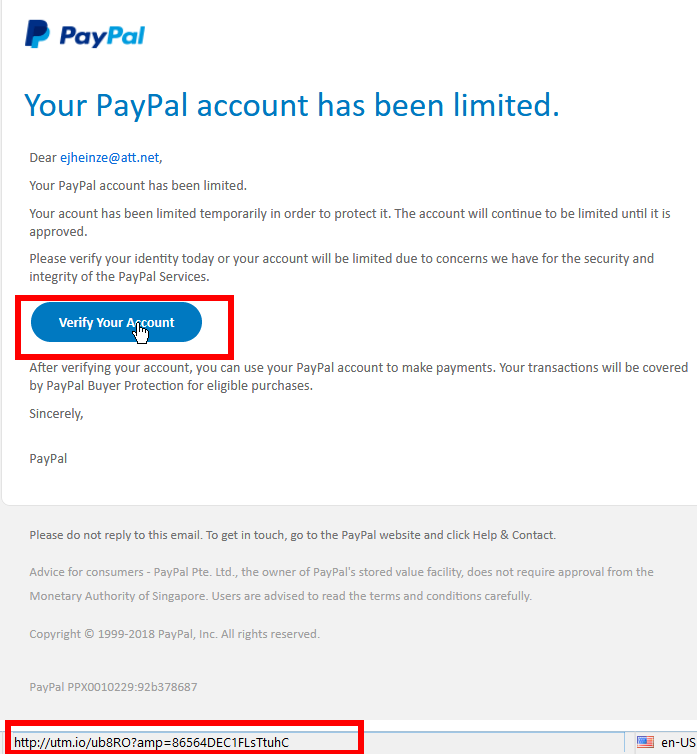
For many years I use PayPal; I just received this email:


Something made me more suspicious than I usually am so I moved the cursor to the "Verify Your Account" button. And YES, that button translates to a shortened link - as you can see in the second red square.

Why would a well reputed company like PayPal ever use a shortened link?

I admit, the email looks convincing and even sort of professional.

Before I hit the Delete button in my email program, I took above screen shot for this blog post.

Stay safe!

Saturday, July 7, 2018

URGENT ALERT! For users of any Apple thinghy!


Hi y'all and thanks for reading this.

If you or someone in your household has any piece of equipment from Apple, like an iPhone, iPad, iPod or the like then
 this is for you!

Since iPhones a.s.o. are so common nowadays the crooks are targeting you. Look at the email I just got in a partial screen shot of the Thunderbird screen:


I have marked the give-away items with colored rectangles as follows:

Blue: I don't have an Apple account! Ha, ha, ha.

Purple: The email does not even come from Apple!

Green: My cursor pointing to the "Verify..." button.

Red: The URL (web site address) that the "Verify..." button actually is pointing to; it has NOTHING AT ALL to do with Apple.

To be addressed as "Dear ejheinze@att.net" is so unprofessional this alone would be reason enough to click on the Delete button!

The item in the red rectangle I see only because I told my email program to show this and because the cursor is on the "Verify..." button. I believe none of this needs further clarification. Should you have any questions please feel free to ask me, preferably in an email.

A general remark: 
If the program you use to read your emails
does not show you any of the information in blue, purple and red
then you potentially endanger your computer!

Any Questions? Please feel free to ask me, preferably in an email. 

Stay safe.

Monday, December 4, 2017

Attention Everybody ...

... with an AT&T, SBC Global or a Yahoo email account:

Likely every direct or indirect Yahoo user got this or an email similar to this:


DO NOT CLICK on the RESET link! This email is a scam!

As you can see my cursor was on the RESET link in the text when I took this screenshot.

Please look at the red framed box in the left bottom corner. You can easily see that the link would take you to helpdeskhomezone.com, a web site that obviously has NOTHING AT ALL to do with Yahoo! It is your guess what might happen if you do click on it.

Just the line where these crooks address me, "Dear ejkheinze@att.net" is another simple giveaway. No even vaguely reasonable company would address a customer like that!

Again, check every link in emails in this way BEFORE you click!

THINK TWICE and stay safe!

Monday, November 20, 2017

(GRAND-) PARENTS: Real and Present Danger!


Yes, I know, it has been way too long since the last time I had to say something.

With the holiday season immediately upon us and the crazy sales already in full swing:

You please, please have to read this article about the risks associated with the newfangled so-called "internet connected" toys.   

Other than that I wish everybody a HAPPY THANKSGIVING!

Stay safe - and help keeping your kids and grand kids safe.


Friday, July 21, 2017

The Skinny ...

... about the latest outbreak of Encrypting Ransomware.

The original of this text was written by Ken Dwight, aka The Virus Doctor. I am an alumnus of his Virus Remediation Training and make this text available for my customers with his kind permission. Thanks Ken.

As with malware in general, encrypting ransomware is continually changing.  Most of these changes are evolutionary and somewhat predictable.  As such, they don’t call for any significant changes in the methodology to be used in dealing with them.

Some recent developments in specific families and strains of encrypting ransomware are
significant enough to justify an update to the IT Support technician’s strategies and tactics for handling them effectively.

There are primarily two families of such ransomware that warrant this attention.  Multiple names have been assigned to these families, but this discussion will use the names that are most frequently found in credible press coverage of these outbreaks.

WannaCry was released into the wild on May 12, 2017.  According to most reports, it infected at least 200,000 computers, in more than 150 countries.  This ransomware spawned its own Wikipedia entry, at
https://en.wikipedia.org/wiki/WannaCry_ransomware_attack.

The more recent attack, erroneously known as Petya, but more accurately referred to as
NotPetya, first struck on June 27, 2017.  There are no estimates of the total number of computers infected by this malware, or the number of countries represented.  But it clearly targeted businesses and organizations in Ukraine, with some 80% of the infections found there.  This ransomware also has its own Wikipedia entry, at
https://en.wikipedia.org/wiki/2017_cyberattacks_on_Ukraine.

These two families of ransomware have several characteristics in common.  Probably the most notable is the widespread coverage both received in the general press.  While malware generally goes unreported in the non-trade press, these attacks were the exception to that rule.  Fueling the press coverage was the revelation that both of these attacks were based on exploits developed by, and subsequently stolen from, the U. S. National Security Agency (NSA).

Interestingly enough, I have not seen any of these infections first-hand, nor have I received reports from any graduates of my Virus Remediation Training workshops that they have encountered computers encrypted by either of these families of ransomware.  Considering the fact that hundreds of IT Support Techs fall into this category, in most of the United States + 7 foreign countries, I can only speculate that the actual infection rate is much less widespread than the press coverage would lead one to believe.

Another common denominator between these two infections was the fact that the vulnerability in Windows that was used for both of these attacks had been patched by Microsoft in their March, 2017 Windows Updates; any computer with that update applied would not have been infected by either of these pieces of malware.

Two NSA exploits were used in both of these attack scenarios; they are named EternalBlue and DoublePulsar.  A free EternalBlue vulnerability scanner is available for download from http://omerez.com/eternal-blues-worldwide-statistics/.  As of mid-July, 2017 more than 10 million IPs have been scanned; the majority of hosts scanned (53.82%) still have SMBv1 enabled, and 1 out of 9 hosts in a network is vulnerable to EternalBlue.

The WannaCry malware included a “Kill switch” which was discovered by a malware researcher and activated to disable the infection from spreading any further.  No such kill switch has been found for NotPetya, but a “Vaccine” has been developed to protect against it.  More details from Bleeping Computer at https://www.bleepingcomputer.com/news/security/vaccine-not-killswitch-found-for-petya-notpetya-ransomware-outbreak/.

Another important difference between these two families of malware involves the type of
encryption they perform on the victim’s hard drive.  WannaCry, like most encrypting
ransomware, encrypts each individual file.  It also changes the filename to end with an extension of .wcry.

On the other hand, NotPetya encrypts the entire hard drive and replaces the Master Boot Record with its own version.  While the encryption is taking place, the malware displays a screen that looks like a chkdsk operation is being performed; when the whole-disk encryption is complete, it forces a reboot.

Upon the reboot, the modified MBR causes the ransom note to be displayed, with instructions to pay $300 USD in Bitcoin; after 72 hours, the ransom increases to $600 USD.  Because of the modified MBR, at this point it is not possible to boot into a normal Windows environment.

As of this writing there is no means to pay the ransom; even if the ransom is paid, there appears to be no way to decrypt the hard drive or restore it to normal operation. Consequently, there is no reason to even consider paying the ransom.

Back to WannaCry, there have been some reports of successful decryption after paying the ransom. But here again, I have no first-hand (or even second-hand) reports from victims of this family of ransomware.

Those are the most recent, high-profile developments in the field of encrypting ransomware.  But it’s a pretty safe bet they won’t be the last.  This category of malware continues to evolve and become more sophisticated and more insidious.  It has crossed the threshold of being a billion-dollar industry; that success will attract more and more criminals who are lured by the promise of  easy money.  Our prospects for future employment remain secure!
That was it.

All my customers are advised to weekly initiate a check for Windows Updates. If they followed that advice their computers  were protected and they don't need to care about these two overly "hyped up" virus outbreaks.

Stay safe.


Tuesday, October 4, 2016

The newest Scam - Beware


The newest telephone scam I heard of is the Microsoft Licensing Scam. You may get a phone call or a voice mail saying something like this (phone numbers deliberately obscured):
“This is to notify you that your Microsoft Windows license key has been expired in your computer so Microsoft Corporation has stopped the services in your computer. To renew the Windows license key, please call 866 XXX XXXX. Let me repeat. This is to notify you that your Microsoft Windows license key has been expired in your computer so Microsoft Corporation has stopped the services in your computer. To renew the Windows license key, please call 866 XXX XXXX. I will repeat 866 XXX XXXX.”
The message obviously was from a computer generated, sort of "mechanical" voice and the stilted English suggest a non-native English speaker behind the whole thing.

Any messages about licensing issues truly from Microsoft would pop up on your computer's screen only during installation or activation. And we all know, if only from experience, that a Microsoft license for the Operating System comes with the computer when you buy it and it is good for the lifetime of the machine.

In Windows services are programs running in the background; they are required for even basic functions of the computer. A computer would not work at all without the required services running in the background.

In the case I read about the recipient happened to be a very, very experienced Windows user; the gentleman called back the 866 number from the message; he said about that call:
"Because the number was toll free, I called it just to see what would happen. An answering machine invited me to leave a message and my number for a callback — I declined.
Please remember: Any and all phone calls claiming to come from Microsoft or any company associated with Microsoft are scams. Don't even talk to these people! Do not give them your phone number or ANY OTHER information.

As usual I welcome comments and suggestions right here in the blog. Thank you in advance.

Stay safe.


Saturday, July 23, 2016

What browser?


I got an email from a customer and believe my reply might be of interest to many people. The customer quoted an article from another blog(?) that recommended to search directly out of the URL field. Here is my reply verbatim as I sent it:
The crux with all these "easy" tips is that they all play right into the industry's game.

The more searches any given search engine gets to perform the more money they can ask for their aggregated info on what we search for. The search engine companies may not directly advertise to us but the companies that buy this aggregated search information can then advertise better and more directly to us.
  • It's a fact that Bing and Yahoo (they use Bing) do NOT show us what in the search results are paid advertisements.
  • It's a fact that way too many advertisements get abused to get malicious programs on our computers.
  • It's a fact that some web browsers (like IE and Edge, both from Microsoft!) make it very difficult or don't allow us at all to suppress advertisements.
  • It's a fact that Google does not allow us to suppress certain advertisements in Google's own Chrome browser.
All the before said and more is behind my STRONG recommendation to use only Firefox as I set it up for my customers.

And I urge my customers to search ONLY out of the little browser specific Search window:
because when you search from there you get a Google search result
MINUS any advertisement(s),
PLUS the red, yellow and green Web of Trust ratings right by every search result.
AND your search with Google has happened anonymously!

Update Jan. 10th 2017:
Sadly around November 5th 2016 Mozilla, the organization that supplies Firefox and Google have removed that piece of code from their download pages; some details are here.
If you remove the WOT extension or add-on from your Firefox browser it currently can not be re-installed!
Google recently made the WOT extension available again.
If that is not reason enough for any of my customers it's their decision and their money if I have to clean up their machine again.
 Stay safe!

Monday, July 4, 2016

Norton "Security" Software - REALLY INSECURE


It is a shame that "the media" ignore these facts and thus allow millions of computer users to live with unsafe computers.

A few quotes from The Register's recent article
  • Scores (or thousands, or millions) of enterprise and home Symantec users are open to remote compromise through multiple now-patched (where possible) wormable remote code execution holes described by Google as 'as bad as it gets'.
  • They [the security flaws] don’t require any user interaction, they affect the default configuration...
  • Victims would not even need to open the malicious files to be compromised.
  • Some of those [affected] platforms cannot be upgraded. 
Towards the end of the article The Register seems to quote six actions users should take to secure their systems. Four of those six are impossible to even think of for normal home users; they require corporate installations and corporate management structures that just are non-existent in home installations.

The other two require a level of know-how and technical expertise that is equally non-existent in the average home user environment.

The only consequent reaction for home user is what I preach to my customers for years:
Ditch any and all Norton products.
If you have allowed that Norton automatically charges your credit card you have to revoke that permission. You can get their phone number(s) through this web page.

Normally uninstalling them from Programs and Features in the Control Panel is not enough. I recommend to additionally run the Norton Removal Tool downloaded from this page; click on either of the links "Download@MajorGeeks".

Stay safe.

Thursday, April 7, 2016

2016-04-07 WBKV Talking Points


This is the first time ever in 12 years of regular radio shows that I do not have a set agenda for the 15 minutes ahead of us.

Listeners, please call in with ANY kind of question you may have around your PC and MS Windows.

Other than that only the standards;

    - Use common sense!
    - Read and think(!) before you click.

    - Update ALL programs you use.

   - Ransomware.

    - Backup your data and your system!

And stay safe.

Sunday, March 27, 2016

Spybot Anti Beacon - A Must Have?


If privacy of your data and files is to you as important as it is for me than the answer to the title question on Windows 7 and above is YES, clear and loud.

Let me explain: SpyBot Anti Beacon is a relatively new utility that can reliably turn off most of Windows 10's unwelcome behavior. Many others besides myself think of as being spied at. Whether Micro$oft calls this telemetry or whatever, I feel spied at.

If you want to know why I call Windows 10 a masterpiece of data collection and judge it's telemetry as for me unwanted spying please read this article originally written in October 2012 after Windows 8 was available. And I repeated the IMHO main reason in the context of Windows 10 quite recently.

If you want to try SB Anti Beacon (SBAB) please keep in mind this is professionally made but it is a FREE program; free as in free beer, that is you do not have to pay for it. This has consequences; not everything is as automatic as you might have come to expect from good programs. The main program window has four tabs for four different functions or info screens. I recommend to read the Frequently Asked Questions in tab #4 but will shortly describe what I do in tabs #1 and #2 (usage instructions).

In tab #1 I want ALL the entries to be green, that is all the spying turned off. So I just click the Immunize button at the bottom of the page.

In tab #2 I want as well all entries to be turned off but the page is differently organized. For every entry I have to click on the Apply button immediately above the entry. And especially on laptops and other (mainly smaller) wide screens I have to realize that in tab #2 the program windows has a scroll bar! I need to use it to uncover the last entry or entries on that tab's page.

Here are some visual examples from the only Windows 10 system I currently have available which happens to be a laptop:
Tab #1 BEFORE and AFTER "Immunize"
Tab #2 BEFORE and AFTER "Apply"
Please see that the scroll bar in the pictures of tab #2 is in a different positions.

Just an hour ago I made an interesting observation: After installing updates from Windows Update I checked the Win 7 system I write this on and there was one new telemetry entry in each of the tabs. That shows that Micro$oft at least for now will keep bringing telemetry from Windows 10 back to Windows 7 and 8!

That is why I say to you:  If you are willing to use SpyBot's Anti Beacon and to take on this additional check after EVERY update from Micro$oft (whether the updates were automatically applied or you checked and installed them manually) then you can rest fairly assured that Micro$oft will not collect data from your computer and about your computing habits.

As usual, stay safe.

Wednesday, March 23, 2016

2016-03-24 WBKV Talking Points


Today nothing but viruses, malware and currently acute dangers.
  • Ransomware (so far mainly from infectious MS-Office documents)
    Record ransom paid; 17 million US$ 
     -  -
  • now infectious advertisements on BIG company web sites with 100s of millions of visitors every day:
    - -
    New York Times (nyt.com)
    AOL.com
    ESPN.com
    MSN.com (MicroSoft Network)
    NFL.com (yes, National Football League)
    TheWeatherNetwork.com
    TheHill.com
    Yahoo.com  and many more.
I feel like a prayer wheel:
   If you see advertisements in your web browser your computer is at risk!

Firefox web browser with Adblock Plus and WOT are the browser protections you should use!

No, not Goggle Chrome, Safari or Edge or Internet Explorer!

Monday, March 21, 2016

Norton Software IS RISKY!


For years I recommend to my customers and on my radio shows to stay away from so called "security products" from the big names like Norton, McAfee, Trend Micro and many others.

The makers of the Norton branded software is a company called Symantec.

Here is revealing and interesting article about Symantec and some of the major security problems in some of their software.

If you want to entrust the security of your computer to Norton software be my guest. I don't mind at all to clean up the mess.

Stay safe!

Credit cards ARE a risk factor...


.., especially if last year you used them at Target or Home Depot.

Home Depot so far shelled out $19.5 million and they are still counting.

More details are here.

Personally I always cringe when I see someone paying everyday smaller mounts with a credit card, be it at Starbucks, McDonald or anywhere else.

Disclaimer: I am hardly ever at McDonald and if at all I pay with cash!

Stay safe!

New Dangers And Bad News


You may already have heard of ransomware, the newest trick of the bad guys to get at your money.

If you have not here is a VERY SHORT explanation: A ransomware virus encrypts all your data files, that is in effect makes them unusable and unreadable. After the encryption is done you have to pay money to the crooks do get instructions and a "decryption key"; if the instructions and the decryption key work correctly as they should you get your data back but sometimes it does not work. Your data is held for ransom, hence the name.

So far the highest amount reportedly paid by a large California based medical organization was 17 million dollars.

Very recently the web sites of a whole lot of well known and big organizations got abused to show advertisements infected with ransomware. Some of the affected web sites were:
  • msn.com
  • nytimes.com
  • aol.com
  • nfl.com
  • theweathernetwork.com
  • thehill.com
  • zerohedge.com 
and many more. These sites have millions of daily visitors! If you are interested you can read more details here.

I can not say it often and loud enough:
If you see advertisements on the Internet your web browser and thus your computer are NOT SAFE at all! Fire your current technician and call me or send me an email!
When I leave a customer's house they ALL have a safely set up web browser that should not show ANY of these commercially distributed advertisements.

Stay safe.

Saturday, March 19, 2016

Skype Users Be Warned


If you use Skype PLEASE read through this article about two conversations triggered by Skype friend requests. I will let that speak for itself.

For the less geeky of my readers, a spam bot is program or robot programmed to "have a conversation".

You are warned.

Stay safe.

Wednesday, March 9, 2016

2016-03-10 WBKV Talking Points


Part 2: Stay Safe on the Internet

Be aware that trustworthy companies, especially Microsoft and it’s affiliates, will never contact you because of a supposed technical problem of any kind.
The following will definitely be scams:
  • Phone calls
  • Advertisements for technical support for any software product on search engines like Google, Yahoo or Bing
  • Pop-ups for tech support from social web sites (Facebook! or LinkedIn)
  • Pop-ups for tech support that promote phone based tech; these usually require a previous malware infection or an unsafe web browser.
Scam avoidance 101:
  1. Never completely trust someone you don’t know who called you.
    Listen to them, if you like.
  2. Ask questions, if you feel like it, but NEVER EVER give them access to your PC
  3. NEVER EVER give them any payment information.
  4. Tell them that you will let your local tech look into it (even if you don’t have one).
  5. If the caller hangs up – good for you.
  6. If he/she gets impolite or abusive it’s your time to hang up!
Afraid of a real problem? Do the research yourself or contact a trusted tech support person.

Chances are there’s nothing to see at all.

If you have handed over payment information, you’ve just given that information to a complete stranger. Immediately put your credit card or payment provider on fraud alert. If you allowed the scammer to access your computer things can get ugly. Do NOT use the computer; you usually have no idea what they did. You need a trusted technician to check out your machine.
This IS a common scam right now and the best defense is to not fall for it in the first place.

Another currently growing threat: MS-Word, Excel or Powerpoint files sent as attachments! When these files are opened you mostly see the request “... to turn protection on ...” or similar tricks. Don’t do it, don't believe it, it's a trick!  Many very nasty ransomware viruses use this trick! If you do not have a current backup YOU PAY! You either pay the crooks to get your files back and/or a trusted technician to re-build all the software on your computer.  And if you don't have install disks for Windows  - b.t.w. they do NOT come with computers any longer - you have even more problems.

Stay safe.