Showing posts with label online. Show all posts

Wednesday, November 25, 2015

Yahoo! Get away from there - QUICKLY!

Although I am on vacation this is too important for quite a few of my customers. Here it goes:

If you have a Yahoo email address you need to read this! All others can relax - for now.

It has happened; this ZD-Net article has the details why for some of their users Yahoo has made it impossible to access their emails. Currently for "some users" only but what if this "test" proves successful for Yahoo? They will do it to all accounts! You can bet on that!

Why did these good people with a Yahoo email address get bloaked from accessing their emails? They used an Ad blocker because
  1. they could not stand the many obnoxious ads and/or
  2. they had heard about the many virus infected ads Yahoo has served in the past or
  3. they just happen to be my customers.
My recommendation: Set up a Gmail account with Google. Be careful to give Google only the minimally required info about yourself.

Then set up your new Gmail account to automatically pull all mails from the Yahoo account. Google so far always has been far better at blocking malicious content from the Internet.

Let's hope that Yahoo's attempt to force feed advertisements fizzles out and becomes a big failure.

Wednesday, August 19, 2015

Yahoo! - Helps to Distribute Malware


I have said it to countless customers and I say it again, publicly and absolutely clear:
If you see advertisements while browsing the internet
then your computer is not set up safely!
I have said it to countless customers and I say it again, publicly and absolutely clear:
Stay away from Yahoo!
And I mean Yahoo! everything; email, finance, sports, EVERYTHING that comes from Yahoo! 

Here is a literal quote from NetworkWorld.com (bolding and links added by yours truly):
Malwarebytes Labs recently uncovered a large malvertising attack on the Yahoo! advertising network that started on July 28. Malwarebytes estimates that up to 6.9 billion readers could have been affected, making it one of the largest malvertising attacks Malwarebytes Labs has seen recently.
Malvertising is defined as crafted advertisements that intentionally infect the computers of anyone who visits the site. A tiny piece of code hidden deep in the ad will reroute your computer to criminal servers without your knowledge, which then determines how exposed your computer is and decides which piece of malware to send you.

In the case of the Yahoo ad, victims are infected with ransomware via the Angler Exploit Kit, but it’s possible that anything from banking Trojans to additional advertising fraud is also being used in this attack.

Malwarebytes said that the infection included Yahoo's main site, as well as subgroups like News, Finance, Sports, Celebrity, and Games. The ads route users to a site on Microsoft Azure, which eventually leads to the Angler Exploit Kit.

But, according to a friend at Malwarebytes, when you are running Adblock Plus or any other ad blocker, then the ad never plays, so no payload is delivered to your PC. So the malware doesn't ever get to touch your PC. Even if you don't click on the ad, the fact is it loads and becomes saved in your browser cache, so it does get onto your PC without the blocker.
My customers do not need to worry about malvertising, they all have Adblock Plus installed. All others please listen up:

If you use ANYthing from Yahoo! and/or
if you see advertisements when web surfing
then your computer is UNSAFE!

Do yourself a favor, get your computer cleaned up and secured.
As usual I welcome comments and suggestions right here in the blog. Thank you in advance.

For whatever reason the darned TOC (table of contents) feature that I got from Google does not work any longer, sorry.

Tuesday, August 11, 2015

NO to Windows 10


Please click this link if you are looking for general information on Windows 10.


My verdict on Windows 10:   
Do not install Windows 10.

If the word privacy and the concept of privacy mean anything to you then you should stay away form the biggest data slurp this world has ever seen. That IMHO is what Windows 10 is going to be.

Here is an example of what others think about Windows 10; this a literal quote from a reply to an article about Windows 10 privacy settings (bolding added by me):
Microsoft has built into Windows 10, the most comprehensive personal surveillance system ever built into an OS. . .
I cannot, for the life of me, envision any reputable business or government entity running this illegal and unconstitutional monstrosity - and still claim that they are able to protect client/citizen's privacy. Doctor's, lawyers, banks or anyplace where client/patient privacy is important should probably avoid Windows Malware 10 at all cost.
And as far as technical "improvements" are concerned here is a snippet from one of the support forums I follow. A user of this forum put it very nicely and IMHO he nailed it precisely:
Personally, I haven't seen a compelling reason to upgrade to Windows 10. ... I haven't found a good reason to upgrade from Windows 8.1...

PRO: Start Menu.
CON: I already have Classic Shell, which is more like the Start Menu to which I am accustomed, and much more configurable.

PRO: Edge Browser.
CON: I'd rather use Firefox.

PRO: Cortana.
CON: This is a security risk just waiting to happen; that being said, this may be a pro... Then again, maybe not. I'm on the fence...

PRO: Multiple Desktops.
CON: Already available to XP and above from Microsoft Sysinternals Desktops 2.0.

PRO: Windowed Universal (Metro/Windows Store) Apps.
CON: I haven't found any Universal Apps that are any better than the desktop programs I already have installed.

PRO: Comes with Solitaire:
CON: You can get solitaire in Windows 8.1 also, from the Windows Store.

PRO: New Mail and Calendar Apps.
CON: Not even as capable as Microsoft's Windows Live Mail 2012 with Microsoft Accounts, and relatively useless with some other accounts. Where are my local folders? Why is the Spam from the junk folder archived forever, it's Spam!?!

PRO: New Photos App.
CON: Better photo editors are out there.

PRO: DirectX 12.
CON: I can't think of a con to this one, except I don't really play games on this computer. That's what consoles are for. (And I don't really care about the XBox App...)

PRO: Unified Settings.
CON: Thanks for moving around the Control Panel again...

PRO: New Task Switcher.
CON: Alt-Tab

PRO: Schedule Restarts.
CON: Forced Windows Updates. Because Microsoft never fudges updates...

PRO: Hello.
CON: Like I have an infrared 3D camera...

etc.
So far for the quote. I had a similar compilation in an earlier article; in case you are interested it is here.

As I said above, my verdict is clear; if you have a well working Windows 7 or Windows 8.1 system there is no compelling technical reason to upgrade to Windows 10; you only would give up what vestiges of privacy there are left in the brave new world of Windows 10 home computing.


As usual I welcome comments and suggestions right here in the blog. Thank you in advance.

Click here for a categorized Table Of Contents.
    

Friday, August 8, 2014

2014 Update On Malicious Programs


As far as malicious software is concerned much has changed since I last wrote about it. So here is an updated report on the current situation (summer 2014) ans my personal advice on how to stay safe on the Internet. I will talk about
  • Definitions
  • Protective tools for the home user
  • How to avoid these troubles and a
  • Conclusion

Definitions:

Malware: Short for malicious software. It is a general term used to describe all viruses, worms, spyware, and pretty much anything that is specifically designed to cause harm to your PC, steal your information or throw never ending torrents of advertisements at you.

Virus: A program that copies itself and infects a PC, spreading from one file to another, and then from one PC to another when infected files are copied or shared.

Spyware: Any software that collects your information without your knowledge and usually sends that information back to the creator(s) so they can use that personal information in some nefarious way.

Scareware: A relatively new type of attack, where a user is tricked into downloading what appears to be an antivirus application, which then proceeds to tell you that your PC is infected with hundreds of viruses, and can only be cleaned if you pay for a full license. Of course, these scareware applications are nothing more than malware that holds your PC hostage until you pay for the “full” version. In many cases you can't uninstall them and/or the render the PC unusable.

Trojan horses: Applications that look like they are doing something innocuous, but secretly have malicious code that does something else. In many cases, trojans will create a backdoor that allows your PC to be remotely controlled, either directly or as part of a botnet—a network of computers also infected with this trojan and/or other malicious software. The major difference between a virus and a Trojan is that trojans don't replicate themselves—they must be installed by an unwitting user.

A computer worm uses a network to send copies of itself to other PCs, usually utilizing a security hole to travel from one computer to the next, often automatically without user intervention and often via email.

Ransomware usually encrypts your files that then are useless to you and some even “lock” your computer. The software requests an often quite substantial payment for the means to restore your files into usable form – which even after payment sometimes fails. 


Protective tools for the home user

You will always want to run a specialized anti virus program and a specialized on-demand only malware removal tool. I will recommend the only two programs I have learned to trust over the years – and that are easy enough to handle for the home user.

Anti virus: The release of Microsoft Security Essentials has changed the landscape of antivirus software. We finally have a completely free application that protects against viruses, spyware, and other malware without killing system performance like some of the "suites" tend to do. In my extensive personal experience it barely slows down even relatively slow machines and it's user interface is the easiest to use of all I know.

Don't only take my word for it. AV-Test.org found that it detects 98% of their enormous malware database and AV-Comparatives (a widely known anti-malware testing group) found that MSE was one of only three products that did well at both finding and removing malware.

Anti malware: Modern malware, mostly called PuP (potentially unwanted program), is very different from classic viruses. Most anti-virus programs can not detect PuPs and thus do nothing about it. And, as if to add insult to injury, most of them come on the computer because the user got tricked into allowing their installation.

I recommend Malwarebytes Anti-Malware (MBAM for short). Please download it from these two links only (they both go to the same destination).

MBAM is a time proven product and available in a totally sufficient free version. You have to watch during the original install and when you install a program update. The last window of the installer looks like this:
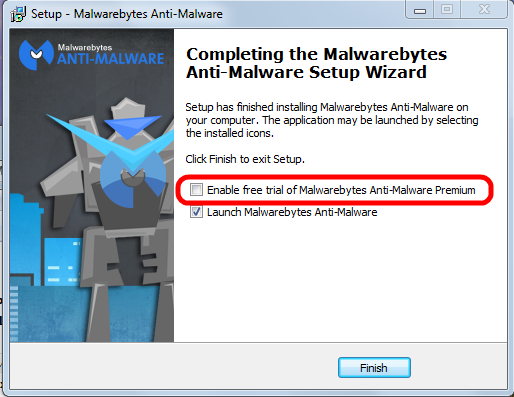


Please pay attention to the marked entry; it's check box is preselected! That means the “trial version” will be activated and after the trial period ends you would have to pay for using the program.

You have to uncheck this check mark.

Eventually the program itself needs to be updated; the installer will run again and again you have to pay attention to this little detail to avoid the for-pay version!

See this article on how to correctly use MBAM.


How to avoid all these troubles

When it comes to protecting yourself, it's laughable how many people install multiple antivirus applications but don't keep their system updated with the latest patches for the operating system.

If everybody would simply keep their system and all programs up to date, we wouldn't have to worry so much about these problems. If the constant rebooting action of Windows Update has you frustrated, you can always temporarily delay the reboot; remember, only after the reboot the patches are completely installed and active to protect your computer..

Keeping your applications updated is critically important to protect your computer's security. Your firewall won't protect you, and an antivirus software is unlikely to help if you're using an old, vulnerable version of Adobe Flash or Adobe Reader.


Conclusion

In the end, good browsing habits and common sense should be your first line of defense against any kind of malware. I recommend to always run a good security suite like MSE and additionally to use MBAM as an on-demand scanner. That way you're as well protected as easily possible and you can scan your system for malware whenever you want.

So here's the bottom line: In my not so insignificant experience MSE and the on-demand free version MBAM work very well together . Coupled with good browsing habits and common sense this a good combination of security tools and judiciously using them should keep you well protected.

As usual I welcome comments and suggestions right here in the blog. Thank you in advance.

Click here for a categorized Table Of Contents.


Thursday, July 24, 2014

Cloud Storage - again


May 5th 2013 I documented my opinion about cloud storage based on a real life example with Google's service.

Today I ran across a similar example based on Microsoft's service named "LiveDrive". Here is the original text:
LiveDrive has started closing people's accounts without warning.  Not everyone's account, of course.  Just a few.  And when those people contact the company to ask why, they're told that they were breaching the terms of their "unlimited storage" package by, er, storing too much stuff.

If this happens to you, and you make a fuss, LiveDrive will restore your access in order that you can retrieve any important data.  However, in the experience of a couple of friends of mine, this access has its bandwidth throttled to such a degree that it is virtually impossible to download anything.  So your files are pretty much lost.
So again, as a reminder, cloud storage services may be convenient but:
Your data is not safe!

You can lose access any time without warning! 
Always keep the original file locally stored and locally backed up! But does that not blow the loudly touted advantages of cloud-backup clearout of the water?


Sometimes I am outright fascinated by how easily people can be made to believe in third parties they have absolutely no control over.

IMHO at least the cloud is no place to entrust my most important documents and irreplaceable memories (aka pictures) with.

As usual I welcome comments and suggestions right here in the blog. Thank you in advance.

Click here for a categorized Table Of Contents.

Saturday, April 12, 2014

Heartbleed - Internet Wide Risk


You may already have heard about the Heartbleed bug. This article is meant to be a simple rundown:

Web sites encrypt (or should encrypt) important traffic over the Internet such as usernames and passwords for example.

All web sites use some sort of special encryption software for this. Many web sites use a freely available (free as in no money) encryption software named OpenSSL.

Many OpenSSL versions are perfectly safe, only a few versions are affected, that is they contain a bug that allows encrypted information to be decrypted, that is finally to be read in clear text.

There is little we can do on our computers to avoid Heartbleed except avoiding affected web sites. Here are two places where you can check web site addresses for this bug. A web site address is the URL, what you type in the address bar of your web browser.
  1. Heartbleed Test by Filipio.io seems to be privately run; just type over the example "Facebook" entry in the form. This site has lots and lots of detailed information about Heartbleed  and a lengthy Q&A page.
     
  2. Heartbleed Test by Lastpass.com is professionally run by Lastpass.com, a password management service.
    For full disclosure: I use Lastpass, I am one of their customers.
And last but not least here is a list of affected web sites. A warning: This link leads to a forum entry with lots of subsequent discussions that you can safely ignore.

What to do if you use an affected web site?

Assuming that you have done above checking and you have in the past used an affected web site there is only one thing we can do:
Do not log into accounts from afflicted sites until you're sure the company has patched the problem. If the company hasn't been forthcoming -- confirming a fix or keeping you up to date with progress -- reach out to its customer service teams for information, said John Miller, security research manager for TrustWave, a security and compliance firm.
PLEASE give that website or company feedback; tell them that you will shun them if they don't fix their servers soon. If we don't speak up we give them the liberty to stay lazy and to ignore our concerns about this.

Don't be shy about reaching out to small businesses that have your data. Make sure their web site is secure. While high-profile companies like Yahoo and Google certainly know about the problem, a small businesses might not be aware of it, said TrustWave's Miller. Be proactive about the safety of your information.

Keep a close eye on financial statements for the next few days. If attackers can access stored credit card information it can't hurt to be on the lookout for unfamiliar charges on your bank statements.

Once you have gotten confirmation that the web site is fixed change passwords of sensitive accounts like banks and email immediately.

What to do if you have used the same password on more than one web site? Immediately stop this dangerous practice.

On important web sites, where money is involved for example, establish unique passwords for every such web site. And as usual, write the passwords down where you can find the note when you need it - you will need the note, believe me.

And last but not least at all: Your sleek Android smartphone could be affected as well! You find more about that here.

As usual I welcome suggestions and comments right here in the blog.

Click here for a categorized Table Of Contents.
 

Thursday, February 6, 2014

NO to Office 2013, Office 365 and Microsoft Accounts in general


I stumbled over this article about lack of basic security features in Microsoft's cloud offerings.

I feel confirmed when I say
  • do not use a Microsoft account
  • do not use MS Office 2013 or MS Office 365
  • do not use Sky Drive (Microsoft's cloud storage option)
For everybody using Windows 8 that means they should cancel their Microsoft accounts and they should convert the account on the computer to a local account.

If you can't find out how to do that, you know who can help, right?

At least Office 2013 can be used without a Microsoft account; I don't know for sure about Office 365.

There are many cloud storage services that do not entail the usual "Microsoft risks" for lack of a better word.

As usual I welcome suggestions and comments right here in the blog.

Click here for a categorized Table Of Contents.


Friday, January 17, 2014

Microsoft Accounts and Windows 8 – A Rant


In a nutshell, any email address can become a Microsoft account just by “registering” it with Microsoft (MS). Almost any live, usable email address is acceptable. But since we talk about MS it actually is not quite that simple; there are, for lack of a better word, implications.

Any email address with or issued by any MS service is a Microsoft account. Some of these services are Hotmail, Microsoft Passport, Microsoft Live, MSN, Outlook email service, .NET Passport, Member Services Passport, Messenger ID, Windows Live ID, Xbox Live ID, Zune/Zune Pass ID, Windows Phone and SkyDrive ID. To name only the most well known ones.

I documented my opinion about MS accounts already in October 2012 in my blog post “What does Microsoft want to do with Windows 8?”.

Have you ever set up a new Windows 8 computer? Or, even worse, updated from Windows 8 to 8.1? MS goes through quite some trouble and IMHO actually tries hard to literally trick you into setting up Win8 with a MS account. I wrote here in some detail about the tricks MS uses.

I smell a rat and my opinion voiced in “What does Microsoft want to do with Windows 8?” has only been confirmed by MS' shenanigans and seemingly desperate attempts to make us use a MS account.

With establishing a MS account you get automatically some GB of “free storage space” on SkyDrive, MS' cloud storage service. Again, that sounds pretty good, doesn't it? Like in “free is always good”. For the home user “cloud storage” is nothing but a glorifying name for a File Hosting service.

It may only be me but I am troubled by getting sucked into using SkyDrive. In May 2013 I documented my personal take on cloud storage; IMHO much more revealing is what the rest of the world thinks about this.

Disclaimer: Yes, I know that there are advantages to cloud storage and I use it to some extent.

The brighter side is that it is fairly easy to avoid all the implications of MS accounts and cloud storage, even when using Windows 8. Win8 can be set up to work nicely with a conventional local computer account without any direct connection to MS. And it works very nicely in desktop mode, just like we have gotten familiar with during the last 20 years. 

The main reason that MS gives for all this is that you can log into your MS account from many different computers or tablets or smart phones and you will have everywhere “your” desktop, the sane apps and programs, your individual settings and even via SkyDrive the same data files. Sounds almost too good to be true, right?

Smart phones are telephones with lots of added computer like capabilities and very small touch enabled screens.

Tablets are easily portable media consumption devices with added computer like capabilities and relatively small touch enabled screens.

Computers can be more or less of all of the above plus I can get work done on them. I can not write this blog on either a smart phone or a tablet! So far at least computers usually do not have touch enabled monitors (screens).

And frankly, do you know how heavy your hand gets when you stretch your arm forward only for two minutes? Thank you Microsoft, but I DO NOT WANT to be forced to stretch my arm and work with my fingers on a computer monitor; and so do literally all of my customers.

As usual I welcome comments and suggestions right here in the blog. Thank you in advance.

Click here for a categorized Table Of Contents.


Tuesday, September 17, 2013

Video vs. Privacy


A few times customers have asked why they can't watch videos on some web sites. Mostly they suspect Firefox to be the reason because they can see the video clip in Internet Explorer or Google Chrome just fine.

It is not Firefox that blocks the videos, it is something that I install in Firefox that causes this effect. Please bear with me.

Regularly I advise my customers to use Firefox to "go to the Internet", that is for every day web browsing. And I set Firefox up in a way that
  1. Advertisements from commercial advertisement servers are blocked.
  2. Google and Yahoo search results warn from known potentially dangerous web sites.
  3. Google's pervasive tracking is minimized
  4. Facebook's pervasive tracking is minimized
  5. Local weather conditions are displayed without installing PUP software.
    (PUP stands for Potentially Unwanted Programs; see Wikipedia about mal-ware.)
Much of Google's and Facebook's tracking is done by small programs embedded in many, many web sites. These small programs send information about every step you do on the web to Google, Facebook and third parties, to companies that secretly want to collect this information about you. It is like Big Brother is watching all the time!

Numbers  3 and 4 above are blocking this "secret" transfer of information about what you do on the Internet. Quite a few web sites are programmed in a way that the video is only shown when this communication to the third parties has happened!

All the aforementioned leaves us to decide:
Is this video more important to me than my privacy? (See below.)
If you are NOT on Facebook related content mostly the blocking effect comes from the program behind above number 3; it is called Google Disconnect. When Google Disconnect is active (when you are on a web page that wants to send information to Google) you see in your browser's address bar a red dot with Google's "g" in it. If Facebook Disconnect is active you see a blue dot with Facebook's "f" in it. Here is what it looks like (look for the red oval):
If you decide FOR watching the video then just click on the red "g" dot and then click "Unblock x Google requests" where "x" is the number of requests. The web page will reload and you can watch the video.

And naturally Google (and/or Facebook) will know about your interest in this video.

As usual I welcome suggestions and comments right here in the blog.

Click here for a categorized Table Of Contents.


Cybercrime


If you ever wondered about the how and why of virus programs, cyber crime and all that nasty stuff then please take 18 minutes out of your busy schedule and watch this video.

As usual I welcome suggestions and comments right here in the blog.

Click here for a categorized Table Of Contents.


Saturday, March 2, 2013

Can Your Computer Be Seen on the Internet?


Have you ever wondered if your computer may be "visible" from the outside world, meaning whether it could get hacked into?

Here is a relatively easy way to answer the question "Is my computer visible on the internet?"

I recommend that you print these instructions before you go to Gibson Research's web site. Once you are there please click the Services menu and there choose Shields Up. You will see:


Click on the text Shields Up (do you see the little cursor on the "s" of Shields?). You will come to a page where you find this text:
 

Click again on the text ShieldsUP! (do you see the little cursor?). You should get something like this:


For privacy reasons I have partially obscured my computer's IP address.
Click on Proceed and you will be on a page with this big button:
 

Click on the big orange button and you will (finally!) get what you were looking for in the first place:

Again, for privacy reasons I have partially obscured my computer's IP address. The text in the green box is what you want to see.

What to do if there is anything else but this green box and text? It gets so technical that I recommend you call me or send me an email. One contact email address is in the left side bar at the end of the "Welcome" text and my customers all have my email address anyway.

I know this seems to be a lot of steps and hassle to get to the result. All this totally depends on the history of how Gibson Research's web site was built and grew over time. I think it's well worth the few steps to know with some certainty that one's computer can not easily be seen on the internet.   

As usual I welcome comments and suggestions right here in the blog. Thank you in advance.

Click here for a categorized Table Of Contents.


Thursday, February 28, 2013

Computer Security and Common Sense


As I have mentioned several times in earlier posts I am a paying subscriber to a technical blog that is MS Windows oriented. One of the latest articles talked about security on the internet and explained in detail a fairly technical method to secure web browsing and general work on a computer.I know that the method described in the original article is far too technical for most of my users.

But the article contained some general remarks that I want to quote verbatim:
We are all aware of the dangers of malware infection from the Internet these days. The danger has always been there, but this has increased a lot more because people with malicious intents are constantly devising new methods to infect the systems, and the inexperienced, naive, general-users/elderly/teens are the most affected by it. Malware infection from the Internet can occur in many ways:
  • Downloading a malware infected setup/file from a malicious site
  • Venturing to a malicious site
  • Clicking on a bad link in an email, or on a page, or on a bad advertisement
  • Clicking on links that fool you into believing that there is a malware on the system and prompt you to install rogue software etc.
Although there are many ways of getting infected by malware it does not mean that we need to become paranoid, or live in constant fear of the possible consequences. With a little effort, precaution, and by using common sense we can easily avoid getting systems infected with malware.
The key words in this quote IMHO are "by using common sense". Most of my customers and many listeners of my regular radio show may have heard my take on common sense. It is a simple question/answer saying:
Q: What is the problem with common sense?
A: Common sense ain't that common.
If you have read my immediately preceding post about phone scams you will understand when I state:
IMHO common sense is the most important ingredient in home computer safety.
How does one get common computer sense? Some may not like me saying it but it is fairly simple:
By learning at least the basics about the computer and conscientiously applying what one knows.

As usual I welcome comments and suggestions right here in the blog. Thank you in advance.

Click here for a categorized Table Of Contents.


Thursday, December 20, 2012

Comments with Links

I always experience a comment here on the blog as a tap on the shoulder, especially if they are favorable. And luckily most are.

But some comments, often short ones, come with links to web sites. I have tested a few of these links and the web sites either were directly marked as red in Web Of Trust or they linked to people selling THEIR services or merchandise.

THIS BLOG IS NOT AN ADVERTISING PLATFORM FOR ANYONE!

Please do not salt your comment with any link. I do not have the time to check the veracity and trustworthiness of every link!

All comments with links will be deleted and will NOT appear on the blog. Save both of us the trouble.

As usual I welcome comments and suggestions right here in the blog. Thank you in advance.
Click here for a categorized Table Of Contents.


Saturday, September 15, 2012

On Line Backup - Not For Me


Yesterday I wrote in my article "Free Trials - User Beware!" the following:
In my opinion some of these services are bordering on useless and/or the promised services lack a sound technical base. An example for the latter are in my opinion the numerous online data backup services. All these offers pitched to the unsuspecting consumer do not mention the speed problem.

Practically all normal Internet connections, whether via DSL, cable or wireless technology have the same big drawback in common: The transfer speed from your computer up to the service's computers is significantly slower than the download speed that you experience when you browse web pages or watch a video or peruse Facebook.
Today I can give you numbers from the hard reality of what that means in real life terms.

I read on a fairly techie-oriented website a glowing endorsement of the online backup service CrashPlan and decided to give it a try. I downloaded their software, installed it and set it up to back up only the minimally required folders with my most important data.

Several hours later I wrote this email to Crash Plan's customer support:
Based on a recommendation at Lifehacker.com I bought your xxxxx plan for 2+ home computers instead of signing up for a trial. What a mistake.

After paring down the directories to the absolutely necessary minimum your program tells me after over 5 hours of run time that it still estimates another 12.2 days of run time remaining.

I am sorry, but this is absolutely unacceptable for me.

I herewith cancel my purchase. I have stopped the transfer by killing the process in Task Manager. I have uninstalled your software and deleted the downloaded installer file.

According to the promise on your web site

Our risk-free cancellation policy will automatically credit you for the
remaining unused months on any plan if you decide to cancel at any time.
I request that you please refund my payment.
Well, I warned you and promptly, on the very next day I stumble by my own free will directly in the trap. Dumb old man that I am!

As usual I welcome suggestions right here in the blog.

Click here for a categorized Table Of Contents.