Showing posts with label Virustotal. Show all posts

Wednesday, April 26, 2017

Nothing New?


I got an email from a long time customer who asked me
... where have you been? Not on the Blog in three months...
Here is my reply to him:
Thanks for checking the blog.
There is nothing new -- and that means no bad news and that is good news, right?

It still is the "old" story"; ransomware is at the top of the list of nasty programs.

The only way to
avoid that junk fairly reliably - but not guaranteed - is NEVER to click on any attachment to any email! 

Save the attachment to your desktop, upload the attachment to VirusTotal.com and have it checked there.

Even only one negative result is enough for me to tell the sender to check his attachments himself and stop sending out potentially infected junk files.
And DO NOT click on links in emails! Check if the link goes to the correct web site! Rest your cursor on the link and look at the left bottom corner of the browser window; there you should see the text of the target URL ( = Internet address) that your browser will take you to if you click on that link. Learn to correctly read these URLs!
 
Stay safe!


Wednesday, September 28, 2016

Ransomware IS on the Loose, NO JOKING!


Today I met with a customer who recently I had pointed to my blog posts about ransomware. He sort of poo-pooed my words and pointed me to his safe habits.

With his permission I looked in his (very big) Inbox with about 1,000 emails. I looked only for mails with attachments and found quite a few.

I grabbed randomly one of the attachments, a ZIP file by the way, and saved that file to the computer.

Then I went to Virustotal.com, uploaded the file and had it tested. The results speak for them selves, here they are:


Clearly this file contains a downloader and a variant of the encrypting ransomware Locky. And who knows what the downloader would do to the machine if it ever gets to run.

Currently DO NOT directly open ANY attachment from an email, no matter how "good" you think you know the sender or what ever excuses your brain comes up with.

Always save the attachment to a place on your computer you can easily access like the desktop.

Then in your web browser go to virustotal.com, browse to the file - in this example on the desktop, upload the file and if virustotal.com comes up with anything then delete the file AND the email it came from!

Better safe than sorry!

And before you ask, some of my previous articles about ransomware are here, here, here, here and here.

As usual I welcome comments and suggestions right here in the blog. Thank you in advance.

Stay safe.

Tuesday, March 29, 2016

Avoid or Mitigate Ransomware Risks


A big THANK YOU to the Emerging Threats Team at SophosLabs and their blog Naked Security for their excellent recommendations on this nasty but important topic.

I have taken the liberty to add some remarks just to help you remember important little details that are easy to forget in cursive.
  • Backup regularly and keep a recent backup copy off-site. There are dozens of ways other than ransomware that files can suddenly vanish, such as fire, flood, theft, a dropped laptop or even an accidental delete. Encrypt your backup and you won’t have to worry about the backup device falling into the wrong hands.

    But do not, I repeat, do not leave your backup device connected to the computer. Always unplug the backup device after the backup is complete!

     
  • Don’t enable macros in document attachments received via email. Microsoft deliberately turned off auto-execution of macros by default many years ago as a security measure. A lot of malware infections rely on persuading you to turn macros back on, so don’t do it!

    Naturally they don't tell you that the click they ask you to do will turn macros back on. They rather trick you into believing that clicking is the thing to do to be able to read what they sent you...

     
  • Be cautious about unsolicited attachments. The crooks are relying on the dilemma that you shouldn’t open a document until you are sure it’s the one you want, but you can’t tell if it’s the one you want until you open it. If in doubt, leave it out.

    Currently I do not open ANY attachments; I call the sender and have them explain what and why they sent the attachment and even if all that checks out I additionally check the attachment on
    Virus Total. 
     
  • Don’t give yourself more login power than you need. Most importantly, don’t stay logged in as an administrator any longer than is strictly necessary, and avoid browsing, opening documents or other “regular work” activities while you have administrator rights.

    Quite a lofty ideal as I am currently experiencing first hand.

     
  • Consider installing the Microsoft Office viewers. These viewer applications let you see what documents look like without opening them in Word or Excel itself. In particular, the viewer software doesn’t support macros at all, so you can’t enable macros by mistake!

    Now is a good suggestion, I will have to do that!

     
  • Patch early, patch often. Malware that doesn’t come in via document macros often relies on security bugs in popular applications, including Office, your browser, Flash and more. The sooner you patch, the fewer open holes remain for the crooks to exploit.

    As I always preach: Update, update, update.
That is it; certainly to a large part common sense but here it is, nicely packaged and in one place.

Stay safe!

Monday, March 28, 2016

Ransomware - A Current Example


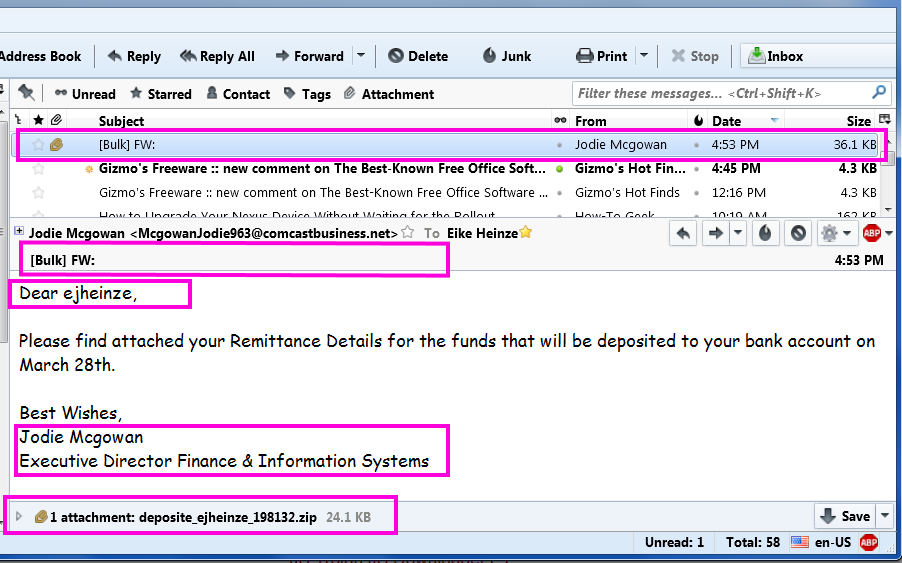
Please take a close look at this cut out grabbed diectly off my screen:

From the top the red frames are around:
  1. The virus infected scam email in the message list
  2. The totally unprofessionally empty subject line.
    [Bulk] is from my ISP telling me that this email was sent  from a server that is known to send out spam
    FW: tells me that the email was forwarded
  3. Addressing me with "ejheinze" shows that the sender does not even know my first name;
    ejheinze is the part of my email address before the @ character
  4. A totally unprofessional signature
  5. .zip is one of the potentially dangerous file types 
Do I really need to comment? Yes? Okay, here we go:
  1. Hm, no subject and I don't know a Jodie M and Comcast in her email address? I have no business at all with Comcast.
  2. Unprofessional and bordering on rude.
  3. Totally unprofessional and in a primitive way impolite.
  4. From Comcast I would at least expect some sort of company logo or an avatar.
  5. I wonder what might be in there...
    but with all the above I DO NOT CLICK on the attachment!
Instead I save the attached file and submit it to Virus Total (Wikipedia). And the "success" confirms my suspicion. 17 out of  58 anti virus programs flag the file as infected. See for yourself:
The rest was simple:
Delete the email which deletes the attachment as well.
Delete the file from the computer and
Empty Recycle Bin, just to be sure.

Remember: NEVER, EVER click on an email attachment unless you have verified it's legitimacy with the sender.

Stay safe.


Thursday, December 5, 2013

Virus Check BEFORE Download


I assume that you know about Virustotal (VT). If you still don't now than I am at a loss of words- which rarely if ever happens to me. But enough of my puny attempts on being funny.

With VT you can check any reasonably sized file (up to 64MB) that already is stored on your computer for viruses. What if you want to check a file for viruses before you actually download it?

If you use a web browser other than Internet Explorer you could install an extension.
  • In Mozilla Firefox you can install the VTzilla extension.
  • In Google Chrome  you can install the VTchromizer extension.
  • In Opera you can install the VTopera extension. 
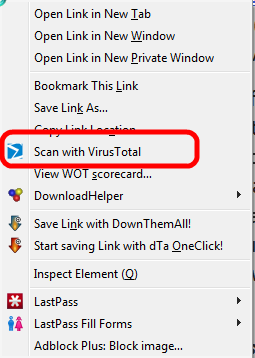
Thesae extensions make it possible to right click on a download link before you start the download. In the context meny that opens you will see an entry like shown here; the example was taken from VTzilla in Firefox:
VT will upload and test the file in it's usual manner and presto you have a good idea whether the file in question is "clean".

If you feel challenged by the idea to install an extension in Firefox don't despair, I can do that remotely. 

As usual I welcome suggestions and comments right here in the blog.

Click here for a categorized Table Of Contents.


Thursday, September 1, 2011

Virus Check Any File


Today a customer told me that she actually reads this blog and that she would like to see something about virus-checking any given file. Thank you Rose K. for reading this blog and for the suggestion.

I can think of many scenarios where you have a file, any kind of file, that you feel you better check for viruses before you "work" with it. And you may want something like a "majority vote" because just the other day you read in the newspaper that scary article saying that one anti virus program may not be enough to know "the truth".

As with increasingly many things around computers the Internet can help with a service that will allow you to upload any file up to a size of 20MB; this service then will submit your file to currently 40 (forty!) different anti-virus programs and give you the results.

This free service is called VirusTotal. Here is a partial screenshot of  an example output:


When you click on the Show All button the list gets much, much longer.

In the Result column on the far right you see what every anti-virus program says about the file. No entry here means that the AV program does not qualify the file as containing a virus.

Yes, above mentioned newspaper article is technically correct, one vote is not enough to really matter. But when only 5 of 40 results mark the file as virus infected you can with some degree of reliability assume that these five positive results may be so called "false positives". 

A word of warning: I can imagine that only a few AV programs mark a file as infected while the majority does not and the file actually contains a brand new virus that the majority of AV programs can not yet detect! Depending on the circumstances you may react super carefully rather than too trusting.

Again another good example that computer safety benefits from an open mind, common sense, a good measure of caution and careful consideration of all aspects of the given situation.

The only problem with common sense seems to be that it ain't that common..

As usual I welcome comments and suggestions right here in the blog. Thank you in advance.

Click here for a categorized Table Of Contents.