Showing posts with label email. Show all posts
Monday, April 6, 2020
Amazon Prime member? WARNING!
I have an Amazon account AND an Amazon Prime membership.
I received an email and I want to show it in a screen shot:
On first glance nothing really alarming, right?
BUT:
The sender email address (labeled From:) looks to me totally wacky and the Reply-To address (labeled To:) IMHO is equally unlikely.
The warning bells in my mind started to ring loud and clear.
My wife and I use the same Amazon account all the time and thus I know that the payment method is correct and that it works.
Even saving the attached PDF document to my computer and then scanning it with Malwarebytes did not show any alarms or warnings.
So I opened the file in my PDF reader to check it out in more detail.
The PDF document contains a link and a BIG button to supposedly go to Amazon's account and payment method web page.
BUT this is what the link and the button actually would have sent my web browser to:
https://t.umblr.com/redirect?z=https%3A%2F%2Fam1zn-updtaeinfmtaonsupdtee-verifyconfimationss76757855.com%2F%3Fsigninn-&t=NmVmZTU1YjdlNTBkODkzYjc0NTg1NzM0MTI2YWNhNWJkOGNiZGRjZSxjYTVkNGQyNzY5ZjI4OGQ2OGFiZjQ2ZDJmOTg3NjZlMTZkNTI5M2Y3
What a crazy nightmare - and for me a clear indicator that something was VERY WRONG!
I went to Amazon.com and checked in my account settings and voila, my Prime membership is paid for until September and the payment information is correct.
Naturally I will report this to Amazon.
MY conclusion as far it concerns you?
Be super vigilant, never trust an email and do NOT be complacent!
Yes, IMHO it is complacent to "just click" on the big button or the link in the PDF file rather than verifying the claim made in the PDF file independent of the email and it's attachment!
Stay safe, stay vigilant and pay attention to the details!
Saturday, July 7, 2018
URGENT ALERT! For users of any Apple thinghy!
Hi y'all and thanks for reading this.
If you or someone in your household has any piece of equipment from Apple, like an iPhone, iPad, iPod or the like then
this is for you!
Since iPhones a.s.o. are so common nowadays the crooks are targeting you. Look at the email I just got in a partial screen shot of the Thunderbird screen:
I have marked the give-away items with colored rectangles as follows:
Blue: I don't have an Apple account! Ha, ha, ha.
Purple: The email does not even come from Apple!
Green: My cursor pointing to the "Verify..." button.
Red: The URL (web site address) that the "Verify..." button actually is pointing to; it has NOTHING AT ALL to do with Apple.
To be addressed as "Dear ejheinze@att.net" is so unprofessional this alone would be reason enough to click on the Delete button!
The item in the red rectangle I see only because I told my email program to show this and because the cursor is on the "Verify..." button. I believe none of this needs further clarification. Should you have any questions please feel free to ask me, preferably in an email.
A general remark:
If the program you use to read your emails
does not show you any of the information in blue, purple and red
then you potentially endanger your computer!
does not show you any of the information in blue, purple and red
then you potentially endanger your computer!
Any Questions? Please feel free to ask me, preferably in an email.
Stay safe.
Tuesday, March 29, 2016
Avoid or Mitigate Ransomware Risks
A big THANK YOU to the Emerging Threats Team at SophosLabs and their blog Naked Security for their excellent recommendations on this nasty but important topic.
I have taken the liberty to add some remarks just to help you remember important little details that are easy to forget in cursive.
- Backup regularly and keep a recent backup copy off-site.
There are dozens of ways other than ransomware that files can suddenly
vanish, such as fire, flood, theft, a dropped laptop or even an
accidental delete. Encrypt your backup and you won’t have to worry about
the backup device falling into the wrong hands.
But do not, I repeat, do not leave your backup device connected to the computer. Always unplug the backup device after the backup is complete!
- Don’t enable macros in document attachments received via email.
Microsoft deliberately turned off auto-execution of macros by default
many years ago as a security measure. A lot of malware infections rely
on persuading you to turn macros back on, so don’t do it!
Naturally they don't tell you that the click they ask you to do will turn macros back on. They rather trick you into believing that clicking is the thing to do to be able to read what they sent you...
- Be cautious about unsolicited attachments.
The crooks are relying on the dilemma that you shouldn’t open a document
until you are sure it’s the one you want, but you can’t tell if it’s the one
you want until you open it. If in doubt, leave it out.
Currently I do not open ANY attachments; I call the sender and have them explain what and why they sent the attachment and even if all that checks out I additionally check the attachment on Virus Total.
- Don’t give yourself more login power than you need. Most importantly, don’t stay logged in
as an administrator any longer than is strictly necessary, and avoid
browsing, opening documents or other “regular work” activities while you
have administrator rights.
Quite a lofty ideal as I am currently experiencing first hand.
- Consider installing the Microsoft Office viewers. These viewer applications
let you see what documents look like without opening them in Word or
Excel itself. In particular, the viewer software doesn’t support macros
at all, so you can’t enable macros by mistake!
Now is a good suggestion, I will have to do that!
- Patch early, patch often. Malware that
doesn’t come in via document macros often relies on security bugs in
popular applications, including Office, your browser, Flash and more.
The sooner you patch, the fewer open holes remain for the crooks to
exploit.
As I always preach: Update, update, update.
Stay safe!
Labels:
attachment,
Backup,
email,
general,
HowTo,
malware,
ransomware,
recommended,
security,
Virustotal
Monday, March 28, 2016
Ransomware - A Current Example
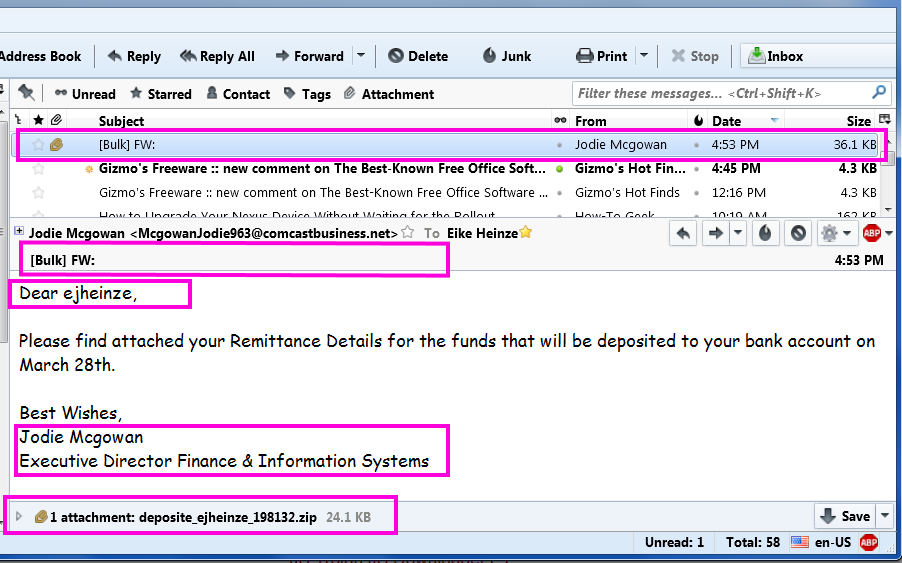
Please take a close look at this cut out grabbed diectly off my screen:
From the top the red frames are around:
- The virus infected scam email in the message list
- The totally unprofessionally empty subject line.
[Bulk] is from my ISP telling me that this email was sent from a server that is known to send out spam
FW: tells me that the email was forwarded - Addressing me with "ejheinze" shows that the sender does not even know my first name;
ejheinze is the part of my email address before the @ character - A totally unprofessional signature
- .zip is one of the potentially dangerous file types
- Hm, no subject and I don't know a Jodie M and Comcast in her email address? I have no business at all with Comcast.
- Unprofessional and bordering on rude.
- Totally unprofessional and in a primitive way impolite.
- From Comcast I would at least expect some sort of company logo or an avatar.
- I wonder what might be in there...
but with all the above I DO NOT CLICK on the attachment!
The rest was simple:
Delete the email which deletes the attachment as well.
Delete the file from the computer and
Empty Recycle Bin, just to be sure.
Remember: NEVER, EVER click on an email attachment unless you have verified it's legitimacy with the sender.
Stay safe.
Labels:
email,
general,
netiquette,
pup,
ransomware,
thunderbird,
virus,
Virustotal
Wednesday, November 25, 2015
Yahoo! Get away from there - QUICKLY!
Although I am on vacation this is too important for quite a few of my customers. Here it goes:
If you have a Yahoo email address you need to read this! All others can relax - for now.
It has happened; this ZD-Net article has the details why for some of their users Yahoo has made it impossible to access their emails. Currently for "some users" only but what if this "test" proves successful for Yahoo? They will do it to all accounts! You can bet on that!
Why did these good people with a Yahoo email address get bloaked from accessing their emails? They used an Ad blocker because
Then set up your new Gmail account to automatically pull all mails from the Yahoo account. Google so far always has been far better at blocking malicious content from the Internet.
Let's hope that Yahoo's attempt to force feed advertisements fizzles out and becomes a big failure.
If you have a Yahoo email address you need to read this! All others can relax - for now.
It has happened; this ZD-Net article has the details why for some of their users Yahoo has made it impossible to access their emails. Currently for "some users" only but what if this "test" proves successful for Yahoo? They will do it to all accounts! You can bet on that!
Why did these good people with a Yahoo email address get bloaked from accessing their emails? They used an Ad blocker because
- they could not stand the many obnoxious ads and/or
- they had heard about the many virus infected ads Yahoo has served in the past or
- they just happen to be my customers.
Then set up your new Gmail account to automatically pull all mails from the Yahoo account. Google so far always has been far better at blocking malicious content from the Internet.
Let's hope that Yahoo's attempt to force feed advertisements fizzles out and becomes a big failure.
Thursday, July 2, 2015
Repair Scams And New Variants - Again
Please click this link if you are looking for information on Windows 10.
I hardly can count how often I have spoken in my radio shows about repair scams and other tricks crooks use to scare unsuspecting computer users into handing over their credit card info; that is what all these and similar scams come down to.
Here is only a small selection of articles from this blog that deal with various aspects of this situation - with NO claim of completeness at all:
- June 2012 "Email Scams Getting More Elaborate"
- February 2013 "Phone Scams - Way Too Many!"
- May 2013 "Email From The IRS? No Way!"
- September 2013 "Cybercrime"
- October 2013 "How Malware Gets Installed"
- February 2014 ''New Twist - Old Scam"
- October 2014 "How To Spot Socially Engineered Emails"
- April 2015 "Bye bye Viruses, Hello Carelessness"
But suddenly you get a pop up window or some other kind of message informing you that "your computer has been reported" to some "Windows Security" team or it "is infected with 567 viruses" or similar.
This sort of pop up is by definition a scam!
The only safe way out of such windows and/or messages is to close them with Alt+F4, that is holding down the Alternate key and while holding this key down pressing function key F4.
- Do not click anywhere in this window.
- If applicable DO NOT call the toll free phone number givin in the message.
- Do NOT "x out" of this window, that is do not click on the "red X" in the top right corner of the window to close it.
Beside getting out of this window safely I would avoid ever again going to this web site. There is almost always some alternative.
Why did I above say "... is by definition a scam"?
- There is no "Windows Security" team or company or anything even vaguely similar.
- You Windows operating system does NOT report any info to anybody; only malicious software does that!
- Neither Microsoft nor any of their partner companies care about your computer's and your well being!
- Tech Support Scams from the Federal Trade Commission and
Avoid tech support phone scams from Microsoft's Safety & Security Center
As usual I welcome comments and suggestions right here in the blog. Thank you in advance.
Click here for a categorized Table Of Contents.
Tuesday, April 28, 2015
Bye bye Viruses, Hello Carelessness
It's almost like in the Everly Brothers song "Bye Bye Love" from 1957. They sang
Bye bye happiness, hello loneliness...
I am enticed to, no, don't be afraid, not sing but say
Bye bye viruses, hello carelessness...
In August 2014 I wrote in this blog the 2014 Update On Malicious Programs. Everything in this article is still valid today – which in the fast changing world of computers is astonishing all by itself. Self replicating viruses that "find and infect" our computers by their own accord have gone almost extinct.
What has massively changed though are the tricks and methods used by miscreants to foist their malicious junk software on our computers. It is so bad that I feel compelled to say
Do NOT click on any link in any email,
do NOT open any email attachment
and NEVER click in any advertisement.
do NOT open any email attachment
and NEVER click in any advertisement.
Does that sound extreme to you? Good, because it is extreme. We are in an extreme situation and it's getting worse so extreme measures seem appropriate.
In the meantime you have learned to immediately delete emails with an unfamiliar sender address. But what about the email from that buddy of yours who always sends all the jokes? My advice is to IGNORE it! Just hit the Delete button. If that email really was from him and if he were a nice guy he would have told you in the email why and what he sends there. If he does not have the decency to do that you better err on the side of caution and delete that email; you may “miss” a joke but what is that compared to $100 or $200 cost for a good clean-up job?
Another way how modern malware (called PuPs) is distributed are dirty tricks pulled on us when we apply required updates. Even big, well known companies participate in these schemes; names that come to mind as examples are Oracle, Norton, McAfee and Adobe. Some visual examples are here.
And don't get me going on advertisements. Listen up:
If you see advertisements on your computer screen then you computer most likely already is compromised. Get it cleaned up!
And then the sneaky methods that well known download web sites like Download.com, Cnet.com and other use. You want to download that nice free little program and what they give you is a specially crafted downloader program that in turn is supposed to download the program you actually want. But what you get are one or several PuPs and then the program you really wanted.
The only method to help here is to watch for the tricks, traps and deceptions.
In July 2013 I published my 10 Commandments Of Safe Computing. To heed the first of these has become more important than ever before; it reads:
Thou shalt read and think(!) before you click.
Be vigilant, pay attention to details and always remember: If it sounds too good to be true it usually is not true; especially in this day and age on the Internet.
As usual I welcome suggestions and comments right here in the blog.
Click here for a categorized Table Of Contents.
As usual I welcome suggestions and comments right here in the blog.
Click here for a categorized Table Of Contents.
Monday, October 13, 2014
How To Spot Socially Engineered Emails
For quite some time I wanted to give information about how to spot spam emails. That is quite a sizable field and I wavered too long. This time to my and I believe to your advantage the wait pays off.
I discovered that KnowBe4.com already had done an excellent job and published the result as a one page fact sheet much better and more concise than I could ever have done it. The paper is called Social Engineering Red Flags. This link should show the information in your browser or in your reader application for PDF files.
I recommend to print it as a handy reference guide.
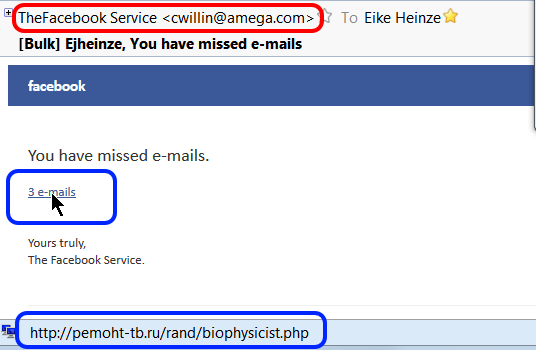
And here is a real life example; just this morning (10-20-2014) I received an email that looks on first glance like it came from Facebook, optically quite convincing. It is such a "classical" example that I took a screen shot to show it to you:
For me it goes without saying that I do NOT just click on a link in ANY email, no matter who the sender is supposed to be, no matter how "familiar" it looks.
The first clue is the sender address. Bad, simple forgery, not even an attempt to disguise the forgery; maybe that is even the miscreant's real email address. This is one of the times where I regret not to be a security researcher because I would love to mess a bit with this guy.
Then I did what for me by now has become second nature: I rested my mouse on the link (see the cursor). The translation of where the link would have taken my computer to in the status line (bottom left corner of the picture) confirmed my suspicion: The link goes to a web site in Russia. Did you see "http://pemoht-tb.ru/rand..."? ".ru" is the country code for Russia!
If you handle your email with programs or techniques that do not show you all the information from this example then you live dangerously. Imagine a teenager; they would blindly click on the link and voilà , the computer is infected and maybe you even loose all your files!
Oh well, more work for me... (tongue in cheek!_).
As usual I welcome suggestions and comments right here in the blog.
Click here for a categorized Table Of Contents.
Monday, September 1, 2014
Details on CryptoWall
This article assumes that you are familiar with my previous article CryptoLocker - Revisited.
Detailed information was released about CryptoWall, one of the CryptoLocker variants.
Between mid-March and late August CryptoWall infected almost 625,000 systems; on these systems it encrypted more than 5.25 billion files.
The US seems to have the most CryptoWall infections: 253,521 (or about 40 percent), followed by Vietnam with 66,590 infections, the U.K. with 40,258, Canada with 32,579 and India with 22,582.
The US likely got targeted more often because CryptoWall's got distributed through spam emails sent from the Cutwail botnet which targets English language computer users.
Researchers collected data directly from CryptoWall's payment server such as the exact number of paying victims and the amount of payments. Of nearly 625,000 infections and over about six months 1,683 victims (0.27%) paid the ransom for a total of $1,101,900.
CryptoWall seems to have a home-made problem by accepting payment of ransom by Bitcoin only. Many average computer users will have problems paying with Bitcoin and reseachers assume that this is part of the reason that only 0.27% of CryptoWall's victims paid compared to 1.3% of CryptoLocker victims; CryptoLocker allowed payment by MoneyPak as well.
As sad as it is, these numbers clearly show that cyber crime pays.
As usual I welcome suggestions and comments right here in the blog.
Click here for a categorized Table Of Contents.
Labels:
clean-up,
cleanup,
crapware,
CryptoLocker,
cryptowall,
email,
fireeye,
fox-it,
general,
malware,
privacy,
ransomware,
recommended,
security,
support,
Trojan,
virus,
warning
Tuesday, August 26, 2014
CryptoLocker - Revisited
In December 2012 I wrote for the first time about the back then new relatively virus CryptoLocker.
In October 2013 I wrote again about new variants of this virus. Now I have new information that warrants to visit CryptoLocker again.
This family of viruses is by now one of the most destructive threats I have seen. Much of the news regarding CryptoLocker is rather negative but there is at least a bit of positive news as well.
CryptoLocker has evolved
Very shortly after the original CryptoLocker had appeared the first variant was discovered; on first glance it appeared to be similar to the original version. It almost was a look-alike, the method of infection was the same, the encryption seemed the same and the message on the infected computer's screen was very much like the original's. There were only two obvious differences: The original CryptoLocker demanded $100 for information to decrypt the user's files and it offered two payment methods (MoneyPak or Bitcoin); the “look alike” demanded $300 and accepted Bitcoin only.
Time consuming and detailed analysis uncovered significant internal differences. Specialists found that the second version most likely was written by a different programmer or even programming team. It was written in a different programming language and many other internal differences were discovered as well.
In the meantime we know of at least six other virus programs that work similar to CryptoLocker. They are called “encrypting ransom ware” (in the following ERW), they are actively distributed, modified and improved. Most likely they were created and are being run by different groups of malware creators and distributors. Some names I have run across:
- CryptoLocker (the original)
- CryptoLocker 2 (the first imitator referenced above, my naming))
- Critroni
- CryptoDefense
- CryptorBit
- CryptoWall (see this new article for details)
- CTB Locker
- PrisonLocker or PowerLocker
- TorLocker
How these infections spread
Many infections happen when the user attempts to opens an e-mail attachment that then in turn launches the ERW. By now almost any file type can be abused in this way; you just can't trust so called “safe” file types any longer.
Over time I have received many emails about supposedly failed deliveries of goods. Some of these emails were made professionally and looked at first glance almost authentic. It made no difference whether the email seemed to be from DHL, FedEx, UPS or the US Postal Service; there always seemed to be some legitimate sounding reason to open the attachment.
In all cases attention to detail and applied common sense protected my computer better than any security program could have done; I simply avoided that one fatal click to open an attachment.
Another increasingly often encountered way for ERWs to spread are “drive-by downloads”. They come from compromised websites and compromised web servers. These sophisticated attacks take advantage of known vulnerabilities in almost ubiquitous software like Windows, Adobe Flash, Adobe Reader, Java and so on. Since these vulnerabilities are known there is only very little excuse to get caught by a drive-by download. To get the computer infected by a drive-by download is very unlikely if the user keeps all software up to date.
Protection?
On the positive side we have to my knowledge three options, some free and some with premium versions for a charge. These programs do not interfere in or conflict with common anti virus or security software. I warn against running any two of these programs concurrently due to the likelihood of conflicts with each other.
1. CryptoPrevent
2. MalwareBytes Anti-Exploit
3. HitmanPro Alert with CryptoGuard
If you are interested to learn more please follow the links.
To make it perfectly clear: I am convinced that the best protection is our own attention to detail, caution and applied common sense. No software in the world can replace our watchfulness!
ERWs on non-Windows computers
To make a bad situation even worse there are reports of ERWs on other, non-Windows platforms like tablets and smart phones with the Android operating system. There was talk about a popular NAS system (Network Attached Storage) being targeted as well. Only Apple systems seem to be not affected, so far at least; as we all know that can change any moment.
A bit of good news
Fairly recently, I believe it was in early August 2014, two software companies announced that they have jointly developed a method to decrypt at least some of the files that were encrypted by the original CryptoLocker. The companies and their web sites are The companies offer their program free of charge to people who still have files encrypted by the original version of CryptoLocker who wants to attempt to recover them.
The companies are FireEye (www.fireeye.com) and Fox-IT (www.fox-it.com). These companies apparently did not crack the encryption, they gained access to some of the command and control servers where some private keys were stored that the original CryptoLocker virus had used.
Much detailed sleuthing, dis-assembling, re-engineering and analysis of the original virus enabled them to write a program called DecryptCryptoLocker that can decrypt affected files when the were encrypted using any of the recovered private keys. At https://www.decryptcryptolocker.com/ you can read how this works. There is a decent chance that this program will recover encrypted files but there is no guarantee.Some so far encountered obstacles that may prevent decryption are:
- It works only on files encrypted by the original version of CryptoLocker infections; it may or may not work on files encrypted by later versions of ERW.
- Nobody knows if the servers accessed by FireEye and Fox-IT contained all private keys CryptoLocker had used.
- The original CryptoLocker was effectively eliminated late in May, 2014; any later infections will most likely have used different sets of private keys.
My personal conclusion
It is primarily user behavior that protects the computer by always keeping Windows and all other regularly used programs up to date. If all this is accompanied by attention to detail and applied common sense then the computer will most likely remain “healthy” and safe.
In the worst case scenario, that is after your computer got hit by CrypyoLocker or a look-alike having a recent clean backup will be the best medicine against sleepless nights.
As usual I welcome suggestions and comments right here in the blog.
Click here for a categorized Table Of Contents.
Wednesday, June 18, 2014
Micro$oft's new Terms and Conditions - A Bombshell
Microsoft Corp. changes their Terms and Conditions. Not that big an issue for me but when I think of millions of Windows 8 users who get tricked, conned and arm-twisted into establishing a "Microsoft Account", well, then I get a queasy stomach.
If I add in the many millions of unsuspecting users of email accounts with hotmail.com, outlook.com, live.com and other M$ server names then the I get really nauseous.
And when I think of hundreds of millions of Windows 8 and Office 2013/365 users whose data gets "automatically stored in the cloud" plus many small businesses that think "cloud backup" is a good solution, man, then I actually want to p**e.
To spare you (and me) wading through lots of legalese details here only hree quotes from Micro$oft's original text (highlights by me, some editing lost in transferring the text):
- 10.3. Binding arbitration. If you and Microsoft don't resolve any dispute by informal negotiation or in small claims court, any other effort to resolve the dispute will be conducted exclusively by individual binding arbitration governed by the Federal Arbitration Act ("FAA"). Class arbitrations aren't permitted. you're giving up the right to litigate disputes in court before a judge or jury (or participate in court as a party or class member). Instead, all disputes will be resolved before a neutral arbitrator, whose decision will be final except for a limited right of appeal under the FAA. Any court with jurisdiction over the parties may enforce the arbitrator’s award.
- 10.4. Class action waiver. Any proceedings to resolve or litigate any dispute in any forum will be conducted solely on an individual basis. Neither you nor Microsoft will seek to have any dispute heard as a class action, private attorney general action, or in any other proceeding in which either party acts or proposes to act in a representative capacity. No arbitration or other proceeding will be combined with another without the prior written consent of all parties to all affected arbitrations or proceedings.
11. NO WARRANTIES
MICROSOFT, AND OUR AFFILIATES, RESELLERS, DISTRIBUTORS, AND VENDORS, MAKE NO WARRANTIES, EXPRESS OR IMPLIED, GUARANTEES OR CONDITIONS WITH RESPECT TO YOUR USE OF THE SERVICES. YOU UNDERSTAND THAT USE OF THE SERVICES IS AT YOUR OWN RISK AND THAT WE PROVIDE THE SERVICES ON AN “AS IS” BASIS “WITH ALL FAULTS” AND “AS AVAILABLE.” MICROSOFT DOESN'T GUARANTEE THE ACCURACY OR TIMELINESS OF INFORMATION AVAILABLE FROM THE SERVICES. TO THE EXTENT PERMITTED UNDER YOUR LOCAL LAW, WE EXCLUDE ANY IMPLIED WARRANTIES, INCLUDING FOR MERCHANTABILITY, SATISFACTORY QUALITY, FITNESS FOR A PARTICULAR PURPOSE, WORKMANLIKE EFFORT, AND NON-INFRINGEMENT. YOU MAY HAVE CERTAIN RIGHTS UNDER YOUR LOCAL LAW. NOTHING IN THIS AGREEMENT IS INTENDED TO AFFECT THOSE RIGHTS, IF THEY ARE APPLICABLE.YOU ACKNOWLEDGE THAT COMPUTER AND TELECOMMUNICATIONS SYSTEMS AREN'T FAULT-FREE AND OCCASIONAL PERIODS OF DOWNTIME OCCUR. WE DON'T GUARANTEE THE SERVICES WILL BE UNINTERRUPTED, TIMELY, SECURE, OR ERROR-FREE OR THAT CONTENT LOSS WON'T OCCUR.
This is much worse than expressed in my previous diatribe about cloud storage services.
And trust me, just by using any Micro$oft service you have agreed to these Term of Service. Even if you only use your copy of Windows 8 that you set up with a MS account you have agreed to these Terms!
As usual I welcome comments and suggestions right here in the blog. Thank you in advance.
Click here for a categorized Table Of Contents.
Thursday, February 20, 2014
Voicemail via Email? No Way!
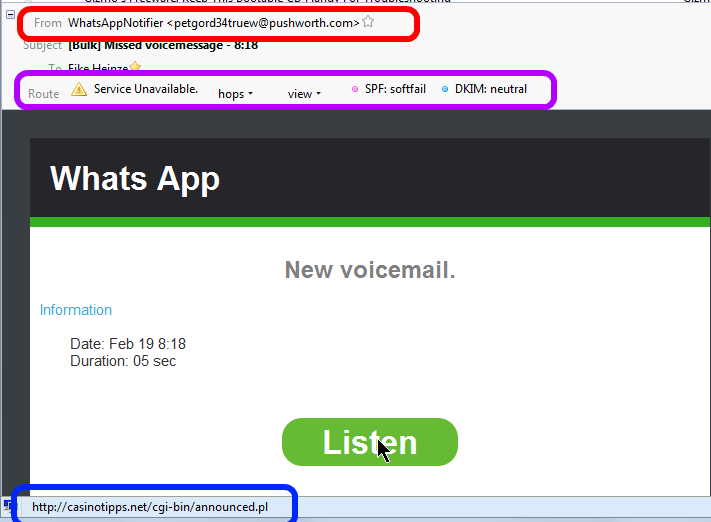
Here is yet another example of a scam I hear often about. This is a screen shot of what I saw in my email program:
At first glance a friendly, nicely formatted and really "professional" looking email.
Three things caught my attention before I would have clicked on "Listen";
- Red highlight: The sender address seems to come from "@pushworth.com". Big discrepancy to the supposes (company?) name "Whats App".
In my mind the warning lights went on.
- Purple highlight: The sender disguised very well the actual route the email had taken. That shows technical know how and (criminal?) intent.
By now the warning bells where ringing loud.
- Blue highlight: When I rested the mouse cursor on the pretty "Listen" button the link behind this button translated to "casinotipps.net". Casino tips and forwarding voice mails via email? Oh Please, don't think I am that dumb.
Now I was already chuckling; just another scam email.
But I know from experience that there are simple souls out there who did click on "Listen"; although the mail they had gotten likely looked different.
Actually I should be thanking the creator of this scam because he keeps me in the business of cleaning up virus infected computers.
As usual I welcome suggestions and comments right here in the blog.
Click here for a categorized Table Of Contents.
Tuesday, February 18, 2014
New Twist - Old Scam
Whether you ever would read The New York Times or whatever your political stance is,
if you have a computer you NEED to read this NYT article.
The age old story of "User Beware" with a macabre twist.
As usual I welcome suggestions and comments right here in the blog.
Click here for a categorized Table Of Contents.
.
Monday, February 10, 2014
eFax Scam - New Variant Of An Old Trick
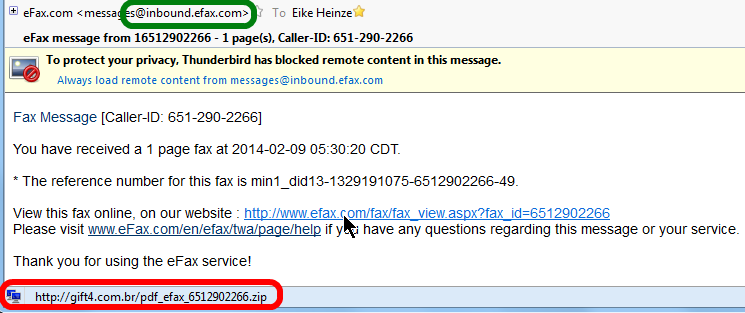
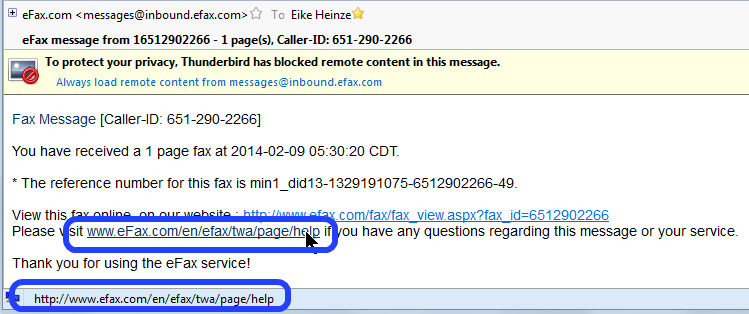
Just this morning I got an email supposedly coming from eFax and I thought I better document it here.
Here are screen shots of what it looked like in Thunderbird, my email program.
The sender address seems to be efax.com (green frame). But resting the mouse cursor on the link supposedly representing the fax the translation of the name in the link, that is the place where a mouse click really would take me to, that translation clearly shows a web site in Brazil (red frame). Do you smell the rat?
Just for fun I rested the mouse cursor on the link for Help instructions and that really would take me to the efax.com help page (blue frames).
Although I personally know some people in Brazil. needless to say that I neither clicked on the first link nor did I download the compressed file (.zip) nor would I ever have opened this .zip file. My acquaintances in Brazil all have my email address.
As I always say, user beware.
As usual I welcome suggestions and comments right here in the blog.
Click here for a categorized Table Of Contents.
Tuesday, January 28, 2014
Driver's License for Computers?
If you drive down the highway, you’re at risk of getting in a car wreck.
If you log onto the Internet, you’re at risk of identity theft, viruses and malware — no matter who you are or where you’re coming from.
Like safe driving, maintaining a secure computer is all about being attentive, defensive, proactive and educated.
This is why drivers of cars need to be trained and licensed to drive.
This is why many computer professionals think computer users should be educated and licensed to browse the Internet and handle email.
What about your "Internet License"?
As usual I welcome suggestions and comments right here in the blog.
Click here for a categorized Table Of Contents.
Monday, November 18, 2013
Warning - W A R N I N G - Warning
On October 23rd 2013 I wrote about a really, really bad new virus called CryptoLocker.
Back then, only three and a half weeks ago, CryptoLocker was an acute danger mainly in the UK, parts of continental Europe and in some Asian countries.
This has changed dramatically. Computer users in the USA get hit with this virus increasingly often. Since a few days I receive about five emails every day that offer me "free money" or pre approved credit cards "ready to be shipped" my way. Would I ever click on a link in such an email? Would I ever be tempted to open one of the attachments? You bet not!
A free(!) protection method is available but it will interfere to some degree with normal computer operation. When this happens the computer user needs a certain amount of technical know-how to correctly diagnose the reason for the interruption and the to create an exception; this has to happen every time when it happens. If you can do that you should look at CryptoPrevent.
For everybody else I shout as loud as I can:
Disconnect your external backup drive when the backup is done!If you don't disconnect the backup drive your backup files will be encrypted as well! They are totally useless once encrypted.
As usual I welcome suggestions and comments right here in the blog.
Click here for a categorized Table Of Contents.
Wednesday, October 23, 2013
Warning: Old Fiend With New Muscle
In the title I say "old fiend" and it is an old adversary in new clothes and with significantly more muscle.
Instead of repeating the background story please first head over to my September 2012 article and come back here after you have read it.
So what's new? Besides the new name, Crypto Locker, a couple of major improvements have been made to that nasty piece of maliciuos software:
- The encryption is now "NSA grade", meaning there is no way out! Your data files most likely will remain lost!
- The ransom has been raised in some variants of this malware to close to $1000.
- Now even files on other than the system drive C: will be encrypted. That renders restore partitions useless.
- Is your backup disk permanently connected to the computer? Then the files on this drive get encrypted as well and all your backups are totally useless!
- Now even files on network connected other computers can get encrypted.
- Many victims that actually did pay the ransom got a decryption key that did not work! Their files remained inaccessible and were totally lost.
- To pay ransom in some instances credit card information was given to the obviously wrong people; credit cards got maxed out in minutes! That is much more trouble than the loss of years of pictures, emails and other files!
- Many attempts to save files turned out to be more expensive than a brand new computer would have been, Even with a new computer your files remain lost!
- arrives on victims computers in an email from an arbitrary sender they often don't know.
- arrives on victims computers as an email attachment; this requires the victim to explicitly execute the attachment, that is double
click on it and eventually even ignore the warning from Windows about
running a downloaded program.
- arrives on victims computers after the victim clicked on a link in an email without first checking the link and it's real target.
You ask why your anti virus program did not catch the bad program? Simply because this form of CryptoLocker is new. It requires time and quite some effort to design detection methods and find secure ways to neutralize these modern and very sophisticated threats.
As of this writing we all are unprotected and need to use due diligence. Always wear your common sense hat!
The only currently known "protection" against damage by CryptoLocker is to have a recent image backup of your system drive and/or to have a set of restore DVDs that were created when the system was still functioning correctly.
If you need to use either of the aforementioned a System Repair disk is required. Did you already create one?
If you need help to set up a sensible backup routine and/or to create the disks mentioned above please contact me. You find a useable email address in the left sidebar at the end of the text titled "Welcome".
As usual I welcome suggestions and comments right here in the blog.
Click here for a categorized Table Of Contents.
Sunday, August 11, 2013
Privacy On The Internet - A Contradiction
Many times I have mentioned one of the more technically oriented info services that I am subscribed to. On that blog I found an IMHO good article about privacy on the internet or, better, the lack thereof. The article is here. I will quote it literally because of a comment I want to add.
As usual I welcome suggestions and comments right here in the blog.
Click here for a categorized Table Of Contents.
Especially to points numbers 7 through 10 I want to add: Everything you ever put out on the internet will never go away. Clever sleuthing will bring it to the light of the day no matter how firmly you believe that "deleted" items or accounts should be gone for good. Usually they are not gone, you just can't access them anymore.
- There is no such thing as 100% privacy on the Internet.
You can take steps to lessen the intrusions into your privacy but there is no way to guarantee that nothing can be learned about you and your affairs. Learn to live with this reality and act accordingly.- Like it or not, you have to trust somebody.
Anything you do on the Internet has to go through numerous intermediaries, routers, networks, etc. Ultimately, you have to trust the security of your ISP and other services that you use. VPNs and proxy servers can increase your security but they are not foolproof.- Privacy comes at the cost of convenience.
The more measures to increase privacy that you use, the more cumbersome using the Internet becomes. Locked doors are harder to use than open ones. The correct trade-off between privacy measures and convenience depends on how you use the Internet. If you like to live dangerously, you may need a lot of privacy measures. If you are a casual web surfer and send harmless emails, not so much. Choose the level of privacy appropriate to your Internet usage.- There are innumerable ways to spy on wireless or cell connections.
There is no standard encryption that can’t be broken and deciphered but using a strong version of WPA encryption on your wireless router is better than not. Avoid using public hot-spots for private business.- Assume that all email that you send is public.
If you must use email to send sensitive material, use some form of strong encryption. Send the encryption key to the recipient by some other means than email.- Deleted email is probably still there somewhere.
You may delete an embarrassing or private email but it may very well still be on the email servers or on the other party's computer.- Everything you do or say on the Internet is recorded somewhere, usually in numerous places.
You can take measures to make it hard to trace your Internet actions back to you personally but there is always the chance that a persistent and technically adept person or agency can track you down. However, most of us aren't important enough to warrant that kind of effort.- What you post on social sites might as well be on a public bulletin board.
Privacy measures at Facebook and other social sites are full of holes. Assume that anybody can see what you post.- Be careful what you reveal on the Internet
Use disposable email addresses and pseudonyms as much as possible. Don't reveal anything you don't have to when signing up for some service. Assume any information you reveal on one site gets shared or sold.- It is almost impossible to remove all traces of something once it is on the Internet.
Those pictures of yourself that you posted when drunk can come back to haunt you years later.- Advertisers want to track you.
Advertisers want to know as much as possible about your activities so they can target their ads for you. They keep developing more and better methods to track your Internet activities. Gizmo’s has many articles about ad blocking and control of tracking cookies.- Monitor your credit cards and bank accounts daily.
Personal records stored in company databases are stolen all the time. If you have online credit card accounts, monitor them for unauthorized activity daily. Also monitor any online banking or financial accounts daily.
As usual I welcome suggestions and comments right here in the blog.
Click here for a categorized Table Of Contents.
Saturday, June 8, 2013
Urgent Alert!
To all users of email accounts ending in @YAHOO.COM, @ATT.NET and @SBCGLOBAL.NET :
If you use the web interface, that is if you handle your email from within a web browser like Firefox, Chrome or Internet Explorer (boooo), then the look and feel of what you see has been or will be forcibly changed to a new look. It happened to me today.
Immediately I got this email;
What perplexed me was the "Mail Classic" moniker to the right of Yahoo. Why would some message relating to a NEW system be sent from the old one?
So I checked the link behind "Click Here". This is what I saw in the status bar of my email program:
This link goes to a web site that has nothing at all to do with Yahoo.
Do you see the rat when you smell it?
As usual I welcome comments and suggestions right here in the blog. Thank you in advance.
Click here for a categorized Table Of Contents.
Thursday, May 30, 2013
Email From The IRS? No Way!
I am battling with uneasy feelings because of an obvious scam email although I know that it is a scam. Needless to say but naturally I did not open the attached ZIP file.
I have problems imagining what some of my customers might feel and think if they received a scam email like this one (screen shot of how it looks in my email program, email addresses obscured):
This obviously is a scam. The clues to this are:
- No government agency will ever send you an email out of the blue; never ever!
- The open recipient address list in the top line of the picture is a gross violation of privacy and email etiquette; even the IRS would not do that I hope.
- "You have received" is bogus because according to the text of the email supposedly the IRS has received a complaint.
- "filled" instead of "filed"; typos of this kind are a dead giveaway.
As usual I welcome comments and suggestions right here in the blog. Thank you in advance.
Click here for a categorized Table Of Contents.
Subscribe to:
Posts (Atom)


