Showing posts with label scam. Show all posts
Monday, April 6, 2020
Amazon Prime member? WARNING!
I have an Amazon account AND an Amazon Prime membership.
I received an email and I want to show it in a screen shot:
On first glance nothing really alarming, right?
BUT:
The sender email address (labeled From:) looks to me totally wacky and the Reply-To address (labeled To:) IMHO is equally unlikely.
The warning bells in my mind started to ring loud and clear.
My wife and I use the same Amazon account all the time and thus I know that the payment method is correct and that it works.
Even saving the attached PDF document to my computer and then scanning it with Malwarebytes did not show any alarms or warnings.
So I opened the file in my PDF reader to check it out in more detail.
The PDF document contains a link and a BIG button to supposedly go to Amazon's account and payment method web page.
BUT this is what the link and the button actually would have sent my web browser to:
https://t.umblr.com/redirect?z=https%3A%2F%2Fam1zn-updtaeinfmtaonsupdtee-verifyconfimationss76757855.com%2F%3Fsigninn-&t=NmVmZTU1YjdlNTBkODkzYjc0NTg1NzM0MTI2YWNhNWJkOGNiZGRjZSxjYTVkNGQyNzY5ZjI4OGQ2OGFiZjQ2ZDJmOTg3NjZlMTZkNTI5M2Y3
What a crazy nightmare - and for me a clear indicator that something was VERY WRONG!
I went to Amazon.com and checked in my account settings and voila, my Prime membership is paid for until September and the payment information is correct.
Naturally I will report this to Amazon.
MY conclusion as far it concerns you?
Be super vigilant, never trust an email and do NOT be complacent!
Yes, IMHO it is complacent to "just click" on the big button or the link in the PDF file rather than verifying the claim made in the PDF file independent of the email and it's attachment!
Stay safe, stay vigilant and pay attention to the details!
Tuesday, August 28, 2018
This is well done - WATCH OUT!
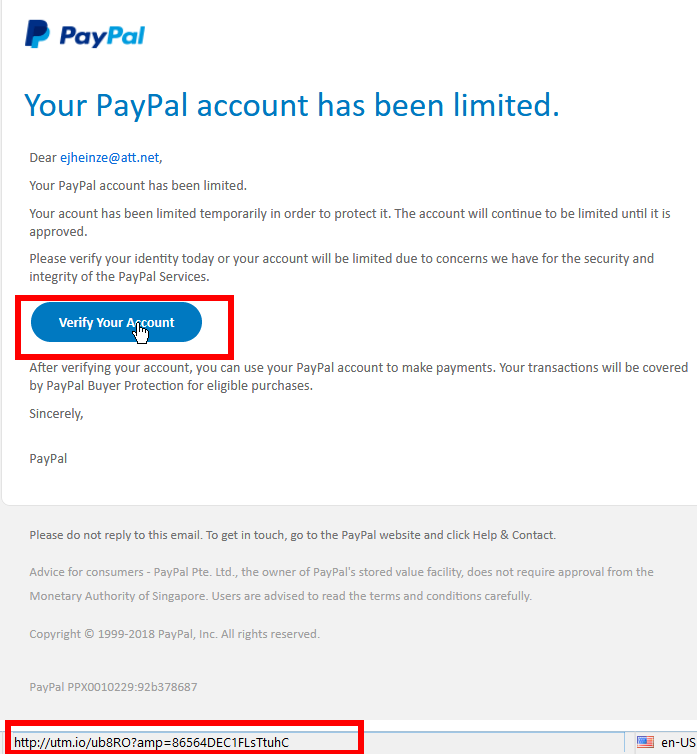
For many years I use PayPal; I just received this email:
Something made me more suspicious than I usually am so I moved the cursor to the "Verify Your Account" button. And YES, that button translates to a shortened link - as you can see in the second red square.
Why would a well reputed company like PayPal ever use a shortened link?
I admit, the email looks convincing and even sort of professional.
Before I hit the Delete button in my email program, I took above screen shot for this blog post.
Stay safe!
Sunday, August 12, 2018
Old Scam - New Clothes
A scammer from India came up with a new twist of an old ruse.
Look at this screen shot of the offending email as shown in my email program:
Btw. following references to the blue or red squares do in no way refer to BattleBots. 😉
In the blue square we have the sender's email address. I believe that NO administrator in the whole wide world would ever use an AOL email account for his official business. Some criticism of AOL can be found here.
In the first red square you see my cursor on the VERIFY NOW link and because of that you can see in the second red square the textual representation of what web page that link would actually send my browser to - if I were sufficiently un-attentive to click my mouse in that situation.
The target web page is on a server in India at "managershub"! You don't see that? Learn how to read URLs.
And I don't even use what the scammer refers to as a "Web-mail system".
To top it off there are three simple spelling errors or typos in the short text of the email; unprofessional to the hilt!
Sum total: An old but time honored scam in a new dress - but not even a fancy dress.
Again it comes down to the first of my ten commandments for safe computing:
Thou shalt read and think(!) before you click.Stay safe!
Thursday, November 24, 2016
About Scams - Beware!
It saddens mw but it has to be said again and again:
Microsoft WILL NOT CALL you because your computer "has been reported" or anything similar.Please take the few minutes to read this article from the How-To-Geek on common scamming tricks and what to do about them. This article talks about some other commonly encountered scams as well, not only the Microsoft or Tech Support based scams.
It always is good to be well informed. The time to read the HTG article is time well spent; it can help you to avoid the most common traps.
Stay safe.
Tuesday, October 4, 2016
The newest Scam - Beware
The newest telephone scam I heard of is the Microsoft Licensing Scam. You may get a phone call or a voice mail saying something like this (phone numbers deliberately obscured):
“This is to notify you that your Microsoft Windows license key has been expired in your computer so Microsoft Corporation has stopped the services in your computer. To renew the Windows license key, please call 866 XXX XXXX. Let me repeat. This is to notify you that your Microsoft Windows license key has been expired in your computer so Microsoft Corporation has stopped the services in your computer. To renew the Windows license key, please call 866 XXX XXXX. I will repeat 866 XXX XXXX.”The message obviously was from a computer generated, sort of "mechanical" voice and the stilted English suggest a non-native English speaker behind the whole thing.
Any messages about licensing issues truly from Microsoft would pop up on your computer's screen only during installation or activation. And we all know, if only from experience, that a Microsoft license for the Operating System comes with the computer when you buy it and it is good for the lifetime of the machine.
In Windows services are programs running in the background; they are required for even basic functions of the computer. A computer would not work at all without the required services running in the background.
In the case I read about the recipient happened to be a very, very experienced Windows user; the gentleman called back the 866 number from the message; he said about that call:
"Because the number was toll free, I called it just to see what would happen. An answering machine invited me to leave a message and my number for a callback — I declined.Please remember: Any and all phone calls claiming to come from Microsoft or any company associated with Microsoft are scams. Don't even talk to these people! Do not give them your phone number or ANY OTHER information.
As usual I welcome comments and suggestions right here in the blog. Thank you in advance.
Stay safe.
Wednesday, March 9, 2016
Wrong, Every Step She Took Wrong
Original text of email I got from a long ago customer:
Recently our Microsoft Essentials "little house" has been erratic in its stability. We have done full scans and quick scans with it staying green for a short period of time changing to orange and then eventually to red.And here is the original text of my reply, please judge for yourself:
I googled this question and received an answer that Microsoft is not updating this since last year - so the definitions are not really up to date. Is this true?
It was suggested that I get AVG Anti Virus which is Free. I did do this and it appears to be doing the job with the green circles, etc.
On that same page there is a area where I can check to "fix performance". It is a PC Analyzer - After doing this, the report was: many errors in various areas and they said it could be fixed for fee/one time and/or I could get a program for 1 year. I would not need one for one year but I would like take advantage of the free analyzing of this performance. Do you think I should do this and is AVG a good solution if indeed Microsoft has stopped updating?
... [I] realize we will have to update to windows 10 when they force us to do so. If we do not do this will they charge us?
Thanks for asking. If you remember I do not express myself politically correct so please brace yourself for some rough truths:
I believe I still could fix the situation and hopefully repair your computer. I guarantee that the free solution will not work to your satisfaction.
- The "little house" you refer to represents Microsoft Security Essentials which was your anti virus program until you installed AVG.
- ANY anomaly with your anti virus should have rang a LOUD alarm bell.
- If it has not updated since last year your computer potentially was not protected against common viruses.
- AVG is a program that I urge my customers to stay away from!
- It installs really crappy programs, that is how AVG (the company) makes money nowadays.
- PC Analyzer IMHO is known malware.
- I bet you that almost ALL the errors that you get shown are false messages meant to scare you into installing even more useless programs.
- Keep going with these silly suggestions and soon your computer will likely not be usable any longer.
- No, DO NOT take "advantage" of the "free" solution that you mention, it will make it only worse.
The question about "they" ( I assume you mean Microsoft?) charging you only Microsoft can answer and they, MS, has been asked the same thing thousands of times; so far MS has only replied with marketing blah-blah; we just do not know. My personal suspicion is yes, no later than January 2020 when in MS's view Windows 7 comes to the end of it's supported lifetime.
In case my replies offended you I apologize, that was and is not my intention at all.For my readers here: No further comment from my side; please come to your own conclusion and PLEASE, don't make similar or the same mistakes.
Stay safe.
Friday, October 23, 2015
Ink Jet Printers
Original quote:
A significant number of Canon-printer owners had print-head failures soon after the one-year warranty expired. There seemed to be a pattern, which prompted a class-action lawsuit. Though Canon denied any wrongdoing, they agreed to pay $930,000. Each class member will receive $50 in cash or $75 for a Canon store voucher. Canon also agreed to extend the warranty period by nine months for those who have print-head issues.For years now I have said that ink jet printers seem to be a scam to sell massively overpriced ink. In the long run you generally are way better off with a faster laser printer.
To see the particular models involved, and to get listed as a lawsuit class member, go to the settlement information site before Nov. 24.
Other than that I have no comment.
Labels:
Canon,
deception,
general,
HowTo,
printer,
purchasing,
recommended,
scam
Thursday, July 2, 2015
Repair Scams And New Variants - Again
Please click this link if you are looking for information on Windows 10.
I hardly can count how often I have spoken in my radio shows about repair scams and other tricks crooks use to scare unsuspecting computer users into handing over their credit card info; that is what all these and similar scams come down to.
Here is only a small selection of articles from this blog that deal with various aspects of this situation - with NO claim of completeness at all:
- June 2012 "Email Scams Getting More Elaborate"
- February 2013 "Phone Scams - Way Too Many!"
- May 2013 "Email From The IRS? No Way!"
- September 2013 "Cybercrime"
- October 2013 "How Malware Gets Installed"
- February 2014 ''New Twist - Old Scam"
- October 2014 "How To Spot Socially Engineered Emails"
- April 2015 "Bye bye Viruses, Hello Carelessness"
But suddenly you get a pop up window or some other kind of message informing you that "your computer has been reported" to some "Windows Security" team or it "is infected with 567 viruses" or similar.
This sort of pop up is by definition a scam!
The only safe way out of such windows and/or messages is to close them with Alt+F4, that is holding down the Alternate key and while holding this key down pressing function key F4.
- Do not click anywhere in this window.
- If applicable DO NOT call the toll free phone number givin in the message.
- Do NOT "x out" of this window, that is do not click on the "red X" in the top right corner of the window to close it.
Beside getting out of this window safely I would avoid ever again going to this web site. There is almost always some alternative.
Why did I above say "... is by definition a scam"?
- There is no "Windows Security" team or company or anything even vaguely similar.
- You Windows operating system does NOT report any info to anybody; only malicious software does that!
- Neither Microsoft nor any of their partner companies care about your computer's and your well being!
- Tech Support Scams from the Federal Trade Commission and
Avoid tech support phone scams from Microsoft's Safety & Security Center
As usual I welcome comments and suggestions right here in the blog. Thank you in advance.
Click here for a categorized Table Of Contents.
Thursday, June 25, 2015
2015-06-25 WBKV Talking Points (June 25th 2015)
Please click this link if you are looking for information on Windows 10.
Emergency patch for Adobe Flash Player; details here (June 24 2015)
Windows 10 not necessary for Windows 7 users, IMHO at least:
- If you are still running Windows XP I can't help you.
- If you are running Windows Vista you better think about a new computer (mostly).
- If you have a stable Windows 7 system that does dependably what you want to do then don't upgrade to Windows 10.
- If you are still on Windows 8 you are long overdue to upgrade to 8.1.
- If you have Windows 8.1 then upgrading to Windows 10 will eliminate most of Windows 8's annoying quirks and shortcomings.
Beware of scam phone calls for "computer support". Your computer does NOT "report" about viruses, to nobody.
- This is an oldie (Feb. 2013) but still very actively exploited.
Curious about Windows 10? Microsoft has a free book "Introducing Windows 10 for IT Professionals here (scroll down just a few lines to see the title!).
Labels:
Adobe,
Flash Player,
general,
Microsoft,
Radio show,
scam,
upgrade,
WBKV,
Windows 10,
Windows 8,
Windows 8.1,
Windows7
Tuesday, April 28, 2015
Bye bye Viruses, Hello Carelessness
It's almost like in the Everly Brothers song "Bye Bye Love" from 1957. They sang
Bye bye happiness, hello loneliness...
I am enticed to, no, don't be afraid, not sing but say
Bye bye viruses, hello carelessness...
In August 2014 I wrote in this blog the 2014 Update On Malicious Programs. Everything in this article is still valid today – which in the fast changing world of computers is astonishing all by itself. Self replicating viruses that "find and infect" our computers by their own accord have gone almost extinct.
What has massively changed though are the tricks and methods used by miscreants to foist their malicious junk software on our computers. It is so bad that I feel compelled to say
Do NOT click on any link in any email,
do NOT open any email attachment
and NEVER click in any advertisement.
do NOT open any email attachment
and NEVER click in any advertisement.
Does that sound extreme to you? Good, because it is extreme. We are in an extreme situation and it's getting worse so extreme measures seem appropriate.
In the meantime you have learned to immediately delete emails with an unfamiliar sender address. But what about the email from that buddy of yours who always sends all the jokes? My advice is to IGNORE it! Just hit the Delete button. If that email really was from him and if he were a nice guy he would have told you in the email why and what he sends there. If he does not have the decency to do that you better err on the side of caution and delete that email; you may “miss” a joke but what is that compared to $100 or $200 cost for a good clean-up job?
Another way how modern malware (called PuPs) is distributed are dirty tricks pulled on us when we apply required updates. Even big, well known companies participate in these schemes; names that come to mind as examples are Oracle, Norton, McAfee and Adobe. Some visual examples are here.
And don't get me going on advertisements. Listen up:
If you see advertisements on your computer screen then you computer most likely already is compromised. Get it cleaned up!
And then the sneaky methods that well known download web sites like Download.com, Cnet.com and other use. You want to download that nice free little program and what they give you is a specially crafted downloader program that in turn is supposed to download the program you actually want. But what you get are one or several PuPs and then the program you really wanted.
The only method to help here is to watch for the tricks, traps and deceptions.
In July 2013 I published my 10 Commandments Of Safe Computing. To heed the first of these has become more important than ever before; it reads:
Thou shalt read and think(!) before you click.
Be vigilant, pay attention to details and always remember: If it sounds too good to be true it usually is not true; especially in this day and age on the Internet.
As usual I welcome suggestions and comments right here in the blog.
Click here for a categorized Table Of Contents.
As usual I welcome suggestions and comments right here in the blog.
Click here for a categorized Table Of Contents.
Thursday, March 12, 2015
2015-03-12 WBKV Talking Points (March 12 2015)
Superfish bug on some Lenovo laptops is a real risk:
A test for Superfish is here, removal instructions are here.
Firefox vers. 36.0.1 has protection against SF, vers. 37 will further improve certificate checking!
Confirmed sensation: Microsoft will allow all Win 7 & 8 users to upgrade to Win10 for free – for one year (only?). But then the licensing will kick in? A rented operating system? Home user be careful! Microsoft does not give anything away for free; that is the first concrete step to get us all to accept a licensing model, that means yearly payments. This way Microsoft will in the medium and long term make oodles of money more than by selling the software.
More dangerous bugs in Adobe Flash Player! Currently (as of March 12 2015) officially released version is 16.0.0.305! The catch: Many fake updates around! Mostly the user is tricked to download and install a fake plugin that then installs a key logger to collect log in info & passwords. User beware!
Scam phone calls: Microsoft does not even know that we exist. MS's own advice:
Have your DNS settings been tampered with? Test here (but know what is correct…)
Adobe's cash-less bug bounty program: Can it ever work?
Symantec splitting security (Norton) from storage business. The beginning of the end (like HP)?
FREAK bug (low quality encryption): Check your web browser here.
News March 12 2015: Fixed with this month's batch of updates for Windows
As usual I welcome suggestions and comments right here in the blog.
Click here for a categorized Table Of Contents.
A test for Superfish is here, removal instructions are here.
Firefox vers. 36.0.1 has protection against SF, vers. 37 will further improve certificate checking!
Confirmed sensation: Microsoft will allow all Win 7 & 8 users to upgrade to Win10 for free – for one year (only?). But then the licensing will kick in? A rented operating system? Home user be careful! Microsoft does not give anything away for free; that is the first concrete step to get us all to accept a licensing model, that means yearly payments. This way Microsoft will in the medium and long term make oodles of money more than by selling the software.
More dangerous bugs in Adobe Flash Player! Currently (as of March 12 2015) officially released version is 16.0.0.305! The catch: Many fake updates around! Mostly the user is tricked to download and install a fake plugin that then installs a key logger to collect log in info & passwords. User beware!
Scam phone calls: Microsoft does not even know that we exist. MS's own advice:
- If anyone calls you and claims to be in any way affiliated with Microsoft IT IS A SCAM!
- Do not purchase any software or services.
- Ask if there is a fee or subscription associated with the “service.” If there is, hang up.
- Never give control of your computer to a third party unless you can confirm that it is a legitimate person you personally know and trust and/or are already a customer of.
- Never provide your credit card or financial information to someone claiming to be from Microsoft tech support.
- Take the caller’s information down and immediately report it to your local authorities.
Have your DNS settings been tampered with? Test here (but know what is correct…)
Adobe's cash-less bug bounty program: Can it ever work?
Symantec splitting security (Norton) from storage business. The beginning of the end (like HP)?
FREAK bug (low quality encryption): Check your web browser here.
News March 12 2015: Fixed with this month's batch of updates for Windows
As usual I welcome suggestions and comments right here in the blog.
Click here for a categorized Table Of Contents.
Labels:
DNS Changer,
download,
Firefox,
Flash Player,
FREAK,
general,
Microsoft,
opinion,
Radio,
scam,
Superfish,
support,
test,
upgrade,
WBKV,
Windows 10,
Windows 8.1,
Windows7
Sunday, February 1, 2015
2015-02-02 WTKM Talking Points (February 2nd 2015)
Confirmed sensation: Microsoft will allow all Win 7 & 8 users to upgrade to Win10 for free – for one year (only?). But then the licensing will kick in? A rented operating system? Home user be careful! Microsoft does not give anything away for free; that is the first concrete step to get us all to accept a licensing model, that means yearly payments. This way Microsoft will in the medium and long run make oodles of money more than by selling the software.
New dangerous bug in Adobe Flash Player is exploited via Facebook! Current version is 16.0.0.296!The catch: Many fake updates around! Mostly the user is tricked to download/install a fake plugin that then installs a keylogger to collect log in info & passwords. User beware!
Renewed warning: CryptoWall (new CrypotoLocker variant) spread through advertising networks.
When you see advertisements your computer is already infected!It is more important than ever to have a backup routine in place AND TO DO IT!
Finally: Microsoft takes on scam tech support phone call organizations (PDF).
If MS succeeds I expect the crooks to move off-shore and do the same from India.
Microsoft Digital Crimes Unit attorney Courtney Gregoire has an article and a video about these scams on this blog.
If anyone calls you and claims to be in any way affiliated with Microsoft IT IS A SCAM!
Here is Microsoft's own advice for such a case:
The supposed hack attack on French news media after the Charlie Hebdo shooting was no attack at all. It was a simple server cockup.
In Canada it is now illegal to install computer programs without consent. Why not in the US?
375 of the 500 largest companies do not protect their web sites from typosquatters. That causes real danger when you mistype a web address in your browser. Be careful!
New dangerous bug in Adobe Flash Player is exploited via Facebook! Current version is 16.0.0.296!The catch: Many fake updates around! Mostly the user is tricked to download/install a fake plugin that then installs a keylogger to collect log in info & passwords. User beware!
Renewed warning: CryptoWall (new CrypotoLocker variant) spread through advertising networks.
When you see advertisements your computer is already infected!It is more important than ever to have a backup routine in place AND TO DO IT!
Finally: Microsoft takes on scam tech support phone call organizations (PDF).
If MS succeeds I expect the crooks to move off-shore and do the same from India.
Microsoft Digital Crimes Unit attorney Courtney Gregoire has an article and a video about these scams on this blog.
If anyone calls you and claims to be in any way affiliated with Microsoft IT IS A SCAM!
Here is Microsoft's own advice for such a case:
- Do not purchase any software or services.
- Ask if there is a fee or subscription associated with the “service.” If there is, hang up.
- Never give control of your computer to a third party unless you can confirm that it is a legitimate person you personally know and trust and/or are already a customer or when you personally initiated a support call with Microsoft.
- Never provide your credit card or financial information to someone claiming to be from Microsoft tech support.
- Take the caller’s information down and immediately report it to your local authorities.
The supposed hack attack on French news media after the Charlie Hebdo shooting was no attack at all. It was a simple server cockup.
In Canada it is now illegal to install computer programs without consent. Why not in the US?
375 of the 500 largest companies do not protect their web sites from typosquatters. That causes real danger when you mistype a web address in your browser. Be careful!
As usual I welcome suggestions right here in the blog.
Click here for a categorized Table Of Contents.
Labels:
CryptoLocker,
general,
Gunk,
Microsoft,
opinion,
scam,
security,
update,
upgrade,
Windows 10,
Windows 8,
Windows 8.1,
Windows7,
WTKM
Monday, October 13, 2014
How To Spot Socially Engineered Emails
For quite some time I wanted to give information about how to spot spam emails. That is quite a sizable field and I wavered too long. This time to my and I believe to your advantage the wait pays off.
I discovered that KnowBe4.com already had done an excellent job and published the result as a one page fact sheet much better and more concise than I could ever have done it. The paper is called Social Engineering Red Flags. This link should show the information in your browser or in your reader application for PDF files.
I recommend to print it as a handy reference guide.
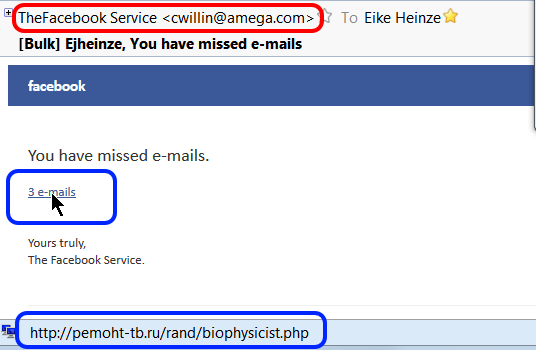
And here is a real life example; just this morning (10-20-2014) I received an email that looks on first glance like it came from Facebook, optically quite convincing. It is such a "classical" example that I took a screen shot to show it to you:
For me it goes without saying that I do NOT just click on a link in ANY email, no matter who the sender is supposed to be, no matter how "familiar" it looks.
The first clue is the sender address. Bad, simple forgery, not even an attempt to disguise the forgery; maybe that is even the miscreant's real email address. This is one of the times where I regret not to be a security researcher because I would love to mess a bit with this guy.
Then I did what for me by now has become second nature: I rested my mouse on the link (see the cursor). The translation of where the link would have taken my computer to in the status line (bottom left corner of the picture) confirmed my suspicion: The link goes to a web site in Russia. Did you see "http://pemoht-tb.ru/rand..."? ".ru" is the country code for Russia!
If you handle your email with programs or techniques that do not show you all the information from this example then you live dangerously. Imagine a teenager; they would blindly click on the link and voilà , the computer is infected and maybe you even loose all your files!
Oh well, more work for me... (tongue in cheek!_).
As usual I welcome suggestions and comments right here in the blog.
Click here for a categorized Table Of Contents.
Thursday, February 20, 2014
Voicemail via Email? No Way!
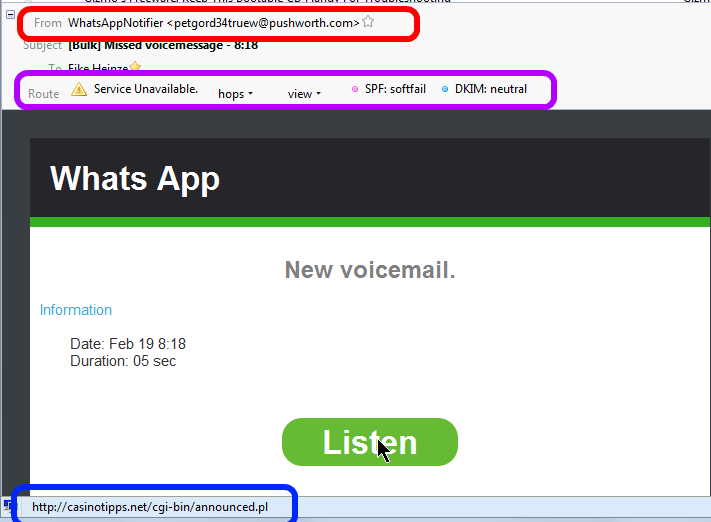
Here is yet another example of a scam I hear often about. This is a screen shot of what I saw in my email program:
At first glance a friendly, nicely formatted and really "professional" looking email.
Three things caught my attention before I would have clicked on "Listen";
- Red highlight: The sender address seems to come from "@pushworth.com". Big discrepancy to the supposes (company?) name "Whats App".
In my mind the warning lights went on.
- Purple highlight: The sender disguised very well the actual route the email had taken. That shows technical know how and (criminal?) intent.
By now the warning bells where ringing loud.
- Blue highlight: When I rested the mouse cursor on the pretty "Listen" button the link behind this button translated to "casinotipps.net". Casino tips and forwarding voice mails via email? Oh Please, don't think I am that dumb.
Now I was already chuckling; just another scam email.
But I know from experience that there are simple souls out there who did click on "Listen"; although the mail they had gotten likely looked different.
Actually I should be thanking the creator of this scam because he keeps me in the business of cleaning up virus infected computers.
As usual I welcome suggestions and comments right here in the blog.
Click here for a categorized Table Of Contents.
Tuesday, February 18, 2014
New Twist - Old Scam
Whether you ever would read The New York Times or whatever your political stance is,
if you have a computer you NEED to read this NYT article.
The age old story of "User Beware" with a macabre twist.
As usual I welcome suggestions and comments right here in the blog.
Click here for a categorized Table Of Contents.
.
Wednesday, January 8, 2014
Learning About Computers
During my last radio show (Jan 6, 2014 on WTKM 104.9 FM) a caller expressed his dismay about the demise of a good TV show with very helpful information and practical tips.
When I checked on the morning of Jan 7th I found a very interesting email from a listener with lots of information on the subject of computer info on TV. With that email author's kind permission (Thank you Jeremy R.) here is the full text plus an additional note he sent later. I have done only very minor editing but have added links to the web sites and shows mentioned and to persons as available.
I heard your radio show today.
I am enjoying the conversations you and Dave have been having when you are waiting for callers.
I decided to email you with some info about the TechTV show one of the callers talked about.
I missed TechTV when it went away, but now there are much better shows available online. I wanted to point your attention to some that are relevant. All of these are free and available on demand through their websites, or through set-top boxes like Roku, etc...
'The Screen Savers' (1998-2005) (This is the one the caller talked about)
This was the first email and here is the additional note he sent with his permission to publish his information here:
- A program on the old TechTV channel that no longer exists.
- The hosts Patrick Norton and Leo Laporte
- Revision3.comhttp://revision3.com/
- Patrick Norton from 'The Screen Savers' is now on Revision3.com
- Revision3 makes a variety of shows for varying degrees of computer skill.
- Some examples of their 20+ shows are:
- Tekzilla - News and brief How-To's much like TechTV stuff. (host Patrick Norton)
- HD Nation - Focusing mainly on Home Entertainment computers and gadgets. (host Patrick Norton)
- GeekBeat.tv - brief technology news updates.
- The Ben Heck Show - in depth, hands on project building.
- Revision3 also makes a few shows purely for entertainment.
- TWiT.tv
- Leo Laporte from 'The Screen Savers' created his own network called TWiT. ("This Week in Tech")
- Leo Laporte hosts most of the shows.
- Read about the transition from TechTV to TWiT here: twit.tv/the-twit-story.
- TWiT has 20+ audio and video broadcasts actively being produced.
- Various show topics include: Android Tablets, iPads, How-To, Home Theater, Free Software, Ham Radio, Security
Microsoft Phone Scam
- Category5.tv (not related to the viewer's question)
- Based in Canada
- A relaxed show about current tech, including some hands on activities, and answering viewer questions.
- Airs LIVE every Tuesday night at 6:00pm Central Time.
- Viewers can ask questions by Phone, eMail, or Instant Message Chat
- Viewer questions range from quite technical to very basic.
- The host helps people with Windows and linux questions.
- Category5.tv is currently my personal favorite.
- Some episodes include:
- #327 - Fake Support Call Scammers
Video recording of a 'Microsoft phone scam' in progress.
See what the scammers have people do on their computers.
- #321 - Making Windows 8 Look and Feel more like Windows 7
- #317 - Virus Advisory: CryptoLocker
Interview with Adam Kujawa from Malwarebytes.org about Cryptolocker virus.
- #274 - Brother's Business Smart Printers
Interview with Brother printer manufacturer.
I want to point your attention to the Category5.tv episode #327 - Fake Support Call Scams where they have video footage of what the phone scammers have people do on their computers. The show notes page for that episode has a link to the last 30 minutes the guy spent on the phone with the scammers. Now if someone says to me, "They called me up and asked me to do 'x-y-z'" I have a better idea of what they went through.
The scammers were clever, but not clever enough to notice that the machine they were hacking was a freshly installed Virtual Machine specifically set up for this purpose.
One note about the shows being available on the Roku and similar devices...
Revision3 and TWiT have their own channel/app for various devices, while I believe Category5.tv has to be added as an ordinary RSS feed.
When TechTV went off the air, I missed not having that stuff to watch. Now, there is more "Tech TV" than I have time to watch. I am still getting caught up on episodes of Category5 that I have missed.
The video of the scam phone call includes little popup notes on the screen that briefly explain what the scammer is really doing, while he is saying something else.
Well, that was this. I publish this information without any warranty to be fit for any purpose.
But again I want to thank Jeremy R. very much for theeffort he put into assembling his email.
As usual I welcome comments and suggestions right here in the blog. Thank you in advance.
Click here for a categorized Table Of Contents.
Labels:
general,
HowTo,
Internet,
non-computer,
Radio,
recommended,
scam,
support,
TV,
WTKM
Tuesday, September 17, 2013
PUPs - The List
This is the list of PuPs that I have encountered; it is not comprehensive and it is growing almost daily...
Update February 12th 2014: This list now is 313 entries long and the malware programmers create new names every day. Keeping this list up-to-date has become increasingly time consuming and I will in the future add only well descriptive new names.
This list makes sense only as part of this article on PuPs.
| 1clickdownload |
| 24x7 Help |
| adawaretb |
| AdpeakProxy |
| Advanced System Protector |
| alotToolbar |
| ammyy |
| Amonetize |
| Anti-phishing Domain Advisor |
| aol toolbar |
| apn |
| apnupdater |
| AppGraffitti |
| Application Updater |
| Ask Search |
| Ask Toolbar |
| Ask Web Search |
| ask.com |
| AskPartnerCoBrandingTool |
| AskPartnerNetwork |
| AskSearch |
| AudioToAudioToolBar |
| AVG SafeGuard toolbar |
| AVG Security Toolbar |
| avg-sitesafety-plugin |
| AvgToolbar |
| AVS4You |
| Babylon |
| BabylonToolbar |
| Backupstack |
| BatBrowse |
| BearShare |
| bearshare applications |
| BearShareMediaBar |
| bearsharemusicboxtoolbar |
| BigFiah Games |
| BingBar |
| BitGuard |
| Blekko |
| blekko toolbars |
| blekkotb |
| Body Media Sync |
| boost_interprocess |
| Browser Helper Objects |
| Browser Manager |
| browserconnection |
| BrowserMngr |
| browsersafeguard |
| Buzzdock |
| BuzzdockTease |
| caphyon |
| chatsessionplugin |
| ChromeHelper |
| ChromeHelper |
| Claro / iSearch |
| CleanUp |
| Common Files\spigot |
| CommunityToolbar |
| Conduit |
| conduitsearchscopes |
| contextmenunotifier |
| CouponPrinter |
| coupons |
| Coupons Amazing |
| cr_installer |
| crossrider.com |
| CrossriderApp |
| custominternetsecurityimpl |
| datacontrol |
| DataMngr |
| DealPly |
| DealPlyLive |
| Default_Page_URL |
| defaulttab |
| defaulttabbrowser |
| DefaultTabSearch |
| DefineExt |
| Delta |
| Delta Search |
| DeskBarEnabler |
| Distromatic |
| Dogpile |
| driver robot |
| driver-soft |
| DriverCure |
| DriverUpdate |
| DropDownDeals |
| DynConIE |
| EasyCopyND |
| eBay.lnk |
| escort |
| eSupport.com |
| Extreme Flash Player |
| F3PopularScreenSavers |
| Facemoods |
| Fast Free Converter |
| feedmanager |
| file scout |
| File Type Helper |
| Findgala |
| FirefoxHelper |
| FirefoxHelper |
| FirstRowSportApp.com |
| firstsearch |
| Fkash Player Pro |
| FLEXnet |
| FocusInteractive |
| Free Offers from Freeze.com |
| Free Ride Games |
| Freecause |
| FreeRIP |
| Freeze.com |
| FromDocToPDF |
| Funmoods |
| funwebproducts |
| GamePlayLab |
| genericasktoolbar |
| Globasearch |
| GreatArcadeHits |
| HiDefMedia |
| Highlightly |
| historykillerscheduler |
| HotspotShield |
| I Want This |
| Ibryte |
| ibrytedesktop |
| IBUpdaterService |
| iecookiesmanager |
| IeHelper |
| IeHelper |
| iLivid |
| iLividIEHelper |
| ilividsetupv1.exe |
| Iminent |
| Inbox |
| inbox toolbar |
| InstallCore |
| InstallIQ |
| InstallServices64\ |
| InternetHelper3.6 |
| InternetUpdater |
| InternetUpdaterService |
| ironsource |
| isafe |
| iwon |
| LaunchApp |
| LCTaskAssistant |
| LessTabs |
| Level Quality Watcher |
| LinkSicle |
| LyricSing |
| MapIt |
| MapsGalaxy |
| mediabar |
| MetaStream |
| metastreamctl |
| MixiDJ |
| Mobogenie |
| MocaFlix |
| Music Toolbar |
| my-web-search |
| mybabylon |
| MyBabylontb |
| MyPC Backup |
| MyScrapNook |
| Mysearchdial |
| MyWebSearch |
| mywebsearch bar |
| OnlineMapFinder |
| OpenCandy |
| optimizer pro |
| OptimizerPro |
| ParetoLogic |
| pc cleaners |
| PC Health Kit |
| PC Health Kit |
| Pc Performar |
| pc speed maximizer |
| pchealthboost |
| pcpro |
| pdfforge |
| PerformerSoft |
| PIP |
| playbryte |
| PlayFizz |
| priam |
| priam_bho |
| pricegong |
| pricesparrow |
| Privitize |
| Prod.cap |
| Protector |
| protector_dll |
| protectorbho |
| pseudotransparentplugin |
| QwixLinx |
| RadioBeta |
| radiorage |
| Re-Markable |
| RebateGiant |
| RebateInformer |
| Recipehub |
| RegClean Pro |
| Registry Mechanic |
| ReMarkIt |
| roboot |
| roboot64 |
| RoyAlCoupon |
| savesenselive |
| SaveValet |
| ScorpionSaver |
| ScreenSaverInstaller |
| scripthelper |
| Search Bar |
| Search Page |
| SearchAssistant |
| SearchPlzBar |
| SearchProtect |
| searchprovidermanager |
| SearchQmMdiaBar |
| Searchqu |
| Searchqu Toolbar |
| SearchquMediaBar |
| SearchScope |
| SearchSettings |
| SearchYa |
| SecondStepInstaller |
| selectrebates |
| SevereWeatherAlerts |
| shop to win |
| Shopping |
| shopping sidekick |
| shoppingbho |
| ShopToWin |
| shopwithshelly |
| Site Ranker |
| SmartBar |
| Snap Do |
| SocialBit |
| SocialPrivacy |
| Softonic |
| SoftonicDownloader |
| software assist |
| Software Update Utility |
| solid savings |
| Sparktrust |
| SpeedAnalysis |
| speeddial |
| SpeedMaxpc |
| speedupmypc |
| SpeedyPC |
| spigot |
| SPUpdater |
| Start Page |
| StartNow Toolbar |
| StartSearch |
| StatusWinks |
| Strongvault |
| supreme savings |
| Swag Bucks |
| SwiftBrowse |
| Systweak |
| Tarma installer |
| tbcommonutils |
| tbdownloadmanager |
| tbhelper |
| TelevisionFanatic |
| thirdpartyinstaller |
| TidyNetwork |
| toolbar |
| Toolbar Cleaner |
| toolbar3 |
| toolbarbroker |
| TotalRecipeSearch |
| Translate Genius |
| Trymedia |
| Uniblue |
| URLSearchHooks |
| utorrentcontrol |
| V9 |
| ValueApps |
| Video downloader |
| VideoDownloadConverter |
| videodownloadconverter search scope monitor |
| ViewpointMediaPlayer |
| viprotocol |
| VirtualBee |
| visi_coupon |
| VisualBee |
| vProt |
| w3i |
| Wajam |
| WajamUpdater |
| Weather_Notifications |
| WeatherBlink |
| WeatherNetwork |
| Web Assistant |
| web-search |
| WebCake |
| WebSteroids |
| WeCareReminder |
| WeDownloadMgr |
| Wheather Alerts |
| WhiteSmoke |
| wincert |
| Wincore MediaBar |
| WinPcap |
| wiseconvert |
| WordOv |
| YahooPartnerToolbar |
| Yontoo |
| yontooieclient |
| Zoom_Downloader |
| Zugo |
As usual I welcome suggestions and comments right here in the blog.
Click here for a categorized Table Of Contents.
Cybercrime
If you ever wondered about the how and why of virus programs, cyber crime and all that nasty stuff then please take 18 minutes out of your busy schedule and watch this video.
As usual I welcome suggestions and comments right here in the blog.
Click here for a categorized Table Of Contents.
Labels:
antivirus,
crapware,
deception,
foistware,
Gunk,
Hijack,
Key Logger,
non-computer,
online,
recommended,
scam,
security,
Social Media,
social networks,
support,
Trojan,
virus,
warning
Thursday, May 30, 2013
Email From The IRS? No Way!
I am battling with uneasy feelings because of an obvious scam email although I know that it is a scam. Needless to say but naturally I did not open the attached ZIP file.
I have problems imagining what some of my customers might feel and think if they received a scam email like this one (screen shot of how it looks in my email program, email addresses obscured):
This obviously is a scam. The clues to this are:
- No government agency will ever send you an email out of the blue; never ever!
- The open recipient address list in the top line of the picture is a gross violation of privacy and email etiquette; even the IRS would not do that I hope.
- "You have received" is bogus because according to the text of the email supposedly the IRS has received a complaint.
- "filled" instead of "filed"; typos of this kind are a dead giveaway.
As usual I welcome comments and suggestions right here in the blog. Thank you in advance.
Click here for a categorized Table Of Contents.
Subscribe to:
Posts (Atom)