Showing posts with label Internet Explorer. Show all posts
Showing posts with label Internet Explorer. Show all posts
Saturday, July 22, 2017
Why NOT TO USE Internet Explorer
About one to two times every month I encounter customers who react clearly with doubt or outright disbelief when I tell them NOT TO USE Internet Explorer. IE is Microsoft's web browser with roots in the mid 1990s. That is in computer terms ancient!
Finally I found an article on maketecheasier.com that explains the "why" in easily understandable terms. You find it here. Enjoy the read and please, please pass the word to your relatives and friends.
And if you are only a little bit like me you want to turn off IE totally. You find instructions on how to do that here.
Stay safe.


Tuesday, June 9, 2015
Windows 10 - What We Know
Update 7/30.2015: Please keep reading anyway for the nitty gritty!
The first reports about upgrades to Windows 10 are in! Generally it seems to have gone surprisingly well with only a few minor glitches. Good job, Microsoft.
This article was originally posted early in June 2015. Because of it's relevance and IMHO importance I have kept it and will keep it up-to-date by adding dated Updates to it. For the time being I will put a reference to this article at the top of all future posts in this blog.
Most home users of Windows 7 and Windows 8.1 have been graced via Windows Update with a new icon "Get Windows 10" in the system tray; I wrote about it on June 4th.
I do not claim to be complete but please let me tell you what the major changes (improvements?) in Windows 10 supposedly will be:
- "Universal apps" (formerly Metro or Full Screen apps) can now be resized, positioned a.s.o., that is run as a "normal" window.
- The Start Menu is back plus live tiles.
- Again we will have a unified Settings panel aka Control Panel.
- On hybrid and/or convertible and tablet computers Windows 10 will move easily between keyboard, mouse and touch usage.
- The Cortana digital assistant enables voice control.
- XBOX and XBOX Live integration (implementation?)
- Spartan web browser instead of IE.
- Win 10 will run on cell phones.
- Snap Assist
- Holo Lens (to be seen)
- For Windows 8.1 users maybe an advantage; but frankly, I know nobody who even uses Windows 8 in Full Screen mode.
- BIG plus for Windows 8 users - but not for my customers who all have a Start Menu.
- BIG plus for Win 8 users; a no-brainer otherwise.
- I would have taken for granted this "Continuum Mode" and think of it as a self evident requirement on such computers.
- Careful, it is said to crate permanent web activity and to give results of "shallow" content and gossipy information on a rather low intellectual level.
- Most teenagers I know don't want their parents to even only touch their game consoles. A non-issue for my customers.
- A new web browser from Microsoft is long overdue. For the longest time we have very good alternatives to IE; I recommend my customers stay with Firefox. New is not always good ...
- What a marketing stunt...
- A feature that supposedly suggests "other" documents ... Ha?
- Usefulness remains to be seen. New is not always better ...
There will be bugs of the first days, that is unavoidable in such a huge, complex piece of software. No corporate testing can ever simulate what really happens in hundreds of millions of home computers.
And, the free upgrade offer is good at least through July 28 2016.
My tip to my customers:
Wait and see. If you have a stable and well working Windows 7 or 8.1 system Windows 10 has only marginal improvements over Win 7 but it irons out quirks and annoyances of Win 8.Let others fight through the problems of the first hour.
Furthermore we still live with Microsoft's word that these "free" upgrades will be "valid", that is legally usable only until January 2020 or 2023 respectively; details in this article.We still do not know what Microsoft's plans are beyond that.
Update 6/16/2015:
Not every computer is worth upgrading. Your computer should have at least 4GB of main memory (RAM) and 120GB (or more) of free disk space on the C: drive.
If you have a computer with less than 4GB of RAM and/or it runs a 32-bit version of Windows 7 and/or it is over 5 years old you might want to consider a new machine.Update 6/20/2015:
Windows Media Center will disappear. In it's place we will get a new program to play DVDs. Lucky me, I never had the time or inclination to use my PC as a media machine.
And the Sidebar Gadgets are (finally!) gone; they were unsafe anyway.
Then there will be changes to the way updates are delivered. Details are still missing but it may be that MS will in the future deliver updates as soon as they are available.
IMHO for the non-technical home user long overdue!
I do believe that "reserving" an update to Windows 10 is a pointless exercise. It will lead to an upgrade to Win 10 in the course of running Windows Update - which my customers usually do weekly.
I advise to start an upgrade of this magnitude only AFTER you have a full image backup of your system and then to do the upgrade on your own schedule.
Previous sentence is of UTMOST IMPORTANCE!
Update 6/25/2015:
And here my advice for my customers concerning Windows 10:
- I can't help you if you are still running Windows XP.
- If you are running Windows Vista you better think about a new computer (mostly).
- If you have a stable Windows 7 SP1 system that does dependably what you want to do then don't upgrade to Windows 10.
- If you are still on Windows 8 you are long overdue to upgrade to 8.1.
- If you have Windows 8.1 then upgrading to Windows 10 will eliminate most of Windows 8's annoying quirks and shortcomings.
And although I repeat myself you need to have a known good system image backup - and the proven ability to successfully restore it to your system!
These things need to be verified BEFORE you even begin to seriously think about any upgrade of the operating system.
Update 7/10/15:
Watch out! Microsoft has included Wi-Fi Sense in Windows 10. Here is a lengthy and detailed article about it.
You have to be fully aware that the upgrade to Windows 10 will completely wipe out your current Windows 7 or 8.1 operating system; compatible programs you have installed and you date files will be retained.
Please attempt to upgrade ONLY if you have a proven good full system image backup. This backup needs to be created now, that is before you attempt the upgrade.
We do not know yet if Win 10 will contain any means to roll back if the upgrade fails. And I believe it is really tempting fate to blindly trust an automated tools in these situations. Past experience has clearly shown that a clean install is always better than an in-place upgrade when we deal with the operating system.
And to top it off:
If you have a computer that connects to a wireless network, either at home or any place else, then you must read this article!
Update 7/22/15:
If my article is too "technical" for you then read this text from Vic Laurie; Vic has very special experiences and a great talent to express himself very understandably.
As usual I welcome suggestions and comments right here in the blog.
Click here for a categorized Table Of Contents.
Thursday, December 5, 2013
Virus Check BEFORE Download
I assume that you know about Virustotal (VT). If you still don't now than I am at a loss of words- which rarely if ever happens to me. But enough of my puny attempts on being funny.
With VT you can check any reasonably sized file (up to 64MB) that already is stored on your computer for viruses. What if you want to check a file for viruses before you actually download it?
If you use a web browser other than Internet Explorer you could install an extension.
- In Mozilla Firefox you can install the VTzilla extension.
- In Google Chrome you can install the VTchromizer extension.
- In Opera you can install the VTopera extension.
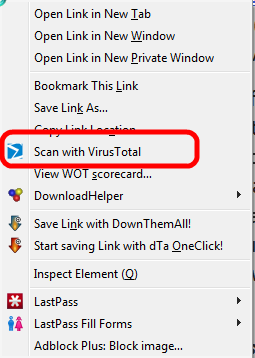
VT will upload and test the file in it's usual manner and presto you have a good idea whether the file in question is "clean".
If you feel challenged by the idea to install an extension in Firefox don't despair, I can do that remotely.
As usual I welcome suggestions and comments right here in the blog.
Click here for a categorized Table Of Contents.
Click here for a categorized Table Of Contents.
Sunday, March 24, 2013
Internet Explorer 10 - Do You Need It?
Again a question from a customer is reason to write this article.
Via email I got this question:
Should I download the update to Internet Explorer 10 for Windows from Microsoft?
I have not used Internet Explorer since you took care of my computer.
I have not used Internet Explorer since you took care of my computer.
Here is my reply:
Thanks for asking. And no, you don't really "need" IE 10.
Currently IE 10 is considered to still have quite a few "first hour" bugs.
Because it's very tight integration with the operating system we will need to upgrade sooner or later.
Since you do not use Internet Explorer I recommend that you allow the update but keep not using it.
Currently IE 10 is considered to still have quite a few "first hour" bugs.
Because it's very tight integration with the operating system we will need to upgrade sooner or later.
Since you do not use Internet Explorer I recommend that you allow the update but keep not using it.
This way you would have everything in place in case that the OS integration ever needs to use one of it's modules.
As usual I welcome comments and suggestions right here in the blog. Thank you in advance.
Click here for a categorized Table Of Contents.
Click here for a categorized Table Of Contents.
Subscribe to:
Posts (Atom)
