Potentially
unwanted
Program
That exactly is what PuPs are. Now that formulation with "potentially" is a protection against frivolous law suits; every PuP does something, in the opinion of it's author definitely something positive and useful. The word potential protects everybody who has to or wants to name these programs from lawsuits.
In my opinion EVERY PuP out there is outright malware and it is sad that existing laws and court decisions force us to use the word potential at all.
I happened to run across a good article (IMHO at least) about PuPs. You can find it here. Yes, it's three years old and I believe I have already linked to it in an earlier article. I hope you don't mind to get the suggestion to refresh your memory.
The article I linked to in the previous paragraph refers to an even older article about one of the major sources of PuPs on our computers, the so called Download Portals.
IMHO a refresher about this might be recommended as well.
Stay safe.
Showing posts with label pup. Show all posts
Showing posts with label pup. Show all posts
Wednesday, May 1, 2019


Monday, March 28, 2016
Ransomware - A Current Example
Please take a close look at this cut out grabbed diectly off my screen:
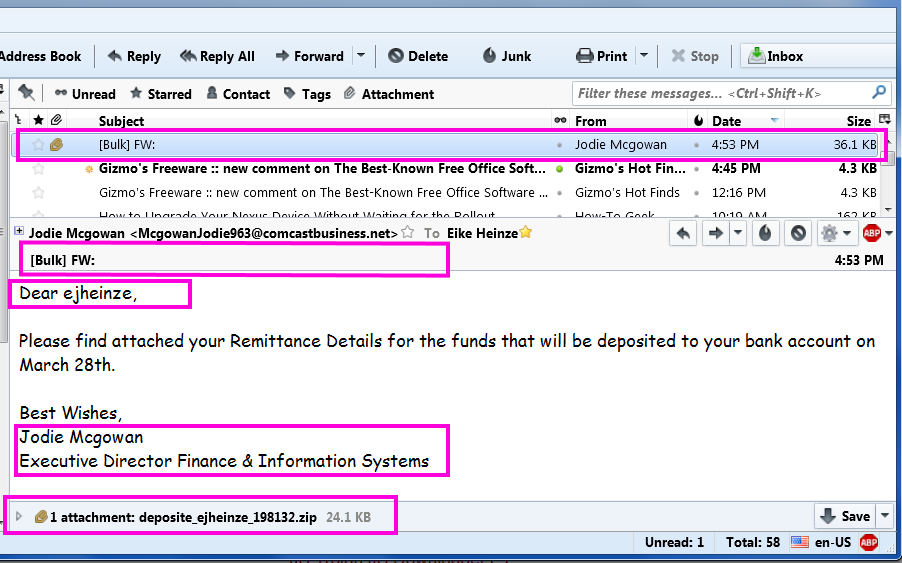
From the top the red frames are around:
- The virus infected scam email in the message list
- The totally unprofessionally empty subject line.
[Bulk] is from my ISP telling me that this email was sent from a server that is known to send out spam
FW: tells me that the email was forwarded - Addressing me with "ejheinze" shows that the sender does not even know my first name;
ejheinze is the part of my email address before the @ character - A totally unprofessional signature
- .zip is one of the potentially dangerous file types
- Hm, no subject and I don't know a Jodie M and Comcast in her email address? I have no business at all with Comcast.
- Unprofessional and bordering on rude.
- Totally unprofessional and in a primitive way impolite.
- From Comcast I would at least expect some sort of company logo or an avatar.
- I wonder what might be in there...
but with all the above I DO NOT CLICK on the attachment!

Delete the email which deletes the attachment as well.
Delete the file from the computer and
Empty Recycle Bin, just to be sure.
Remember: NEVER, EVER click on an email attachment unless you have verified it's legitimacy with the sender.
Stay safe.
Sunday, January 3, 2016
AVG + Google Chrome = TROUBLE
Happy and healthy New Year to everybody!
... It's the first post in 2016 ...
The title describes the newest formula for disaster.
For years I have advised against using Google Chrome as your primary web browser.
For years I have advised against using AVG's free "security" programs.
Now this combination has become a wide open barn door for malicious software and/or viruses to take over your computer. You can read more about the details here.
If you use AVG I recommend to uninstall it and instead rely on Microsoft's Defender respectively Security Essentials in Windows 7. If you run into problems when you uninstall AVG you find AVG's special removal programs here. Take care to download the correct "bittedness" version for your version of Windows.
I you use Google Chrome I recommend to install Mozilla's Firefox browser; in Firefox you need to install two extensions or add-ons:
That plus some applied common sense is all you need to be and stay safe on the Internet.
If you want to do more against eventual advertisement malware and so called PUPs then download THE FREE version from here. Install Malwarebytes only AFTER you read this article about how to install and use it correctly.
Stay safe!
... It's the first post in 2016 ...
The title describes the newest formula for disaster.
For years I have advised against using Google Chrome as your primary web browser.
For years I have advised against using AVG's free "security" programs.
Now this combination has become a wide open barn door for malicious software and/or viruses to take over your computer. You can read more about the details here.
If you use AVG I recommend to uninstall it and instead rely on Microsoft's Defender respectively Security Essentials in Windows 7. If you run into problems when you uninstall AVG you find AVG's special removal programs here. Take care to download the correct "bittedness" version for your version of Windows.
I you use Google Chrome I recommend to install Mozilla's Firefox browser; in Firefox you need to install two extensions or add-ons:
- Adblock Plus and
- WOT (Web Of Trust)
That plus some applied common sense is all you need to be and stay safe on the Internet.
If you want to do more against eventual advertisement malware and so called PUPs then download THE FREE version from here. Install Malwarebytes only AFTER you read this article about how to install and use it correctly.
Stay safe!
Wednesday, June 24, 2015
Important Update for Adobe Flashplayer
Please click this link if you are looking for information on Windows 10.
Adobe released an emergency patch for it's ubiquitous Flash Player.
You should now be at least on version 18.0.0.194.
You can check the version in Control Panel, Flash Player; click on the Update tab.
Caution: Adobe gets paid to coax you to download and install McAfee Security Scan.
If you run your computer like I recommend (and may have set up) then you do not need/want this blind passenger!Adobe's update web page looks like this:

Watch for the always pre-selected check box (big red arrow); please DE-select the check mark before you click on "Install now".
As usual I welcome suggestions and comments right here in the blog.
Click here for a categorized Table Of Contents.
Tuesday, February 17, 2015
Computer(s) And "Friends"
And again it was a customer's email that brings forth another post on this blog; thank you G. G. With his kind permission here is his email:
And here is my reply:
All the above was meant to be the whole post on this issue and then the heavens made me meet with a friend who had given his computer to someone when last fall they were on a hunting excursion.
In this case there are no sexually explicit materials involved but the computer was majorly infected with PuPs, this nasty new kind of malicious programs that I talked about here and here. And here are a few more examples of how we get tricked to allow this stuff to be installed.
I want to add here that you should never activate the Guest account that you find in many versions of Windows. Crooks and hackers know about this account and will be happy to exploit it if they find a computer with activated Guest account.
Update 2/19/2015
I forgot to mention that all good will and the best intentions by us and by others are null and void if my
10 Commandment of Safe Computing are ignored!
As usual I welcome suggestions and comments right here in the blog.
Click here for a categorized Table Of Contents.
I recently have run into a situation about which I don’t know what to do.
For the last few years I have occasionally let a friend, who does not have a computer, use mine. This would be a few times per year. Basically he wanted to go on Craig’s List, so he used my second address, with his own password for a Craig’s List account. I didn’t really question what he was doing, because I know one can sell and buy on Craig’s List.
What I found out is that he was posting sexually explicit ads on Craig’s List.
While the screen shows all the ads have been deleted, I cannot figure out a way to get them off of my computer. An email to Craig’s List was of no help, it just told how to delete the ads, but not how to permanently remove them from my computer.
I’m finding this to be a difficult situation, not only because of the mechanics of getting rid of something I don’t want on my computer, but because of the personal factors involved with someone who was a friend, and trying to weigh in if that relationship can be continued. Any help that you can give will be appreciated.
And here is my reply:
Dear Mr. G,So much for the customer's letter and my response.
I have heard of similar situations like yours and you have my sympathy.
To your question about cleaning up your computer: I can most likely help. I can try to do that via remote support or in a house call, that is your choice. Although since sexually explicit material is involved I would strongly prefer a house call. Working locally on the computer will allow me to disconnect the computer from the Internet which will allow deeper analysis and cleaning and protect the computer and your Internet connection from eavesdropping.
Additionally and because you asked me I will voice some general ideas:
Above advice may seem harsh but consider your situation. Naturally I can not "advise" you on how to handle the situation with your "friend".
- NEVER let a "friend" or relative (children, teenager, nephew/niece, grandchildren!) use your computer in/with your regular user account.
If you are a "normal" home user you most likely always work in an administrator account; that can incur added risks. If you follow this link to the explanation of administrator account please ignore the outdated line "Applies to Windows Vista". These basic concepts apply to all modern operating systems.
- For other people on your computer always create "standard" user accounts.
- NEVER trust that anybody will behave responsibly and that they will follow basic rules of safe computing.
- NEVER let anybody (and not for ANY reason) use an identifier that is tied to your person (email account). It may happen that you will have to answer to the FBI if the person for example uploaded child pornography.
- Only allow any third parties (whether visitor or family!) to use your internet connection (wireless network, cell phones, tablets a.s.o) when you can be certain that your internet connection is secured beyond browser and operating system based measures.
One option of several is described here.
My very personal and for you irrelevant opinion is that this person has proven beyond doubt that he is not a friend, maybe not even an acquaintance worth my time. But I am certain you will find your way of dealing with this aspect of the situation.
Additionally and independent of all the preceding I want to ask your kind permission to re-work your question and my answer into an article on my blog. What has happened to you is so "typical" that it lends itself to wider attention. Naturally your text would be quoted completely anonymously.
All the above was meant to be the whole post on this issue and then the heavens made me meet with a friend who had given his computer to someone when last fall they were on a hunting excursion.
In this case there are no sexually explicit materials involved but the computer was majorly infected with PuPs, this nasty new kind of malicious programs that I talked about here and here. And here are a few more examples of how we get tricked to allow this stuff to be installed.
I want to add here that you should never activate the Guest account that you find in many versions of Windows. Crooks and hackers know about this account and will be happy to exploit it if they find a computer with activated Guest account.
Update 2/19/2015
I forgot to mention that all good will and the best intentions by us and by others are null and void if my
10 Commandment of Safe Computing are ignored!
As usual I welcome suggestions and comments right here in the blog.
Click here for a categorized Table Of Contents.
Friday, August 8, 2014
2014 Update On Malicious Programs
As far as malicious software is concerned much has changed since I last wrote about it. So here is an updated report on the current situation (summer 2014) ans my personal advice on how to stay safe on the Internet. I will talk about
- Definitions
- How to avoid these troubles and a
- Conclusion
Protective tools for the home user
Definitions:
Malware: Short for malicious software. It is a general term used to describe all viruses, worms, spyware, and pretty much anything that is specifically designed to cause harm to your PC, steal your information or throw never ending torrents of advertisements at you.
Virus: A program that copies itself and infects a PC, spreading from one file to another, and then from one PC to another when infected files are copied or shared.
Spyware: Any software that collects your information without your knowledge and usually sends that information back to the creator(s) so they can use that personal information in some nefarious way.
Scareware: A relatively new type of attack, where a user is tricked into downloading what appears to be an antivirus application, which then proceeds to tell you that your PC is infected with hundreds of viruses, and can only be cleaned if you pay for a full license. Of course, these scareware applications are nothing more than malware that holds your PC hostage until you pay for the “full” version. In many cases you can't uninstall them and/or the render the PC unusable.
Trojan horses: Applications that look like they are doing something innocuous, but secretly have malicious code that does something else. In many cases, trojans will create a backdoor that allows your PC to be remotely controlled, either directly or as part of a botnet—a network of computers also infected with this trojan and/or other malicious software. The major difference between a virus and a Trojan is that trojans don't replicate themselves—they must be installed by an unwitting user.
A computer worm uses a network to send copies of itself to other PCs, usually utilizing a security hole to travel from one computer to the next, often automatically without user intervention and often via email.
Ransomware usually encrypts your files that then are useless to you and some even “lock” your computer. The software requests an often quite substantial payment for the means to restore your files into usable form – which even after payment sometimes fails.
Protective tools for the home user
You will always want to run a specialized anti virus program and a specialized on-demand only malware removal tool. I will recommend the only two programs I have learned to trust over the years – and that are easy enough to handle for the home user.
Anti virus: The release of Microsoft Security Essentials has changed the landscape of antivirus software. We finally have a completely free application that protects against viruses, spyware, and other malware without killing system performance like some of the "suites" tend to do. In my extensive personal experience it barely slows down even relatively slow machines and it's user interface is the easiest to use of all I know.
Don't only take my word for it. AV-Test.org found that it detects 98% of their enormous malware database and AV-Comparatives (a widely known anti-malware testing group) found that MSE was one of only three products that did well at both finding and removing malware.
Anti malware: Modern malware, mostly called PuP (potentially unwanted program), is very different from classic viruses. Most anti-virus programs can not detect PuPs and thus do nothing about it. And, as if to add insult to injury, most of them come on the computer because the user got tricked into allowing their installation.
I recommend Malwarebytes Anti-Malware (MBAM for short). Please download it from these two links only (they both go to the same destination).
MBAM is a time proven product and available in a totally sufficient free version. You have to watch during the original install and when you install a program update. The last window of the installer looks like this:
MBAM is a time proven product and available in a totally sufficient free version. You have to watch during the original install and when you install a program update. The last window of the installer looks like this:
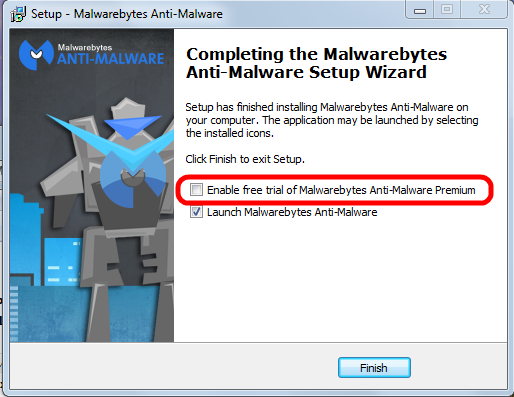
Please pay attention to the marked entry; it's check box is preselected! That means the “trial version” will be activated and after the trial period ends you would have to pay for using the program.
You have to uncheck this check mark.
Eventually the program itself needs to be updated; the installer will run again and again you have to pay attention to this little detail to avoid the for-pay version!
See this article on how to correctly use MBAM.
See this article on how to correctly use MBAM.
How to avoid all these troubles
When it comes to protecting yourself, it's laughable how many people install multiple antivirus applications but don't keep their system updated with the latest patches for the operating system.
If everybody would simply keep their system and all programs up to date, we wouldn't have to worry so much about these problems. If the constant rebooting action of Windows Update has you frustrated, you can always temporarily delay the reboot; remember, only after the reboot the patches are completely installed and active to protect your computer..
Keeping your applications updated is critically important to protect your computer's security. Your firewall won't protect you, and an antivirus software is unlikely to help if you're using an old, vulnerable version of Adobe Flash or Adobe Reader.
Conclusion
In the end, good browsing habits and common sense should be your first line of defense against any kind of malware. I recommend to always run a good security suite like MSE and additionally to use MBAM as an on-demand scanner. That way you're as well protected as easily possible and you can scan your system for malware whenever you want.
So here's the bottom line: In my not so insignificant experience MSE and the on-demand free version MBAM work very well together . Coupled with good browsing habits and common sense this a good combination of security tools and judiciously using them should keep you well protected.
As usual I welcome comments and suggestions right here in the blog. Thank you in advance.
Click here for a categorized Table Of Contents.
Click here for a categorized Table Of Contents.
Monday, October 28, 2013
How Malware Gets Installed
You hear from me that your computer got infected with malware, especially PuPs, and you ask:
"How did that stuff get on my computer? I did not download or install it".Sorry, but in most cases you did give permission to install that garbage alongside some legitimate install or update. You did not do it consciously, you got duped or tricked into allowing the installation. See this article for just one all too common example.
These tricks can have many different shapes and forms. They all are designed to trick or fool us into allowing the garbage to get installed alongside a legitimate program or update. User beware!
One of the more and more common forms is a legitimate install or update that asks something along the lines of
- Default (or Express) install (recommended)
- Custom install (for experienced users)
Simple answer: Money! The authors of PuPs pay for their stuff being bundled with legitimate software. There is a lot of money to be made from advertising!
Distributing viruses is illegal, distributing "search helpers" or tool bars is not!
My advice: When you have to choose between Default and Custom installs always(!) click Custom; it is the only way to check for PuPs because so far at least they are being offered with some sort of a choice to decline or skip them.
If you are in doubt take a screen shot of the window(s) that sparked your suspicion, postpone the install and ask me in an email about it; don't forget to attach the screen shot please.
As usual I welcome suggestions and comments right here in the blog.
Click here for a categorized Table Of Contents.
Tuesday, September 17, 2013
PUPs - The List
This is the list of PuPs that I have encountered; it is not comprehensive and it is growing almost daily...
Update February 12th 2014: This list now is 313 entries long and the malware programmers create new names every day. Keeping this list up-to-date has become increasingly time consuming and I will in the future add only well descriptive new names.
This list makes sense only as part of this article on PuPs.
| 1clickdownload |
| 24x7 Help |
| adawaretb |
| AdpeakProxy |
| Advanced System Protector |
| alotToolbar |
| ammyy |
| Amonetize |
| Anti-phishing Domain Advisor |
| aol toolbar |
| apn |
| apnupdater |
| AppGraffitti |
| Application Updater |
| Ask Search |
| Ask Toolbar |
| Ask Web Search |
| ask.com |
| AskPartnerCoBrandingTool |
| AskPartnerNetwork |
| AskSearch |
| AudioToAudioToolBar |
| AVG SafeGuard toolbar |
| AVG Security Toolbar |
| avg-sitesafety-plugin |
| AvgToolbar |
| AVS4You |
| Babylon |
| BabylonToolbar |
| Backupstack |
| BatBrowse |
| BearShare |
| bearshare applications |
| BearShareMediaBar |
| bearsharemusicboxtoolbar |
| BigFiah Games |
| BingBar |
| BitGuard |
| Blekko |
| blekko toolbars |
| blekkotb |
| Body Media Sync |
| boost_interprocess |
| Browser Helper Objects |
| Browser Manager |
| browserconnection |
| BrowserMngr |
| browsersafeguard |
| Buzzdock |
| BuzzdockTease |
| caphyon |
| chatsessionplugin |
| ChromeHelper |
| ChromeHelper |
| Claro / iSearch |
| CleanUp |
| Common Files\spigot |
| CommunityToolbar |
| Conduit |
| conduitsearchscopes |
| contextmenunotifier |
| CouponPrinter |
| coupons |
| Coupons Amazing |
| cr_installer |
| crossrider.com |
| CrossriderApp |
| custominternetsecurityimpl |
| datacontrol |
| DataMngr |
| DealPly |
| DealPlyLive |
| Default_Page_URL |
| defaulttab |
| defaulttabbrowser |
| DefaultTabSearch |
| DefineExt |
| Delta |
| Delta Search |
| DeskBarEnabler |
| Distromatic |
| Dogpile |
| driver robot |
| driver-soft |
| DriverCure |
| DriverUpdate |
| DropDownDeals |
| DynConIE |
| EasyCopyND |
| eBay.lnk |
| escort |
| eSupport.com |
| Extreme Flash Player |
| F3PopularScreenSavers |
| Facemoods |
| Fast Free Converter |
| feedmanager |
| file scout |
| File Type Helper |
| Findgala |
| FirefoxHelper |
| FirefoxHelper |
| FirstRowSportApp.com |
| firstsearch |
| Fkash Player Pro |
| FLEXnet |
| FocusInteractive |
| Free Offers from Freeze.com |
| Free Ride Games |
| Freecause |
| FreeRIP |
| Freeze.com |
| FromDocToPDF |
| Funmoods |
| funwebproducts |
| GamePlayLab |
| genericasktoolbar |
| Globasearch |
| GreatArcadeHits |
| HiDefMedia |
| Highlightly |
| historykillerscheduler |
| HotspotShield |
| I Want This |
| Ibryte |
| ibrytedesktop |
| IBUpdaterService |
| iecookiesmanager |
| IeHelper |
| IeHelper |
| iLivid |
| iLividIEHelper |
| ilividsetupv1.exe |
| Iminent |
| Inbox |
| inbox toolbar |
| InstallCore |
| InstallIQ |
| InstallServices64\ |
| InternetHelper3.6 |
| InternetUpdater |
| InternetUpdaterService |
| ironsource |
| isafe |
| iwon |
| LaunchApp |
| LCTaskAssistant |
| LessTabs |
| Level Quality Watcher |
| LinkSicle |
| LyricSing |
| MapIt |
| MapsGalaxy |
| mediabar |
| MetaStream |
| metastreamctl |
| MixiDJ |
| Mobogenie |
| MocaFlix |
| Music Toolbar |
| my-web-search |
| mybabylon |
| MyBabylontb |
| MyPC Backup |
| MyScrapNook |
| Mysearchdial |
| MyWebSearch |
| mywebsearch bar |
| OnlineMapFinder |
| OpenCandy |
| optimizer pro |
| OptimizerPro |
| ParetoLogic |
| pc cleaners |
| PC Health Kit |
| PC Health Kit |
| Pc Performar |
| pc speed maximizer |
| pchealthboost |
| pcpro |
| pdfforge |
| PerformerSoft |
| PIP |
| playbryte |
| PlayFizz |
| priam |
| priam_bho |
| pricegong |
| pricesparrow |
| Privitize |
| Prod.cap |
| Protector |
| protector_dll |
| protectorbho |
| pseudotransparentplugin |
| QwixLinx |
| RadioBeta |
| radiorage |
| Re-Markable |
| RebateGiant |
| RebateInformer |
| Recipehub |
| RegClean Pro |
| Registry Mechanic |
| ReMarkIt |
| roboot |
| roboot64 |
| RoyAlCoupon |
| savesenselive |
| SaveValet |
| ScorpionSaver |
| ScreenSaverInstaller |
| scripthelper |
| Search Bar |
| Search Page |
| SearchAssistant |
| SearchPlzBar |
| SearchProtect |
| searchprovidermanager |
| SearchQmMdiaBar |
| Searchqu |
| Searchqu Toolbar |
| SearchquMediaBar |
| SearchScope |
| SearchSettings |
| SearchYa |
| SecondStepInstaller |
| selectrebates |
| SevereWeatherAlerts |
| shop to win |
| Shopping |
| shopping sidekick |
| shoppingbho |
| ShopToWin |
| shopwithshelly |
| Site Ranker |
| SmartBar |
| Snap Do |
| SocialBit |
| SocialPrivacy |
| Softonic |
| SoftonicDownloader |
| software assist |
| Software Update Utility |
| solid savings |
| Sparktrust |
| SpeedAnalysis |
| speeddial |
| SpeedMaxpc |
| speedupmypc |
| SpeedyPC |
| spigot |
| SPUpdater |
| Start Page |
| StartNow Toolbar |
| StartSearch |
| StatusWinks |
| Strongvault |
| supreme savings |
| Swag Bucks |
| SwiftBrowse |
| Systweak |
| Tarma installer |
| tbcommonutils |
| tbdownloadmanager |
| tbhelper |
| TelevisionFanatic |
| thirdpartyinstaller |
| TidyNetwork |
| toolbar |
| Toolbar Cleaner |
| toolbar3 |
| toolbarbroker |
| TotalRecipeSearch |
| Translate Genius |
| Trymedia |
| Uniblue |
| URLSearchHooks |
| utorrentcontrol |
| V9 |
| ValueApps |
| Video downloader |
| VideoDownloadConverter |
| videodownloadconverter search scope monitor |
| ViewpointMediaPlayer |
| viprotocol |
| VirtualBee |
| visi_coupon |
| VisualBee |
| vProt |
| w3i |
| Wajam |
| WajamUpdater |
| Weather_Notifications |
| WeatherBlink |
| WeatherNetwork |
| Web Assistant |
| web-search |
| WebCake |
| WebSteroids |
| WeCareReminder |
| WeDownloadMgr |
| Wheather Alerts |
| WhiteSmoke |
| wincert |
| Wincore MediaBar |
| WinPcap |
| wiseconvert |
| WordOv |
| YahooPartnerToolbar |
| Yontoo |
| yontooieclient |
| Zoom_Downloader |
| Zugo |
As usual I welcome suggestions and comments right here in the blog.
Click here for a categorized Table Of Contents.
Subscribe to:
Posts (Atom)
