Showing posts with label netiquette. Show all posts

Monday, March 28, 2016

Ransomware - A Current Example


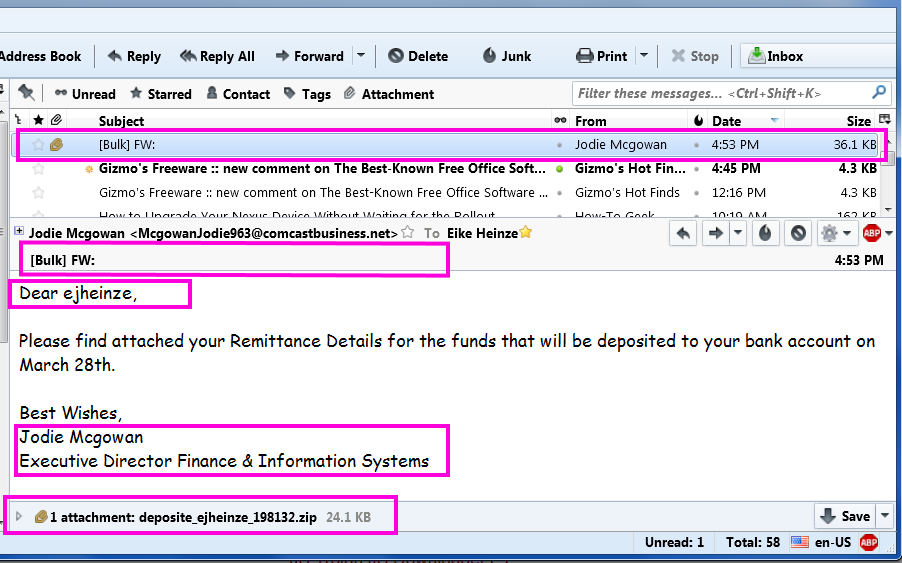
Please take a close look at this cut out grabbed diectly off my screen:

From the top the red frames are around:
  1. The virus infected scam email in the message list
  2. The totally unprofessionally empty subject line.
    [Bulk] is from my ISP telling me that this email was sent  from a server that is known to send out spam
    FW: tells me that the email was forwarded
  3. Addressing me with "ejheinze" shows that the sender does not even know my first name;
    ejheinze is the part of my email address before the @ character
  4. A totally unprofessional signature
  5. .zip is one of the potentially dangerous file types 
Do I really need to comment? Yes? Okay, here we go:
  1. Hm, no subject and I don't know a Jodie M and Comcast in her email address? I have no business at all with Comcast.
  2. Unprofessional and bordering on rude.
  3. Totally unprofessional and in a primitive way impolite.
  4. From Comcast I would at least expect some sort of company logo or an avatar.
  5. I wonder what might be in there...
    but with all the above I DO NOT CLICK on the attachment!
Instead I save the attached file and submit it to Virus Total (Wikipedia). And the "success" confirms my suspicion. 17 out of  58 anti virus programs flag the file as infected. See for yourself:
The rest was simple:
Delete the email which deletes the attachment as well.
Delete the file from the computer and
Empty Recycle Bin, just to be sure.

Remember: NEVER, EVER click on an email attachment unless you have verified it's legitimacy with the sender.

Stay safe.


Friday, August 8, 2014

2014 Update On Malicious Programs


As far as malicious software is concerned much has changed since I last wrote about it. So here is an updated report on the current situation (summer 2014) ans my personal advice on how to stay safe on the Internet. I will talk about
  • Definitions
  • Protective tools for the home user
  • How to avoid these troubles and a
  • Conclusion

Definitions:

Malware: Short for malicious software. It is a general term used to describe all viruses, worms, spyware, and pretty much anything that is specifically designed to cause harm to your PC, steal your information or throw never ending torrents of advertisements at you.

Virus: A program that copies itself and infects a PC, spreading from one file to another, and then from one PC to another when infected files are copied or shared.

Spyware: Any software that collects your information without your knowledge and usually sends that information back to the creator(s) so they can use that personal information in some nefarious way.

Scareware: A relatively new type of attack, where a user is tricked into downloading what appears to be an antivirus application, which then proceeds to tell you that your PC is infected with hundreds of viruses, and can only be cleaned if you pay for a full license. Of course, these scareware applications are nothing more than malware that holds your PC hostage until you pay for the “full” version. In many cases you can't uninstall them and/or the render the PC unusable.

Trojan horses: Applications that look like they are doing something innocuous, but secretly have malicious code that does something else. In many cases, trojans will create a backdoor that allows your PC to be remotely controlled, either directly or as part of a botnet—a network of computers also infected with this trojan and/or other malicious software. The major difference between a virus and a Trojan is that trojans don't replicate themselves—they must be installed by an unwitting user.

A computer worm uses a network to send copies of itself to other PCs, usually utilizing a security hole to travel from one computer to the next, often automatically without user intervention and often via email.

Ransomware usually encrypts your files that then are useless to you and some even “lock” your computer. The software requests an often quite substantial payment for the means to restore your files into usable form – which even after payment sometimes fails. 


Protective tools for the home user

You will always want to run a specialized anti virus program and a specialized on-demand only malware removal tool. I will recommend the only two programs I have learned to trust over the years – and that are easy enough to handle for the home user.

Anti virus: The release of Microsoft Security Essentials has changed the landscape of antivirus software. We finally have a completely free application that protects against viruses, spyware, and other malware without killing system performance like some of the "suites" tend to do. In my extensive personal experience it barely slows down even relatively slow machines and it's user interface is the easiest to use of all I know.

Don't only take my word for it. AV-Test.org found that it detects 98% of their enormous malware database and AV-Comparatives (a widely known anti-malware testing group) found that MSE was one of only three products that did well at both finding and removing malware.

Anti malware: Modern malware, mostly called PuP (potentially unwanted program), is very different from classic viruses. Most anti-virus programs can not detect PuPs and thus do nothing about it. And, as if to add insult to injury, most of them come on the computer because the user got tricked into allowing their installation.

I recommend Malwarebytes Anti-Malware (MBAM for short). Please download it from these two links only (they both go to the same destination).

MBAM is a time proven product and available in a totally sufficient free version. You have to watch during the original install and when you install a program update. The last window of the installer looks like this:
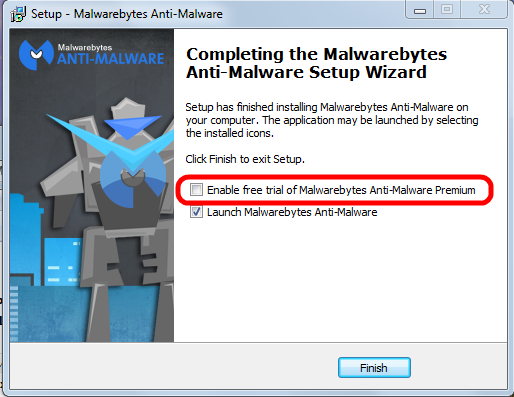


Please pay attention to the marked entry; it's check box is preselected! That means the “trial version” will be activated and after the trial period ends you would have to pay for using the program.

You have to uncheck this check mark.

Eventually the program itself needs to be updated; the installer will run again and again you have to pay attention to this little detail to avoid the for-pay version!

See this article on how to correctly use MBAM.


How to avoid all these troubles

When it comes to protecting yourself, it's laughable how many people install multiple antivirus applications but don't keep their system updated with the latest patches for the operating system.

If everybody would simply keep their system and all programs up to date, we wouldn't have to worry so much about these problems. If the constant rebooting action of Windows Update has you frustrated, you can always temporarily delay the reboot; remember, only after the reboot the patches are completely installed and active to protect your computer..

Keeping your applications updated is critically important to protect your computer's security. Your firewall won't protect you, and an antivirus software is unlikely to help if you're using an old, vulnerable version of Adobe Flash or Adobe Reader.


Conclusion

In the end, good browsing habits and common sense should be your first line of defense against any kind of malware. I recommend to always run a good security suite like MSE and additionally to use MBAM as an on-demand scanner. That way you're as well protected as easily possible and you can scan your system for malware whenever you want.

So here's the bottom line: In my not so insignificant experience MSE and the on-demand free version MBAM work very well together . Coupled with good browsing habits and common sense this a good combination of security tools and judiciously using them should keep you well protected.

As usual I welcome comments and suggestions right here in the blog. Thank you in advance.

Click here for a categorized Table Of Contents.


Sunday, August 11, 2013

Privacy On The Internet - A Contradiction

Many times I have mentioned one of the more technically oriented info services that I am subscribed to. On that blog I found an IMHO good article about privacy on the internet or, better, the lack thereof. The article is here. I will quote it literally because of a comment I want to add.
  1. There is no such thing as 100% privacy on the Internet.
    You can take steps to lessen the intrusions into your privacy but there is no way to guarantee that nothing can be learned about you and your affairs. Learn to live with this reality and act accordingly.
  2. Like it or not, you have to trust somebody.
    Anything you do on the Internet has to go through numerous intermediaries, routers, networks, etc. Ultimately, you have to trust the security of your ISP and other services that you use.  VPNs and proxy servers can increase your security but they are not foolproof. 
  3. Privacy comes at the cost of convenience.
    The more measures to increase privacy that you use, the more cumbersome using the Internet becomes. Locked doors are harder to use than open ones. The correct trade-off between privacy measures and convenience depends on how you use the Internet. If you like to live dangerously, you may need a lot of privacy measures. If you are a casual web surfer and send harmless emails, not so much. Choose the level of privacy appropriate to your Internet usage.
  4. There are innumerable ways to spy on wireless or cell connections.
    There is no standard encryption that can’t be broken and deciphered but using a strong version of WPA encryption on your wireless router is better than not. Avoid using public hot-spots for private business.
  5. Assume that all email that you send is public.
    If you must use email to send sensitive material, use some form of strong encryption. Send the encryption key to the recipient by some other means than email.
  6. Deleted email is probably still there somewhere.
    You may delete an embarrassing or private email but it may very well still be on the email servers or on the other party's computer.
  7. Everything you do or say on the Internet is recorded somewhere, usually in numerous places.
    You can take measures to make it hard to trace your Internet actions back to you personally but there is always the chance that a persistent and technically adept person or agency can track you down. However, most of us aren't important enough to warrant that kind of effort.
  8. What you post on social sites might as well be on a public bulletin board.
    Privacy measures at Facebook and other social sites are full of holes. Assume that anybody can see what you post.
  9. Be careful what you reveal on the Internet
    Use disposable email addresses and pseudonyms as much as possible. Don't reveal anything you don't have to when signing up for some service. Assume any information you reveal on one site gets shared or sold.
  10. It is almost impossible to remove all traces of something once it is on the Internet.
    Those pictures of yourself that you posted when drunk can come back to haunt you years later.
  11. Advertisers want to track you.
    Advertisers want to know as much as possible about your activities so they can target their ads for you. They keep developing more and better methods to track your Internet activities. Gizmo’s has many articles about ad blocking and control of tracking cookies. 
  12. Monitor your credit cards and bank accounts daily.
    Personal records stored in company databases are stolen all the time. If you have online credit card accounts, monitor them for unauthorized activity daily. Also monitor any online banking or financial accounts daily.
Especially to points numbers 7 through 10 I want to add: Everything you ever put out on the internet will never go away. Clever sleuthing will bring it to the light of the day no matter how firmly you believe that "deleted" items or accounts should be gone for good. Usually they are not gone, you just can't access them anymore.

As usual I welcome suggestions and comments right here in the blog.

Click here for a categorized Table Of Contents.

Thursday, December 20, 2012

Comments with Links

I always experience a comment here on the blog as a tap on the shoulder, especially if they are favorable. And luckily most are.

But some comments, often short ones, come with links to web sites. I have tested a few of these links and the web sites either were directly marked as red in Web Of Trust or they linked to people selling THEIR services or merchandise.

THIS BLOG IS NOT AN ADVERTISING PLATFORM FOR ANYONE!

Please do not salt your comment with any link. I do not have the time to check the veracity and trustworthiness of every link!

All comments with links will be deleted and will NOT appear on the blog. Save both of us the trouble.

As usual I welcome comments and suggestions right here in the blog. Thank you in advance.
Click here for a categorized Table Of Contents.

Saturday, November 10, 2012

On Incomplete Emails and Free Advice


All too often I receive emails from customers with questions about technical issues. Now, please remember that from my side I think about this as a business communication, not a personal one. What I would expect is at least proper identification and contact info, i.e. the sender's full name, address info and phone number. Please do that in every email you send to me or I have to go on a wild goose chase for that info.
And frankly spoken, I don't have the time to chase this sort of wild geese. If this info is missing most likely you will get a standard reply, text see below following the ---------

Please consider as well:
  • My email advice is a free service!
  • pollidoll@isp.com signed with Polli is NOT correct identification. (This thoughtless incivility is pretty rude – in my book at least).
And no, I am not going to apologize for this remark. You can not expect a civil and matter-of-fact response if the most basic information, politeness and formality are missing, sorry. You are asking professional advice, please be "professional" as well.

Please remember, I do not retain any personal info about my customers!
Please include technical info on what you are asking about; that includes all technical details, like what operating system you use, what program you are asking about, the version numbers and so on.

In this context it may be adequate to point to one of the IMHO better web sites about Netiquette (etiquette on the Internet), especially the pages about email etiquette.

And another thing in this context: It has happened that after receiving above mentioned reminder email I got a reply with just the name, phone number and address. That is outright rude, sorry.

PLEASE use the Reply button and leave all original text in the mail; this way I have the context of the original question in the email and do not need to go on a trip with the divining rod to find the original mail. Thank you for your cooperation. Subsequently added: You may want to read this post as well; it gives more information concerning the same basic issue.

Another BIG issue is the amount of advice about trivial basic things that is being asked. When you're asking a professional for free information and advice then please always remember what Abraham Lincoln said:
"A lawyer's time and advice are his stock in trade."
"Stock in trade" means what he or she sells in order to earn a living. Just as a lawyer's knowledge of the law is her/his "stock in trade" my knowledge and experience with computers is my "stock in trade".

Please be reasonable about how much and how often you are asking for free work and advice. And let me know that you have tried to find an answer yourself and where you looked for it. Trust me, there are way too many people out there that just ask without ever having made the slightest attempt at finding an answer themselves.

When I get an e-mail like, "how can I turn the greyed-out save as back on" I have to ask for more specifics or just refer the sender to my blog. A carefully targeted question, such as "How can I activate Save As... in Firefox's File Menu when it is greyed out" will get a specific answer and not just a request for more information.

And, by the way, with enough interest in your computer and security on the Internet you could have read my blog in the first place, right?

And in this context something different: Currently it is happening that possibly a child of a customer is emailing me; he did not tell me whose child he is, he does not give me his address, only his cell number. He seems not to understand that I can get in trouble with the law if I communicate with him without parental consent. So please, I need to be able to identify what customer you are related with if you are a minor son or daughter of a customer! Your personal cell phone number is NOT sufficient, I need parental consent. And please consider that I did not “make” this society and its laws.

As usual I welcome comments and suggestions right here in the blog.

Thank you in advance.

----------------------
I am very sorry but I can't help with a quick phone call that might solve your immediate problem. Why? Because sadly you did not give me your phone number in your email. This way I can not help directly with a quick phone call to eventually resolve your problem via remote support.
Please read this entry on my blog and amend this and all future emails accordingly.
This is obligatory for all support questions by email, always and every time!
Please use Reply, do not just write a new email. Reply keeps the context in the email and thus saves a lot of time consuming and frustrating search.
Thank you for your cooperation.
Regards
Eike
----------------------

 As usual I welcome suggestions and comments right here in the blog.

Click here
for a categorized Table Of Contents.

Saturday, May 28, 2011

Help Requests - Correct, Complete And Courteous Please

Just about a week ago an email conversation with an acquaintance and customer of mine went totally, horribly wrong. On first impulse I wanted to completely post the email exchange with my background thoughts added but all names except mine and all locations neutralized. My dear wife convinced me not to do that but rather try to explain why I asked the questions I asked. All this appears to be sufficiently important (to me at least!) to put it in a generalized form and to publish it here.

I need to write something that truthfully and forcefully makes it clear beyond excuses, cop-outs and exceptions why I do request certain information. I have to get this across in a way that “hits home” with the vast majority of my customers; if I can't get this done I am going to burn out.

Here we go:

I receive many, many emails from customers with questions about technical issues and so far I believe not a single email has remained unanswered, either by an email reply or a phone call. And please consider that my email advice is a free service!
 

Please remember, I do not retain any personal information about my customers! No phone numbers, no address information and no information about their computer configuration. Why you ask? Simply because I need to avoid any risk of eventually being accused of “leaking” any of that to someone who is not entitled to this info and may misuse it.

From my side I see these emails with support questions as business communications, not personal ones. What I would expect in business communications is at least proper identification and contact info, that is the sender's full name, phone number and eventually address info. An example: A sending email address like risibisibear@isp.com signed with John is NOT correct identification. “risibisibear” does not resemble any name I know and I know at least twenty gentlemen named John.

And I ask to please include that information in every email you send to me or I have to go on a wild goose chase, either scrolling and scrolling through a long thread or even read through potentially many old emails from that customer to find that info. Frankly, I don't have the time to chase this sort of wild geese. If this info is missing most likely you will get a standard reply asking for the missing info.

As far as I know email is a fast and convenient way to send someone a written note, aka a little letter. Do you like to get letters that miss addressing you with your name and/or missing a signature at the end? I didn't think so.

In this context I point you to one of the IMHO better web sites about Netiquette (etiquette on the Internet), especially the pages about email etiquette.

Every week I see many customers and I get many support questions via email. If I were to remember all technical and environmental details of all the many installations I have seen there wouldn’t be space left for anything else in my scatterbrain. And if I had to hunt down contact information every time I get a request from a customer there wouldn't be any time left to do actual customer visits.

Please include technical info on what you are asking about; that includes all technical details, like what operating system you use, what program you are asking about, the version number and so on. Simply give as much detail as humanly possible if you want fast and good answers. These details can be (but are by no means limited to)

     - a screen shot instead of re-typing lengthy messages
     - tell me what program you are using
     - what you were attempting to do or achieve  
     - please spell names correctly
     - please use the reply button; this leaves the context in a longer conversation so I don't need to go on a wild goose chase to establish the context again
     - if your question is about emails please tell me whether you “do” emails in a web browser and which one it is or in an email client like Thunderbird or Outlook.

Did you see my request to please send a screen shot? If that seems too difficult please read this article on my blog for more details; thank you.

Should you send your email from another than your own email account then please tell me so. I don't care for your reasons to do so but I do care about correctly addressing my reply!

PLEASE remember above explanations and understand that I need to insist on everybody's cooperation. I do not want to get forced into a situation where I would have to charge for this service; that really is the last thing I want to do!

Lastly I want to quote two snippets of text from this article on the NetManners blog:
"Simply because one is the “customer” certainly doesn’t give them permission to e-mail without any details, courtesy or proper e-mail etiquette."

"… when you e-mail with courtesy, details and clarity, you can bet the other side will value your business and go out of their way … to promptly answer your requests with the same! "
Am I asking too much? Frankly, I don’t think so.

As usual I welcome comments and suggestions right here in the blog. Thank you in advance.

Click here for a categorized Table Of Contents.

Thursday, August 5, 2010

Hoaxes, Scams and Urban Legends

Here is a good and comprehensive list of reliable sources to check out the next email that asks you to “Send this to everybody you know” and/or tries to scare you into forwarding it.

PLEASE use these free services instead of just hitting Forward.

As usual I welcome comments and suggestions right here in the blog. Thank you in advance.

Click here for a categorized Table Of Contents.

Friday, January 1, 2010

Happy New Year To Y’all

And again I have squandered a wonderful year and am facing a new one. It has never been my thing to make big “New Years Resolutions” or the like. I have seen it too many times that such resolutions hardly survive a few weeks and much less a full year.

Today I ran across two sets of New Years Resolutions that have to do with our computers; not only was I intrigued by that association but when reading them I realized how much they are applicable to me – and to others.

With all due respect towards my customers I know that the  first set of resolutions applies to the majority of computer users. I truly wish that more people would abide by these oh-so-simple and oh-so-basic rules of politeness, respect and decent manners.

This first set of resolutions comes from the Netmanners.com web site; this is a place I can highly recommend! Judith Kallos, the owner of Netmanners.com, IMHO deserves to be as proverbially known as Miss Manners, Emily Post.

The second set of resolutions comes from DownloadSquad.com and definitely is geared much more at technically experienced computer users.

Despite a few misgivings about some of the statements in these resolutions, the general gist IMHO is quite acceptable. As far as some of my customers are concerned please be warned, quite a bit of this is fairly technical.

If you have worked your way through to this point you deserve a reward. Allow your pensive, thoughtful, imaginative, spiritual, funny, inspirational and, and, and… side to be captivated by Monina Velarde’s newest achievement and visit her New Year’s Resolution Generator. Just click the  “Gimme More” button and be surprised. I bet you will find something to like.

As usual I welcome comments and suggestions right here in the blog. Thank you in advance.

Click here for a categorized Table Of Contents.

Sunday, November 8, 2009

Scared Again

And again I received a well meaning “warning”. It went like this:

New  Virus (NO JOKE)
This is  legitimate. Please pass this along to your  friends.
The newest virus circulating is the UPS/FedEx/DHL Delivery Failure.
You will receive an email from UPS/Fed Ex Service along with a packet number.
It will say that they were unable to deliver a package sent to you on such-and-such a date.
It then asks you to print out the invoice copy attached.  
DON'T TRY TO PRINT THIS… IT LAUNCHES THE VIRUS!
Pass  this warning on to all your PC operators at work and home.  
Snopes  confirms that it is real.
http://www.snopes.com/computer/virus/ups.asp

True, that IS a known scam to distribute a virus program. BUT:

  1. If nobody in the household ordered anything that we expect through UPS/FedEx/DHL it can only be a scam, right?
  2. And again, if we are observant of what we are doing we will see that the link in the email does NOT go to a legitimate UPS/FedEx/DHL web site.
  3. AND: Even children should know that these three carriers will NEVER notify any recipient via email. If they can not deliver a package they always leave a paper notification.
  4. And NO, but absolutely no recipient of a package can ever print an invoice through the freight carrier’s service. Only the buyer of the merchandise can do that on the merchant’s web site, right?

So really, only when we are un-observant we would fall for a dumb social engineering trick like this in the first place. I don't think anybody I know is in that category.

Everybody out there, PLEASE do not forward such tracts to me.

And still, there is a lesson to be learned here:

This curiosity impulse that makes a person click “to see what is in the package” (?) is all the hacker wants from us. This one click will lead to a maliciously programmed web site that may attempt to coax us into revealing personal information, that may immediately download malicious programs into our computer and so on – unless we actually use our common sense before we click – or forward a message like this.

As usual I welcome comments and suggestions right here in the blog.

Thank you in advance.

What To Do After A BSOD

The dreaded Blue Screen Of Death (BSOD) can have way too many reasons for specific advice. But there are some reasons that are more prevalent than others like these three examples:

  1. A BSOD can be an indication of a corrupted or incorrect device driver (software that controls some piece of hardware like a printer).
  2. A BSOD can be caused by a faulty memory chip.
    Yes, they worked yesterday; but sometimes they get weak over time and then, all of a sudden, they throw a BSOD.
  3. Some other hardware failure on the motherboard; mostly very bad...

The remedy for number 1 can be time consuming but generally it is possible to correct these errors.

Number 2 can be tested for in relatively little time, usually less than half an hour. Whether I happen to have a suitable replacement memory chip along is dictated by the luck of the draw.

Number 3 can be very tricky to trace, especially if it occurs randomly. I am neither qualified nor equipped to do that and would in such a case refer to a local hardware repair store; luckily I know a good technician who has a store in the area – and on top of being good he is honest; that is a rare combination in this field. As always with computers you should carefully consider all options. If the computer in question is more than three years old I usually advise to at least consider a new machine versus the vagaries of a motherboard repair or replacement.

You can help a great deal if you please would collect some information from the BSOD before you send me an email asking for advice. Here is an example of a BSOD.

BSOD

Please look for the marked portions of this example and write down what appears in these locations when you see it. If you call me please have this information available when we talk. Or please send an email with this info once you have three or four occurrences documented. Caution: Some of this info may or may not be present; please note if it is not present; it may be in different places and/or sequence as well. In above example we have in this sequence:

  1. The name of the file that caused the problem,
  2. a textual error code,
  3. a so-called stop-error code and
  4. again the file name of the driver that caused the error.

The stop error code and if available the file name are most important to trace errors in a BSOD and to get at the root cause! The stop error code always begins with “0x” and should be in every BSOD.

I know, recording these details is tedious but I hardly can stay at your house and wait for the next BSOD to happen.

Let's cooperate to get at the root of this and "Thank You" in advance!

As usual I welcome comments and suggestions right here in the blog.

.

Friday, September 25, 2009

On Incomplete Emails the 2nd

Once more I got an email that kind of “pushed my button”. Here is the full text minus the individual’s name of course.
Subject: Re: McAfee Sight Adviser
Eike,
The McAfee sight adviser shows up grey in the lower tool bar. The sight adviser also does not work when using the search engine.
Is there an easy fix?
Signed with name
"It is nice that he spelled my name correctly but what do I do with an email like this” I thought for the longest time.
Finally I chose this reply:
Xyz,
With the information you provide there is no fix because
- you don't give any detailed info on what program you are using,
- what version this program is, 
- what you are doing and
- why you draw the conclusions that you draw.
You stir up questions hat I need answered before I even can address the matter at hand.
- How do you tell that it does not work?
- What search engine are you using?
- Have you checked if you have the latest version?
- Have you turned on "Highlight search results" in it's General Settings?
And by the way, it's called McAfee Siteadvisor.
Regards
Eike
Now, what are the lessons to be learned here?
  1. Simply give as much detail as humanly possible if you want useful answers.
  2. Send me a screen shot instead of re-typing lengthy messages.
  3. Spell names correctly (not only mine).
  4. And let me know that you appreciate the free email advice that I offer.
Am I asking too much? Frankly, I don’t think so.
I get many request every week. If I were to remember all technical and environmental details of all the many installations I see every week there wouldn’t be space left for anything else in my scatterbrain. And if I had to hunt down contact information every time I get a request from a customer there wouldn't be any time left to do actual customer visits.
As a reminder: If you read down to here you may want to read my newest rant about incomplete emails as well; thank you.
Please comment with your thoughts right here in the blog.
Thank you in advance.

Tuesday, April 28, 2009

Anti - WHAT? A real life rant

I just received an email from a customer that is so typical that I post the text and my reply here literally with no further comment.

YOUR comments right here in the blog are welcome as always.

Thank you.

------------------------------------
The text of the email:
"With ATT automatically providing antispyware I don't need to renew avasti, right?".

My response:
xyz,
It is up to you to decide if you want to trust 27 years of PC
experience and 45 years of computer experience or if you prefer to overlook the obvious self-interest of big companies and trust their promises.

Don't we all just now see where it's getting the country and the world if we trust in what "the big guys" are telling us?

And then, as a fact, you talk about "antispyware".
avast! is an anti-virus program.
Don't update it and/or remove it at your own risk!

Additionally I would appreciate if you would please read this entry on my blog.

------------------------------------

Sunday, April 26, 2009

On incomplete Emails - the original post


An updated version of this article is here. 

All too often I receive emails from customers with questions about technical issues. Now, please remember that from my side I think about this as a business communication, not a personal one. What I would expect is at least proper identification and contact info, i.e. the sender's full name, address info and phone number. Please do that in every email you send to me or I have to go on a wild goose chase for that info.
And frankly spoken, I don't have the time to chase this sort of wild geese. If this info is missing most likely you will get a standard reply, text see below following the ---------
Please consider as well:
  • That my email advice is a free service!
  • And pollidoll@isp.com signed with Polli is NOT correct identification.
  • This thoughtless incivility is pretty rude – in my book at least.
And no, I am not going to apologize for this remark. You can not expect a civil and matter-of-fact response if the most basic information, politeness and formality are missing, sorry.
Please remember, I do not retain any personal info about my customers!
Please include technical info on what you are asking about; that includes all technical details, like what operating system you use, what program you are asking about, the version number and so on.
In this context it may be adequate to point to one of the IMHO better web sites about Netiquette (etiquette on the Internet), especially the pages about email etiquette.
And another thing in this context: It has happened that after receiving above mentioned reminder email I got a reply with just the name, phone number and address. That is outright rude, sorry. PLEASE use the Reply button and leave all original text in the mail; this way I have the context of the original question in the email and do not need to go on a trip with the divining rod to find the original mail. Thank you for your cooperation.
Subsequently added: You may want to read this post as well; it gives more information concerning the same basic issue. 
Another BIG issue is the amount of advice about trivial basic things that is being asked. When you're asking a professional for free information and advice then please always remember what Abraham Lincoln said:
"A lawyer's time and advice are his stock in trade."
"Stock in trade" means what he or she sells in order to earn a living. Just as a lawyer's knowledge of the law is her/his "stock in trade" my knowledge and experience with computers is my "stock in trade".
Please be reasonable about how much free work and advice you are asking for. And let me know that you tried to find an answer yourself and where you looked for it. Trust me, there are way too many people out there that just ask without ever having made the slightest attempt at finding an answer themselves.
When I get an e-mail like, "how can I turn the greyed-out save as back on" I have to ask for more specifics or just refer the sender to my blog. A carefully targeted question, such as "How can I activate Save As... in Firefox's File Menu when it is greyed out" will get a specific answer and not just a link to my blog.
And, by the way, with enough interest in your computer and security on the Internet you could have read my blog in the first place, right?
And in this context something different: Currently it is happening that possibly a child of a customer is emailing me; he did not tell me whose child he is, he does not give me his address, only his cell number. He seems not to understand that I can get in trouble with the law if I communicate with him without parental consent. So please, I need to be able to identify what customer you are related with if you are a minor son or daughter of a customer! Your personal cell phone number is NOT sufficient, I need parental consent. And please consider that I did not “make” this society and it’s laws.
As usual I welcome comments and suggestions right here in the blog.
Thank you in advance.
----------------------
I am very sorry but I can't help with a quick phone call that might solve your immediate problem. Why? Because sadly you did not give me your phone number in your email. This way I can not help directly with a quick phone call to eventually resolve your problem via remote support.
Please read this entry on my blog and amend this and all future emails accordingly.
This is obligatory for all support questions by email, always and every time!
Please use Reply, do not just write a new email. Reply keeps the context in the email and thus saves a lot of time consuming and frustrating search.
Thank you for your cooperation.
Regards
Eike
----------------------

Tuesday, December 2, 2008

How to Deal With Chain Letters

Ever so often I get chain letters, just like you get them. Besides the fact that they are illegal and mostly simple bogus here is what I do - if I can identify the sender. I send him an unsolicited email back; it has the following contents:


Dear friend;

Thank you for remembering me and trying to stay in touch. This is my personal reply to the chain letter you recently sent to me.

I would highly appreciate if you took the time and read the text that follows this message.

I always love to get a personal message, especially from you; but please remove me from your address list for chain letters.

Thank you in advance. Eike

--------------------------------------------------

This letter has been sent to you to stop you from sending out chain letters. The original was written in the 3rd century A.D. by a deranged member of the Most Holy Post. That version vanished during the Spanish Inquisition (nobody suspects the Spanish Inquisition though!). More recently, it was communicated telepathically to Shirley MacLaine by monks on the planet Mongo in the eighth dimension. Now it has been sent to you. Good things will soon be happening to you if you follow the instructions given in this letter.

This is no joke! If you do what this letter says to do, every person who owes you money will repay you. The IRS will never audit you again. Hugh Hefner will invite you to house-sit at the playboy mansion while he and the missus go on a six month vacation. Finally, you will be spotted by a head hunter and whisked off into the fast paced life of an insurance salesman in Kansas.

To get all of this good fortune, you must keep this letter for the next five years. If at any time during that time you receive a chain letter, don't send out any copies of it. Instead, you must send this anti-chain letter back to the person who sent you the chain letter. If you don't know who sent it, send a copy of this letter to a random person. At the end of five years, do the following 'de-briefing' ceremony, and you will be done:

  1. Throw salt over your shoulder.
  2. Throw salt over Madonna's shoulder.
  3. Throw Madonna over your shoulder.
  4. Walk under a ladder.
  5. Do the rumba under a ladder.
  6. Pray the rosary.
  7. Pray the zippity-doo-dah, zippity-ay.
  8. Drink Vitameatavegimin (3 tablespoons at a time)
  9. Mix 2 frogs, 3 locks of Michael Jackson's hair, 2 turtledoves, and the remains of this letter in a cauldron and boil at 375 degrees for 2 hours and 3 minutes.
  10. Place the whole mixture in the microwave, sauté for 6:53 and place in serving bowls, let chill.
  11. Gargle and spit.

Don't send out those chain letters and see what happens. You will be shocked to find that none of their curses come true. The person you send this anti-chain letter to will be heartily amused, and besides, it’s much easier to send out one copy of this than 5 or 20 copies of some dreary chain letter.

Remember, NEVER send chain letters.

Please do not ignore this letter, rather heed this sage and time proven advice.

------------------------------------------------

As usual I welcome comments and suggestions right here in the blog.

Thank you in advance.


Sunday, June 8, 2008

Real Life Lack of Common Sense


Just a little while ago I received the following email from a concerned customer of mine. I know it’s quite a mouthful but I believe it’s worth reading all the way through it so you understand my conclusions at the end.

> To:
> Subject: Bad virus
> Date: Fri, 6 Jun 2008 11:34:57 -0500>
> ---------- Forwarded Message ----------
>
> http://www.snopes.com/computer/virus/postcard.asp
>
> Hi All, I checked with Norton Anti-Virus,
> and they are gearing up for this virus!
>
> I checked Snopes (URL above:), and it is for real!!
>
> Get this E-mail message sent around to your contacts
> ASAP. PLEASE FORWARD THIS WARNING AMONG FRIENDS,
> FAMILY AND CONTACTS!
> You should be alert during the next few days.
> Do not open any message with an attachment entitled
> 'POSTCARD,' regardless of who sent it to you.
> It is a virus which opens A POSTCARD IMAGE, which
> 'burns' the whole hard disc C of your computer.
>
> This virus will be received from someone who has
> your e-mail address in his/her contact list.
> This is the reason why you need to send this e-mail
> to all your contacts.
> It is better to receive this message 25 times than to
> receive the virus and open it.
>
> If you receive a mail called' POSTCARD,' even though
> sent to you by a friend, do not open it!
> Shut down your computer immediately.
>
> This is the worst virus announced by CNN.
> It has been classified by Microsoft as
> the most destructive virus ever.
> This virus was discovered by McAfee yesterday
> and there is no repair yet for this kind of virus.
> This virus simply destroys the Zero Sector of
> the Hard Disc where vital information is kept.
>
> COPY THIS E-MAIL, AND SEND IT TO YOUR FRIENDS.
> REMEMBER: IF YOU SEND IT TO THEM,
> YOU WILL BENEFIT ALL OF US.
>
> Snopes lists all the subject lines this email
> could come with.
></UNDISCLOSED-RECIPIENT:;>

So far so good, all that is nothing new.

As you can see at the bottom of the Snopes page this thing is known at least since August 13th, 2007.

Somebody just got scared all over again and there goes the next avalanche of spam emails; yes, SPAM emails!

I try to explain to all my customers that greeting cards, even right around your birthday, anniversary or the like should ALWAYS be met with high suspicion; and that even if you know the supposed sender.

For those of my customers that listen it should be a question of honor NOT to give in to natural curiosity and click on a link in a “Postcard” or greeting card or the like.

In the example on Snopes the reader is asked to go to www.123greetings.com. A simple check with SiteAdvisor will show that 123greetings.com is a malicious web site.

My conclusion:

If you trust any old greeting card or postcard or the like it is your own fault when your computer gets wrecked! I’d love to help you getting it going again.

It is so easy to check these things out yourself that I am hard pressed to feel sympathy if anyone’s computer gets “nailed” because they forgot to check; it tells me that again somebody had taken their “common sense coat” off before they sat down at their computer.

As usual I welcome comments and suggestions right here in the blog. Thank you in advance.

Click here for a categorized Table Of Contents.

Wednesday, June 4, 2008

About chain letters

Dear friend;

Thank you for remembering me and trying to stay in touch. This is my personal reply to the chain letter you recently sent to me.

I would highly appreciate if you took the time and read the text that follows this message.

I always love to get a personal message, especially from you; but please remove me from your address list for chain letters. Thank you in advance.

Eike

--------------------------------------------------

This letter has been sent to you to stop you from sending out chain letters. The original was written in the 3rd century A.D. by a deranged member of the Most Holy Post. That version vanished during the Spanish Inquisition (Nobody suspects the Spanish Inquisition !!!!!!!!!). More recently, it was communicated telepathically to Shirley MacLaine by monks on the planet Mongo in the eighth dimension. Now it has been sent to you. Good things will soon be happening to you if you follow the instructions given in this letter.

This is no joke! If you do what this letter says to do, every person who owes you money will repay you. The IRS will never audit you again. Hugh Hefner will invite you to house-sit at the playboy mansion while he and the missus go on a six month vacation. Finally, you will be spotted by a head hunter and whisked off into the fast paced life of an insurance salesman in Kansas.

To get all of this good fortune, you must keep this letter for the next five years. If at any time during that time you receive a chain letter, don't send out any copies of it. Instead, you must send this anti-chain letter back to the person who sent you the chain letter (If you don't know who sent it, send a copy of this letter to a random person). At the end of five years, do the following 'de-briefing' ceremony, and you will be done:

A. Throw salt over your shoulder.

B. Throw salt over Madonna's shoulder.

C. Throw Madonna over your shoulder.

D. Walk under a ladder.

E. Do the rumba under a ladder.

F. Pray the rosary.

G. Pray the zippity-doo-dah, zippity-ay.

H. Drink Vitameatavegimin (3 tablespoons at a time)

I. Mix 2 frogs, 3 locks of Michael Jackson's hair, 2 turtledoves, and the remains of this letter in a cauldron and boil at 375 degrees for 2 hours and 3 minutes.

J. Place the whole mixture in the microwave, sauté for 6:53 and place in serving bowls, let chill.

K. Gargle and spit.

Don't send out those chain letters and see what happens. You will be shocked to find that none of their curses come true. The person you send this anti-chain letter to will be heartily amused, and besides, it’s much easier to send out one copy of this than 5 or 20 copies of some dreary chain letter.

Remember, send no chain letters. Please do not ignore this letter.

------------------------------------------------

Feel free to post any comment you may have.

Thank you in advance.