Wednesday, September 18, 2013

PUPs - No Virus But Just As Nasty


Updated Oct. 27th, 2013

The latest and fast growing trend of cyber crime against the unsuspecting user of a Windows PC is a new breed of malware, so called PuP programs (Potentially Unwanted Program).

These programs technically are not viruses; that is why anti virus programs don't find them - although there are some special programs for geeks and technicians that can clean this stuff from your computer.

You can easily check your computer for at least a few the most commonly encountered names.
  1. Open the Control Panel
  2. Set "View by" in the right top corner to Small Icons and 
  3. Open Programs and Features
You find names of PuPs that I have encountered in this list. Warning: The list is long, by it's very nature incomplete and it keeps growing almost every week. Please be aware that spelling, capitalization, prepended or appended numbers or syllables and inserted or omitted spaces are common and still denote the "main offender" as worthy of removal.

The somewhat good news: Many of these pieces of trouble can be uninstalled, that is removed, from right there in the Programs and Features window where you just found them.

The really BAD news: Even if you uninstall them successfully there will be leftovers in web browsers and other important locations in the operating system.; especially Google Chrome seems to be likely to retain some of that. These leftover entries can be numerous, affect functioning of web browser(s) and significantly hamper the computer; they can only be removed with some specially written very detail oriented clean-up programs.

Well, you know who can help, don't you?

Please remember: Toolbars are forbidden, no matter who promises what, no matter how tempting the name and no matter who made the tool bar! If you find any toolbars remove them right away.

If you find folders with names from random letters or numbers like for example:
         pgmfkblbflahhponhjmkcnpjinenhlnc
you have a clear indicator of malicious software. You know who can help, don't you?

If you wonder how all this stuff got on the computer then please read the explanation  here.

As usual I welcome suggestions and comments right here in the blog.

Click here for a categorized Table Of Contents.


Tuesday, September 17, 2013

PUPs - The List


This is the list of PuPs that I have encountered; it is not comprehensive and it is growing almost daily...

Update February 12th 2014: This list now is 313 entries long and the malware programmers create new names every day. Keeping this list up-to-date has become increasingly time consuming and I will in the future add only well descriptive new names. 

This list makes sense only as part of this article on PuPs.


1clickdownload
24x7 Help
adawaretb
AdpeakProxy
Advanced System Protector
alotToolbar
ammyy
Amonetize
Anti-phishing Domain Advisor
aol toolbar
apn
apnupdater
AppGraffitti
Application Updater
Ask Search
Ask Toolbar
Ask Web Search
ask.com
AskPartnerCoBrandingTool
AskPartnerNetwork
AskSearch
AudioToAudioToolBar
AVG SafeGuard toolbar
AVG Security Toolbar
avg-sitesafety-plugin
AvgToolbar
AVS4You
Babylon
BabylonToolbar
Backupstack
BatBrowse
BearShare
bearshare applications
BearShareMediaBar
bearsharemusicboxtoolbar
BigFiah Games
BingBar
BitGuard
Blekko
blekko toolbars
blekkotb
Body Media Sync
boost_interprocess
Browser Helper Objects
Browser Manager
browserconnection
BrowserMngr
browsersafeguard
Buzzdock
BuzzdockTease
caphyon
chatsessionplugin
ChromeHelper
ChromeHelper
Claro / iSearch
CleanUp
Common Files\spigot
CommunityToolbar
Conduit
conduitsearchscopes
contextmenunotifier
CouponPrinter
coupons
Coupons Amazing
cr_installer
crossrider.com
CrossriderApp
custominternetsecurityimpl
datacontrol
DataMngr
DealPly
DealPlyLive
Default_Page_URL
defaulttab
defaulttabbrowser
DefaultTabSearch
DefineExt
Delta
Delta Search
DeskBarEnabler
Distromatic
Dogpile
driver robot
driver-soft
DriverCure
DriverUpdate
DropDownDeals
DynConIE
EasyCopyND
eBay.lnk
escort
eSupport.com
Extreme Flash Player
F3PopularScreenSavers
Facemoods 
Fast Free Converter
feedmanager
file scout
File Type Helper
Findgala
FirefoxHelper
FirefoxHelper
FirstRowSportApp.com
firstsearch
Fkash Player Pro
FLEXnet
FocusInteractive
Free Offers from Freeze.com
Free Ride Games
Freecause
FreeRIP
Freeze.com
FromDocToPDF
Funmoods
funwebproducts
GamePlayLab
genericasktoolbar
Globasearch
GreatArcadeHits
HiDefMedia
Highlightly
historykillerscheduler
HotspotShield
I Want This
Ibryte
ibrytedesktop
IBUpdaterService
iecookiesmanager
IeHelper
IeHelper
iLivid
iLividIEHelper
ilividsetupv1.exe
Iminent
Inbox
inbox toolbar
InstallCore
InstallIQ
InstallServices64\
InternetHelper3.6
InternetUpdater
InternetUpdaterService
ironsource
isafe
iwon
LaunchApp
LCTaskAssistant
LessTabs
Level Quality Watcher
LinkSicle
LyricSing
MapIt
MapsGalaxy
mediabar
MetaStream
metastreamctl
MixiDJ
Mobogenie
MocaFlix
Music Toolbar
my-web-search
mybabylon
MyBabylontb
MyPC Backup
MyScrapNook
Mysearchdial
MyWebSearch
mywebsearch bar
OnlineMapFinder
OpenCandy
optimizer pro
OptimizerPro
ParetoLogic
pc cleaners
PC Health Kit
PC Health Kit
Pc Performar
pc speed maximizer
pchealthboost
pcpro
pdfforge
PerformerSoft
PIP
playbryte
PlayFizz
priam
priam_bho
pricegong
pricesparrow
Privitize
Prod.cap
Protector
protector_dll
protectorbho
pseudotransparentplugin
QwixLinx
RadioBeta
radiorage
Re-Markable
RebateGiant
RebateInformer
Recipehub
RegClean Pro
Registry Mechanic
ReMarkIt
roboot
roboot64
RoyAlCoupon
savesenselive
SaveValet
ScorpionSaver
ScreenSaverInstaller
scripthelper
Search Bar
Search Page
SearchAssistant
SearchPlzBar
SearchProtect
searchprovidermanager
SearchQmMdiaBar
Searchqu
Searchqu Toolbar
SearchquMediaBar
SearchScope
SearchSettings
SearchYa
SecondStepInstaller
selectrebates
SevereWeatherAlerts
shop to win
Shopping
shopping sidekick
shoppingbho
ShopToWin
shopwithshelly
Site Ranker
SmartBar
Snap Do
SocialBit
SocialPrivacy
Softonic
SoftonicDownloader
software assist
Software Update Utility
solid savings
Sparktrust
SpeedAnalysis
speeddial
SpeedMaxpc
speedupmypc
SpeedyPC
spigot
SPUpdater
Start Page
StartNow Toolbar
StartSearch
StatusWinks
Strongvault
supreme savings
Swag Bucks
SwiftBrowse
Systweak
Tarma installer
tbcommonutils
tbdownloadmanager
tbhelper
TelevisionFanatic
thirdpartyinstaller
TidyNetwork
toolbar
Toolbar Cleaner
toolbar3
toolbarbroker
TotalRecipeSearch
Translate Genius
Trymedia
Uniblue
URLSearchHooks
utorrentcontrol
V9
ValueApps
Video downloader
VideoDownloadConverter
videodownloadconverter search scope monitor
ViewpointMediaPlayer
viprotocol
VirtualBee
visi_coupon
VisualBee
vProt
w3i
Wajam
WajamUpdater
Weather_Notifications
WeatherBlink
WeatherNetwork
Web Assistant
web-search
WebCake
WebSteroids
WeCareReminder
WeDownloadMgr
Wheather Alerts
WhiteSmoke
wincert
Wincore MediaBar
WinPcap
wiseconvert
WordOv
YahooPartnerToolbar
Yontoo
yontooieclient
Zoom_Downloader
Zugo
---------------- End of List

As usual I welcome suggestions and comments right here in the blog.

Click here for a categorized Table Of Contents.


Video vs. Privacy


A few times customers have asked why they can't watch videos on some web sites. Mostly they suspect Firefox to be the reason because they can see the video clip in Internet Explorer or Google Chrome just fine.

It is not Firefox that blocks the videos, it is something that I install in Firefox that causes this effect. Please bear with me.

Regularly I advise my customers to use Firefox to "go to the Internet", that is for every day web browsing. And I set Firefox up in a way that
  1. Advertisements from commercial advertisement servers are blocked.
  2. Google and Yahoo search results warn from known potentially dangerous web sites.
  3. Google's pervasive tracking is minimized
  4. Facebook's pervasive tracking is minimized
  5. Local weather conditions are displayed without installing PUP software.
    (PUP stands for Potentially Unwanted Programs; see Wikipedia about mal-ware.)
Much of Google's and Facebook's tracking is done by small programs embedded in many, many web sites. These small programs send information about every step you do on the web to Google, Facebook and third parties, to companies that secretly want to collect this information about you. It is like Big Brother is watching all the time!

Numbers  3 and 4 above are blocking this "secret" transfer of information about what you do on the Internet. Quite a few web sites are programmed in a way that the video is only shown when this communication to the third parties has happened!

All the aforementioned leaves us to decide:
Is this video more important to me than my privacy? (See below.)
If you are NOT on Facebook related content mostly the blocking effect comes from the program behind above number 3; it is called Google Disconnect. When Google Disconnect is active (when you are on a web page that wants to send information to Google) you see in your browser's address bar a red dot with Google's "g" in it. If Facebook Disconnect is active you see a blue dot with Facebook's "f" in it. Here is what it looks like (look for the red oval):
If you decide FOR watching the video then just click on the red "g" dot and then click "Unblock x Google requests" where "x" is the number of requests. The web page will reload and you can watch the video.

And naturally Google (and/or Facebook) will know about your interest in this video.

As usual I welcome suggestions and comments right here in the blog.

Click here for a categorized Table Of Contents.


Cybercrime


If you ever wondered about the how and why of virus programs, cyber crime and all that nasty stuff then please take 18 minutes out of your busy schedule and watch this video.

As usual I welcome suggestions and comments right here in the blog.

Click here for a categorized Table Of Contents.


Wednesday, September 4, 2013

Social Media and Teenagers

I ran across a link to a blog post that may be a good read if you have teenagers of any sex. The post was written to a girl but it equally applies to boys.

This lady says it in a really nice and polite way. Most teenagers just don't believe it, but whatever they put out there will stay out there forever! This one "oh so funny" picture from long gone high school days has in the past and will in the future ruin promising careers, promising relationships and more.

As usual I welcome suggestions and comments right here in the blog.

Click here for a categorized Table Of Contents.
Sunday, August 11, 2013

Privacy On The Internet - A Contradiction

Many times I have mentioned one of the more technically oriented info services that I am subscribed to. On that blog I found an IMHO good article about privacy on the internet or, better, the lack thereof. The article is here. I will quote it literally because of a comment I want to add.
  1. There is no such thing as 100% privacy on the Internet.
    You can take steps to lessen the intrusions into your privacy but there is no way to guarantee that nothing can be learned about you and your affairs. Learn to live with this reality and act accordingly.
  2. Like it or not, you have to trust somebody.
    Anything you do on the Internet has to go through numerous intermediaries, routers, networks, etc. Ultimately, you have to trust the security of your ISP and other services that you use.  VPNs and proxy servers can increase your security but they are not foolproof. 
  3. Privacy comes at the cost of convenience.
    The more measures to increase privacy that you use, the more cumbersome using the Internet becomes. Locked doors are harder to use than open ones. The correct trade-off between privacy measures and convenience depends on how you use the Internet. If you like to live dangerously, you may need a lot of privacy measures. If you are a casual web surfer and send harmless emails, not so much. Choose the level of privacy appropriate to your Internet usage.
  4. There are innumerable ways to spy on wireless or cell connections.
    There is no standard encryption that can’t be broken and deciphered but using a strong version of WPA encryption on your wireless router is better than not. Avoid using public hot-spots for private business.
  5. Assume that all email that you send is public.
    If you must use email to send sensitive material, use some form of strong encryption. Send the encryption key to the recipient by some other means than email.
  6. Deleted email is probably still there somewhere.
    You may delete an embarrassing or private email but it may very well still be on the email servers or on the other party's computer.
  7. Everything you do or say on the Internet is recorded somewhere, usually in numerous places.
    You can take measures to make it hard to trace your Internet actions back to you personally but there is always the chance that a persistent and technically adept person or agency can track you down. However, most of us aren't important enough to warrant that kind of effort.
  8. What you post on social sites might as well be on a public bulletin board.
    Privacy measures at Facebook and other social sites are full of holes. Assume that anybody can see what you post.
  9. Be careful what you reveal on the Internet
    Use disposable email addresses and pseudonyms as much as possible. Don't reveal anything you don't have to when signing up for some service. Assume any information you reveal on one site gets shared or sold.
  10. It is almost impossible to remove all traces of something once it is on the Internet.
    Those pictures of yourself that you posted when drunk can come back to haunt you years later.
  11. Advertisers want to track you.
    Advertisers want to know as much as possible about your activities so they can target their ads for you. They keep developing more and better methods to track your Internet activities. Gizmo’s has many articles about ad blocking and control of tracking cookies. 
  12. Monitor your credit cards and bank accounts daily.
    Personal records stored in company databases are stolen all the time. If you have online credit card accounts, monitor them for unauthorized activity daily. Also monitor any online banking or financial accounts daily.
Especially to points numbers 7 through 10 I want to add: Everything you ever put out on the internet will never go away. Clever sleuthing will bring it to the light of the day no matter how firmly you believe that "deleted" items or accounts should be gone for good. Usually they are not gone, you just can't access them anymore.

As usual I welcome suggestions and comments right here in the blog.

Click here for a categorized Table Of Contents.
Wednesday, July 17, 2013

Is Government Data Collection Bad? (PRISM)


Just yesterday a customer asked me verbatim what I think "about all the fuss about the NSA having all our phone records".

I said that my personal opinion might be irrelevant because of my status in the country. And today I find this 10 minute video.

Be warned though: The speaker is a German stutterer with a strong accent. But what he says and visualizes made me shudder.

As usual I welcome suggestions and comments right here in the blog.

Click here for a categorized Table Of Contents.


Thursday, July 11, 2013

10 Commandments Of Safe Computing


  1. Thou shalt read and think(!) before you click. 
  2. Thou shalt check for updates every week but ONLY on Windows 7/8!
  3. Thou shalt check Security Essentials (Win 7) or Defender (Win 8 & 10) every week.  
  4. Thou shalt ask if thou knowest not.  
  5. Thou shalt use only safe passwords.
  6. Thou shalt use common sense.
  7. Thou shalt not use Internet Explorer or MS Edge.
  8. Thou shalt not use any Microsoft email program/service.  
  9. Thou shalt not use Bing for the bling.
  10. Thou shalt not visit pornographic websites.

As usual I welcome suggestions and comments right here in the blog.


Sunday, July 7, 2013

Gunk - Everyday Examples


On September 16, 2012 I wrote about a very bad example of a useful program trying to trick us into installing lots of unwanted software; admittedly this was an exceptionally bad example. 

Last week I got my most beloved question about malicious and unwanted programs one too many times. It is the question "But how does this sort of program get on my computer? I certainly did not install it."

Here is my reaction to all this: Dear customer, you did it, I bet!

Let me show you some examples. Today I deliberately used the automatically appearing reminder to update Java; I used the mechanism that every unsuspecting computer user gets offered. The first program downloaded was a downloader which then in turn downloads the actual update.

This and other "download" programs download not only the real updater program that you want and need, no, they almost always offer some unrelated software sort of disguised as part of the actual update, here Java. The installer for the Java update showed several common windows to select the location for the install, agree to the ubiquitous End User License Agreement and so on. And among all these small windows was this one:


The title shows clearly that Java Setup is running, see the blue marking. If you read the text in the window, and you should read it, you see that they, whoever that may be, "... recommends insrtalling the FREE Browser Add-on from Ask, see the green marking. And then it comes:

Two lines that very clearly state what the gunk software wants to do:
  • Install the Ask Toolbar and
  • "Set and Keep" Ask as the default search provider.
And the check boxes in front of the text are pre-selected, naturally! Please see the red marking.

The "Set and Keep" is really tricky. Not only do they change your default search provider, they also tell the web browser not to allow future change.That means you can not just go in and set the browser back to the search provider of your choice. 


Every single of my customers has heard me saying: Toolbars are POISON for computers, no exceptions and no matter whose name they carry, no matter where they come from, no matter who made them and no matter what they promise.

We have to read these little windows, see that there are pre-selected check marks and let our common sense tell us that the Ask Toolbar and Search Page have absolutely nothing to do with Java. We need to un-check both check marks or our web browser will be messed up - and then it will get worse and worse and in the end effect some of you will call me for help.

Update 2014-01-16:

Here are more examples of the same process with different optics and different "gunk" to be foisted on our computers.


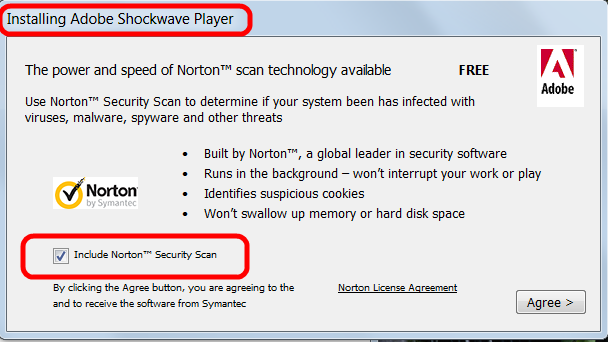
Updating Adobe Shockwave player would install Norton Security Scan.

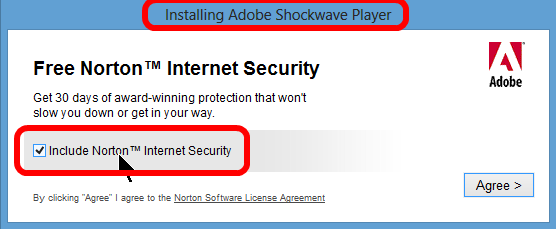
Or, in different optics and different content because downloaded from a different download site:


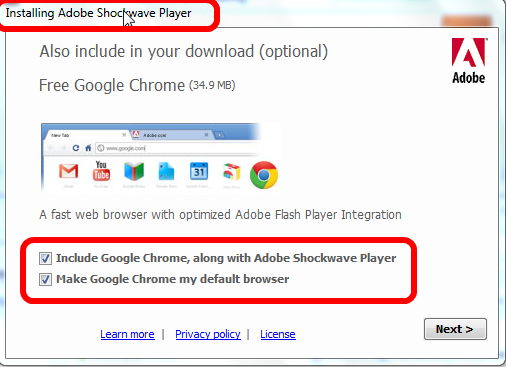
IMHO the worst example because even Google employs these sneaky tactics:


This is how Google Chrome got on your computer Jerry G, you did allow it's installation.

Make no mistake, these things can happen with any installer or update of any program. Isn't it a shame that even well known big companies like Adobe, Oracle, Symantec (Norton products), McAfee and others employ these sneaky tactics trying to dupe us into installing something else than what we want?

Please save yourself the aggravation and some money, simply by paying attention!
As usual I welcome suggestions and comments right here in the blog.

Click here for a categorized Table Of Contents.

Saturday, June 15, 2013

Passwords - The Latest


Over the years I have written several articles about passwords. I stand by what I wrote back then but everything around computers changes at break neck speeds. Recently I had to completely change my take on passwords.

I read an article on a more technically oriented web site about modern methods of password cracking and much of what I have said in the past about passwords has to be revised. I will update the old articles about passwords to point to this article.

The article I read is here. I will quote the key conclusions and key advice (emphasis added):
  1. Long passwords are the best defense. That is nothing new ... [a graphic] shows that the time required for a brute force hack really takes off at around a password length of 7 or 8 characters. Many people recommend 11 or 12 characters [length] for passwords.
     
  2. However, just making passwords longer is not enough. ... That means complexity is required in a password, with random mixtures of case, symbols, and numbers. If it is allowed by a service, use a mixture of alphabets.
    Again, nothing new but it really needs to be emphasized that randomness is necessary.
     
  3. Various popular substitution methods such as @ for “a” and $ for “s” are too well-known by hackers and don’t add security. ...
     
  4. Anytime a service that you use loses password data to a security break-in, your password probably ends up on a list somewhere. You need to change it, no matter what the service says.
     
  5. Don’t use the same password everywhere.
    Not new advice but millions of people don’t heed it. 
     
  6. The password testers that you see on the web often just look at length. Their results do not take into account compexity and have to be interpreted accordingly.
I admit it, as far as point 5 goes I am guilty as charged.

The long and short of it is that any password you can easily remember is UNsafe!  

I strongly recommend using a password manager. Names that come to mind are LastPass, Dashlane and Keepass. I know there are more but these three seem to be the best reviewed and most secure ones. And these programs and services are free for the computer based versions. If you need this service on one or more cellphones then LastPass costs $12.-/year and Dashlane Premium $20.-/year.

If you are uncomfortable with giving your passwords to a cloud service and if you need to manage passwords only on your single home computer then look at Keepass

As usual I welcome comments and suggestions right here in the blog. Thank you in advance.

Click here for a categorized Table Of Contents.

Saturday, June 8, 2013

Urgent Alert!


To all users of email accounts ending in @YAHOO.COM, @ATT.NET and @SBCGLOBAL.NET :

If you use the web interface, that is if you handle your email from within a web browser like Firefox, Chrome or Internet Explorer (boooo), then the look and feel of what you see has been or will be forcibly changed to a new look. It happened to me today.

Immediately I got this email;
What perplexed me was the "Mail Classic" moniker to the right of Yahoo. Why would some message relating to a NEW system be sent from the old one?

So I checked the link behind "Click Here". This is what I saw in the status bar of my email program:
This link goes to a web site that has nothing at all to do with Yahoo.

Do you see the rat when you smell it?

As usual I welcome comments and suggestions right here in the blog. Thank you in advance.

Click here for a categorized Table Of Contents.

Thursday, May 30, 2013

Email From The IRS? No Way!


I am battling with uneasy feelings because of an obvious scam email although I know  that it is a scam. Needless to say but naturally I did not open the attached ZIP file.

I have problems imagining what some of my customers might feel and think if they received a scam email like this one (screen shot of how it looks in my email program, email addresses obscured):


This obviously is a scam. The clues to this are:
  1. No government agency will ever send you an email out of the blue; never ever!
  2. The open recipient address list in the top line of the picture is a gross violation of privacy and email etiquette; even the IRS would not do that I hope.
  3. "You have received" is bogus because according to the text of the email supposedly the IRS has received a complaint.
  4. "filled" instead of "filed"; typos of this kind are a dead giveaway.
The DELETE button was created for exactly this kind of email!

As usual I welcome comments and suggestions right here in the blog. Thank you in advance.

Click here for a categorized Table Of Contents.

Wednesday, May 22, 2013

Dangerous PDF Files


Microsoft published a list of eight names of known virus infected PDF files that have been repeatedly seen as the carrier of virus infections:
  • pdf_new[1].pdf
  • auhtjseubpazbo5[1].pdf
  • avjudtcobzimxnj2[1].pdf
  • pricelist[1].pdf
  • couple_saying_lucky[1].pdf
  • 5661f[1].pdf 7927
  • 9fbe0[1].pdf 7065
  • pdf_old[1].pdf
What  does that mean for you? Beware of any email attachment with any of these or similar file names!

One easy security measure against only exactly this type of virus is to disable Javascript in your PDF reader.. This depends on having the latest up-to-date version of the PDF reader installed.

If you use Adobe Reader at the time of writing the latest version is 11.0.3. Open the Edit menu and click on Preferences (or type Ctrl+K).  In the Preferences window click in the left side bar on Javascript. Then remove first the check mark by  "Enable global object security policy" and then the one by "Enable Acrobat Javascript". Then click OK to close the Preferences window. This is what the window looks like (emphasis added):


If you still have Adobe Acrobat installed please remove it and replace it with PDF-XChange Viewer! Well, if you actually use Adobe Acrobat regularly to create PDF documents then keep it up-to date and use it at your own risk.

Update May 27 2013:

If you use PDF X-Change Viewer at the time of writing the latest version is 2.5.210.Open the Edit menu and click on Preferences, select JavaScript, uncheck Enable JavaScript Actions and click “OK”. This is what the window looks like (emphasis added):


If you use a different PDF reader you have to find out if this reader allows embedded Javascript to be executed. If so then find out how to disable it.

Again, this avoids only Javascript viruses embedded in PDF files.
Additionally:
If you run any version of Adobe Reader older then 11.0.3 please upgrade immediately! After an upgrade you have to check if there is another older version of Adobe Reader installed; if so remove it! 

Should you have any difficulties with any of the above I will be glad to help. For things like these I do not need to come to your house, they can be fixed remotely.

As usual I welcome comments and suggestions right here in the blog. Thank you in advance.

Click here for a categorized Table Of Contents.

Thursday, May 9, 2013

Cloud Storage?


If you want to know what "cloud storage" is please read this explanation on Wikipedia.

I get asked quite often for my opinion on cloud storage including backup solutions "in the cloud". The following begins with a real life experience that some lady had with Google. 

I know from my own attempts to try cloud storage that other services are not that much different - and the legal underpinnings are the same for all anyway. Here we go:

One recent Thursday morning, a dedicated Google user logged into her email and made an alarming discovery. Instead of opening the Inbox, Google directed her to a notice:
[Your] Account has been disabled . . . . In most cases, accounts are disabled if we believe you have violated either the Google Terms of Service, product-specific Terms of Service . . . . or product-specific policies . . . . it might be possible to regain access to your account.
  • the terms and policies offered no clues
  • no phone numbers to call, no tickets to request help
Google -
  • - manages a whopping 343 million active Google+ accounts
  • - operates in 130 languages
  • - strategically avoids the crush of users by offering little direct customer service.
  • - reserves the right to “terminate your account at any time, for any reason, with or without notice.”
  • Phone calls to Mountain View [Google HQ] land in a labyrinth of recorded messages that inevitably lead to one of a man, sounding quite exasperated shutting the call down with a “Thank-you-goodbye”.
  • - is a company with $50 billion in revenues
  • - has the modest aim to “organize the world’s information
  • It seems implicit that in allowing Google to use one's data we should rely on Google to hold on to it and to give it back.
Reality -
  • - Google assumes no responsibility over user data
  • - Google is not required by law to do so 
  • - Google limits its total liability for stolen data, lost data, anything, “TO THE AMOUNT YOU PAID US TO USE THE SERVICES” (yes, in all caps), which might mean as much as nothing for the most commonly used free accounts.
  • - Google reserves the right to take away or vaporize our data for any reason
  • - Google also reserves the right to discontinue services, the means to prohibit any access to the data, whenever it wants.
Consequently:
  • users are easily discarded
  • Google’s priority is preventing data from falling into the wrong hands, not ensuring it is always available to the right hands
My personal conclusion: I don't use cloud storage.

Naturally your mileage may vary. But I recommend you really thoroughly and together with your lawyer work through the details of all applicable Terms Of Service, End User License Agreements and the like.

As usual I welcome comments and suggestions right here in the blog. Thank you in advance.

Click here for a categorized Table Of Contents.

Sunday, March 24, 2013

Internet Explorer 10 - Do You Need It?


Again a question from a customer is reason to write this article. 

Via email I got this question:

Should I download the update to Internet Explorer 10 for Windows from Microsoft?
I have not used Internet Explorer since you took care of my computer.

Here is my reply:

Thanks for asking. And no, you don't really "need" IE 10.

Currently IE 10 is considered to still have quite a few "first hour" bugs.
Because it's very tight integration with the operating system we will need to upgrade sooner or later.

Since you do not use Internet Explorer I recommend that you allow the update but keep not using it. 
This way you would have everything in place in case that the OS integration ever needs to use one of it's modules. 

As usual I welcome comments and suggestions right here in the blog. Thank you in advance.

Click here for a categorized Table Of Contents.


Saturday, March 2, 2013

Can Your Computer Be Seen on the Internet?


Have you ever wondered if your computer may be "visible" from the outside world, meaning whether it could get hacked into?

Here is a relatively easy way to answer the question "Is my computer visible on the internet?"

I recommend that you print these instructions before you go to Gibson Research's web site. Once you are there please click the Services menu and there choose Shields Up. You will see:


Click on the text Shields Up (do you see the little cursor on the "s" of Shields?). You will come to a page where you find this text:
 

Click again on the text ShieldsUP! (do you see the little cursor?). You should get something like this:


For privacy reasons I have partially obscured my computer's IP address.
Click on Proceed and you will be on a page with this big button:
 

Click on the big orange button and you will (finally!) get what you were looking for in the first place:

Again, for privacy reasons I have partially obscured my computer's IP address. The text in the green box is what you want to see.

What to do if there is anything else but this green box and text? It gets so technical that I recommend you call me or send me an email. One contact email address is in the left side bar at the end of the "Welcome" text and my customers all have my email address anyway.

I know this seems to be a lot of steps and hassle to get to the result. All this totally depends on the history of how Gibson Research's web site was built and grew over time. I think it's well worth the few steps to know with some certainty that one's computer can not easily be seen on the internet.   

As usual I welcome comments and suggestions right here in the blog. Thank you in advance.

Click here for a categorized Table Of Contents.


Thursday, February 28, 2013

Computer Security and Common Sense


As I have mentioned several times in earlier posts I am a paying subscriber to a technical blog that is MS Windows oriented. One of the latest articles talked about security on the internet and explained in detail a fairly technical method to secure web browsing and general work on a computer.I know that the method described in the original article is far too technical for most of my users.

But the article contained some general remarks that I want to quote verbatim:
We are all aware of the dangers of malware infection from the Internet these days. The danger has always been there, but this has increased a lot more because people with malicious intents are constantly devising new methods to infect the systems, and the inexperienced, naive, general-users/elderly/teens are the most affected by it. Malware infection from the Internet can occur in many ways:
  • Downloading a malware infected setup/file from a malicious site
  • Venturing to a malicious site
  • Clicking on a bad link in an email, or on a page, or on a bad advertisement
  • Clicking on links that fool you into believing that there is a malware on the system and prompt you to install rogue software etc.
Although there are many ways of getting infected by malware it does not mean that we need to become paranoid, or live in constant fear of the possible consequences. With a little effort, precaution, and by using common sense we can easily avoid getting systems infected with malware.
The key words in this quote IMHO are "by using common sense". Most of my customers and many listeners of my regular radio show may have heard my take on common sense. It is a simple question/answer saying:
Q: What is the problem with common sense?
A: Common sense ain't that common.
If you have read my immediately preceding post about phone scams you will understand when I state:
IMHO common sense is the most important ingredient in home computer safety.
How does one get common computer sense? Some may not like me saying it but it is fairly simple:
By learning at least the basics about the computer and conscientiously applying what one knows.

As usual I welcome comments and suggestions right here in the blog. Thank you in advance.

Click here for a categorized Table Of Contents.


Phone Scams - Way Too Many!


It has happened again: One of my customers got caught by a phone scam. This lady (elderly, pardon me) got a phone call claiming to be from a Microsoft partner company and informing her that her computer had reported a virus infection and needed to be thoroughly cleaned.

The lady fell for the ruse and gave the caller her debit/credit card information and allowed the guy remote access to her computer.

She ended up with almost $200 less in her bank account and a nasty virus program on her computer. Just the removal of this virus cost her additionally two hours of my time.

Currently I hear similar stories way too often.

Please read this article in Microsoft's Safety & Security center; it gives you everything you need to know. With this knowledge and a dash of common sense you can easily detect these scams.

Stay safe.

As usual I welcome comments and suggestions right here in the blog. Thank you in advance.

Click here for a categorized Table Of Contents.


Thursday, February 7, 2013

Beware of Micro$oft's newest Daylight Robbery - UPDATE


All my customers and everybody else who ever talked with me about computers is pretty much aware that I have quite a few misgivings about Micro$oft. Their newest "pony trick" is in my opinion not only price gouging but outright daylight robbery.

The background: So far you could buy a so called "Home and Student" license for Micro$oft's MS-Office suite. With this license you did not get MS Outlook, their big email program that medium and lager companies might use. For the average home user that was rather a positive thing; you can read more details about the background for this statement here.

Above mentioned Home & Student license mostly came with DVD's containing the software. Additionally it came in two flavors, one where the license was valid for only one computer and another version of the license that allowed you to install MS-Office Home & Student on up to three computers in a household. The price difference mostly was a mere $10! And to top it off, if a computer had to be replaced you could install it on a new computer.

In comes MS-Office 2013, the newest incarnation. And guess what:
Micro$oft has changed the terms of the license drastically! 
You can install every license on one computer only, the license is tied to this computer and not transferable. That means if you get a new computer you have to buy the same license again! Original quote from the license agreement:
How can I use the software? We do not sell our software or your copy of it – we only license it. Under our license we grant you the right to install and run that one copy on one computer (the licensed computer) for use by one person at a time, but only if you comply with all the terms of this agreement. Our software license is permanently assigned to the licensed computer.
I really don't know whether Micro$oft has simply gone nuts or whether they really believe they can take the world's public for a fool!

There are alternatives to MS-Office available, two out of three even FREE!
  1. Softmaker Office ($100 with support!)
  2. Kingsoft Office Free ($0.00 as the name says and much like MS-Office 2003)
  3. Libre Office (free, lively development, needs know-how for set-up, available here)
Please warn everybody who might be interested of Micro$oft's newest money trap!

UPDATE March 8, 2013:  User outcry was heard!

Effective immediately Micro$oft has reneged and changed their terms for the license. Here is the relevant part of the modified license agreement:
You may transfer the software to another computer that belongs to you, but not more than one time every 90 days (except due to hardware failure, in which case you may transfer sooner). If you transfer the software to another computer, that other computer becomes the “licensed computer.” You may also transfer the software (together with the license) to a computer owned by someone else if a) you are the first licensed user of the software and b) the new user agrees to the terms of this agreement before the transfer.
Not what it was for Office 2007 and 2010 but better than before.

As usual I welcome comments and suggestions right here in the blog. Thank you in advance.


Click here for a categorized Table Of Contents.
 

Monday, January 21, 2013

Linksys Router WRT54GL - DANGER!


Do you have an old(er) Linksys router model WRT54GL? If yes please read on.

Cisco is the name of the company behind Linksys networking equipment; they had to admit that the WRT54GL is not safe. Here is a quote from an email that Linksys wrote to The Register, an IT blog.
“Following our assessment of information recently released by DefenseCode, we have confirmed a vulnerability in the Linksys WRT54GL home router. At this point, no other Linksys products appear to be impacted."

This router model is so old that I would anyway recommend to upgrade to a new router.

Please choose another brand instead of Linksys. I have only good experiences with routers from Netgear for example.

As usual I welcome comments and suggestions right here in the blog. Thank you in advance.

Click here for a categorized Table Of Contents.