Showing posts with label phishing. Show all posts

Tuesday, October 4, 2016

The newest Scam - Beware


The newest telephone scam I heard of is the Microsoft Licensing Scam. You may get a phone call or a voice mail saying something like this (phone numbers deliberately obscured):
“This is to notify you that your Microsoft Windows license key has been expired in your computer so Microsoft Corporation has stopped the services in your computer. To renew the Windows license key, please call 866 XXX XXXX. Let me repeat. This is to notify you that your Microsoft Windows license key has been expired in your computer so Microsoft Corporation has stopped the services in your computer. To renew the Windows license key, please call 866 XXX XXXX. I will repeat 866 XXX XXXX.”
The message obviously was from a computer generated, sort of "mechanical" voice and the stilted English suggest a non-native English speaker behind the whole thing.

Any messages about licensing issues truly from Microsoft would pop up on your computer's screen only during installation or activation. And we all know, if only from experience, that a Microsoft license for the Operating System comes with the computer when you buy it and it is good for the lifetime of the machine.

In Windows services are programs running in the background; they are required for even basic functions of the computer. A computer would not work at all without the required services running in the background.

In the case I read about the recipient happened to be a very, very experienced Windows user; the gentleman called back the 866 number from the message; he said about that call:
"Because the number was toll free, I called it just to see what would happen. An answering machine invited me to leave a message and my number for a callback — I declined.
Please remember: Any and all phone calls claiming to come from Microsoft or any company associated with Microsoft are scams. Don't even talk to these people! Do not give them your phone number or ANY OTHER information.

As usual I welcome comments and suggestions right here in the blog. Thank you in advance.

Stay safe.


Monday, September 26, 2016

Yahoo Users, it's Time to Run for the Hills

For years I have told my clients to stay away from Yahoo as far as possible. Those with Yahoo email accounts I have told to to switch their email provider.

Yes, it is a BIG hassle to do that but now it seems to be imperative to do it - finally.

Yahoo has been majorly hacked!

In 2014 already and they have kept it a secret until recently!

Reported numbers of compromised accounts vary from 500 thousand to one billion affected users but that is irrelevant; relevant is that practically all sensitive information got copied off by miscreants. User names, passwords, date-of-birth, SSNs, security questions and the answers, phone numbers, "real names", address information and the list goes on...

In California the first class action lawsuit against Yahoo has been filed and many more are expected to follow all over the nation.

What to do?

First change your Yahoo password, make the new one at least 12 characters long. Read this article from 2011(!) and this one from 2013(!) on my blog for more information.

More info on Passwords is in these articles:
Passwords that are NOT a password
Passwords the Latest

You have a Yahoo email account or use other Yahoo services (like Yahoo Financials!) and you still are "on the fence"? I can't help you, actually nobody can help you but yourself.

As usual I welcome comments and suggestions right here in the blog. Thank you in advance.

Stay safe.

Saturday, March 19, 2016

Skype Users Be Warned


If you use Skype PLEASE read through this article about two conversations triggered by Skype friend requests. I will let that speak for itself.

For the less geeky of my readers, a spam bot is program or robot programmed to "have a conversation".

You are warned.

Stay safe.

Monday, October 13, 2014

How To Spot Socially Engineered Emails


For quite some time I wanted to give information about how to spot spam emails. That is quite a sizable field and I wavered too long. This time to my  and I believe to your advantage the wait pays off.

I discovered that KnowBe4.com already had done an excellent job and published the result as a one page fact sheet much better and more concise than I could ever have done it. The paper is called Social Engineering Red Flags. This link should show the information in your browser or in your reader application for PDF files.

I recommend to print it as a handy reference guide.

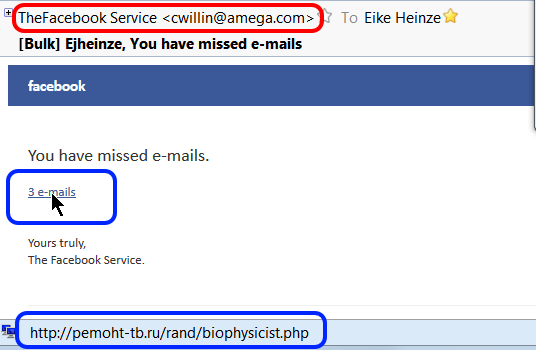
And here is a real life example; just this morning (10-20-2014) I received an email that looks on first glance like it came from Facebook, optically quite convincing. It is such a "classical" example that I took a screen shot to show it to you:


For me it goes without saying that I do NOT just click on a link in ANY email, no matter who the sender is supposed to be, no matter how "familiar" it looks.

The first clue is the sender address. Bad, simple forgery, not even an attempt to disguise the forgery; maybe that is even the miscreant's real email address. This is one of the times where I regret not to be a security researcher because I would love to mess a bit with this guy.

Then I did what for me by now has become second nature: I rested my mouse on the link (see the cursor). The translation of where the link would have taken my computer to in the status line (bottom left corner of the picture) confirmed my suspicion: The link goes to a web site in Russia. Did you see "http://pemoht-tb.ru/rand..."? ".ru" is the country code for Russia!

If you handle your email with programs or techniques that do not show you all the information from this example then you live dangerously. Imagine a teenager; they would blindly click on the link and voilĂ , the computer is infected and maybe you even loose all your files!

Oh well, more work for me... (tongue in cheek!_).


As usual I welcome suggestions and comments right here in the blog.

Click here for a categorized Table Of Contents.


Saturday, June 8, 2013

Urgent Alert!


To all users of email accounts ending in @YAHOO.COM, @ATT.NET and @SBCGLOBAL.NET :

If you use the web interface, that is if you handle your email from within a web browser like Firefox, Chrome or Internet Explorer (boooo), then the look and feel of what you see has been or will be forcibly changed to a new look. It happened to me today.

Immediately I got this email;
What perplexed me was the "Mail Classic" moniker to the right of Yahoo. Why would some message relating to a NEW system be sent from the old one?

So I checked the link behind "Click Here". This is what I saw in the status bar of my email program:
This link goes to a web site that has nothing at all to do with Yahoo.

Do you see the rat when you smell it?

As usual I welcome comments and suggestions right here in the blog. Thank you in advance.

Click here for a categorized Table Of Contents.

Thursday, August 9, 2012

Tune-Up Utilities


The newest crooked trick is to tell you that your computer needs a "tune up" because it has so and so many "errors". You will be shown an impressively looking list with technical details. Please don't fall for this new trick.

This time around it's not virus programmers that try to scare you into doing the exactly wrong thing, this time well known companies use this old scare tactic to get their sticky finger into your wallet. The companies in question in the limited test I refer to are Corel, Norton and AVG.

When you try to use whatever is offered on your screen to "clean" the computer you are asked to pay! You can read about all the gory details here.

Please trust me, anybody, no matter how well known their name is, who tells you that your computer is full of errors or viruses or whatever and then wants money to correct the situation does NOT have your best interest on their mind! They are after your money, only after money!

Any commercially offered tune-up utility carries inherent dangers. Many are way too aggressive and some even have rendered well running systems unusable. Please stay away!

Read how the author of above linked detailed story summarizes his experience:
Scare tactics and hard sells should be a red flag. . . .

. . .  the software I test-drove for this article clearly seems aimed at inexperienced users who are more likely to purchase "repairs" when confronted with frightening reports of critical and numerous system problems. Unfortunately, these PC users often lack the skills to do basic troubleshooting themselves. 
My conclusions:
  • It's not only crooks anymore that try to scare unsuspecting computer users out of some money
     
  • Formerly renowned companies like Corel, Norton and AVG have begun to copy tactics so far only used by crooks; how desperate are these companies?
     
  • In the case of Norton software (marketed by Symantec Corp) they actually add insult to injury; IMHO Norton Anti-Virus has for years caused more trouble than done good.
As usual I welcome comments and suggestions right here in the blog. Thank you in advance.

Click here for a categorized Table Of Contents.

Friday, July 13, 2012

Yet Another Scam - Beware


Just today I got this email (screen shot from my email program):
Looks almost "real", doesn' it?

I thought "Yes, we have that old BoA credit card from store XYZ" and so I started reading the email..

I read until I saw the sentence in the red rectangle above. A bank asking to "confirm customer data"?
"No way you lil' ole scammer" was my reaction.

Then I thought to check the link on "HERE". And yes, you guessed it, it goes to some place somewhere but not to BoA; see this screen shot:


You csn see my cursor was on "HERE" and in the status line you see the target web site; No BoA at all!

My conclusion: Optically appealing scam.

This shows again that we need to think before we click!  And we better check every link in an email whether it's actual target has anything to with what it claims to be.

As usual I welcome comments and suggestions right here in the blog. Thank you in advance.

Click here for a categorized Table Of Contents.

Tuesday, April 19, 2011

Phishing Revealed In Detail

Here is an outstanding article on how to spot a phishing email. Although taken from real life this example naturally does not cover exactly what you may encounter. But the principal method to spot phishing emails is always the same, simply be observant and use common sense.

Yes, I know, the problem with common sense is that it is not all that common . . .

I suggest you stop reading when you reach the header line "The Attachment" unless you want to learn the geeky stuff. This has several reasons:

  1. When you already suspect an email to be phony than still downloading an attachment would be outright dumb and suicidal. Pardon my French.
  2. I REALLY don't want you to even try to download a suspect attachment! Way too many virus infections happen this way.
  3. After the discussion of the attachment it gets very quickly very technical.

As usual I welcome comments and suggestions right here in the blog. Thank you in advance.

Click here for a categorized Table Of Contents.