Showing posts with label ransomware. Show all posts

Friday, July 21, 2017

The Skinny ...

... about the latest outbreak of Encrypting Ransomware.

The original of this text was written by Ken Dwight, aka The Virus Doctor. I am an alumnus of his Virus Remediation Training and make this text available for my customers with his kind permission. Thanks Ken.

As with malware in general, encrypting ransomware is continually changing.  Most of these changes are evolutionary and somewhat predictable.  As such, they don’t call for any significant changes in the methodology to be used in dealing with them.

Some recent developments in specific families and strains of encrypting ransomware are
significant enough to justify an update to the IT Support technician’s strategies and tactics for handling them effectively.

There are primarily two families of such ransomware that warrant this attention.  Multiple names have been assigned to these families, but this discussion will use the names that are most frequently found in credible press coverage of these outbreaks.

WannaCry was released into the wild on May 12, 2017.  According to most reports, it infected at least 200,000 computers, in more than 150 countries.  This ransomware spawned its own Wikipedia entry, at
https://en.wikipedia.org/wiki/WannaCry_ransomware_attack.

The more recent attack, erroneously known as Petya, but more accurately referred to as
NotPetya, first struck on June 27, 2017.  There are no estimates of the total number of computers infected by this malware, or the number of countries represented.  But it clearly targeted businesses and organizations in Ukraine, with some 80% of the infections found there.  This ransomware also has its own Wikipedia entry, at
https://en.wikipedia.org/wiki/2017_cyberattacks_on_Ukraine.

These two families of ransomware have several characteristics in common.  Probably the most notable is the widespread coverage both received in the general press.  While malware generally goes unreported in the non-trade press, these attacks were the exception to that rule.  Fueling the press coverage was the revelation that both of these attacks were based on exploits developed by, and subsequently stolen from, the U. S. National Security Agency (NSA).

Interestingly enough, I have not seen any of these infections first-hand, nor have I received reports from any graduates of my Virus Remediation Training workshops that they have encountered computers encrypted by either of these families of ransomware.  Considering the fact that hundreds of IT Support Techs fall into this category, in most of the United States + 7 foreign countries, I can only speculate that the actual infection rate is much less widespread than the press coverage would lead one to believe.

Another common denominator between these two infections was the fact that the vulnerability in Windows that was used for both of these attacks had been patched by Microsoft in their March, 2017 Windows Updates; any computer with that update applied would not have been infected by either of these pieces of malware.

Two NSA exploits were used in both of these attack scenarios; they are named EternalBlue and DoublePulsar.  A free EternalBlue vulnerability scanner is available for download from http://omerez.com/eternal-blues-worldwide-statistics/.  As of mid-July, 2017 more than 10 million IPs have been scanned; the majority of hosts scanned (53.82%) still have SMBv1 enabled, and 1 out of 9 hosts in a network is vulnerable to EternalBlue.

The WannaCry malware included a “Kill switch” which was discovered by a malware researcher and activated to disable the infection from spreading any further.  No such kill switch has been found for NotPetya, but a “Vaccine” has been developed to protect against it.  More details from Bleeping Computer at https://www.bleepingcomputer.com/news/security/vaccine-not-killswitch-found-for-petya-notpetya-ransomware-outbreak/.

Another important difference between these two families of malware involves the type of
encryption they perform on the victim’s hard drive.  WannaCry, like most encrypting
ransomware, encrypts each individual file.  It also changes the filename to end with an extension of .wcry.

On the other hand, NotPetya encrypts the entire hard drive and replaces the Master Boot Record with its own version.  While the encryption is taking place, the malware displays a screen that looks like a chkdsk operation is being performed; when the whole-disk encryption is complete, it forces a reboot.

Upon the reboot, the modified MBR causes the ransom note to be displayed, with instructions to pay $300 USD in Bitcoin; after 72 hours, the ransom increases to $600 USD.  Because of the modified MBR, at this point it is not possible to boot into a normal Windows environment.

As of this writing there is no means to pay the ransom; even if the ransom is paid, there appears to be no way to decrypt the hard drive or restore it to normal operation. Consequently, there is no reason to even consider paying the ransom.

Back to WannaCry, there have been some reports of successful decryption after paying the ransom. But here again, I have no first-hand (or even second-hand) reports from victims of this family of ransomware.

Those are the most recent, high-profile developments in the field of encrypting ransomware.  But it’s a pretty safe bet they won’t be the last.  This category of malware continues to evolve and become more sophisticated and more insidious.  It has crossed the threshold of being a billion-dollar industry; that success will attract more and more criminals who are lured by the promise of  easy money.  Our prospects for future employment remain secure!
That was it.

All my customers are advised to weekly initiate a check for Windows Updates. If they followed that advice their computers  were protected and they don't need to care about these two overly "hyped up" virus outbreaks.

Stay safe.


Wednesday, April 26, 2017

Nothing New?


I got an email from a long time customer who asked me
... where have you been? Not on the Blog in three months...
Here is my reply to him:
Thanks for checking the blog.
There is nothing new -- and that means no bad news and that is good news, right?

It still is the "old" story"; ransomware is at the top of the list of nasty programs.

The only way to
avoid that junk fairly reliably - but not guaranteed - is NEVER to click on any attachment to any email! 

Save the attachment to your desktop, upload the attachment to VirusTotal.com and have it checked there.

Even only one negative result is enough for me to tell the sender to check his attachments himself and stop sending out potentially infected junk files.
And DO NOT click on links in emails! Check if the link goes to the correct web site! Rest your cursor on the link and look at the left bottom corner of the browser window; there you should see the text of the target URL ( = Internet address) that your browser will take you to if you click on that link. Learn to correctly read these URLs!
 
Stay safe!


Monday, January 9, 2017

How to stay safe in 2017 - Short List


Here is a short list of in my experience the most important steps you can take to keep your computer and your data safe. have I have added e few remarks for clarification.
  1. Update your software.
    Not only Windows but all other regularly used programs as well;
    for a Windows PC this includes (but is not limited to)
    -   Adobe Flash (beware of fake download sites!)
    -   Adobe Shockwave
    -   Web browser(s)
    -   Email client
    -   Java (if installed; mostly Java is not needed at all!)
    -   Office programs
    We always have to keep in mind that some programs still don't update automatically and quietly in the background! Checking manually hardly ever has hurt anything.
     
  2. Back-up to an external hard drive.
    Done regularly and correctly this currently is the only protection against ransomware viruses!
     
  3. Use a password manager.
    For single machines see Keepass, for more than one machine see LastPass and include all cell phones and tablets in the count!
       
  4. Use a unique password for every account.
    Everybody has many, many accounts; you need a password manager!
     
  5. Use random passwords
    Easily done only with a password manager!
     
  6. Turn on two-step verification everywhere you can.
    If you have a cell phone that you really use, otherwise this is pretty useless.
     
  7. Read and think(!) before you click.
    "My" first commandment for safe computing.
     
  8. Enable full-disk encryption
    On a single home computer? Only protects your data when the machine gets stolen.
     
  9. Put a six-digit PIN on your phone and set the phone to wipe it's contents if the PIN is guessed wrongly too many times.
Do you have questions to any of that? Please feel free to ask them in the comments, I will reply. Maybe not immediately but I will.

Stay safe.


Wednesday, September 28, 2016

Ransomware IS on the Loose, NO JOKING!


Today I met with a customer who recently I had pointed to my blog posts about ransomware. He sort of poo-pooed my words and pointed me to his safe habits.

With his permission I looked in his (very big) Inbox with about 1,000 emails. I looked only for mails with attachments and found quite a few.

I grabbed randomly one of the attachments, a ZIP file by the way, and saved that file to the computer.

Then I went to Virustotal.com, uploaded the file and had it tested. The results speak for them selves, here they are:


Clearly this file contains a downloader and a variant of the encrypting ransomware Locky. And who knows what the downloader would do to the machine if it ever gets to run.

Currently DO NOT directly open ANY attachment from an email, no matter how "good" you think you know the sender or what ever excuses your brain comes up with.

Always save the attachment to a place on your computer you can easily access like the desktop.

Then in your web browser go to virustotal.com, browse to the file - in this example on the desktop, upload the file and if virustotal.com comes up with anything then delete the file AND the email it came from!

Better safe than sorry!

And before you ask, some of my previous articles about ransomware are here, here, here, here and here.

As usual I welcome comments and suggestions right here in the blog. Thank you in advance.

Stay safe.

Thursday, April 7, 2016

2016-04-07 WBKV Talking Points


This is the first time ever in 12 years of regular radio shows that I do not have a set agenda for the 15 minutes ahead of us.

Listeners, please call in with ANY kind of question you may have around your PC and MS Windows.

Other than that only the standards;

    - Use common sense!
    - Read and think(!) before you click.

    - Update ALL programs you use.

   - Ransomware.

    - Backup your data and your system!

And stay safe.

Tuesday, March 29, 2016

Avoid or Mitigate Ransomware Risks


A big THANK YOU to the Emerging Threats Team at SophosLabs and their blog Naked Security for their excellent recommendations on this nasty but important topic.

I have taken the liberty to add some remarks just to help you remember important little details that are easy to forget in cursive.
  • Backup regularly and keep a recent backup copy off-site. There are dozens of ways other than ransomware that files can suddenly vanish, such as fire, flood, theft, a dropped laptop or even an accidental delete. Encrypt your backup and you won’t have to worry about the backup device falling into the wrong hands.

    But do not, I repeat, do not leave your backup device connected to the computer. Always unplug the backup device after the backup is complete!

     
  • Don’t enable macros in document attachments received via email. Microsoft deliberately turned off auto-execution of macros by default many years ago as a security measure. A lot of malware infections rely on persuading you to turn macros back on, so don’t do it!

    Naturally they don't tell you that the click they ask you to do will turn macros back on. They rather trick you into believing that clicking is the thing to do to be able to read what they sent you...

     
  • Be cautious about unsolicited attachments. The crooks are relying on the dilemma that you shouldn’t open a document until you are sure it’s the one you want, but you can’t tell if it’s the one you want until you open it. If in doubt, leave it out.

    Currently I do not open ANY attachments; I call the sender and have them explain what and why they sent the attachment and even if all that checks out I additionally check the attachment on
    Virus Total
     
  • Don’t give yourself more login power than you need. Most importantly, don’t stay logged in as an administrator any longer than is strictly necessary, and avoid browsing, opening documents or other “regular work” activities while you have administrator rights.

    Quite a lofty ideal as I am currently experiencing first hand.

     
  • Consider installing the Microsoft Office viewers. These viewer applications let you see what documents look like without opening them in Word or Excel itself. In particular, the viewer software doesn’t support macros at all, so you can’t enable macros by mistake!

    Now is a good suggestion, I will have to do that!

     
  • Patch early, patch often. Malware that doesn’t come in via document macros often relies on security bugs in popular applications, including Office, your browser, Flash and more. The sooner you patch, the fewer open holes remain for the crooks to exploit.

    As I always preach: Update, update, update.
That is it; certainly to a large part common sense but here it is, nicely packaged and in one place.

Stay safe!

Monday, March 28, 2016

Ransomware - A Current Example


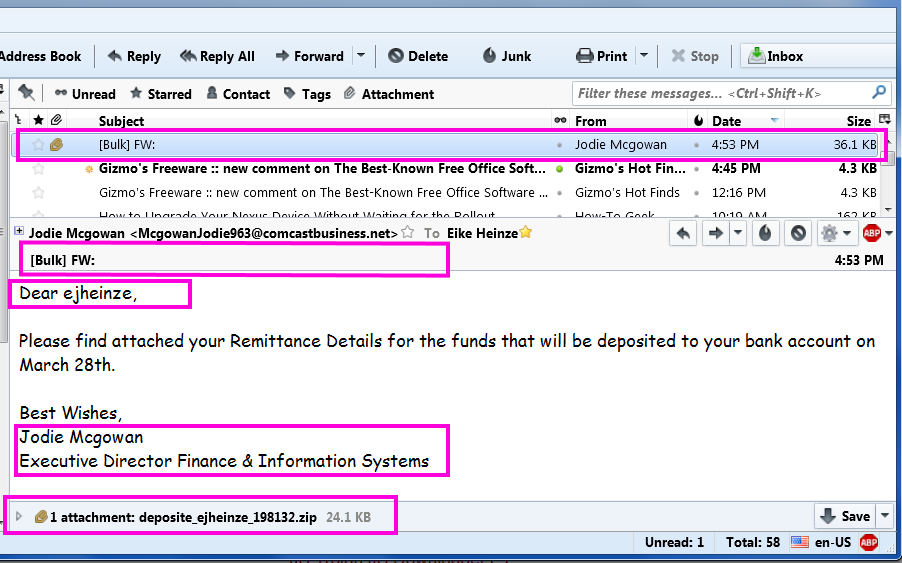
Please take a close look at this cut out grabbed diectly off my screen:

From the top the red frames are around:
  1. The virus infected scam email in the message list
  2. The totally unprofessionally empty subject line.
    [Bulk] is from my ISP telling me that this email was sent  from a server that is known to send out spam
    FW: tells me that the email was forwarded
  3. Addressing me with "ejheinze" shows that the sender does not even know my first name;
    ejheinze is the part of my email address before the @ character
  4. A totally unprofessional signature
  5. .zip is one of the potentially dangerous file types 
Do I really need to comment? Yes? Okay, here we go:
  1. Hm, no subject and I don't know a Jodie M and Comcast in her email address? I have no business at all with Comcast.
  2. Unprofessional and bordering on rude.
  3. Totally unprofessional and in a primitive way impolite.
  4. From Comcast I would at least expect some sort of company logo or an avatar.
  5. I wonder what might be in there...
    but with all the above I DO NOT CLICK on the attachment!
Instead I save the attached file and submit it to Virus Total (Wikipedia). And the "success" confirms my suspicion. 17 out of  58 anti virus programs flag the file as infected. See for yourself:
The rest was simple:
Delete the email which deletes the attachment as well.
Delete the file from the computer and
Empty Recycle Bin, just to be sure.

Remember: NEVER, EVER click on an email attachment unless you have verified it's legitimacy with the sender.

Stay safe.


Wednesday, March 23, 2016

2016-03-24 WBKV Talking Points


Today nothing but viruses, malware and currently acute dangers.
  • Ransomware (so far mainly from infectious MS-Office documents)
    Record ransom paid; 17 million US$ 
     -  -
  • now infectious advertisements on BIG company web sites with 100s of millions of visitors every day:
    - -
    New York Times (nyt.com)
    AOL.com
    ESPN.com
    MSN.com (MicroSoft Network)
    NFL.com (yes, National Football League)
    TheWeatherNetwork.com
    TheHill.com
    Yahoo.com  and many more.
I feel like a prayer wheel:
   If you see advertisements in your web browser your computer is at risk!

Firefox web browser with Adblock Plus and WOT are the browser protections you should use!

No, not Goggle Chrome, Safari or Edge or Internet Explorer!

Monday, March 21, 2016

New Dangers And Bad News


You may already have heard of ransomware, the newest trick of the bad guys to get at your money.

If you have not here is a VERY SHORT explanation: A ransomware virus encrypts all your data files, that is in effect makes them unusable and unreadable. After the encryption is done you have to pay money to the crooks do get instructions and a "decryption key"; if the instructions and the decryption key work correctly as they should you get your data back but sometimes it does not work. Your data is held for ransom, hence the name.

So far the highest amount reportedly paid by a large California based medical organization was 17 million dollars.

Very recently the web sites of a whole lot of well known and big organizations got abused to show advertisements infected with ransomware. Some of the affected web sites were:
  • msn.com
  • nytimes.com
  • aol.com
  • nfl.com
  • theweathernetwork.com
  • thehill.com
  • zerohedge.com 
and many more. These sites have millions of daily visitors! If you are interested you can read more details here.

I can not say it often and loud enough:
If you see advertisements on the Internet your web browser and thus your computer are NOT SAFE at all! Fire your current technician and call me or send me an email!
When I leave a customer's house they ALL have a safely set up web browser that should not show ANY of these commercially distributed advertisements.

Stay safe.

Wednesday, January 13, 2016

2016-01-14 WBKV Talking Points


For the normal home user: Upgrade to Windows 10 will be enforced by January!
Only two ways around:
1. Change Windows Update Settings. Not recommended because permanent user involvement required.
2. Use GWX Control Panel. See my blog Jan. 3
rd. 2016

AVG installs an extension in Google Chrome that opens computers to malware. DO NOT use Google Chrome and/or AVG “security products! See my blog Jan. 3rd. 2016
First ransomware written in Java discovered. Please uninstall all Java. To my knowledge only Pogo.com still offers games written in Java.

Using Internet Explorer version 10 or older? Update it now! Support runs out NOW!
Better: Finally make the switch to Mozilla Firefox browser.

And a very recent true horror story about Dell's technical support and their willingness to handle a warranty case.


Wednesday, August 19, 2015

Yahoo! - Helps to Distribute Malware


I have said it to countless customers and I say it again, publicly and absolutely clear:
If you see advertisements while browsing the internet
then your computer is not set up safely!
I have said it to countless customers and I say it again, publicly and absolutely clear:
Stay away from Yahoo!
And I mean Yahoo! everything; email, finance, sports, EVERYTHING that comes from Yahoo! 

Here is a literal quote from NetworkWorld.com (bolding and links added by yours truly):
Malwarebytes Labs recently uncovered a large malvertising attack on the Yahoo! advertising network that started on July 28. Malwarebytes estimates that up to 6.9 billion readers could have been affected, making it one of the largest malvertising attacks Malwarebytes Labs has seen recently.
Malvertising is defined as crafted advertisements that intentionally infect the computers of anyone who visits the site. A tiny piece of code hidden deep in the ad will reroute your computer to criminal servers without your knowledge, which then determines how exposed your computer is and decides which piece of malware to send you.

In the case of the Yahoo ad, victims are infected with ransomware via the Angler Exploit Kit, but it’s possible that anything from banking Trojans to additional advertising fraud is also being used in this attack.

Malwarebytes said that the infection included Yahoo's main site, as well as subgroups like News, Finance, Sports, Celebrity, and Games. The ads route users to a site on Microsoft Azure, which eventually leads to the Angler Exploit Kit.

But, according to a friend at Malwarebytes, when you are running Adblock Plus or any other ad blocker, then the ad never plays, so no payload is delivered to your PC. So the malware doesn't ever get to touch your PC. Even if you don't click on the ad, the fact is it loads and becomes saved in your browser cache, so it does get onto your PC without the blocker.
My customers do not need to worry about malvertising, they all have Adblock Plus installed. All others please listen up:

If you use ANYthing from Yahoo! and/or
if you see advertisements when web surfing
then your computer is UNSAFE!

Do yourself a favor, get your computer cleaned up and secured.
As usual I welcome comments and suggestions right here in the blog. Thank you in advance.

For whatever reason the darned TOC (table of contents) feature that I got from Google does not work any longer, sorry.

Monday, September 1, 2014

Details on CryptoWall


This article assumes that you are familiar with my previous article CryptoLocker - Revisited.

Detailed information was released about CryptoWall, one of the CryptoLocker variants.

Between mid-March and late August CryptoWall infected almost 625,000 systems; on these systems it encrypted more than 5.25 billion files.

The US seems to have the most CryptoWall infections: 253,521 (or about 40 percent), followed by Vietnam with 66,590 infections, the U.K. with 40,258, Canada with 32,579 and India with 22,582.

The US likely got targeted more often because CryptoWall's got distributed through spam emails sent from the Cutwail botnet which targets English language computer users.

Researchers collected data directly from CryptoWall's  payment server such as the exact number of paying victims and the amount of payments. Of nearly 625,000 infections and over about six months 1,683 victims (0.27%) paid the ransom for a total of $1,101,900.

CryptoWall seems to have  a home-made problem by accepting payment of ransom by Bitcoin only. Many average computer users will have problems paying with Bitcoin and reseachers assume that this is part of the reason that only 0.27% of CryptoWall's victims paid compared to 1.3% of CryptoLocker victims; CryptoLocker allowed payment by MoneyPak as well.

As sad as it is, these numbers clearly show that cyber crime pays.


As usual I welcome suggestions and comments right here in the blog.

Click here for a categorized Table Of Contents.


Tuesday, August 26, 2014

CryptoLocker - Revisited


In December 2012 I wrote for the first time about the back then new relatively virus CryptoLocker.
In October 2013 I wrote again about new variants of this virus. Now I have new information that warrants to visit CryptoLocker again.

This family of viruses is by now one of the most destructive threats I have seen. Much of the news regarding CryptoLocker is rather negative but there is at least a bit of positive news as well.

CryptoLocker has evolved

Very shortly after the original CryptoLocker had appeared the first variant was discovered; on first glance it appeared to be similar to the original version. It almost was a look-alike, the method of infection was the same, the encryption seemed the same and the message on the infected computer's screen was very much like the original's. There were only two obvious differences: The original CryptoLocker demanded $100 for information to decrypt the user's files and it offered two payment methods (MoneyPak or Bitcoin); the “look alike” demanded $300 and accepted Bitcoin only.

Time consuming and detailed analysis uncovered significant internal differences. Specialists found that the second version most likely was written by a different programmer or even programming team. It was written in a different programming language and many other internal differences were discovered as well.

In the meantime we know of at least six other virus programs that work similar to CryptoLocker. They are called “encrypting ransom ware” (in the following ERW), they are actively distributed, modified and improved. Most likely they were created and are being run by different groups of malware creators and distributors. Some names I have run across:
  • CryptoLocker (the original)
  • CryptoLocker 2 (the first imitator referenced above, my naming))
  • Critroni
  • CryptoDefense
  • CryptorBit
  • CryptoWall (see this new article for details)
  • CTB Locker
  • PrisonLocker or PowerLocker
  • TorLocker
The newer versions of ERW viruses have become increasingly sophisticated, hard to detect and difficult to remove.

How these infections spread

Many infections happen when the user attempts to opens an e-mail attachment that then in turn launches the ERW. By now almost any file type can be abused in this way; you just can't trust so called “safe” file types any longer.

Over time I have received many emails about supposedly failed deliveries of goods. Some of these emails were made professionally and looked at first glance almost authentic. It made no difference whether the email seemed to be from DHL, FedEx, UPS or the US Postal Service; there always seemed to be some legitimate sounding reason to open the attachment.

In all cases attention to detail and applied common sense protected my computer better than any security program could have done; I simply avoided that one fatal click to open an attachment.

Another increasingly often encountered way for ERWs to spread are “drive-by downloads”. They come from compromised websites and compromised web servers. These sophisticated attacks take advantage of known vulnerabilities in almost ubiquitous software like Windows, Adobe Flash, Adobe Reader, Java and so on. Since these vulnerabilities are known there is only very little excuse to get caught by a drive-by download. To get the computer infected by a drive-by download is very unlikely if the user keeps all software up to date.

Protection?

On the positive side we have to my knowledge three options, some free and some with premium versions for a charge. These programs do not interfere in or conflict with common anti virus or security software. I warn against running any two of these programs concurrently due to the likelihood of conflicts with each other.

1. CryptoPrevent
2. MalwareBytes Anti-Exploit
3. HitmanPro Alert with CryptoGuard

If you are interested to learn more please follow the links.

To make it perfectly clear: I am convinced that the best protection is our own attention to detail, caution and applied common sense. No software in the world can replace our watchfulness!

ERWs on non-Windows computers

To make a bad situation even worse there are reports of ERWs on other, non-Windows platforms like tablets and smart phones with the Android operating system. There was talk about a popular NAS system (Network Attached Storage) being targeted as well. Only Apple systems seem to be not affected, so far at least; as we all know that can change any moment.

A bit of good news

Fairly recently, I believe it was in early August 2014, two software companies announced that they have jointly developed a method to decrypt at least some of the files that were encrypted by the original CryptoLocker. The companies and their web sites are The companies offer their program free of charge to people who still have files encrypted by the original version of CryptoLocker who wants to attempt to recover them.

The companies are FireEye (www.fireeye.com) and Fox-IT (www.fox-it.com). These companies apparently did not crack the encryption, they gained access to some of the command and control servers where some private keys were stored that the original CryptoLocker virus had used.

Much detailed sleuthing, dis-assembling, re-engineering and analysis of the original virus enabled them to write a program called DecryptCryptoLocker that can decrypt affected files when the were encrypted using any of the recovered private keys. At https://www.decryptcryptolocker.com/ you can read how this works. There is a decent chance that this program will recover encrypted files but there is no guarantee.Some so far encountered obstacles that may prevent decryption are:
  • It works only on files encrypted by the original version of CryptoLocker infections; it may or may not work on files encrypted by later versions of ERW.
     
  • Nobody knows if the servers accessed by FireEye and Fox-IT contained all private keys CryptoLocker had used.
     
  • The original CryptoLocker was effectively eliminated late in May, 2014; any later infections will most likely have used different sets of private keys.
Despite these obvious limitations of the procedure FireEye and Fox-IT deserve a lot of credit and big kudos. Anybody who still has files encrypted by the original CryptoLocker should try the procedure and see if it works for them.

My personal conclusion

It is primarily user behavior that protects the computer by always keeping Windows and all other regularly used programs up to date. If all this is accompanied by attention to detail and applied common sense then the computer will most likely remain “healthy” and safe.

In the worst case scenario, that is after your computer got hit by CrypyoLocker or a look-alike having a recent clean backup will be the best medicine against sleepless nights.

As usual I welcome suggestions and comments right here in the blog.

Click here for a categorized Table Of Contents.