Showing posts with label upgrade. Show all posts

Sunday, May 22, 2016

"Force Feeding" Windows 10


"Force Feeding" are the only words adequate to describe what Microsoft is doing right now! My email inbox is overflowing with complaints and cries for help. Microsoft seems to be really desperate, it must not be going as well as they had hoped.

After the upgrade to Windows 10 (not update) you have 4 weeks to revert to your previous system. This process has so far worked without a hitch for those of my customers who reverted.
  1. Click the Start button
  2. Click on Settings (on a few systems it is PC Settings)
  3. Click on Update & security
  4. In the left side bar click on Recovery
  5. Find the entry Go back to Windows x (x is 7 or 8 depending on what your previous system was) and click on it
Depending on the speed of your computer it will work for anything between 30 and 90 minutes. After you have reverted to your previous version of Windows Microsoft will again begin to permanently nag you to upgrade to Win 10. This nagging can be reliably turned off!
Microsoft has since about November 2015 been busy to put some of the telemetry of Windows 10 into Windows 7 and Windows 8 systems; this happens in addition to forcing upgrades to Windows 10. That means that Win 7 and 8 systems now contain some of what I call Windows 10 spying on me/us and IMHO that should to be turned off!!

My recommendation is to turn all this junk off and luckily since about February 2016 I know of a dependable piece of free software that allows everybody to do just that on their systems whether it is a Windows 7, 8 or 10 computer!. See this article for more details.


If after the upgrade any icons or programs are missing or if you rather have me install SD Anti Beacon I can do all that via remote support. For remote support please call one of the coming Monday through Thursday evenings between 6PM and 8PM. If I am already at home I want to connect remotely to your computer. If I can not answer on your first attempt please assume that I am already helping somebody else and keep trying every 10 or 15 minutes.

If I have set up or worked on your computer during the last three years you should be set for remote support; if you have an icon labeled either "Teamviewer ..."  or "EJH Remote Support" then all is prepared. If you do not find either of these icons please call anyway, I can walk you on the phone thru the steps to get the remote support program going. Alternatively you can prepare for remote support as described here.

Please have your computer up and running; if your computer is a notebook (or laptop) computer then please have the power supply connected and plugged into a working power outlet.
Stay safe!

Thursday, April 21, 2016

Windows 10 and Microsoft's Attitude to Security and Prvacy


On Slate I found this very revealing article about Windows 10 and it's implications for privacy and security. I highly recommend you read it BEFORE you jump on the Windows 10 band wagon.

No, I take back my "... highly recommend you read ...". If you are seriously thinking about Windows 10 and/or want to be fully informed before you take the plunge (or not) THE ARTICLE IS A MUST READ!

As I said in an earlier article by now we can do something about all that, reliably and free of charge. Well, maybe not totally free if you want me to set it up and demonstrate it's correct usage to you.

Stay safe!


Sunday, February 21, 2016

Windows 10 and why I change my recommendation


On 1/17/2014 I wrote on this blog a rant titled: Microsoft Accounts and Windows 8 – A Rant

For Windows 10 this article is just as valid today. I want to quote the main point (emphasis added):
Apple has made an incredible fortune "having access" to all this information about their customers and as I see it Microsoft wants to bake themselves a similar pie, not only get a slice [of this pie of advertisement money]. Once I realized this my reaction was "Big Brother. . . ".
IMHO Windows 10 is a masterpiece of a copy of that pie, even with some improvements; it's main objective is to gather information about and from the user; why else would Microsoft assign a unique "advertising ID" to  every email address that unsuspecting users give them?

As often in this life where there is light there is shadow and vice versa. And besides the "shadow" that I call outright spying there is light:

Technically Windows 10 is a really good operating system.

The main complaints can by now be alleviated with third party programs.
  • The data reporting can reliably be turned off (no more spying!) while the helpful reporting about the inner workings of the system (or failures to do so) remains active.
     
  • The main menu can look and feel just like your old version of Windows; it can look and
    work just like you were used to from Windows Vista or Windows 7.  
If you want to upgrade to Windows 10, go ahead!
 
But be warned: When you upgrade to Windows 10 IMHO you have to install and correctly configure the program that turns Windows 10's reporting features OFF! And do NOT give Microsoft your email address, it will be treated as a Microsoft account!

Again, if privacy is of any concern to you then DO NOT give Microsoft your email address! That includes that you should NOT use Skype! We have a free alternatives to Skype that does not require to give your email address to Microsoft.

Remember what I wrote in Windows 10 Settings - What I Recommend (August 8th. 2015):
If you gave the system on first start your email address Microsoft has created on their servers the storage for an immense wealth of information about you that Win10 and it's programs will collect from and about you; and that besides the fact that every email address will have it's unique "advertisement ID" assigned. Guess what that will be used for!

Should you feel asked a bit too much with all this please contact me by email, I can help. An email address to contact me is in non-computer readable format at the end of the Welcome paragraph in the left side bar of my blog.

And if you upgraded and don't like what you see you have four weeks to 30 days (conflicting info from MS!) to revert back to what you had before.

Stay safe.

Saturday, February 6, 2016

Windows 10 Now FORCED On Your Computer


You have good reasons to stay with Windows 7 or Windows 8.1? If the world were like Microsoft wants it to be you are out of luck, plain and simple.

Since this month Microsoft, true to what they announced in November last year, will only give you a choice to "Upgrade Now" or to "Upgrade later".

There is NO WAY to decline the upgrade, neither only for now or for the future as well. Now, I admit, the latter was wishful thinking anyway.

Since most of my customers call themselves computer illiterate I recommend to stay away from registry editing or similar DIY solutions.

The only comprehensive, user friendly and dependable solution I know of is GWX Control Panel.
Warning: Do NOT click on the title "GWX Control Panel", the name of this program; this would start the download immediately!

Instead I recommend you read through the description and then read the detailed description of how to use the program and of what the program does. Read this even if you don't fully understand all technical details; it will give you a comprehensive overview and make using the program far easier.

After reading these descriptions you should go back to the first page I linked you to above. To the right of the description of GWX Control Panel are two download links, one for an Installer version and one for the Stand-alone version. I prefer the Stand-alone version because installer programs IMHO introduce an unnecessary additional layer of complexity.

I leave it up to you to decide which version you want to download and use.

Stay safe.

Sunday, January 3, 2016

How to avoid Windows 10


Are you tired of Microsoft's permanent nagging to upgrade to Windows 10?

Do you want to avoid the computer world's biggest and most openly staged attempt to get the greatest data collection system world-wide set up?

Then here is THE solution - as far as I know and as of January 3rd 2016.

Download GWX Control Panel from this web page. I recommend to use the portable version called "Stand-alone" and please read the program author's user guide.

You best start GWX Control Panel [GWXcpl] in administrator mode, that means you right click on the program file and the click on "Run as administrator".

The GWXcpl windows looks like similar to this:
I can not show you an EXACT picture because I have no computer that is still unprotected from Windows 10 upgrades.

 On your computer the upper part will have different contents; I believe it is very self explanatory.

In the lower part you will probably see instead of *n these text entries:
*1  Disable 'Get Windows 10 App' ...
*2  Delete Windows 10 Download Folders
*3  Prevent Automatic Windows 10 Upgrades
*4  Delete Windows 10 Programs
  I recommend to at least click on Disable "Get Windows 10 App' ..." and on "Prevent Automatic Windows 10 Upgrades". Whether you want to delete Windows 10 files and/or folders is up to you; on older computers with less than 320GB large disk drives it seems to be a good idea to free up the space. And don't forget to reboot when you are asked to even if it means that you may have to run GWXcpl more than once.

Feel free to ask any uestions you might have, preferably by email.

Stay safe.


Monday, November 9, 2015

Early End to Windows 7/8?


According to this Neowin article Microsoft is telling manufacturers to stop producing computers with Windows 7 and/or Windows 8 much earlier than usually.

Another heavy handed Microsoft tactic. Draw your own conclusions.


Thursday, November 5, 2015

2015-11-05 WBKV Talking Points


Microsoft admits Windows 10 spying can not be stopped!
Reference here.

Microsoft will push Windows 10 onto computers with Windows 7 and 8.1.
The fun begins in January 2016 (or earlier if MS thinks it feasible).
Reference here.


We need to begin to talk publicly about alternatives to MS Windows! Yes, there are alternatives.
I promise an article about the alternative(s) in the near future.
And yes, in future this blog will talk about other computer operating systems but Windows.

What is the one, big major difference between Windows and the alternatives?
     Technically: Repositories are centrally managed.
     Economically: The alternatives are free; free as in no money.


Sunday, November 1, 2015

Is Microsoft Pushing Windows 10?


Let me, at least by name, introduce Susan Bradley to you. The lady is a very experienced and knowledgeable system administrator in the world of Microsoft networks and she is a Microsoft MVP. She is very active on widely read internet forums and generally well respected.

Ms. Bradley started a petition on Change.org asking Microsoft's CEO Satya Nadella to reconsider the Windows 10 policy of forcing updates of the Windows operating system on user's machines.

Today Ms. Bradley posted  an update to her petition that you can find here.

I have little doubt that Microsoft could and will attempt something like that. I would consider this to be an intrusion into my personal and private sphere.
MS seems to think they own my computer! Have they gone nuts?

It is time that we begin to talk publicly about alternatives to MS Windows!

And before you ask, yes, there are alternatives. I do not want to discuss these here because this blog is named "Computer Trouble..." and that means trouble with MS Windows computers and I will keep it that way.


Thursday, September 24, 2015

10 Reasons Against Win 10 - 10 Reasons For Win 10 (plus comments)


Besides my massive reservations towards Windows 10, voiced here and here, I want to give my readers the pro and con disregarding that personal opinion.
 
The following are excerpts from an Infoworld paper published under the title “Everything you need to know about Windows 10”.
Iinfoworld has these 10 reservations against Windows 10:
  1. Substantial privacy concerns regarding Windows 10. The trade-offs between privacy and what the system “needs to know” can not be simply decided as a black and white decision.
    The same is true for Windows 10's automatically attached Advertising ID.
     
  2. OneDrive works different from Windows 7 and Windows 8. VERY confusing!
     
  3. Media Center and DVD player missing.
     
  4. No useful “universal apps”. The Windows Store is a wasteland.
     
  5. Mail program and Edge browser are test versions at best. Maturing is badly needed.
     
  6. Tablet Mode partially useless (MS Office is better on an iPad than on a Win 10 tablet).
     
  7. The installer may determine that they (MS) are ot quite ready for your machine yet.
    Beg your pardon? Microsoft themselves seem to know that the upgrade isn't as easy peasy
    as they want us to believe!
     
  8. Forced updates have already caused quite a few problems.
     
  9. “If it ain't broke don't fix it”. If you are using Windows 7 properly updated and have switched away from Internet Explorer than there is hardly a reason to risk the upgrade.
     
  10. WAY TOO MANY open questions!

And Infoworld has 10 reasons for an upgrade; I have taken the liberty to comment in the second line:
  1. Windows 10 is the way into the future (of Windows!)
    … the way into the Brave New World of Big Brother Microsoft.
     
  2. The new Start Menu is a big plus for keyboard and mouse users of Windows 8/8.1
    if they had never heard of Classic Shell (and here) which creates a menu identical to Win 7.
     
  3. DirectX 12 is a BIG plus for hard core gamers
    hard core gamers know what they want and where to get it.

     
  4. Some security improvements already in Win 10 and some announced
    the old game of a sparrow in the hand and a dove on the tree.
     
  5. Notification Center similar to smart phones.
    those who ignore notifications now have a central place where they can do their ignoring.
     
  6. Actually usable on touch screen units like tablets
    partially usable that is; MS Office still is better on the iPad!
     
  7. Multiple desktops built-in
    power users always knew how to get that, even free as in no money.
     
  8. Cortana may some day actually help you
    but when? And what does it in the meantime? Listening, recording and building a case?
     
  9. Edge browser is getting better
    meaning now it is not (yet) good enough for prime time.
     
  10. Navigation is easier for mouse users
    than in Win 8/8.1; only for those who could not help themselves so far.
I can only repeat what I have said many times before:
Get ALL the information, combine that with  your individual situation and then make an educated decision.
As usual I welcome comments and suggestions right here in the blog. Thank you in advance.  

 For whatever reason the darned TOC (Table Of Contents) feature that I got from Google does not work any longer, sorry. And I just don't have the time to hunt down another solution; if you know one please tell me in a comment. Thank you.


Saturday, August 29, 2015

Why Not Windows 10?


I have been asked one too many times why I oppose Windows 10. Here is some more fodder for thought.

Besides all eventual arguments for or against technical merit here are only three facts that everybody can check out in Microsoft's Terms of Use for Windows 10. Every single install of Windows 10 must agree to Microsoft's Terms And Conditions for use of Windows 10. This is (supposedly) a 12,000 word document. Everybody I know, me included, just clicks on Agree - and Microsoft knows that.


We usually allow Windows 10 to install with Express Settings (the default that most people choose!); in the Terms of Use we can find that we agree among others goodies to:
  1. Windows 10 is logging all keystrokes
     
  2. Windows 10 is always listening to the microphone
     
  3. Microsoft will turn over all your data and info about you to authorities
Re. point #1: 
Programs that log our keystrokes on the functional level of the operating system (or even below that) have always been called Key Loggers and always have by all security systems been flagged as viruses and removed.

Just think of every keystroke being logged and stored at MS (Microsoft); what about your username(s) and password(s)? What about account details like credit card or bank or investment account numbers?
Re. point #2:
Many desktop computers and virtually all laptop computers have a microphone. Windows 10 will record and store on MS's servers every spoken word that reaches the microphone while the computer is running. Big Brother is always listening!

Windows 10 will (at least try to) make an automatic backup copy of every file you create on your computer and store that copy on MS's servers. What about confidentiality requirements? No lawyer, doctor, real estate agent, CPA or PI can ever use Windows 10; actually everybody who by law is required to respect and guarantee any degree of confidentiality should never use Windows 10. 
Re. point #3:
That sounds kind of "normal" and okay - on the surface at least.
BUT: MS does not say that they require a court order or warrant for that.
Any "authority" can request and will receive all your files and all information about you that MS has gathered.

With no court order at all!
Then there is yet another side to the whole thing that, for me at least, is even more scary; although I have to warn you, it will take 30 minutes away from your busy day to listen to this "video" - which actually is a recorded audio interview.

As usual I welcome comments and suggestions right here in the blog. Thank you in advance.

For whatever reason the darned TOC (Table Of Contents) feature that I got from Google does not work any longer, sorry. And I just don't have the time to hunt down another solution; if you know one please tell me in a comment. Thank you.


Wednesday, August 26, 2015

2015-08-27 WBKV Talking Points (August 27th 2015)


Windows 10
  • For the unsuspecting home user I have decided to give clear warnings:
    Do Not Install Windows 10!
    In it's default settings
    Windows 10 does not respect even basic privacy.
Google Chrome's HTTPS extension can easily be turned OFF by visiting malicious web page!
  • I can't say it often enough: Do NOT, I repeat DO NOT USE Google Chrome!
    About 50% of all malware infections I currently see happened when using Chrome!
Yahoo! slings viruses of he nasty sort – again!
  • Original quote from The Register;
    “Yahoo
    ! has been used to spread ransomware to Windows PCs almost exactly a year after he previous outbreak”.
Users of Apple anything: Check for updates!
Most anything from Apple is affected.

Do yo see advertisements?
Your computer IS NOT SAFE!
The Register:
Internet lowlifes who used Yahoo! ads to infect potentially countless PCs with malware have struck again – using adverts on popular websites to reach millions more people. See this article.
Some affected web sites are ebay, Drudge Report, weather.com plus many others.
This campaign now resides on AOL.com For many years already I tell my customers
Do not use AOL, Yahoo, NetZero, Juno!
My customers have nothing to fear; IMHO a good ad-blocker is mandatory!

Hopefully listener calls with questions.

Sunday, August 16, 2015

Is Microsoft Really As Dumb As They Act?


I can't believe it!

I am doing my Set-Up job for a customer on a Windows 8.1 computer.My very first thing after getting it to work in desktop mode always is Windows Update until the system is fully up to date; then comes everything else.

Well, maybe if an anti virus or security system is installed I will remove that before I do the bulk of updating; many of these systems make a basic computer run clearly slower.

Above mentioned system was brand new and it had been bought from the Microsoft Store as a so called "Signature system", that is guaranteed free of any gunk, trial or other potentially unwanted software.

This was the very first startup of the Windows 8.1 system and I expected GWX not to be present. GWX is Microsoft's trickery software to coax unsuspecting individuals into "reserving" and/or outright downloadung the free upgrade to Windows 10.

When I started Windows Update for the first time it showed 122 important and 6 or 7 optional updates. I checked that there was nothing called anything like "Upgrade to Windows 10" or similar; there was nothing of that kind. I told the system to install the updates.

Imagine my shock when as the very next thing Windows Update showed me exactly this window:


WHAT it screamed inside me; I did not ask for Windows 10! I immediately stopped the download and resolved to talk it over with the customer.

So I called, explained the situation and asked if she would be okay with Windows 10 if I would include for free all the steps to make it respect privacy that I have described in previous articles. The lady was okay with that so I told Windows 8.1 to install the updates - and it showed again above depicted window.

To my greatest surprise Windows 8.1 did all the 8.1 updates, always showing above progress window but actually never downloading or installing the Windows 10 upgrade.

PHEW! 

My very personal conclusion to this story? Some people at Microsoft are either overworked, totally stressed out, simply not at all caring about quality and quality control or they are outright idots. 

Or any combination thereof, you choose.

As usual I welcome comments and suggestions right here in the blog. Thank you in advance.
 
For whatever reason the darned TOC (table of contents) feature that I got from Google isn't working any longer, sorry.


Tuesday, August 11, 2015

NO to Windows 10


Please click this link if you are looking for general information on Windows 10.


My verdict on Windows 10:   
Do not install Windows 10.

If the word privacy and the concept of privacy mean anything to you then you should stay away form the biggest data slurp this world has ever seen. That IMHO is what Windows 10 is going to be.

Here is an example of what others think about Windows 10; this a literal quote from a reply to an article about Windows 10 privacy settings (bolding added by me):
Microsoft has built into Windows 10, the most comprehensive personal surveillance system ever built into an OS. . .
I cannot, for the life of me, envision any reputable business or government entity running this illegal and unconstitutional monstrosity - and still claim that they are able to protect client/citizen's privacy. Doctor's, lawyers, banks or anyplace where client/patient privacy is important should probably avoid Windows Malware 10 at all cost.
And as far as technical "improvements" are concerned here is a snippet from one of the support forums I follow. A user of this forum put it very nicely and IMHO he nailed it precisely:
Personally, I haven't seen a compelling reason to upgrade to Windows 10. ... I haven't found a good reason to upgrade from Windows 8.1...

PRO: Start Menu.
CON: I already have Classic Shell, which is more like the Start Menu to which I am accustomed, and much more configurable.

PRO: Edge Browser.
CON: I'd rather use Firefox.

PRO: Cortana.
CON: This is a security risk just waiting to happen; that being said, this may be a pro... Then again, maybe not. I'm on the fence...

PRO: Multiple Desktops.
CON: Already available to XP and above from Microsoft Sysinternals Desktops 2.0.

PRO: Windowed Universal (Metro/Windows Store) Apps.
CON: I haven't found any Universal Apps that are any better than the desktop programs I already have installed.

PRO: Comes with Solitaire:
CON: You can get solitaire in Windows 8.1 also, from the Windows Store.

PRO: New Mail and Calendar Apps.
CON: Not even as capable as Microsoft's Windows Live Mail 2012 with Microsoft Accounts, and relatively useless with some other accounts. Where are my local folders? Why is the Spam from the junk folder archived forever, it's Spam!?!

PRO: New Photos App.
CON: Better photo editors are out there.

PRO: DirectX 12.
CON: I can't think of a con to this one, except I don't really play games on this computer. That's what consoles are for. (And I don't really care about the XBox App...)

PRO: Unified Settings.
CON: Thanks for moving around the Control Panel again...

PRO: New Task Switcher.
CON: Alt-Tab

PRO: Schedule Restarts.
CON: Forced Windows Updates. Because Microsoft never fudges updates...

PRO: Hello.
CON: Like I have an infrared 3D camera...

etc.
So far for the quote. I had a similar compilation in an earlier article; in case you are interested it is here.

As I said above, my verdict is clear; if you have a well working Windows 7 or Windows 8.1 system there is no compelling technical reason to upgrade to Windows 10; you only would give up what vestiges of privacy there are left in the brave new world of Windows 10 home computing.


As usual I welcome comments and suggestions right here in the blog. Thank you in advance.

Click here for a categorized Table Of Contents.
    

Saturday, August 8, 2015

Windows 10 - Better Instructions to Make it "SAFE"


After writing the previous long, long article about how to make Windows 10 running without the glaring privacy issues I discovered on a forum a link to a MUCH better organized article with visual examples for everything from installation to changing the relevant settings.

You find it here: https://fix10.isleaked.com/

I thank the author(s) of this web page; GREAT work!


As usual I welcome comments and suggestions right here in the blog. Thank you in advance.

Click here for a categorized Table Of Contents.
   

Windows 10 Settings - What I Recommend


Please click this link if you are looking for general information on Windows 10.

If you absolutely do not mind to be followed by "Big Brother" then please do not read the remainder of this article, you are excused and may leave.

By now I have decided to recommend to my customers NOT to upgrade to Windows 10. There are way too many IMHO serious privacy issues that go along with a so called Microsoft account.

In the following I will give some tips on how to remedy at least some or much of that messy situation. For every instance of something I deem in need of correcting or changing I will preface the paragraph with "Gripe:".

Because virtually all of my customers work on the desktop and use a mouse and a keyboard all the following step by step instructions are for desktop mode only.

Immediately after upgrading to Windows 10 your computer will work quite differently than it did before the upgrade.


Gripe:
If you gave the system on first start your email address Microsoft has created on their servers the storage for an immense wealth of information about you that Win10 and it's programs will collect from and about you; and that besides the fact that every email address will have it's unique "advertisement ID" assigned. Guess what that will be used for!

If you want to change your inadvertently created Microsoft Account back into a normal, local account then:
  1. Right click on the Start button
  2. Open Control Panel
  3. Click Settings
  4. Click  ====================to be finished 


Gripe:
Synchronizing personal settings between various computers could under certain circumstances be a convenience. But some of us don’t want the same settings on all of our various Win10 computers. Just imagine using Win10 on your “old” keyboard/mouse computer and on a tablet; ARGGHH!

Plus: My settings are my personal preference and are none of Microsoft's business! Obviously I am way too old for that brave new world where everything is made public! If you are like me here is how to turn synching off:
  1. Right click on the Start button
  2. Open Control Panel
  3. Click Settings
  4. Click Accounts
  5. Click Sync your settings 
  6. Turn OFF Sync settings to disable synchronizing
  
Gripe:
Microsoft Edge, the new web browser, will be the default for all things Internet. You should set that back to Firefox following these steps:
  1. Right click on the Start button
  2. Open Control Panel
  3. Click Default Programs
  4. Click on "Set your default programs"
  5. You should see a list of installed programs
  6. Find and highlight the entry for Firefox
  7. Click on  "Set this program as default" (my cursor points to it)
  8. Click OK to close the window
 

Gripe:
System Protection is the Win10 name for the feature that creates Restore Points. This is turned off after the upgrade on many systems! It is by no means a good backup system but still better than nothing. Here is how to turn it on again:
  1. Right click on the Start button
  2. Open Control Panel
  3. Click System
  4. In the left sidebar click System protection
  5. Highlight your system disk C:
  6. Click Configure (see screen shot)
 
     7. Click on "Turn on system protection" (see screen shot below)
     8. Click OK and OK to close all windows


Gripe:
 Especially important to users of laptops computers are Wi-Fi-credentials

A new Win10 feature — WiFi Sense (online FAQ) — has generated more than its share of controversy. Just read what well renowned security researcher Brian Krebs has has to say about it in a recent column.

Simply said WiFi Sense allows all your Facebook friends, Outlook and Skype contacts to automatically sign in to your WiFi router when they are in range; likewise you can use their WiFi network as soon as you are in range of their router. In short, it “blabs” access to your WiFi network to numbers of people who you might not know well enough. And that feature is turned ON by default! Here is how to turn it off:
  1. Right click on the Start button
  2. Open Control Panel
  3. Click Settings
  4. Click Network & Internet
  5. Click Wi-Fi.
  6. Scroll past your wireless networks and click Manage Wi-Fi settings. 
  7. Turn off  Connect to suggested open hotspots and
  8. Turn off Connect to networks shared by my contacts.


Gripe: 
Simply said, I hate Cortana, the so-called “digital assistant” in Win10.
 
My wife and my best friend may know a lot about me that you don't know and likely even don't want to know. The NSA, Apple and now Microsoft want to know more about every Apple or Win10 user then we want to know about ourselves.

The End User License Agreement (EULA) for Win10 clearly states that Cortana has the ability to collect and use various types of personal information, including your location, calendar data, and programs (called "apps") you use. Cortana collects information about your choice of music, alarm settings, what you view and purchase online, your Bing search history, your use of other Microsoft services, and can even use the camera and microphone of the computer. In short, it is ALWAYS listens when the computer is on. Remember, practically all laptop computers have a microphone and a camera.

This sort of always on data collection worries me deeply; 1984 anyone?

Here is a decent PC World article explaining how to disable Cortana. And don't forget additionally and separately to disable Cortana in the new Edge browser, even if you don't use it!

Remember, Big Brother is always listening, always watching.


Gripe:
Since Microsoft announced that the upgrade to Windows 10 will be free, I have been waiting for the catch. And, surprise, it's very first installment comes with the ubiquitous game of Solitaire.This popular app is included with the new OS, but it includes advertising. To remove the ads, you have to pay a monthly subscription, as reported in a Business Insider story.

Currently I do not know of a hack to get around this.

Just do not go into the trap of recurring payments. There are many free alternatives on the internet. 


Gripe:
Along with forced updates, Win10 also includes — again, on by default — the option to share patches with other computers on your local network or the Internet; this is called peer-to-peer updating. You might want to disable update sharing.

There are serious concerns that attackers might find a way to inject malicious code into the process; many internet connections are metered and with the almost 3GB download size of Win10 you can easily run over your limit and that costs dearly.
 You want to disable peer-to-peer updating obtain patches only directly from Microsoft? Here is how:
  1. Right click on the Start button
  2. Open Control Panel
  3. Click Settings
  4. Click Update & Security
  5. Click windows Update (it is no longer in the Control Panel!)
  6. Select Advanced Options
  7. Click Choose how updates are delivered
  8.  Turn Update Sharing OFF

So much for today. This article is meant to be continued as more details become available.

As usual I welcome comments and suggestions right here in the blog. Thank you in advance.

Click here for a categorized Table Of Contents.


Thursday, August 6, 2015

2015-08-06 WBKV Talking Points (August 6th 2015)


Windows 10
  • If You use Symantec's Norton security software DO NOT UPGRADE to Win 10!
    Seriously broken Windows 7, 8.1 and 10 systems reported in Norton's forum.
     
  • The vast majority of upgrades seems to go very well and smooth. Well dome Microsoft!
     
  • BUT: There re some “rough edges” Microsoft needs time to smooth those. 
My original advice stands:  Wait and see!  There is plenty of time left to get the free upgrade.


Fake emails supposedly from Microsoft, telling people they are ready to download Windows 10.

BIG problem, they run CBT Locker which is MUCH WORSE than CryptoLocker.


Google Chrome's HTTPS extension can easily be turned OFF by visiting malicious web page!
  • I can't say it often enough: Do NOT, I repeat DO NOT USE Google Chrome!

    About 50% of all malware infections I currently see happened when using Chrome!


Hopefully listener calls with questions.

Wednesday, July 22, 2015

2015-07-23 WBKV Talking Points


Windows 10
  • You will get updates like it or not
    License agreement: 'receive these types of automatic updates without any additional notice'.
  • Will be sold on USB drives (no need for DVD drive!)
    Seen on Amazon.com's pre-order page; US release date likely August 30th
  • Price for Windows 10 Home $119.99, for Windows 10 Pro $199.99
Adobe Flash player
A seemingly endless saga of bugs and updates.
Per July 20
th you should be at version 18.0.0.209; everything below that is potentially dangerous!
Mozilla on July 20th temporarily blocked Flash Player in Firefox!

This month's Patch Tuesday fixed 59 vulnerabilities

Microsoft stops AV support for XP
Microsoft Security Essentials nolonger updated on Window XP
Yes, there are still about
180 million people using it!

WPA-TKIP can be cracked in an hour!
Check your WiFi setup.
I know many (older?) DSL routers that have ONLY WPA-TKIP; they need to be replaced!

Google Chrome to add RED SCREEN warning
Only for ads with malicious content, known malicious web pages and web sites.

CVS's photo web site hacked and off-line
Other possibly affected firms are Walmart, Costco, Tesco, Asda & Marks and Spencer; they all used Canada-based PNI Digital Media.
I recently tried the CostCo web service and was appalled by it's bad user interface; I ran away real quick.

Hopefully listener calls with questions.

Friday, July 10, 2015

Windows 10 Broadcasts Wi-Fi Passwords


Please click this link if you are looking for information on Windows 10.

I "stole" the following VERBATIM from a blog post at The Register. 
If you upgrade to Windows 10 and if you have a wireless home network you better turn Wi-Fi Sense in Windows 10 OFF! 
 Wi-Fi Sense is a feature from the world of Microsoft Mobile (cell phones) that sneakily appears in Windows 10.

Here now the article from The Register:

--------------------------    

theregister.co.uk

UH OH: Windows 10 will share your Wi-Fi key with your friends' friends

30 Jun 2015 at 20:59,
Updated A Windows 10 feature, Wi-Fi Sense, smells like a security risk: it can share access to Wi-Fi networks with the user's contacts.
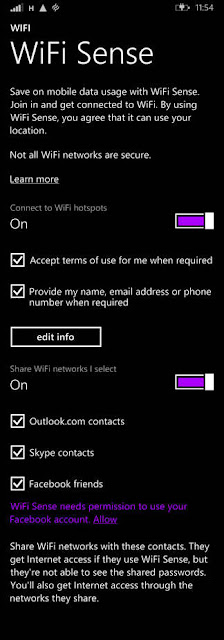
Wi-Fi Sense has been on Windows Phone since 8.1
Those contacts include their Outlook.com (nee Hotmail) contacts, Skype contacts and, with an opt-in, their Facebook friends. There is method in the Microsoft madness – it saves having to shout across the office or house “what’s the Wi-Fi password?” – but ease of use has to be teamed with security. If you wander close to a wireless network, and your friend knows the password, and you both have Wi-Fi Sense, you can log into that network.
Wi-Fi Sense doesn’t reveal the plaintext password to your family, friends, acquaintances, and the chap at the takeaway who's an Outlook.com contact, but it does allow them, if they are also running Wi-Fi Sense, to log in to your Wi-Fi. The password must be stored centrally by Microsoft, and is copied to a device for it to work; Microsoft just tries to stop you looking at it. How successful that will be isn't yet known.
"For networks you choose to share access to, the password is sent over an encrypted connection and stored in an encrypted file on a Microsoft server, and then sent over a secure connection to your contacts' phone if they use Wi-Fi Sense and they're in range of the Wi-Fi network you shared," the Wi-Fi Sense FAQ states.
Microsoft also adds that Wi-Fi Sense will only provide internet access, and block connections to other things on the wireless LAN: "When you share network access, your contacts get internet access only. For example, if you share your home Wi-Fi network, your contacts won't have access to other computers, devices, or files stored on your home network."
That sounds wise – but we're not convinced how it will be practically enforced: if a computer is connected to a protected Wi-Fi network, it must know the key. And if the computer knows the key, a determined user or hacker will be able to find it within the system and use it to log into the network with full access.
In theory, someone who wanted access to your company network could befriend an employee or two, and drive into the office car park to be in range, and then gain access to the wireless network. Some basic protections, specifically ones that safeguard against people sharing their passwords, should prevent this.
The feature has been on Windows Phones since version 8.1. If you type the password into your Lumia, you won’t then need to type it into your laptop, because you are a friend of yourself. Given the meagre installed base of Windows Phones it's not been much of a threat – until now.
With every laptop running Windows 10 in the business radiating access, the security risk is significant. A second issue is that by giving Wi-Fi Sense access to your Facebook contacts, you are giving Microsoft a list of your Facebook friends, as well as your wireless passwords.
In an attempt to address the security hole it has created, Microsoft offers a kludge of a workaround: you must add _optout to the SSID (the name of your network) to prevent it from working with Wi-Fi Sense.
(So if you want to opt out of Google Maps and Wi-Fi Sense at the same time, you must change your SSID of, say, myhouse to myhouse_optout_nomap. Technology is great.)
Microsoft enables Windows 10's Wi-Fi Sense by default, and access to password-protected networks are shared with contacts unless the user remembers to uncheck a box when they first connect. Choosing to switch it off may make it a lot less useful, but would make for a more secure IT environment.
Yes, wireless passwords can be written down and trivially passed along to others: we know network security shouldn't end at the Wi-Fi login prompt. But there's nothing like an OS automating the practice of blabbing passphrases to your mates, eh?

Updated to add

A Microsoft PR rep has been in touch about the headline, pointing out that when you share access to your network via Wi-Fi Sense, your contacts cannot share that access to other people. We know this.
The headline still stands because: imagine you and I are friends, and you visit my house. I tell you the Wi-Fi password, or you read it off the fridge. You type it into your Windows 10 device, and access to my network is shared via Wi-Fi Sense with your Windows 10 friends. Your friends now have access to my network, or in other words, my friend's friends now have access to the network.
And that's not good.
--------------------------

So far for the article from The Register.

By now I have installed several versions of Windows 10 Preview and the install process has changed over time - which is to be expected in a preview for testing of a product that is in active development. The last install(s) have asked questions about sharing Wi-Fi keys and I have declined. By the way, I am planning an extensive article about the install process of Windows 10.

I have declined to share Wi-Fi keys because I read the questions before I ACCEPT the default settings. These preselected default settings more often that not help Microsoft rather than the individual user; that at least is my experience with Microsoft software and products since I know them - and that is only since about the early 1980s.

As usual I welcome comments and suggestions right here in the blog. Thank you in advance.

Click here for a categorized Table Of Contents.

Thursday, July 9, 2015

2015-07-09 WBKV Talking Points (July 9th 2015)

Windows 10
  • What
    It is an in-place upgrade.
    If you want to preserve your Windows 7/8 system DO NOT UPGRADE!
  • When
    Anytime on or after July 29th.

  • Why
    If you want to get rid of Windows 8 annoyances and quirks.
    But you will have to learn a new interface - AGAIN! (boo Microsoft).

  • Why not
    It does not bring anything I consider worth wile the risks of that change.
    There is no realistic simple way to avoid establishing a Microsoft account! Thus every Windows 10 user will become the “target” of the associated “advertisement ID”.
    The install process now even openly mentions the "advertisement ID"!

If your current Windows system is running stable and doing what you want to do I see no compelling reason to upgrade.

Hopefully listener calls with questions. 


As usual I welcome comments and suggestions right here in the blog. Thank you in advance.

Click here for a categorized Table Of Contents.


Thursday, June 25, 2015

2015-06-25 WBKV Talking Points (June 25th 2015)


Please click this link if you are looking for information on Windows 10.

Emergency patch for Adobe Flash Player; details here (June 24 2015)

Windows 10 not necessary for Windows 7 users, IMHO at least:
  • If you are still running Windows XP I can't help you.
     
  • If you are running Windows Vista you better think about a new computer (mostly).
     
  • If you have a stable Windows 7 system that does dependably what you want to do then don't upgrade to Windows 10.

  • If you are still on Windows 8 you are long overdue to upgrade to 8.1.
     
  • If you have Windows 8.1 then upgrading to Windows 10 will eliminate most of Windows 8's annoying quirks and shortcomings.

Beware of scam phone calls for "computer support". Your computer does NOT "report" about viruses, to nobody.
   -  This is an oldie (Feb. 2013) but still very actively exploited.

Curious about Windows 10? Microsoft has a free book "Introducing Windows 10 for IT Professionals here (scroll down just a few lines to see the title!).