Potentially
unwanted
Program
That exactly is what PuPs are. Now that formulation with "potentially" is a protection against frivolous law suits; every PuP does something, in the opinion of it's author definitely something positive and useful. The word potential protects everybody who has to or wants to name these programs from lawsuits.
In my opinion EVERY PuP out there is outright malware and it is sad that existing laws and court decisions force us to use the word potential at all.
I happened to run across a good article (IMHO at least) about PuPs. You can find it here. Yes, it's three years old and I believe I have already linked to it in an earlier article. I hope you don't mind to get the suggestion to refresh your memory.
The article I linked to in the previous paragraph refers to an even older article about one of the major sources of PuPs on our computers, the so called Download Portals.
IMHO a refresher about this might be recommended as well.
Stay safe.
Showing posts with label toolbars. Show all posts
Showing posts with label toolbars. Show all posts
Wednesday, May 1, 2019


Wednesday, January 27, 2016
"Free" Security programs - For A Price
I stumbled over this article on How-To-Geek.
I wan to save you the hassle and time to read this lengthy article your self and will quote a few selected and IMHO most relevant snippets.
My stance toward the remaining "free" security programs as well as the well known commercial offerings is known; I have expressed this here repeatedly. So let's begin:
Don't despair, a good, time proven free solution is available since about 2009.
For now over 13 years I "fix" my customer's home computers by removing all sorts of viruses and other malicious or obnoxious software. Most of my customers call themselves "computer illiterate". All of them have lived safely with mostly little or no manual effort.
The only malware infections happen now when someone "falls" for a social engineering trick; that is in effect when the customer for a moment was inattentive. And hat is just a human weakness, I know from my very own experience.
If you want to know details about this solution plese drop me a personal email; thank you.
I wan to save you the hassle and time to read this lengthy article your self and will quote a few selected and IMHO most relevant snippets.
My stance toward the remaining "free" security programs as well as the well known commercial offerings is known; I have expressed this here repeatedly. So let's begin:
- Free antivirus applications aren’t what they used to be. Free antivirus
companies are now bundling adware, spyware, toolbars, and other junk to
make a quick buck.... At one point, free antivirus was just advertising, pushing users to
upgrade to the paid products. Now, free antivirus companies are making
money through advertising, tracking, and junkware installations.
- Comodo ... change[s] your web browser’s search engine to Yahoo! and
bundles the GeekBuddy paid tech support software. It also bundles other
Comodo products you might not want, including changing your DNS server
settings to Comodo’s servers and installing “Chromodo,” a Chromium-based
browser made by Comodo. ... As the Comodo-affiliated PrivDog software contained a massive security hole similar to the one Superfish had, there’s a good chance you don’t want a bunch of other Comodo-developed software and services thrown onto your computer.
- Lavasoft’s Ad-Aware pushes “Web Protection” that will “secure your
online search” by setting SecureSearch as your web browser’s homepage
and default search engine. Despite the name, this isn’t actually a
security feature. Instead, it just switches your web browser to use a
branded search engine that actually uses Yahoo! in the background — this
means it’s powered by Bing.
If you prefer Bing, that’s fine — just use the full Bing website. You’ll have a better experience than using Lavasoft’s rebranded, stripped-down search engine.
- Avira encourages you to install “Avira SafeSearch Plus.” This is just a
rebranded version of the Ask Toolbar, redirecting your search results
through a rebranded version of Ask.com’s search engine. If you wouldn’t
want the Ask Toolbar installed, you wouldn’t want this rebranded version
of it installed either.
- ZoneAlarm also wants you to enable “ZoneAlarm Search” as your browser’s
default homepage and search engine, along with installing a ZoneAlarm
toolbar that is - once again - a rebranded version of the Ask Toolbar.
- Panda {Free Antivirus] attempts to install their own browser security toolbar as well as
change your browser’s search engine to Yahoo, and its home page to
“MyStart,” which is powered by Yahoo. To Panda’s credit, they at least
don’t attempt to trick you by offering you a renamed Yahoo search engine
or home page.
- avast!’s installer also tries to install additional software you
might not want. We’ve seen Dropbox offered here in the past, but avast!
attempted to install the Google Toolbar when we tried installing it.
Programs like the Google Toolbar and Dropbox are high-quality software you might actually want, so avast! comes out looking very good compared to the other options here. But even avast! has done done some questionable things in the past — witness the avast! browser extension inserting itself into your online shopping.
-
AVG has its own suite of obnoxious utilities, including the AVG Security Toolbar, AVG Rewards, AVG Web TuneUp, and SecureSearch.
- BitDefender offers a stripped-down free antivirus. ... BitDefender is still pursuing the strategy of attempting to upsell you to the paid product.
- MalwareBytes doesn’t attempt to install any extra junk on your
computer, although the free version doesn’t offer real-time protection.
To their credit, MalwareBytes is offering a free tool that’s useful for
manual scans - it even picks up and detects [and removes!] much of the adware other
programs install - and encouraging you to pay for a more full-featured
product.
This tool could be quite useful in combination with another antivirus, like Microsoft’s free Windows Defender or Microsoft Security Essentials solution. But it’s not a standalone free antivirus you can depend on, as it lacks the real-time scanning.
Don't despair, a good, time proven free solution is available since about 2009.
For now over 13 years I "fix" my customer's home computers by removing all sorts of viruses and other malicious or obnoxious software. Most of my customers call themselves "computer illiterate". All of them have lived safely with mostly little or no manual effort.
The only malware infections happen now when someone "falls" for a social engineering trick; that is in effect when the customer for a moment was inattentive. And hat is just a human weakness, I know from my very own experience.
If you want to know details about this solution plese drop me a personal email; thank you.
Thursday, April 19, 2012
Download Portals - A Nasty Side Of the Internet
We all sometimes want or even need to download that nifty program that will do something we think we need done on the computer. Many downloads of really good software are offered on Download Portals, web sites that are specially designed to make many different programs available in "one convenient location" and accessible through "one convenient user interface".
Did you see what I put in quotes in the previous paragraph? "Convenient", one of the regularly (ab-)used weaknesses of human nature.
A consistent single user interface for many different downloads certainly is a nice idea - when it's done correctly and without a hidden agenda. Some very well known download portals do have a hidden agenda; mostly it is about making some money from the fact that many people use them.
Today I found an excellent article on the Emsisoft Blog about the abuse that unsuspecting visitors are subjected to by some well known download portals. Here you find the original blog post with quite a bit of technical detail; Emisisoft makes very good anti virus software and their blog is written for a technically inclined audience.
To save you the need to wade through the technical details here is an excerpt from that blog post (two paragraphs) and then I follow it with just the skinny:
What
are download wrappers good for?
You have every right to wonder what the point of download wrappers is at all, as conventional downloads have been just as simple and as well established for decades now. There are several reasons: Useful features such as pausing and resuming while downloading big files are mostly advertised. Current browsers support pausing and resuming downloads, though. You can also make use of professional download managers instead of having a wrapper imposed onto you. This argument is also rather weak as download wrappers are also used for very small target files that are sometimes even smaller than the wrapper itself.For download portals there is first and foremost a good reason for using download wrappers: the possibility of systematically putting in ads. Software you have designed yourself for that purpose is way more useful than a website is. Plus, this offers the advantage of collecting statistical data on used hardware, which enables the creation of detailed user profiles. One must not forget the commercial effect, either: When a user downloads software from a specific portal, they are highly likely to remember its name and use this portal for future downloads as well. Regular visits including unique user statistics result in more profits from advertising.
Example 1: download.com
Risk: Installing a browser toolbar and hijacking your browser’s
homepage.
Example 2: softonic.com
Risk: Installing undesired software, fraudulent ad banners.
Example 3: softonic.de / RegNow
Risk: Unintentional redirection to unknown third-party providers, ad
banners.
Example 4: tucows.com
Risk: Greatest risk due to accidentally installing third-party
software and tampering with your browser.
Should you at any time have downloaded anything from any of these four download portals you may find any of these icons on your desktop, in your Downloads folder or in almost any other location:



PLEASE uninstall these programs from your computer; uninstall them no matter what they tell you when you attempt the uninstall.
The vast majority of programs offered by download portals is available from other sources without all the "extras". My customers know who to ask.
The vast majority of programs offered by download portals is available from other sources without all the "extras". My customers know who to ask.
As usual I welcome comments and suggestions right here in the blog. Thank you in advance.
Click here for a categorized Table Of Contents.
Click here for a categorized Table Of Contents.
Wednesday, January 25, 2012
Computer 101 - The 2012 Edition
Disclosure:
Recently I found this article on a blog called The Consumerist. I liked the contents of this article very much but it clearly was written by a computer nerd for other computer nerds.
I took the liberty to re-write most of the article in a form and language that I hope is better suited for my customers. Here it is:
- Keep all your data backed up.
Put your data on an external disk drive, upload it to a safe storage website, copy it to another computer or even on a CD or a DVD (most cumbersome!), somewhere, anywhere but please back up your data files!
I am perfectly aware that many of my customers will have issues in setting everything up correctly but as usual I can help.
Having your data on your computer only is NO GOOD, having data files in two places is a MUST. If one of these sets of data files fails you need to create another second storage location! This will save you $$ and a lot of aggravation.
Manufacturer warranties do not cover your data files; you need to protect them yourself. Back up your documents, pictures, emails, email addresses (or contacts), bookmarks (or favorites), tax files, music, videos and ANY business information you may have.
The only exception to my rule "free software for everything" covers data backup. You need a sufficiently large external disk drive and a piece of software costing $30 per computer.
If set up correctly this program will keep all your data files automatically up to date on the external disk drive without you having to do anything except the initial set up. As usual I can help with that.
- Have a current recovery disc for each computer you have.
This is your licensed copy of your OS. You no longer get operating system disks with a new computer; it’s all stored on the disk drive. It is specific to your computer's internals like processor, mother board, sound and graphics. It has the device drivers your computer needs to do its most basic tasks. Burn a recovery disk on to DVDs right away when you get your computer and put the DVD somewhere safe. It may easily take up to 3 hours to do.
If you lose the recovery disk then you can order a new one from your manufacturer for between 15 and 50 dollars, depending on the brand. HP is usually cheaper, Sony is wickedly expensive. They take about 2 or 3 weeks to arrive; that is a looong wait if you need them NOW to replace a hard drive or to fix Windows.
There is a significant difference between recovery disks and a repair disk that you need to be aware of. You can read about that here. You have to be aware of that significant difference. And you have to be aware of the fact that if you have to use these recovery disks your computer will be thrown back to exactly the state it was in at the very moment when the recovery disks where created! Here I am talking about recovery disks created with the standard Windows Vista and Windows 7 system tools, not disks created with manufacturer specific programs; the latter reset your computer to original factory new state. You don't want to go back there losing all updates and so on.
If for whatever reason you can neither buy recovery disks from the manufacturer nor create your own disks then, as a last resort, you can purchase a full copy of Windows 7 for about $100.
- One antivirus at a time, please.
Two antivirus programs running concurrently is like pushing two fat pigs together through a dog door, neither can get through the door correctly and they block each other from functioning properly.
Two antivirus or security programs can tear nasty holes in your operating system depending on which ones you are trying to combine (I have seen it!) or at least they will SLOW DOWN YOUR COMPUTER TO A CRAWL because two systems are trying to scan your every move as well as each others moves.
More than one antivirus or security program running concurrently is usually LESS protection than one good one.
Your new computer most likely came with a trial of some sort of “security” software pre-installed. All these pre-installed antivirus or security programs will cost money, every year! Remove this stuff because you don’t need to pay for a good antivirus program!
Remove the “old” antivirus program before installing a new one; even if they are expired they will get in each other‘s way! And some of them don’t even uninstall correctly. I have uninstalled Norton, McAfee and other security programs and upon detailed inspection found some left over parts of these systems still sitting in and actually running on the computer. This inspection is not trivial at all; it takes very special programs and a lot of detailed know how to do it correctly.
Install the free program Microsoft Security Essentials; you can read here how to do that correctly.
- Do not install any tool bars.
Did you hear me? Please DO NOT INSTALL ANY TOOL BARS!
ALL toolbars are bloatware, they will slow down your internet connection and eventually even crash your web browser.
You don't need any of them, no matter how well known the company is that wants to force the tool bar on your computer!
Tool bars take up screen space and they will end up affecting performance and sometimes even security.
Please DO NOT INSTALL ANY TOOL BARS!
- "Free" stuff can be expensive:
Web sites that offer free games, movies, music (torrent sites!), pornography and even free social networking sites are riddled with viruses. Virus removal can be time and thus $$ consuming.
Viruses are a software issue and are considered private data, they are not covered by any manufacturer warranty.
Be safe and smart on the internet, use common sense and be vigilant.
Keep your important software up to date; read more details about updating here.
- Despite everything said in paragraph #5 above: Excellent free software is available for almost any functionality you can imagine and I can point you in the correct direction, I can show you where to find it.
- Computers don’t like liquids.
This includes water, coke, beer, soup, bodily fluids and excessive and/or aggressive cleaners.
Don't spray screen cleaners directly on your screen, spray it on your lint free cleaning cloth and then wipe the screen. Even a mist of any liquid can cause damage.
Computers also don’t like gravity or being punched. Throwing or punching a computer will probably cause a lot more damage and not fix any issue, be it speed or erratic behavior.
- No computer is immortal.
Computer technology changes at an extremely fast rate. Average computer life spans are mere 2-3 years for laptops or closer to 4-5 years for desktop computers. This makes sense, because laptops undergo more stress from movement, impact and temperature changes. Many laptops are prone to overheating if you have them sitting “just” on your lap, on a table cloth(!) or on a pillow. NEVER EVER do that, always have your notebook computer on a solid, even surface like wooden tabletop, a counter top or a board.
Your computer uses electricity that circulates through lots of electronic components that in turn can get really hot. Many portable computers eventually burn out. And if you have your data backed up, you'll be up and running on a new computer in no time.
Click here for a categorized Table Of Contents.
Wednesday, October 5, 2011
Browser Toolbars - More Than a Nuisance
The following applies generally to ALL tool bars, no matter how well known the name of the company is where the toolbar originates from. I chose the Yahoo! toolbar only because it is so pervasive and comes in many disguises.
Over and over again I find the nasty (at least!) Yahoo! Toolbar on customer's computers. When I ask the rhetorical question "Who installed that?" mostly I get sort of a blank stare and the reply "I have no idea".
And I trust that the customer really has no idea. But then, how did it happen? Two possibilities:
1st possibility:
You installed a new program or an update to a program you have been using for quite some time. These install processes usually ask a lot of tedious questions and we have gotten used to "clicking through", that is to quickly click on the button for the positive, confirming choice. We want to get done with this, don't we?
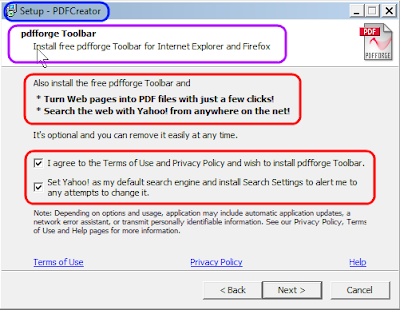
Take the time to really read and understand what these little windows say and act accordingly. The correct action here would be to uncheck the two check boxes by "I agree..." and "Set Yahoo!...". Simple enough one would think...

Do you really understand what Yahoo! offers here? We have to sort of translate the words "...Firefox for Yahoo!". Yahoo! does not have any real updates to Firefox; we get those only from Mozilla.
Yahoo! has a slightly modified version of Firefox that locks you into some Yahoo! services, especially their search engine. Once you have the Yahoo! version installed there is no way to get rid of the "Yahoo! Toolbar" and their "search enhancements" besides re-installing Firefox from a clean installer.
Over and over again I find the nasty (at least!) Yahoo! Toolbar on customer's computers. When I ask the rhetorical question "Who installed that?" mostly I get sort of a blank stare and the reply "I have no idea".
And I trust that the customer really has no idea. But then, how did it happen? Two possibilities:
1st possibility:
You installed a new program or an update to a program you have been using for quite some time. These install processes usually ask a lot of tedious questions and we have gotten used to "clicking through", that is to quickly click on the button for the positive, confirming choice. We want to get done with this, don't we?
This "clicking though" is the culprit. Right in the middle of all these
windows is one window that may look similar to this example:

As you can see the example is from an installation of PDF-Creator. And it asks us for permission to install the "pdfforge Toolbar". Only the text by the second preselected check box gives us a hint as to what toolbar this really is. "Set Yahoo! as my ..." gives it away, it's my friend the Yahoo! toolbar in one of it's many disguises!
Do you know a rat when you smell a rat?
This is a typical example of how we get tricked everywhere and all the time to do the wrong thing. We have "trained" ourselves to click through and the people out there know it and use it to our detriment - if we let them.
2nd possibility:
Just a few minutes ago I did some researching for a specific issue in the Thunderbird email program that many of my customers and I myself use. In a legitimate related article in the Thunderbird support materials was a link to Yahoo! Help. I followed that link and ended up with this (partial) window:
Just a few minutes ago I did some researching for a specific issue in the Thunderbird email program that many of my customers and I myself use. In a legitimate related article in the Thunderbird support materials was a link to Yahoo! Help. I followed that link and ended up with this (partial) window:

Do you really understand what Yahoo! offers here? We have to sort of translate the words "...Firefox for Yahoo!". Yahoo! does not have any real updates to Firefox; we get those only from Mozilla.
Yahoo! has a slightly modified version of Firefox that locks you into some Yahoo! services, especially their search engine. Once you have the Yahoo! version installed there is no way to get rid of the "Yahoo! Toolbar" and their "search enhancements" besides re-installing Firefox from a clean installer.
Do you know a rat when you smell a rat?
Here Yahoo! takes advantage of the fact that most people don't know enough about their computer and seemingly are afraid to ask before they click on stuff like this.
Why is all this important you ask?
Here you have it directly from the horses mouth:
Yahoo! Toolbar "Causes excessive CPU usage"
Ask.com Toolbar "May cause redirected searches, failed keyword searches and/or the "File not found" error..."If you want it more technical see Mozilla's own list of problematic extensions for more similar goodies.
As usual I welcome comments and suggestions right here in the blog. Thank you in advance.
Click here for a categorized Table Of Contents.
Click here for a categorized Table Of Contents.
Subscribe to:
Posts (Atom)
