Thursday, July 24, 2014

Cloud Storage - again


May 5th 2013 I documented my opinion about cloud storage based on a real life example with Google's service.

Today I ran across a similar example based on Microsoft's service named "LiveDrive". Here is the original text:
LiveDrive has started closing people's accounts without warning.  Not everyone's account, of course.  Just a few.  And when those people contact the company to ask why, they're told that they were breaching the terms of their "unlimited storage" package by, er, storing too much stuff.

If this happens to you, and you make a fuss, LiveDrive will restore your access in order that you can retrieve any important data.  However, in the experience of a couple of friends of mine, this access has its bandwidth throttled to such a degree that it is virtually impossible to download anything.  So your files are pretty much lost.
So again, as a reminder, cloud storage services may be convenient but:
Your data is not safe!

You can lose access any time without warning! 
Always keep the original file locally stored and locally backed up! But does that not blow the loudly touted advantages of cloud-backup clearout of the water?


Sometimes I am outright fascinated by how easily people can be made to believe in third parties they have absolutely no control over.

IMHO at least the cloud is no place to entrust my most important documents and irreplaceable memories (aka pictures) with.

As usual I welcome comments and suggestions right here in the blog. Thank you in advance.

Click here for a categorized Table Of Contents.

Monday, July 7, 2014

2014-07-07 WTKM Talking Points (July 07 2014)

 
Security researchers despair: Users will run malware if paid as little as one cent.
This raises questions about the effectiveness of well known security advice when competing against the smallest of incentives,

Cloud storage service Norton Zone closes down. Users have until August 6, 2014 to migrate their data to other services.
My opinion on clous storage was published here.

Whether you use DropBox, Micro$oft's SkyDrive, Google Drive or any other free cloud storage service the service or your data can vanish “over night”.

CryptoLocker: The UK’s National Crime Agency (NCA) a month ago has warned people have just two weeks to protect themselves against the CryptoLocker ransomware before both return from the dead. C&C servers were temporarily down.
These 2 weeks are past by now. What have you done?
NCA hit the nail on the head when they said:
“Our message is simple: Update your operating system regularly, update your security software and use it and think twice before you click on links or attachments in unsolicited emails.”
      “An estimated 234,000 computers worldwide, half in the US, have been infected with CryptoLocker since September 2013. These infection have been used to bilk victims out of more than $27m according to FBI estimates.” 
Protection? 
CryptoPrevent from FoolishIT
CryptoGuard from SurfRight (this is what I use; but my main defense is paying attention!)  

Do you remember?
About 10 to 12 weeks ago the US government (DHS) advised NOT TO USE Internet Explorer! Update, update, update!
In Windows version you should run at least
Vista SP2 IE 9
Windows 7 IE 9
Windows 8 IE 10
Windows 8.1 IE 11

Do NOT tolerate Youtube ads! Some of them distribute malware and trojan horse viruses!

"Microsoft scam calls": Sorry but neither MS not their "partners" know that we exist.
“I am calling from Windows”; there is no company named "Windows"!
All downloads, fixes updates a.s.o. for Windows XP offered on web sites are bogus; beware!
The first file encrypting and device locking trojan horse virus on Android discovered.
Microsoft has changed their Terms and Conditions. (See here for details)
Basically
- you give up your rights to become part of an eventual future class action lawsuit and
- you agree that Micro$oft is not responsible for anything.
My personal take-away:
Don't do any business with Micro$oft, don't entrust any data to their services!


Wednesday, June 18, 2014

Micro$oft's new Terms and Conditions - A Bombshell


Microsoft Corp. changes their Terms and Conditions. Not that big an issue for me but when I think of millions of Windows 8 users who get tricked, conned and arm-twisted into establishing a "Microsoft Account", well, then I get a queasy stomach.

If I add in the many millions of unsuspecting users of email accounts with hotmail.com, outlook.com, live.com and other M$ server names then the I get really nauseous.

And when I think of hundreds of millions of Windows 8 and Office 2013/365 users whose data gets "automatically stored in the cloud" plus many small businesses that think "cloud backup" is a good solution, man, then I actually want to p**e. 

To spare you (and me) wading through lots of legalese details here only hree quotes from Micro$oft's original text (highlights by me, some editing lost in transferring the text): 
  • 10.3. Binding arbitration. If you and Microsoft don't resolve any dispute by informal negotiation or in small claims court, any other effort to resolve the dispute will be conducted exclusively by individual binding arbitration governed by the Federal Arbitration Act ("FAA"). Class arbitrations aren't permitted. you're giving up the right to litigate disputes in court before a judge or jury (or participate in court as a party or class member). Instead, all disputes will be resolved before a neutral arbitrator, whose decision will be final except for a limited right of appeal under the FAA. Any court with jurisdiction over the parties may enforce the arbitrator’s award.
  • 10.4. Class action waiver. Any proceedings to resolve or litigate any dispute in any forum will be conducted solely on an individual basis. Neither you nor Microsoft will seek to have any dispute heard as a class action, private attorney general action, or in any other proceeding in which either party acts or proposes to act in a representative capacity. No arbitration or other proceeding will be combined with another without the prior written consent of all parties to all affected arbitrations or proceedings.
  • 11. NO WARRANTIES


    MICROSOFT, AND OUR AFFILIATES, RESELLERS, DISTRIBUTORS, AND VENDORS, MAKE NO WARRANTIES, EXPRESS OR IMPLIED, GUARANTEES OR CONDITIONS WITH RESPECT TO YOUR USE OF THE SERVICES. YOU UNDERSTAND THAT USE OF THE SERVICES IS AT YOUR OWN RISK AND THAT WE PROVIDE THE SERVICES ON AN “AS IS” BASIS “WITH ALL FAULTS” AND “AS AVAILABLE.” MICROSOFT DOESN'T GUARANTEE THE ACCURACY OR TIMELINESS OF INFORMATION AVAILABLE FROM THE SERVICES. TO THE EXTENT PERMITTED UNDER YOUR LOCAL LAW, WE EXCLUDE ANY IMPLIED WARRANTIES, INCLUDING FOR MERCHANTABILITY, SATISFACTORY QUALITY, FITNESS FOR A PARTICULAR PURPOSE, WORKMANLIKE EFFORT, AND NON-INFRINGEMENT. YOU MAY HAVE CERTAIN RIGHTS UNDER YOUR LOCAL LAW. NOTHING IN THIS AGREEMENT IS INTENDED TO AFFECT THOSE RIGHTS, IF THEY ARE APPLICABLE.
    YOU ACKNOWLEDGE THAT COMPUTER AND TELECOMMUNICATIONS SYSTEMS AREN'T FAULT-FREE AND OCCASIONAL PERIODS OF DOWNTIME OCCUR. WE DON'T GUARANTEE THE SERVICES WILL BE UNINTERRUPTED, TIMELY, SECURE, OR ERROR-FREE OR THAT CONTENT LOSS WON'T OCCUR.  
 If I still can read correctly the very last part of the last sentence "... or that content loss won't occur." contains the admission that Micro$oft can not guarantee availability of their services and that you data will be available to you when you need it.

This is much worse than expressed in my previous diatribe about cloud storage services.

And trust me, just by using any Micro$oft service you have agreed to these Term of Service.  Even if you only use your copy of Windows 8 that you set up with a MS account you have agreed to these Terms!

As usual I welcome comments and suggestions right here in the blog. Thank you in advance.

Click here for a categorized Table Of Contents.
 

Monday, June 2, 2014

2014-06-02 WTKM Talking Points (June 02 2014)

First thing’s first: If you log in to Facebook on your computer and are mysteriously prompted to download a “unique software tool for safe and secure authentication” to your Android device, do not proceed.

If this occurs, your computer is already infected and downloading the software will infect your Android device as well. If you are seeing such a prompt you need help!

A new Trojan distributed through Facebook instant messaging and Yahoo! Messenger has claimed hundreds of victims.

Ebay data breach: Have you changed your password? Is it unique (on the whole big web)?
Ebay is very slow to alert affected customers.

Antivirus firm Avast: We got broken in to. Security guys can't secure their own computers? Oh PLEASE! Do NOT use Avast any longer! Replace it with Microsoft Security Essentials (or Windows Defender on Win 8).

Do you remember?
About 6 to 8 weeks ago the US government (DHS) advised NOT TO USE Internet Explorer! IE 8 still vulnerable; no fix yet. Upgrade to newer version!
In Windows version you should run at least
Vista SP2 IE 9
Windows 7 IE 9
Windows 8 IE 10
Windows 8.1 IE 11

AOL confirms security breach. Yes, we are in 1995 again!

Windows 8.1 Update went to Automatic Updates April 8th. 890+MB; huge; be VERY patient!

Apple has released updates for Safari web browseron OS X fixing 22 serious security flaws.

Test if your Linksys/Cisco Routers is supported. If not you have to replace it.
"Not supported" means that the firmware is unsafe and can not be updated.

 Do NOT tolerate Youtube ads! Some of them distribute malware and trojan horse viruses!

"Microsoft scam calls": Sorry but neither MS not their "partners" know that we exist.
“I am calling from Windows”; there is no company named "Windows"!
All downloads, fixes updates a.s.o. offered for Windows XP are bogus; beware!
Yahoo and AOL hacked; serve infected advertisements!

Symantec: Antivirus (the Norton products!) is 'DEAD' – says Symantec's CEO.

US Senate slams advertisement servers for security failings.
Will anything ever be done about it?


Monday, May 5, 2014

2014-05-05 WTKM Talking Points (May 05 2014)

First thing’s first: If you log in to Facebook on your computer and are mysteriously prompted to download a “unique software tool for safe and secure authentication” to your Android device, do not proceed.
If this occurs, your computer is already infected and downloading the software will infect your Android device as well. If you are seeing such a prompt you need help!
This Android malware can:
  • Intercept real two factor authentication codes sent by real service providers
  • Capture any SMS text, incoming and outgoing
  • Redirect outgoing calls to a preprogrammed phone number
  • Capture audio by activating microphone
  • Steal metadata like call logs and contacts lists
AOL confirms security breach from spam attack. Email addresses, passwords and home addresses swiped. AOL Mail locks down email servers to deal with spam tsunami; are we in 1995 again?

Windows 8.1 Update 1 went to Automatic Updates April 8th. Be warned, that will be up to 6 updates rolled in one of 890+MB; huge; be VERY patient!

Apple has released updates for iOS and OS X operating systems fixing 19 sserious security flaws as well as some stability updates.

New hole in Internet Explorer already under attack to hijack Pcs. The bug hits all IE versions from 6 to 11, no patch yet!
      US government advised NOT TO USE Internet Explorer!

Test if your Linksys/Cisco Routers is supported. If not you have to replace it.
"Not supported" means that the firmware is unsafe and can not be updated.

Do NOT tolerate Youtube ads! Some of them distribute malware and trojan horse viruses!

"Micro$oft scam calls": Sorry but neither M$ not their "partners" know that we exist.
“I am calling from Windows”; there is no company named "Windows"!
All downloads, fixes updates a.s.o. offered for Windows XP are bogus; beware!
"Open" public WiFi-Hotspot? UN-safe by design! Do nothing requiring a password or the password could get stolen!

Michael's Crafts hacked. Three million more credit card's info stolen!
  
Search all now-public NSA surveillance docs at your leisure. See The NSA Archive.

Microsoft spells out new rules for exiling .EXEs. Adware classification regime won't tolerate privacy probes or auto-installs. Let's see what that does to PuPs.


Thursday, April 24, 2014

Nasty Surprise - Thanks Micro$oft!


To hell with Micro$oft, we are getting royally “scr***d” over. “We” here being every home user with Windows 8! We have to decide if we want to stay on version 8.0 or upgrade to 8.1 and then to 8.1 Update.

Watch the capital U in Windows 8.1 Update, it is a major distinction, sort of like of but not quit like a service pack. What is Micro$oft thinking - if somebody is thinking there at all?

There is no big harm in staying with Windows 8.0, Micro$oft is going to supply at least two more years of updates. But after these two years? Not a word ... yet.

Totally out of the blue Micro$oft has decided that Windows 8 users need Windows 8.1 and on top of that 8.1 Update if we want to receive future updates. No warning, no information that gives us time to prepare, nothing. You can read the truly puzzling, no almost confusing details here.

Remember, these Updates are mandatory for the average non-geek home computer user.

Micro$oft defenders put it like this: “If you want security patch C, you need to have installed security patch B first. In this case, security patch B just happens to be the 8.1 Update.” What a joke, what an arbitrary and confusing labeling system!

While there is some merit in above point of view, it overlooks three important facts:

  1. Many people are having problems installing Windows 8.1 and Windows 8.1 Update — and Micro$oft hasn’t fixed the problems.

    Not the least problem being the huge size of 8.1 (ca. 8.2GB!) and of 8.1 Update (ca. 890MB); it is a pain to download that on “slow”, in our area regular DSL connections.

  2. Windows 8.1 Update is a lot more than a security patch. It includes some significant changes to the Windows User Interface.n The latter luckily is no problem for my customers because of the way I set up Windows 8 computers.

  3. Micro$oft is going to continue making patches for Windows 8.1. It just won’t give these updates to the average Windows user. That hurts.
And as if to add insult to injury Micro$oft puts a deadline of May 13th on having Windows 8.1 Update installed!

It all boils down to trust, trust that Micro$oft is recklessly playing with.

And here is an important side note: The whole process takes a lot of time. Basic DSL connections and slower computers will be greatly affected. Brace yourself and prepare for many hours of work. Thank you Micro$oft!


For anybody with original Windows 8 and wanting to update to 8.1 I hope to be able to amend this article with instructions on how to get from Windows 8 to 8.1 and then to 8.1 Update. Hopefully I can do this on the upcoming weekend. Please stay tuned and check back if you are interested.

Update 4/25/2014:

For users with Windows 8:
  • If you want to avoid the pain of updating to 8.1 you can stay on Windows 8.
     
  • If you want the newest and greatest then you should update to 8.1 and then to 8.1 Update. Please consider the implications, especially the extreme time it takes to download over 9GB of updates on average Internet connections!
     
  •  On slower computers the installations can easily take two to four hours!
For users with Windows 8.1:
  • Micro$oft has made that decision for you: You have to download and install 8.1 Upate if you want to receive future security updates via Windows Update. 
As usual I welcome suggestions and comments right here in the blog.

Click here for a categorized Table Of Contents.


Saturday, April 12, 2014

Heartbleed - Internet Wide Risk


You may already have heard about the Heartbleed bug. This article is meant to be a simple rundown:

Web sites encrypt (or should encrypt) important traffic over the Internet such as usernames and passwords for example.

All web sites use some sort of special encryption software for this. Many web sites use a freely available (free as in no money) encryption software named OpenSSL.

Many OpenSSL versions are perfectly safe, only a few versions are affected, that is they contain a bug that allows encrypted information to be decrypted, that is finally to be read in clear text.

There is little we can do on our computers to avoid Heartbleed except avoiding affected web sites. Here are two places where you can check web site addresses for this bug. A web site address is the URL, what you type in the address bar of your web browser.
  1. Heartbleed Test by Filipio.io seems to be privately run; just type over the example "Facebook" entry in the form. This site has lots and lots of detailed information about Heartbleed  and a lengthy Q&A page.
     
  2. Heartbleed Test by Lastpass.com is professionally run by Lastpass.com, a password management service.
    For full disclosure: I use Lastpass, I am one of their customers.
And last but not least here is a list of affected web sites. A warning: This link leads to a forum entry with lots of subsequent discussions that you can safely ignore.

What to do if you use an affected web site?

Assuming that you have done above checking and you have in the past used an affected web site there is only one thing we can do:
Do not log into accounts from afflicted sites until you're sure the company has patched the problem. If the company hasn't been forthcoming -- confirming a fix or keeping you up to date with progress -- reach out to its customer service teams for information, said John Miller, security research manager for TrustWave, a security and compliance firm.
PLEASE give that website or company feedback; tell them that you will shun them if they don't fix their servers soon. If we don't speak up we give them the liberty to stay lazy and to ignore our concerns about this.

Don't be shy about reaching out to small businesses that have your data. Make sure their web site is secure. While high-profile companies like Yahoo and Google certainly know about the problem, a small businesses might not be aware of it, said TrustWave's Miller. Be proactive about the safety of your information.

Keep a close eye on financial statements for the next few days. If attackers can access stored credit card information it can't hurt to be on the lookout for unfamiliar charges on your bank statements.

Once you have gotten confirmation that the web site is fixed change passwords of sensitive accounts like banks and email immediately.

What to do if you have used the same password on more than one web site? Immediately stop this dangerous practice.

On important web sites, where money is involved for example, establish unique passwords for every such web site. And as usual, write the passwords down where you can find the note when you need it - you will need the note, believe me.

And last but not least at all: Your sleek Android smartphone could be affected as well! You find more about that here.

As usual I welcome suggestions and comments right here in the blog.

Click here for a categorized Table Of Contents.
 

Monday, April 7, 2014

2014-04-07 WTKM Talking Points (Apr 07 2014)


Windows 8.1 Update 1 will go to Automatic Updates April 8th. Be warned, that will be up to 6 updates. BE patient!

Apple has fixed 27 vulnerabilities in it's Safari web browser for OS X

Linksys Routers can be hacked.You own any Linksys or Cisco router? Update router firware NOW.Many common models are at danger. Test if your Linksys/Cisco router is still supported. If not you have to replace it. "Not supported" means that the firmware can not be updated any more.

Cisco fixes SIX different vulnerabilities in it's Cisco and Linksys routers! Check your router for firmware updates now if you have a Linksys or a Cisco router!

Banking Trojan Caphaw distributed through Youtube ads! If you get ANY ads when on YouTube you need to call me; you are using the wrong web browser and/or your browser is not set up for safe browsing. Firefox and AdblockPlus rule.

"Micosoft scam calls" abound. I asked one of these callers which one of our five computers he was talking about. Fun...

Public WiFi-Hotspot? UN-safe by design! Do nothing requiring a password!

Malware in hoax emails warning
recipients that they may have cancer.

Microsoft Word 2003, 2007, 2010, 2013,
and Office for Mac 2011 are vulnerable to a newly discovered bug in handling RTF files. No fix yet.

Banks charge Target and one of it's suppliers (of computer security advice!) in a class action lawsuits. Already $172 million damage to banks and more to come.

New ransomware CryptoDefense made programming error and left decryption key behind. Be very careful opening ANY attachments. When in doubt ask!

Search all now-public NSA surveillance docs at your leisure. See The NSA Archive.

Microsoft spells out new rules for adware classification. Won't tolerate privacy probes or auto-installs. Let's see what that does to PuPs

.

Monday, March 3, 2014

2014 03 03 WTKM Talking Points (Mar 3rd 2014)


Linksys Routers can be hacked.
Update router firmware NOW (if you have any Linksys router).
Models E4200, E3200, E3000, E2500, E2100L, E2000, E1550, E1500, E1200, E1000 and E900 are at danger. Some of these models are no longer supported; that means you have to replace them."Not supported" means that there are no more updates for the firmware to fix problem!

Belkin Home Automation routers (WeMo) are unsafe.New variant of Zeus banking trojan horse virus "hides" in common picture file format (.jpg).

Again Adobe issues emergency patch for it's ubiquitous Flash Player.
You have to be on version 12.0.070

Apple
fixes 10(!) major bugs in all it's operating systems.
Supposedly secure network connections could easily be hijacked.
True for iPhones as well! UPDATE!
Major upheaval at Microsoft. What will the new(?) people bring? Windows 8 fallout at work.

Banking Trojan Caphaw distributed through YouTube ads!
If you get ANY ads when on YouTube you need to call me; you are using the wrong web browser and/or your browser is not set up for safe browsing.
Firefox and AdblockPlus rule.
"Micosoft scam phone calls" abound.
I asked one of these callers which one of our five computers he was talking about. Fun...
New to computers and want to learn the basics? Try this web site.

New to the Internet? Want to learn the basics? Start here..


Thursday, February 20, 2014

Voicemail via Email? No Way!


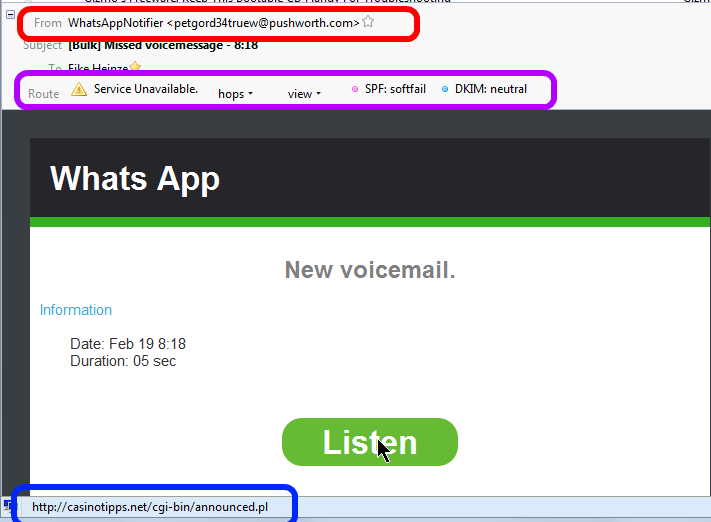
Here is yet another example of a scam I hear often about. This is a screen shot of what I saw in my email program:


At first glance a friendly, nicely formatted and really "professional" looking email.

Three things caught my attention before I would have clicked on "Listen";
  1. Red highlight: The sender address seems to come from "@pushworth.com". Big discrepancy to the supposes (company?) name "Whats App".
    In my mind the warning lights went on.
     
  2. Purple highlight: The sender disguised very well the actual route the email had taken. That shows technical know how and (criminal?) intent.
    By now the warning bells where ringing loud.
     
  3. Blue highlight: When I rested the mouse cursor on the pretty "Listen" button the link behind this button translated to "casinotipps.net".  Casino tips and forwarding voice mails via email? Oh Please, don't think I am that dumb. 
    Now I was already chuckling; just another scam email.
On top of all that I have never given neither the phone company nor the cell phone carrier any instructions to "forward voice mails by email"; what an abstruse idea.

But I know from experience that there are simple souls out there who did click on "Listen"; although the mail they had gotten likely looked different.

Actually I should be thanking the creator of this scam because he keeps me in the business of cleaning up virus infected computers.

As usual I welcome suggestions and comments right here in the blog.

Click here for a categorized Table Of Contents.


Tuesday, February 18, 2014

New Twist - Old Scam


Whether you ever would read The New York Times or whatever your political stance is,


      if you have a computer you NEED to read this NYT article.

The age old story of "User Beware" with a macabre twist.

As usual I welcome suggestions and comments right here in the blog.

Click here for a categorized Table Of Contents.
 

.

Monday, February 10, 2014

eFax Scam - New Variant Of An Old Trick


Just this morning I got an email supposedly coming from eFax and I thought I better document it here.

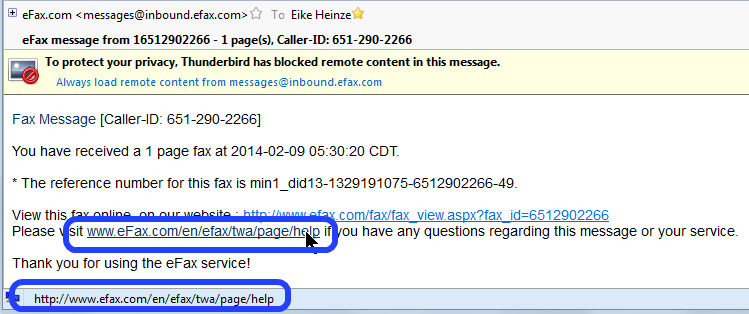
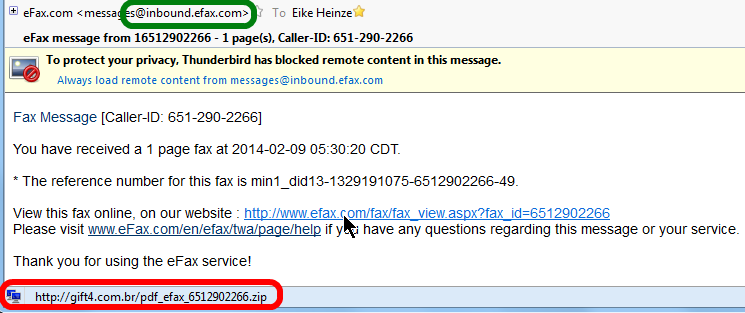
Here are screen shots of what it looked like in Thunderbird, my email program.


The sender address seems to be efax.com (green frame). But resting the mouse cursor on the link supposedly representing the fax the translation of the name in the link, that is the place where a mouse click really would take me to, that translation clearly shows a web site in Brazil (red frame). Do you smell the rat?

Just for fun I rested the mouse cursor on the link for Help instructions and that really would take me to the efax.com help page (blue frames).


Although I personally know some people in Brazil. needless to say that I neither clicked on the first link nor did I download the compressed file (.zip) nor would I ever have opened this .zip file. My acquaintances in Brazil all have my email address.

As I always say, user beware.


As usual I welcome suggestions and comments right here in the blog.

Click here for a categorized Table Of Contents.
  

Thursday, February 6, 2014

NO to Office 2013, Office 365 and Microsoft Accounts in general


I stumbled over this article about lack of basic security features in Microsoft's cloud offerings.

I feel confirmed when I say
  • do not use a Microsoft account
  • do not use MS Office 2013 or MS Office 365
  • do not use Sky Drive (Microsoft's cloud storage option)
For everybody using Windows 8 that means they should cancel their Microsoft accounts and they should convert the account on the computer to a local account.

If you can't find out how to do that, you know who can help, right?

At least Office 2013 can be used without a Microsoft account; I don't know for sure about Office 365.

There are many cloud storage services that do not entail the usual "Microsoft risks" for lack of a better word.

As usual I welcome suggestions and comments right here in the blog.

Click here for a categorized Table Of Contents.


Saturday, February 1, 2014

2014 02 03 WTKM Talking Points (Feb 3rd 2014)


IMHO sensational: A working, usable office suite online!

Yahoo! Mail users urged to change passwords to something secure and unique (on Yahoo)

after security breach and theft of account login details!

Yahoo! serves virus infected Ads! No risk for my customers, they all have Adblock Plus!
I have said it thousands of times: Do not use Yahoo_anything.

SpyEye's creator arrested in Georgia. Worst banking trojan ever decapitated.

FileZilla FTP client versions 3.7.3 and 3.5.3 proven to be virus infected.

An epidemic of a new kind of malware; see:
       PuPs - No Virus But just as Nasty  and
       How Malware Gets Installed

Many more scam phone calls claiming computer infections.
Microsoft (and MS affiliates) do not know about us!
Do not let them work on your computer!
Do not give them any credit card information!

Intel will drop McAfee name and software sometime this year. Finally...

Many more scam emails claiming undeliverable packages, renewals of all sorts, product keys
et al.

Windows 8.1 IMHO only cosmetics. Pressure to create a Microsoft account much increased!

Neiman Marcus: 1.1 million cards stolen!
2,400 were abused quickly for fraudulent purchases.
POS terminals were virus infected!
Win XP? Your risk of virus infection is MUCH higher that of Win7/ 8 – for now.
Micro$oft will support Security Essentials on XP until July 14 2015!
Just shy of 30% PCs worldwide still on XP

Apple released major security updates. Who says Apple MACs are safe?

Please listen to WTKM on 104.9FM, Monday, Feb. 3rd 2014 from 10:00AM to 11:00AM.

Tuesday, January 28, 2014

Driver's License for Computers?


If you drive down the highway, you’re at risk of getting in a car wreck.


If you log onto the Internet, you’re at risk of identity theft, viruses and malware — no matter who you are or where you’re coming from.
 

Like safe driving, maintaining a secure computer is all about being attentive, defensive, proactive and educated. 
This is why drivers of cars need to be trained and licensed to drive.

This is why many computer professionals think computer users should be educated and licensed to browse the Internet and handle email.

What about your "Internet License"?


As usual I welcome suggestions and comments right here in the blog.

Click here for a categorized Table Of Contents.


Friday, January 17, 2014

Microsoft Accounts and Windows 8 – A Rant


In a nutshell, any email address can become a Microsoft account just by “registering” it with Microsoft (MS). Almost any live, usable email address is acceptable. But since we talk about MS it actually is not quite that simple; there are, for lack of a better word, implications.

Any email address with or issued by any MS service is a Microsoft account. Some of these services are Hotmail, Microsoft Passport, Microsoft Live, MSN, Outlook email service, .NET Passport, Member Services Passport, Messenger ID, Windows Live ID, Xbox Live ID, Zune/Zune Pass ID, Windows Phone and SkyDrive ID. To name only the most well known ones.

I documented my opinion about MS accounts already in October 2012 in my blog post “What does Microsoft want to do with Windows 8?”.

Have you ever set up a new Windows 8 computer? Or, even worse, updated from Windows 8 to 8.1? MS goes through quite some trouble and IMHO actually tries hard to literally trick you into setting up Win8 with a MS account. I wrote here in some detail about the tricks MS uses.

I smell a rat and my opinion voiced in “What does Microsoft want to do with Windows 8?” has only been confirmed by MS' shenanigans and seemingly desperate attempts to make us use a MS account.

With establishing a MS account you get automatically some GB of “free storage space” on SkyDrive, MS' cloud storage service. Again, that sounds pretty good, doesn't it? Like in “free is always good”. For the home user “cloud storage” is nothing but a glorifying name for a File Hosting service.

It may only be me but I am troubled by getting sucked into using SkyDrive. In May 2013 I documented my personal take on cloud storage; IMHO much more revealing is what the rest of the world thinks about this.

Disclaimer: Yes, I know that there are advantages to cloud storage and I use it to some extent.

The brighter side is that it is fairly easy to avoid all the implications of MS accounts and cloud storage, even when using Windows 8. Win8 can be set up to work nicely with a conventional local computer account without any direct connection to MS. And it works very nicely in desktop mode, just like we have gotten familiar with during the last 20 years. 

The main reason that MS gives for all this is that you can log into your MS account from many different computers or tablets or smart phones and you will have everywhere “your” desktop, the sane apps and programs, your individual settings and even via SkyDrive the same data files. Sounds almost too good to be true, right?

Smart phones are telephones with lots of added computer like capabilities and very small touch enabled screens.

Tablets are easily portable media consumption devices with added computer like capabilities and relatively small touch enabled screens.

Computers can be more or less of all of the above plus I can get work done on them. I can not write this blog on either a smart phone or a tablet! So far at least computers usually do not have touch enabled monitors (screens).

And frankly, do you know how heavy your hand gets when you stretch your arm forward only for two minutes? Thank you Microsoft, but I DO NOT WANT to be forced to stretch my arm and work with my fingers on a computer monitor; and so do literally all of my customers.

As usual I welcome comments and suggestions right here in the blog. Thank you in advance.

Click here for a categorized Table Of Contents.

Wednesday, January 8, 2014

Learning About Computers


During my last radio show (Jan 6, 2014 on WTKM 104.9 FM) a caller expressed his dismay about the demise of a good TV show with very helpful information and practical tips.

When I checked on the morning of Jan 7th I found a very interesting email from a listener with lots of information on the subject of computer info on TV. With that email author's kind permission (Thank you Jeremy R.) here is the full text plus an additional note he sent later. I have done only very minor editing but have added links to the web sites and shows mentioned and to persons as available.

I heard your radio show today.

I am enjoying the conversations you and Dave have been having when you are waiting for callers.

I decided to email you with some info about the TechTV show one of the callers talked about.
I missed TechTV when it went away, but now there are much better shows available online. I wanted to point your attention to some that are relevant. All of these are free and available on demand through their websites, or through set-top boxes like Roku, etc...

'The Screen Savers' (1998-2005)    (This is the one the caller talked about)
    • A program on the old TechTV channel that no longer exists.
    • The hosts Patrick Norton and Leo Laporte
  • Revision3.comhttp://revision3.com/
    • Patrick Norton from 'The Screen Savers' is now on Revision3.com
    • Revision3 makes a variety of shows for varying degrees of computer skill.
    • Some examples of their 20+ shows are:
      • Tekzilla - News and brief How-To's much like TechTV stuff.  (host Patrick Norton)
      • HD Nation - Focusing mainly on Home Entertainment computers and gadgets.  (host Patrick Norton) 
      • GeekBeat.tv - brief technology news updates.
      • The Ben Heck Show - in depth, hands on project building.
    • Revision3 also makes a few shows purely for entertainment.
  • TWiT.tv
    • Leo Laporte from 'The Screen Savers' created his own network called TWiT.   ("This Week in Tech")
    • Leo Laporte hosts most of the shows.
    • Read about the transition from TechTV to TWiT here: twit.tv/the-twit-story.
    • TWiT has 20+ audio and video broadcasts actively being produced.
    • Various show topics include: Android Tablets, iPads, How-To, Home Theater, Free Software, Ham Radio, Security
  • Category5.tv  (not related to the viewer's question)
    • Based in Canada
    • A relaxed show about current tech, including some hands on activities, and answering viewer questions.
    • Airs LIVE every Tuesday night at 6:00pm Central Time.
    • Viewers can ask questions by Phone, eMail, or Instant Message Chat
    • Viewer questions range from quite technical to very basic.
    • The host helps people with Windows and linux questions.
    • Category5.tv is currently my personal favorite.
    • Some episodes include:
Microsoft Phone Scam
I want to point your attention to the Category5.tv episode #327 - Fake Support Call Scams where they have video footage of what the phone scammers have people do on their computers.  The show notes page for that episode has a link to the last 30 minutes the guy spent on the phone with the scammers.  Now if someone says to me, "They called me up and asked me to do 'x-y-z'" I have a better idea of what they went through.

The scammers were clever, but not clever enough to notice that the machine they were hacking was a freshly installed Virtual Machine specifically set up for this purpose.
This was the first email and here is the additional note he sent with his permission to publish his information here:
One note about the shows being available on the Roku and similar devices...

Revision3 and TWiT have their own channel/app for various devices, while I believe Category5.tv has to be added as an ordinary RSS feed.

When TechTV went off the air, I missed not having that stuff to watch.  Now, there is more "Tech TV" than I have time to watch.  I am still getting caught up on episodes of Category5 that I have missed.

The video of the scam phone call includes little popup notes on the screen that briefly explain what the scammer is really doing, while he is saying something else.

Well, that was this. I publish this information without any warranty to be fit for any purpose.

But again I want to thank Jeremy R. very much for theeffort he put into assembling his email.

As usual I welcome comments and suggestions right here in the blog. Thank you in advance.

Click here for a categorized Table Of Contents.


Monday, January 6, 2014

2014 01 06 WTKM Talking Points (Jan 6thd 2014)

CryptoLocker lure victims with fake activation codes
    
Adobe, Microsoft

 Hacker backdoors Linksys, Netgear, Cisco and other routers

Snapchat issues update in wake of 4.6 million user data breach
     Not one mention of "apology" or "sorry"

Slovenian jailed for creating code behind 12 MILLION strong 'Mariposa' botnet army

Skype's Twitter account, blog hacked to spread anti-Microsoft messages
     Message said not to use Micro$oft email. I spread that message for many years.

Privacy: I read an article How the NSA hacks PCs, phones, routers, hard disks 'at speed of light':
Spy tech catalog leaks
     Subtitle: It's not as bad as you thought - it's much worse


Passwords

Windows 8.1 and Microsoft account

Wednesday, December 25, 2013

Merry Christmas


My prayers for a blessed Christmas

and my best wishes for a happy, healthy 

and successful 2014.

Saturday, December 7, 2013

Passwords - Again --- Updated 12/09/2013

I got this email from a customer:
. . . I heard on the news today that Google is one of many companies whose computers were recently hacked and that passwords were obtained.  I don’t use Google mail on my computer but rather Windows mail. However, in order to have access to Play Store apps, I had to open a Google account on my Samsung smartphone and that password is the same as my computer password. I just closed my Google account on my smartphone. Should I change my password on my computer and if so, how do I do that? I use that same password extensively for other applications. . .
Here is my reply:

You raise a heck of a lot of important questions in your text. Because the issues you are touching on IMHO are very important I will try to reply to every single part separately and interspersed in your text.
I heard on the news today that Google is one of many companies whose computers were recently hacked and that passwords were obtained.
A good example of uninformed sensationalist reporting. What literally ALL halfway decent companies stores are NOT passwords but encrypted passwords. That is technically and for hacking purposes a BIG difference.
I don’t use Google mail on my computer but rather Windows mail.
IMHO using ANY Microsoft email program puts your computer at a far greater risk that the stolen Passwords do. "only" two million passwords from together three companies were stolen; these affected companies together have many hundreds of millions of users. That makes the percentage of compromised passwords VERY small.

There were no reports on how these passwords got in the wrong hands. I have no information on this either but I suspect that some gang of miscreants had a well working virus program on many computers world wide and that virus program copied the passwords. Now THAT would be bad because the virus program would get the real and not yet encrypted passwords directly from the keyboard when they are typed.

Update 12/09.1023: I just read that it was actually 154 million accounts that got compromised. Now That's a different thing now.
 However, in order to have access to Play Store apps, I had to open a Google account on my Samsung smartphone and that password is the same as my computer password.
1. Exactly what do you mean with "computer password"? The one you type to log on to your Windows account or one that you use on any web site? The former is no problem, just change it locally on your computer. The latter poses possibly a risk.

2. Using the same password on more than one service is always a risk and should be avoided.
I just closed my Google account on my smartphone.
That does not eliminate risks from stolen passwords.
 Should I change my password on my computer and if so, how do I do that?
That depends on what exactly the password is used for that you mention. If it is for your local user account then google the name of your operating system and change the password; google something like "windows 7 change user password". You will get many pages with descriptions of how to do that.
I use that same password extensively for other applications. . .
That definitely is about the biggest mistake you can make. Please read the following articles on my blog for lots of background information:

    Passwords too simple and what to do about it.
    Hacked Passwords deals mainly with email issues.
    Passwords that are NOT a password
    Passwords the Latest


Especially the last article above has all the nitty gritty. Follow the link in "The article I read is here ".  There you find all the technical background you could possibly want.

Update 12/09.2013: Hackers often like to publish their discoveries, and the databases of hacked, stolen passwords were uploaded for all to see.  This allowed the people behind a rather useful website to create a searchable copy of the list, so that you can check whether your details appear on a list of some 154 million stolen online accounts and email addresses.

To find out whether your details do indeed appear on any of those stolen lists, just head to http://www.haveibeenpwned.com/ and type in your email address on the home page.  If that address is among any of the lists of stolen accounts, you'll be warned straight away.

Above two paragraphs are a literal copy from here.

I hope this long reply helps in addition to giving you a lot of information and confusion. Please keep asking.

As usual I welcome comments and suggestions right here in the blog. Thank you in advance.

Stay safe!

Thursday, December 5, 2013

Virus Check BEFORE Download


I assume that you know about Virustotal (VT). If you still don't now than I am at a loss of words- which rarely if ever happens to me. But enough of my puny attempts on being funny.

With VT you can check any reasonably sized file (up to 64MB) that already is stored on your computer for viruses. What if you want to check a file for viruses before you actually download it?

If you use a web browser other than Internet Explorer you could install an extension.
  • In Mozilla Firefox you can install the VTzilla extension.
  • In Google Chrome  you can install the VTchromizer extension.
  • In Opera you can install the VTopera extension. 
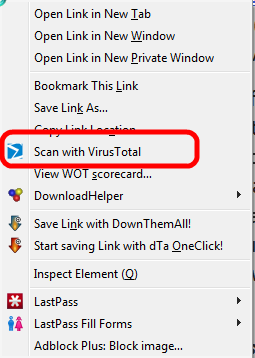
Thesae extensions make it possible to right click on a download link before you start the download. In the context meny that opens you will see an entry like shown here; the example was taken from VTzilla in Firefox:
VT will upload and test the file in it's usual manner and presto you have a good idea whether the file in question is "clean".

If you feel challenged by the idea to install an extension in Firefox don't despair, I can do that remotely. 

As usual I welcome suggestions and comments right here in the blog.

Click here for a categorized Table Of Contents.